• You've discovered RedGuides, an EverQuest multi-boxing and scripting community 🧙‍♀️⚙️. We want you to play several EQ characters at once, come join us and say hello! 👋

  • A TLP without truebox has thawed (Very Vanilla ready)
    Frostreaver
MQ2Enchanter

Plugin - MQ2Enchanter (2 Viewers) 3.1.52471.11

I think I figured it out. Paladin had camp radius set to 40. Everyone else had camp radius set to 60. So mob was getting inside enc camp radius before paladin engaged it and enc mezzed it. Thanks!
Yep that was it from the sounds of it, and what I thought might be the case.

MA's are really quick to grab a new target coming into camp, so you'll want them to have a camp radius that is like 5 higher than the enchanter, or equal and the enchanter stepped back a touch opposite the direction you expect pulls to come from. Either way, the issue was the enchanter was seeing it in camp before the MA was seeing it in camp.
 
Apologies if this has been answered before - is there a way i can get the chanter to /g say something like "target is mezzed" or more importantly "target is immune to mez" ? I dont generally pay super close attention to the plugin output window so the /enc broadcastmez isnt ideal, and it only says when its casting not if it worked or not. Thanks!
 
Apologies if this has been answered before - is there a way i can get the chanter to /g say something like "target is mezzed" or more importantly "target is immune to mez" ? I dont generally pay super close attention to the plugin output window so the /enc broadcastmez isnt ideal, and it only says when its casting not if it worked or not. Thanks!
no, not with mq2enchanter. will will not be broadcasting in game

we broadcast in eqbc or dannet if you have that toggled on like you mentioned, but we're definitely not going to say anything in game

you could make yourself an mq2event or LEM to say in group, but not something that mq2enchanter is going to do, and I would advise against it if you even remotely are not confident in your ability to set that up without mistake and don't "mix groups" with stranger-danger
 
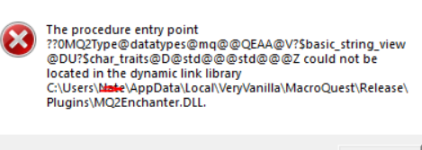
I'm getting the following error.
1683500571959.png
I extracted the .dll into that path after downloading. Followed the same procedure for MQ2mage, mq2monk, etc. and those plugins are working fine. Not sure where I made an error here. Very new to this so any advice helps
 
I'm getting the following error.
View attachment 48420
I extracted the .dll into that path after downloading. Followed the same procedure for MQ2mage, mq2monk, etc. and those plugins are working fine. Not sure where I made an error here. Very new to this so any advice helps
You should always use the RG launcher and let the RG launcher download and place files where possible.

this error means you don't have a current file that matches the MQ build, and need to do one of the following:

- The RG Launcher is unable to *delete* old files.
-- This means you will get an error box if you don't have a current plugin that matches the mq build
-- your options are:
--- a: purchase a license if you don't have one so you can then download an updated file
--- b: delete the old .dll in your plugin folder, and/or
--- c: change your macroquest.ini to MQ2PluginName=0 under [Plugins]

It is also important to ensure nothing is being held-up in your AV, so check your exceptions and any files that are being held hostage, because you can't get a new one if the old one (or the new one) is being held up
 
You should always use the RG launcher and let the RG launcher download and place files where possible.

this error means you don't have a current file that matches the MQ build, and need to do one of the following:

- The RG Launcher is unable to *delete* old files.
-- This means you will get an error box if you don't have a current plugin that matches the mq build
-- your options are:
--- a: purchase a license if you don't have one so you can then download an updated file
--- b: delete the old .dll in your plugin folder, and/or
--- c: change your macroquest.ini to MQ2PluginName=0 under [Plugins]

It is also important to ensure nothing is being held-up in your AV, so check your exceptions and any files that are being held hostage, because you can't get a new one if the old one (or the new one) is being held up
Thanks for the help. Much appreciated!
 
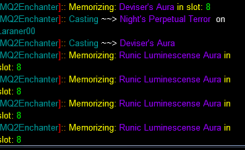
Apologies if this has been answered before, but I used a spell gem to get the Runic Luminescense Aura Rk II, never bought the base spell. Now the ench is stuck in a loop trying to load the base spell. I tried manually loading, but then it just switches to Deviser's Aura, and then goes right back into the loop of trying to load the rk I for Runic. Any ideas on how to fix?

1685384516766.png
 
Apologies if this has been answered before, but I used a spell gem to get the Runic Luminescense Aura Rk II, never bought the base spell. Now the ench is stuck in a loop trying to load the base spell. I tried manually loading, but then it just switches to Deviser's Aura, and then goes right back into the loop of trying to load the rk I for Runic. Any ideas on how to fix?

View attachment 48903
We wouldn't memorize a spell you don't have or already have memorized

This looks like something is in memorizing, or standing you up and interrupting the memorization from completing.


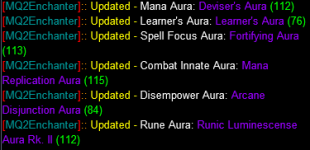
Can you reload the plugin and show me the plugin output of what it says it has for your auras?
 
We wouldn't memorize a spell you don't have or already have memorized

This looks like something is in memorizing, or standing you up and interrupting the memorization from completing.


Can you reload the plugin and show me the plugin output of what it says it has for your auras?
Thanks Sic. It looks like just unloading the plugin and reloading it took care of the problem.

1685400164343.png
 
is there a way to set in the INI what aura's to default to ?
Make sure to check the frequently asked questions and the sticky about the plug-in in the plug-in information.

Change any of the settings so they remain the next time you load the plugins you change them with the/commands. It is in all of the videos and in the frequently asked questions and in all of the documentation and all of the places

Skipping that stuff really hurts you. You really really really deny yourself a lot of enjoyment because there are a ton of things that the out of box default settings just don't apply for everything.

We try and pick settings that are going to be the most applicable for most folks in most scenarios, but that is not always the case and it's not always the same over all levels in the game.

Really have to check out that stuff.

Please see >>> Getting Started with CWTN plugins! (Movement, UI Window, Clickies, Pulling, ETC) Check Here First! <<<
 
Are right thanks....i have been storing settings in the ini already, but most of those settings are ones that are singular and settable by an equal sign, or i seem to remember..i'll check out those resources you mentioned.
 
Are right thanks....i have been storing settings in the ini already, but most of those settings are ones that are singular and settable by an equal sign, or i seem to remember..i'll check out those resources you mentioned.
Outside of stick how settings, you should not be editing the InI at all, just adjust with the slash commands and you'll be golden
 
I'm having a problem with my enchanter, he won't mez anything anymore. I'm playing on Rizlona and just got the underfoot spell Hypnotic Stare. I'm not sure if that has anything to do with it but it's the only thing I can see that's changed. I've unloaded and reloaded the plugin, logged all the way out and back in, changed modes, and reset assists but I can't figure it out. Anyone have any ideas I can try?
 
I'm having a problem with my enchanter, he won't mez anything anymore. I'm playing on Rizlona and just got the underfoot spell Hypnotic Stare. I'm not sure if that has anything to do with it but it's the only thing I can see that's changed. I've unloaded and reloaded the plugin, logged all the way out and back in, changed modes, and reset assists but I can't figure it out. Anyone have any ideas I can try?
That's not much information to go by.

I would check your immunes.

If that spell is one of them that has "special ruleset" changes to make the levels it works on different than live servers, that is an mq issue and there is an open issue about mezz spells having different level requirements than the spell says it does, unfortunately nothing we can do about that
 
lol well I feel a bit stupid, looks like my mq2 and plugins were a few days out of date. It's working great now!
 
lol well I feel a bit stupid, looks like my mq2 and plugins were a few days out of date. It's working great now!
Ok, glad you're sorted out, keep in mind there were zero changes that would have caused what you described.

Happy mezzing
 
I have this in my chanter, shammie and mage ini files.

[*charname*]
Show=1
UseMelee=0


the usemelee works on shammie but not mage or chanter...
 
I have this in my chanter, shammie and mage ini files.

[*charname*]
Show=1
UseMelee=0


the usemelee works on shammie but not mage or chanter...
Is you're using the cwtn plugin there is no need to edit an ini file. Manually change the check box or use a slash command to make the change permanent.

Messing with the cwtn ini files is asking for trouble imo.
 
i do that everytime i start.... I click off usemelee and usecharm on my chanter...next time i play...its still checked.
Unchecked the boxes is a temp on the fly change. Durango is right here, check the faq. For example /enc usemelee off would not only uncheck the box but also make it permanent each time you load the plugin.

Or use /enc (class shortname) for a list of commands you can change.
 
okay i'll try command line....why is there an ini called mq2enchanter.ini ?


The plugin uses it, but unlike KA, you do not need to edit it. The slash commands and ingame options do all that.
 
i do that everytime i start.... I click off usemelee and usecharm on my chanter...next time i play...its still checked.
Please see >>> Getting Started with CWTN plugins! (Movement, UI Window, Clickies, Pulling, ETC) Check Here First! <<<


Nope as instructed before, use the/commands and it saves.
Less for some reason you've locked your files, made them read only using the/command changes the stuff.

The show thing means that you're doing either clicking the x on the window to close the window or you are doing a hide command and then logging out

okay i'll try command line....why is there an ini called mq2enchanter.ini ?
That file exists there because when you use the/command it saves the setting. So next time you load in it will be at that setting. Is why it exists
 
I've watched the videos plenty of time...this is very involved excellent plugin.. my old brain can't absorb every feature, even after watching several times!!!
 
I've watched the videos plenty of time...this is very involved excellent plugin.. my old brain can't absorb every feature, even after watching several times!!!

It is quite amazing to watch it in action if you can break away from your main and watch it do its thing. Amazingly fast and more efficient than I ever imagined.
 
I've watched the videos plenty of time...this is very involved excellent plugin.. my old brain can't absorb every feature, even after watching several times!!!
the FAQ says about how to "save settings" and you've asked that question before and i've answered, which is why i relinked the "check here first"

because you're not saying "so i read where it says to use a slash command and i typed '/blah cool blah' but it isn't working - you didn't communicate any of that, just that you're looking inside the ini
 
I've watched the videos plenty of time...this is very involved excellent plugin.. my old brain can't absorb every feature, even after watching several times!!!
Luckily we have an app for that... or at least an FAQ. However this requires reading and comprehension and a willingness to "go look" before arbitrarily assuming somethings broken.
 
Luckily we have an app for that... or at least an FAQ. However this requires reading and comprehension and a willingness to "go look" before arbitrarily assuming somethings broken.
And heck sometimes stuff is broken but that is why I'm doing a " hey, I tried this specific thing and it didn't do the thing I expected" which is why in the sticky that I share there is a thing that says how to ask for help.

Being a good help receiver is also a skill that takes practice and effort
 
And heck sometimes stuff is broken but that is why I'm doing a " hey, I tried this specific thing and it didn't do the thing I expected" which is why in the sticky that I share there is a thing that says how to ask for help.

Being a good help receiver is also a skill that takes practice and effort
something i'm terrible at.. but trying! my super power is breaking stuff.. or at least doing dumb stuff.. but you knew that ;)
 
i do that everytime i start.... I click off usemelee and usecharm on my chanter...next time i play...its still checked.
/enc usemelee off
then
/enc usecharm on

boom saved for next time (unless as mentioned, you have something like files set to read only, or files getting locked that can't be written to from things like AV or something)
 
/enc usemelee off
then
/enc usecharm on

boom saved for next time (unless as mentioned, you have something like files set to read only, or files getting locked that can't be written to from things like AV or something)
I wish when I save setting it went "Boom" ... *hides from sic*
 
....why is there an ini called mq2enchanter.ini ?
Ini file contains initialization information. It's meant to store the values that the user sets via the command line options, or using the default values setup so that when the plugin loads it can grab the previously used value at startup to know what the Initial setting should be. The ini file, or initialization file isn't meant to be a storage medium from which will be polled from repeatedly throughout the session.
The plugins simply update the file as a user makes changes that are intended to be permanent (with the command line) so that if you crash, exit EQ, computer restarts, etc it will know how to act when it starts. Realistically anything stored in the INI should only be read at the startup portion to grab all the values, and then any values that are changed throughout the session are written to the INI file, but not read until the next session. You will find this is the same for things like Kissassist where the macro starts and uses all the values stored in the INI at the start, and in order to make changes via the INI you must restart the macro for it to get the new information you've changed. The only difference being the plugins have a GUI that allows easily changing things on the fly and there are command line options that allow you to change things on the fly and update the values stored in the INI without the user needing to navigate to a location on their computer, open a file, and manually make a change to the file.

Due to the various potential types of encounters a player can face while wandering the world of EQ the GUI doesn't store the settings when simply clicked on and off. This allows a user to switch things on and off at will for say a raid, or special event, or simply trying out all the various combinations of options without risk of permanently messing up the settings, as simply unloading and then loading the plugin would return the values to their original state.
At the time of the creation of the plugin the default settings were determined to be the most reasonable default value by myself and Sic for engaging in typical group content and are intended to be useful in most situations and for most users.

I hope this explains why there is an INI file.
 
I read this section from beginning to now and cant find it. Some touch on it, but not all the way. I like that Addle adds a twincast, but I dont want it cast except to Mez. When Im by myself boxing, it is fine, but in a group MT loses aggro and then shit goes downhill fast. I have turn chaotic off, I turn off almost everything cept mez. Any clue how to keep spell up without using it except to Mez...
 
I read this section from beginning to now and cant find it. Some touch on it, but not all the way. I like that Addle adds a twincast, but I dont want it cast except to Mez. When Im by myself boxing, it is fine, but in a group MT loses aggro and then shit goes downhill fast. I have turn chaotic off, I turn off almost everything cept mez. Any clue how to keep spell up without using it except to Mez...
You can BYOS if you want to change your spell lineup. entirely - it would need to be a spell the plugin says it can use.

If you turn used chaotic off, we use a different spell instead, which is the Addle line "Single Mez" - this does not give a twincast, and we don't use it the same way we use the "Chaotic" line
 
Plugin - MQ2Enchanter

Users who are viewing this thread

Back
Top
Cart