
Sounds like you may have hidden layers, check layersNot sure if this is the right place.
Having trouble with camp radius line on the map after using mapfilter settings. It and pull and cast radius no longer drawn automatically to the new settings when changing them in the MQ2BST UI. I found the /mac map command to reset the map and that got the cast radius working (green line). But I no longer see the blue line and the yellow line is centered on 0,0.
Any idea on how to get these to reset and work when making changes to the BST ui?
Thanks,

Install the app
How to install the app on iOS
Follow along with the video below to see how to install our site as a web app on your home screen.
Note: This feature may not be available in some browsers.
-
 You've discovered RedGuides, an EverQuest multi-boxing and scripting community 🧙♀️⚙️. We want you to play several EQ characters at once, come join us and say hello! 👋
You are using an out of date browser. It may not display this or other websites correctly.
You should upgrade or use an alternative browser.
You should upgrade or use an alternative browser.

Utility - MQ2CWTNCommons (2 Viewers)
- Thread starter ChatWithThisName
- Start date
No, those are the layer you want visible.Is there another layers other than the EQ map ui layers? I have them set to visible.
Is try unloading and reloading mq2bst and then setting a camp again.
Off the top of my head I'm not sure if there is a "reset to default" mq2map settings button, but might consider doing that
Reloading mq2bst seems to have fixed it. Thanks.No, those are the layer you want visible.
Is try unloading and reloading mq2bst and then setting a camp again.
Off the top of my head I'm not sure if there is a "reset to default" mq2map settings button, but might consider doing that
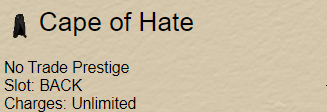
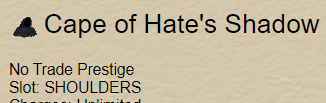
I am having an issue on a character where I have a Cape of Hate and a Cape of Hate's Shadow. For some reason, it will add a new copy of Cape of Hate's Shadow every time I log in. (I'm assuming there is some confusion between it and the back item so it attempts to auto-add the shoulder). Each subsequent copy is not toggleable but will always set itself to active under downtime clickies. If I toggle the primary entry on and off again it will stop casting. All I have to do is delete the original to delete every copy, but, as I said, they will keep adding every login.
It's not too bad unless I forget and log out in an open zone, because it will remove the shadow instantly and cast again on repeat when I log everyone in. Looks suspicious until I can get it deactivated again.
can you show me an image when you load the plugin it says it is adding something, then an image of your add clickies?View attachment 63442View attachment 63443View attachment 63444
I am having an issue on a character where I have a Cape of Hate and a Cape of Hate's Shadow. For some reason, it will add a new copy of Cape of Hate's Shadow every time I log in. (I'm assuming there is some confusion between it and the back item so it attempts to auto-add the shoulder). Each subsequent copy is not toggleable but will always set itself to active under downtime clickies. If I toggle the primary entry on and off again it will stop casting. All I have to do is delete the original to delete every copy, but, as I said, they will keep adding every login.
It's not too bad unless I forget and log out in an open zone, because it will remove the shadow instantly and cast again on repeat when I log everyone in. Looks suspicious until I can get it deactivated again.
Of course. I will be out of the house for awhile today, but I will send it tonight.can you show me an image when you load the plugin it says it is adding something, then an image of your add clickies?
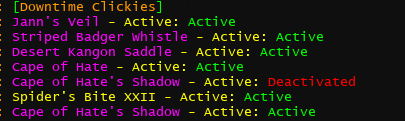
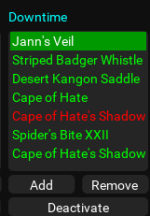
First time I have been grateful to my wife for extended preparation time before we leave. Here is what you requested minus the adding message because there was none.
I have never manually added Cape of Hate's Shadow.
I also deleted the downtimes clickies entry for the Cape of Hate's Shadow completely before logging out yesterday (I do this every day).
The plugin gave no message for adding Cape of Hate's Shadow - it was already active when I logged in. Could it be a partial item name issue with Cape of Hate already begin added?
Prior to this, I have never checked the plugin output, so I am unsure if it adds it sometimes.
i need you to show me the plugin output when the plugin is adding it.View attachment 63448View attachment 63449
First time I have been grateful to my wife for extended preparation time before we leave. Here is what you requested minus the adding message because there was none.
I have never manually added Cape of Hate's Shadow.
I also deleted the downtimes clickies entry for the Cape of Hate's Shadow completely before logging out yesterday (I do this every day).
The plugin gave no message for adding Cape of Hate's Shadow - it was already active when I logged in. Could it be a partial item name issue with Cape of Hate already begin added?
Prior to this, I have never checked the plugin output, so I am unsure if it adds it sometimes.
so I would delete everything you have there for downtime (can leave the spider's bite) and reload the plugin, when it starts up it will tell you it is adding something
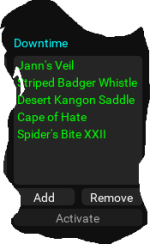
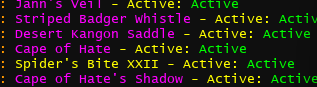
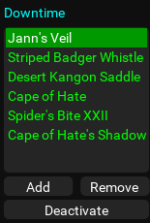
Please do the bit where the plugin says it added somethingView attachment 63450View attachment 63451View attachment 63452
The freeeform click is what it looked like before I logged out after deleting it. Then I logged back in and grabbed the other 2.
I also need you to let me know what UI you're using. I'm curious if you're using a customui with inventory slots that are incorrect (unlikely, but i ran into someone with this issue when i made tstrophy)
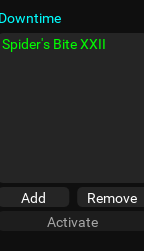

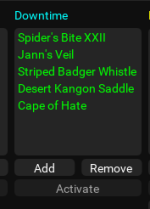
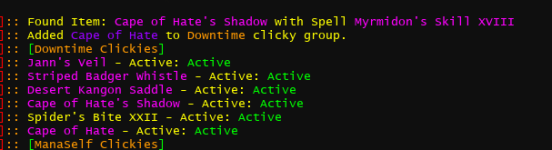
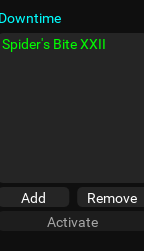
The first screenshot is of me deleting everything before I logged out.
The next 2 screenshots were taken after removing everything except Spider's Bite XXII from Downtime Clickies and logging back in.
On first login, Cape of Hate's Shadow was not there and there was no spam issue.
When I logged out and in again, Cape of Hate's Shadow was added and the spam clicking started.
There was no bit where it said it added something until I deleted everything. It doesn’t give me a message for added but will add a new weird shadow-copy of Cape of Hate’s Shadow everytime i log in.Please do the bit where the plugin says it added something
I also need you to let me know what UI you're using. I'm curious if you're using a customui with inventory slots that are incorrect (unlikely, but i ran into someone with this issue when i made tstrophy)
I am using the base EverQuest UI.
anything that is added, it outputs, let me show youIt doesn’t give me a message for added but will add a new weird shadow-copy of Cape of Hate’s Shadow everytime i log in.
if that isn't happening - it *sounds* like you have a file locked, and we can't actually edit the file. if you're using AV, i'd suggest considering whitelisting your mq/eq/rg files so we can properly update files
so deleting all my addclickies for downtime, and then unloading and reloading the plugin, it goes through and adds stuff
(thank you for ignoring that my cloak is trash)
Code:
[MQ2EsKay]:: Found Item: Jann's Veil with Spell Illusion: Greater Jann
[MQ2EsKay]:: Added Jann's Veil to Downtime clicky group.
[MQ2EsKay]:: Found Item: Striped Badger Whistle with Spell Summon Familiar: Striped Badger
[MQ2EsKay]:: Added Striped Badger Whistle to Downtime clicky group.
[MQ2EsKay]:: Found Item: Radiant Hawk Harness with Spell Summon Mount: Radiant Hawk
[MQ2EsKay]:: Added Radiant Hawk Harness to Downtime clicky group.
[MQ2EsKay]:: Found Item: Aged Dulled Combatant's Cloak of the Selenelion with Spell Illusionary Spikes XXIV
[MQ2EsKay]:: Added Aged Dulled Combatant's Cloak of the Selenelion to Downtime clicky group.
I appreciate you taking the time to work with me. I understand the above screen clip is what you are looking for. That is the reason I posted a similar screen clip of mine under your request (the post just above the one you quoted). I'll copy and paste them here just to break down my issue further.anything that is added, it outputs, let me show you
if that isn't happening - it *sounds* like you have a file locked, and we can't actually edit the file. if you're using AV, i'd suggest considering whitelisting your mq/eq/rg files so we can properly update files
so deleting all my addclickies for downtime, and then unloading and reloading the plugin, it goes through and adds stuff
(thank you for ignoring that my cloak is trash)
Code:[MQ2EsKay]:: Found Item: Jann's Veil with Spell Illusion: Greater Jann [MQ2EsKay]:: Added Jann's Veil to Downtime clicky group. [MQ2EsKay]:: Found Item: Striped Badger Whistle with Spell Summon Familiar: Striped Badger [MQ2EsKay]:: Added Striped Badger Whistle to Downtime clicky group. [MQ2EsKay]:: Found Item: Radiant Hawk Harness with Spell Summon Mount: Radiant Hawk [MQ2EsKay]:: Added Radiant Hawk Harness to Downtime clicky group. [MQ2EsKay]:: Found Item: Aged Dulled Combatant's Cloak of the Selenelion with Spell Illusionary Spikes XXIV [MQ2EsKay]:: Added Aged Dulled Combatant's Cloak of the Selenelion to Downtime clicky group.
View attachment 63458
The items were deleted and the plugin was restarted per your request, giving me this output. As you can see it finds Cape of Hate's Shadow but adds Cape of Hate.

Here it finds Cape of Hate's Shadow again and adds cape of hate instead again.
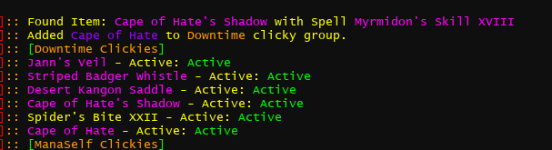
It never adds Cape of Hate's Shadow, but it is in my Downtime clickies. Each subsequent time I log in, there is not an output for adding an item but another Cape of Hate's Shadow is added to the list (All but the primary are not able to be interacted with. The primary can be toggled off temporarily, but will toggle back on the next time I load the plugin and it will always add another copy to the list).
I understand that under normal circumstances all additions have an associated output to the plugin window (probably even in the same block of executable code), but, as a part of whatever is happening, the addition does not print for these duplicate copies.
The progression of the clickies looked something like this:
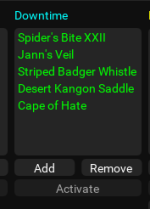
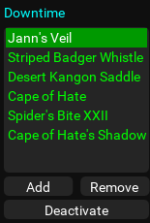
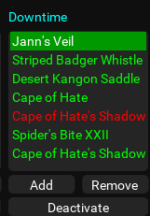
Mind you the last 2 screenshots are just a copies from before the reset, but I forgot to actually screenshot these. I did, however, look - this is what the list looked like with the order slightly off. A new, red, Cape of Hate's Shadow will appear there each time I log in until I delete the green Cape of Hate's Shadow and start again.
Last edited:
Perfect thank you, exactly what I needed.I appreciate you taking the time to work with me. I understand the above screen clip is what you are looking for. That is the reason I posted a similar screen clip of mine under your request (the post just above the one you quoted). I'll copy and paste them here just to break down my issue further.
The items were deleted and the plugin was restarted per your request, giving me this output. As you can see it finds Cape of Hate's Shadow but adds Cape of Hate.
View attachment 63459
Here it finds Cape of Hate's Shadow again and adds cape of hate instead again.
View attachment 63460
It never adds Cape of Hate's Shadow, but it is in my Downtime clickies. Each subsequent time I log in, there is not an output for adding an item but another Cape of Hate's Shadow is added to the list (All but the primary are not able to be interacted with. The primart can be toggled off temporarily, but will toggle back on the next time I load the plugin and it will always add another copy to the list).
I understand that under normal circumstances all additions have an associated output to the plugin window (probably even in the same block of executable code), but, as a part of whatever is happening, the addition does not print for these duplicate copies.
The progression of the clickies looked something like this:
View attachment 63464 View attachment 63465View attachment 63466View attachment 63467
Mind you the last 2 screenshots are just a copies from before the reset, but I forgot to actually screenshot these. I did, however, look - this is what the list looked like with the order slightly off. A new, red, Cape of Hate's Shadow will appear there each time I log in until I delete the green Cape of Hate's Shadow and start again.

- Commits
- 191
ChatWithThisName updated MQ2CWTNCommons with a new update entry:
07/20/2024
Read the rest of this update entry...
07/20/2024
- corrected issue with auto addclicky using partial matches
- we will also now remove any addclickies that give passive abilities from your ini
- - this means if you have a vestigal ini entry, we now remove it
Read the rest of this update entry...
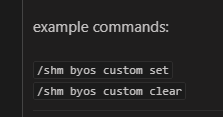
yepis there a text command to toggle BYOSCustom?
Please see >>> Getting Started with CWTN plugins! (Movement, UI Window, Clickies, Pulling, ETC) Check Here First! <<<

whole video on it
- Commits
- 191
ChatWithThisName updated MQ2CWTNCommons with a new update entry:
7/22/2024
Read the rest of this update entry...
7/22/2024
- added some missing ${CWTN} type members
- - will be addtional cleanup/additions in the coming weeks
Read the rest of this update entry...
- Commits
- 191
ChatWithThisName updated MQ2CWTNCommons with a new update entry:
7/24/2024
Read the rest of this update entry...
7/24/2024
- if we're healing an npc (and melee attacking) we will no longer try and melee attack the npc we swapped to heal
- - of course if your MA targets an NPC, we will try and attack it outside of times we're trying to heal it
- - - if your MA is doing that, maybe don't
Read the rest of this update entry...
I absolutely love the Spells and Discs tab. It is a tremendous help when trying to find missing upgrades. Thank you.
If I may offer a suggestion / feature request: Would it be possible to allow spells to be sorted by level in this tab?
This is more of a QoL thing for the tab and for sure is not a need. If it is a limitation, I completely understand.
If I may offer a suggestion / feature request: Would it be possible to allow spells to be sorted by level in this tab?
This is more of a QoL thing for the tab and for sure is not a need. If it is a limitation, I completely understand.
yeah i want to add sorting, but it is more complicated than you think. eventuallyI absolutely love the Spells and Discs tab. It is a tremendous help when trying to find missing upgrades. Thank you.
If I may offer a suggestion / feature request: Would it be possible to allow spells to be sorted by level in this tab?
This is more of a QoL thing for the tab and for sure is not a need. If it is a limitation, I completely understand.

- Commits
- 191
ChatWithThisName updated MQ2CWTNCommons with a new update entry:
7/31/2024
Read the rest of this update entry...
7/31/2024
- We will no longer add a "special" clicky that has a passive ability effect (like Lost Rubicite Breastplate"
Read the rest of this update entry...
- Commits
- 191
ChatWithThisName updated MQ2CWTNCommons with a new update entry:
08/06/2024
Read the rest of this update entry...
08/06/2024
- added ByosCustom member
- - ByosCustom, Byoscustom, BYOSCUSTOM are valid
Read the rest of this update entry...
- Commits
- 191
ChatWithThisName updated MQ2CWTNCommons with a new update entry:
08/06/2024b
Read the rest of this update entry...
08/06/2024b
- CWTN type memeber "TargetIsNamed" returns true/false if we think it is a named
Read the rest of this update entry...
- Commits
- 191
ChatWithThisName updated MQ2CWTNCommons with a new update entry:
08/21/2024
Read the rest of this update entry...
08/21/2024
- your character spells tab will now be sorted by level
- - eventually you'll be able to manually sort, but for now, just by level
Read the rest of this update entry...
- Commits
- 191
ChatWithThisName updated MQ2CWTNCommons with a new update entry:
08/21/2024b
Read the rest of this update entry...
08/21/2024b
- corrected a crash caused by sorting character spells by level even when there were no spells to sort
Read the rest of this update entry...
- Commits
- 191
ChatWithThisName updated MQ2CWTNCommons with a new update entry:
08/22/2024
Read the rest of this update entry...
08/22/2024
- temp fix for issue with sorting spells
Read the rest of this update entry...
- Commits
- 191
ChatWithThisName updated MQ2CWTNCommons with a new update entry:
8/26/2024
Read the rest of this update entry...
8/26/2024
- added missing command/faq items
Read the rest of this update entry...
Nodont suppose there's a way to change buff/misc spell slot?
yes of course, but that doesn't mean more than one aren't casting it at the same timeThis is more or less a general question for CWTN plugins.
Does CWTN look for the debuff/buff of an Alliance/Conjunction spell on a mob before casting?
- Commits
- 191
ChatWithThisName updated MQ2CWTNCommons with a new update entry:
08/29/2024
Read the rest of this update entry...
08/29/2024
- Command/FAQ updates/additions
Read the rest of this update entry...

juice999
the Degenerate
Is there some way to force my group to attack my driver's target? I keep running into this issue where a quest or an event will have some sort of object or something that you're supposed to kill that's not necessarily a mob (quest where you're supposed to go kill tents or an event where the mob spawns eggs on the ground for example), and when I try to get them to attack those it's very difficult. Even with the combat dummy they are confused because it's not a normal mob. Would be very convenient if there was some command to force them to engage on driver's target even if they think it's not valid.
Please see >>> Getting Started with CWTN plugins! (Movement, UI Window, Clickies, Pulling, ETC) Check Here First! <<<Is there some way to force my group to attack my driver's target? I keep running into this issue where a quest or an event will have some sort of object or something that you're supposed to kill that's not necessarily a mob (quest where you're supposed to go kill tents or an event where the mob spawns eggs on the ground for example), and when I try to get them to attack those it's very difficult. Even with the combat dummy they are confused because it's not a normal mob. Would be very convenient if there was some command to force them to engage on driver's target even if they think it's not valid.
You can use my "ass me" hotkey, but otherwise no, the plugins won't fight objects (on purpose).
Combat dummy is cause no xtarget (outside of random taunts), just have them start to attack it with the assme button
juice999
the Degenerate
Alright, gotcha.
I do understand they don't fight objects be design and why that is but there's just been some weird cases where I wished I could force my caster group that I quest with to engage something that plugin thought it should not. I have already been using your Ass Me hotkey but was just hoping for a little more control with that.
Not a big deal, I appreciate the clarification. Happy holiday - Hope you've had a good weekend.
I do understand they don't fight objects be design and why that is but there's just been some weird cases where I wished I could force my caster group that I quest with to engage something that plugin thought it should not. I have already been using your Ass Me hotkey but was just hoping for a little more control with that.
Not a big deal, I appreciate the clarification. Happy holiday - Hope you've had a good weekend.

Users who are viewing this thread
Total: 3 (members: 0, guests: 3)
Share: