• You've discovered RedGuides, an EverQuest multi-boxing and scripting community 🧙‍♀️⚙️. We want you to play several EQ characters at once, come join us and say hello! 👋

  • A TLP without truebox has thawed (Very Vanilla ready)
    Frostreaver
Resource icon

Release MQ2AutoLoot

I was under the impression that mq2autoloot was not really maintained any longer, that perhaps the creator is no longer here or on hiatus or w/e

I started using lootly, and it seems pretty good, have not yet tried YALM..

@Cannonballdex you recommend YALM? does it have similar loot.ini format so we can at least use our existing ones from mq2autoloot or lootly?
 
I was under the impression that mq2autoloot was not really maintained any longer, that perhaps the creator is no longer here or on hiatus or w/e

I started using lootly, and it seems pretty good, have not yet tried YALM..

@Cannonballdex you recommend YALM? does it have similar loot.ini format so we can at least use our existing ones from mq2autoloot or lootly?
There is an import command, will convert lootly or advloot to YALM. Config file is pretty simple for YALM the global in the config folder. Also settings files for each toon in the config yalm folder.
Code:
['items'] = {
        ['Fruit'] = {
            ['setting'] = 'Keep',
        },
        ['Sweetened Mudroot'] = {
            ['setting'] = 'Destroy',
        },
        ['Small Coil Spring'] = {
            ['quantity'] = 1,
            ['setting'] = 'Keep',
        },
        ['Ring Mold'] = {
            ['setting'] = 'Sell',
        },
        ['Descending Moon Amice of Brilliance'] = {
            ['setting'] = 'Keep',
        },
        ['Blizzent\'s Rod of Wintry Fever'] = {
            ['quantity'] = 1,
            ['setting'] = 'Keep',
        },
        ['Silvril Ore'] = {
            ['setting'] = 'Keep',
        },
        ['Shik`Nar Fungal Sample'] = {
            ['setting'] = 'Destroy',
        },
 
At some point, I did something, no idea what, but my master looter will not auto loot anymore unless I have the advanced loot window open. Anybody have any ideas on what I need to do to fix this?
 
At some point, I did something, no idea what, but my master looter will not auto loot anymore unless I have the advanced loot window open. Anybody have any ideas on what I need to do to fix this?
Try opening up /advloot and click on settings. See if anything there.

Can try another looting script like yalm.Lua

1. Turn on advanced looting.
  • Type: /advloot
  • Click the Loot Settings Button on the Advanced Loot Window
  • Select Use Advanced Looting
2. Load the plugin.
- Type: /plugin MQ2AutoLoot
3A. If your in a group set someone to be the master looter. If you don't the leader of the group will assign himself to be the master looter.
3B. If your in a raid set someone to be the master looter. If you don't the leader of the raid will act as the master looter.
 
I seem to be missing something. I have set nodrop to quest and set the number of items based on what it is. example would be.
Glittering Band of Ferociousness=quest|1 But instead of distributing it after looting 1 it just leaves it on the corpse? This is a major issue with otherworldly objects. I don't always seem it before the window goes away and have had a few rott. What am i missing so that it will distribute these items to the whole group. Thanks for your help.
 
Anyone know the best way to clear or reset the loot.ini so that MQ2Autoloot does not think I have a lore item/s I have already removed from my inventory
I have tried /autoloot loot.ini reset and reload and it is still not placing the lore items into my inventory.
 
autoloot does not care about your lore items, thats eq tht cares, so if you have a lore item your housing, or bank, you cant loot another
 
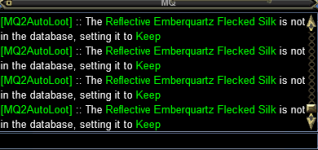
Trying to figure out why this plugin isn't automatically looting items I haven't seen before, I have advloot on, autoloot enabled, it just says "Setting XXX to Keep" and then it just sits there in the advloot window. Any ideas?
 
Trying to figure out why this plugin isn't automatically looting items I haven't seen before, I have advloot on, autoloot enabled, it just says "Setting XXX to Keep" and then it just sits there in the advloot window. Any ideas?
Autoloot has quite a few issues which will likely never get fixed. Strongly recommend using lootly, yalm, or mq2lootmanager.

Having said that, maybe reload the ini.

Also make sure you don't have using eq filters selected in your advloot window
 
Autoloot has quite a few issues which will likely never get fixed. Strongly recommend using lootly, yalm, or mq2lootmanager.

Having said that, maybe reload the ini.

Also make sure you don't have using eq filters selected in your advloot window
Thanks as always, I'll just switch to one of those.
 
Autoloot has quite a few issues which will likely never get fixed. Strongly recommend using lootly, yalm, or mq2lootmanager.

Having said that, maybe reload the ini.

Also make sure you don't have using eq filters selected in your advloot window
One more question, how can I get something to auto-loot things I haven't seen before? i.e. chase loot

I'm trying lootly and mq2lootmanager, neither of those seem to be grabbing things, mq2autloot used to do it, but it doesn't seem to work anymore. Any other ideas?
 
One more question, how can I get something to auto-loot things I haven't seen before? i.e. chase loot

I'm trying lootly and mq2lootmanager, neither of those seem to be grabbing things, mq2autloot used to do it, but it doesn't seem to work anymore. Any other ideas?
I pre add stuff "/setitem keep blah item of coolness"
 
Is there anyway to run a command to destroy anything already in your inventory that's /setitem destroy?
 
Running Very Vanilla, using MuleAssist /LootOn=1, ninjadvloot is installed and managing the loot.ini file I believe. Lootly installed fine with RedGuides launcher but errors trying to run with "/Lua run lootly"

...\Lua\lootly.Lua:325: attempt to index field 'AdvLoot' (a nil value)
stack traceback:
in function 'handle_personal_loot'
...

Very Vanilla doesn't have MQ2AdvLoot installed - do I need to install it just to replace it with lootly?
 
Have only seen it a couple times.

---------------------------
EverQuest Crash Detected
---------------------------
MacroQuest caught a crash:

Process ID: 24352
Version: 3.1.0.2192
Location: C:\Users\eepjr\AppData\Local\VeryVanilla\MacroQuest\Release\Plugins\MQ2AutoLoot.DLL+0000000000018AE3

CrashID: 7b6bc446-7011-4d03-9500-9ea44a08c94f

You can either:
* [RETRY] Continue execution and hope for the best.
* [CANCEL] Write a crash dump and terminate EverQuest.

Copy the contents of this dialog to your clipboard by pressing Ctrl+C

---------------------------
Retry Cancel
---------------------------
 
autoloot has some pretty "unfixable" crashes related to how it was designed. it is strongly recommended to go to lootly or yalm or mq2lootmanager
 
Have only seen it a couple times.

---------------------------
EverQuest Crash Detected
---------------------------
MacroQuest caught a crash:

Process ID: 24352
Version: 3.1.0.2192
Location: C:\Users\eepjr\AppData\Local\VeryVanilla\MacroQuest\Release\Plugins\MQ2AutoLoot.DLL+0000000000018AE3

CrashID: 7b6bc446-7011-4d03-9500-9ea44a08c94f

You can either:
* [RETRY] Continue execution and hope for the best.
* [CANCEL] Write a crash dump and terminate EverQuest.

Copy the contents of this dialog to your clipboard by pressing Ctrl+C

---------------------------
Retry Cancel
---------------------------
If you'd prefer i not respond to your posts, i can keep that in mind. not sure why the taco emoji.

MQ2Autoloot was designed in such a way that it is unlikely that someone is going to be able to fix the issues with it without a complete re-write due to the threadding in it.
the eq autoloot window can crash if you have too many items in it, but it is very likely this is autoloot's fault
 
Can you set up a simple feature to just loot anything over certain plat amount for whole group? I'm just looking for something simple to grind plat.
 
yesterday, I noticed that mq2autoloot did not loot any quest (nodrop,lore) items. I went back to the previous expansion to finish quests, level up ecliptic etc.
Would there be an issue lately with mq2autoloot, or would anything be off on my end?

I also noticed that some augs did not get looted, although they are marked "quest" or "keep", I am not sure...for augs, looter got an item, but none of the group members got theirs.

Loot nodrop items are checked on the crew, so it cannot be it.
 
yesterday, I noticed that mq2autoloot did not loot any quest (nodrop,lore) items. I went back to the previous expansion to finish quests, level up ecliptic etc.
Would there be an issue lately with mq2autoloot, or would anything be off on my end?

I also noticed that some augs did not get looted, although they are marked "quest" or "keep", I am not sure...for augs, looter got an item, but none of the group members got theirs.

Loot nodrop items are checked on the crew, so it cannot be it.
May want to check 5 posts above =) - Likely time to "upgrade"

 
May want to check 5 posts above =) - Likely time to "upgrade"

yeah, I spent some time with this yesterday. unloaded mq2autoloot, and somehow I had nijaloot running, I disabled that, and run lootly (converted ini etc). There is a new setup in eq (I think) which limits the loot of nodrop items, I changed that to ask only if non usable drop item would be looted...so, I might be set. It drives me absolutely crazy that EQ settings change, and with that, loot settings change as well. I don't even remember how many times I changed "do not ask" to look nodrop items...but still, often times it gets checked.

It was a bit of a hassle to figure all this out, but all that matters, that it works now.

it is too bad, I really liked the loot settings in mq2autoloot, especially to clean off corpses and destroy garbage, and not to have bunch of corpses laying around...but it is time to move on I guess
 
yeah, I spent some time with this yesterday. unloaded mq2autoloot, and somehow I had nijaloot running, I disabled that, and run lootly (converted ini etc). There is a new setup in eq (I think) which limits the loot of nodrop items, I changed that to ask only if non usable drop item would be looted...so, I might be set. It drives me absolutely crazy that EQ settings change, and with that, loot settings change as well. I don't even remember how many times I changed "do not ask" to look nodrop items...but still, often times it gets checked.

It was a bit of a hassle to figure all this out, but all that matters, that it works now.

it is too bad, I really liked the loot settings in mq2autoloot, especially to clean off corpses and destroy garbage, and not to have bunch of corpses laying around...but it is time to move on I guess
This may be redundant but since you are using lootly, have you checked out Lootier as well?
 
Mq2autoloot works fine for me. My loot.ini file is up to 292kB.

It IS sort of like a grumpy old wife at times, you need to know how to soothe the beast. If you sometimes play EQ without MQ and you allow ADVLoot to save filters it will screw things up EVEN if you do NOT check the box to Apply Filters. If I see filters on a character I delete them all!

Another thing is that EQ can sometimes assign 2 different Master Looters! This can happen when a previously assigned Master Looter goes LD and then subsequently returns to the group. This causes all sorts of odd looting patterns. Usually if you change group leadership back and forth between the looters you can revert back to a single ML.

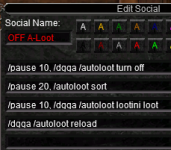
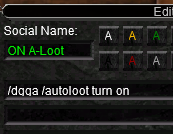
Finally, the plugin itself sometimes needs a bit of gentle nudging to get back into form. I use a pair of social hot buttons that resets the plugins main settings...

1711117604925.png

and

1711117645661.png
 
This may be redundant but since you are using lootly, have you checked out Lootier as well?
Oh, thanks for the suggestion. No, I did not know it existed.
I am okay to edit filters with notepad++. I have some 700 items in my ini anyway :)

I see you can set items to destroy, but they don't get destroyed regardless...this somewhat bothers me, but look works, so I guess it is ok.
 
Oh, thanks for the suggestion. No, I did not know it existed.
I am okay to edit filters with notepad++. I have some 700 items in my ini anyway :)

I see you can set items to destroy, but they don't get destroyed regardless...this somewhat bothers me, but look works, so I guess it is ok.
I think Lootly will loot the items, then you have to run the destroy routine to actually destroy the items. I seem to remember that from the time I used it.
 
I think Lootly will loot the items, then you have to run the destroy routine to actually destroy the items. I seem to remember that from the time I used it.
I really liked the feature that my2autoloot would clean off the corpses, but did not fill up my inventory with garbage, so it would loot the item, and if it as set to destroy, it would not stay in my inventory. Also, corpses would not be laying around. I check map sometime and I see people with a bunch of corpses in their camp and I say...well, they run lootly. I know just about all of us run some 3rd party software, and almost everyone boxes, but still...I would feel a lot more comfortable to be under the radar.

Lootly seems to run smoothly. I am working on some anniversary quests to get clickies I never had patience to get...so far, so good. thanks for the help and the advice!
 
I really liked the feature that my2autoloot would clean off the corpses, but did not fill up my inventory with garbage, so it would loot the item, and if it as set to destroy, it would not stay in my inventory. Also, corpses would not be laying around. I check map sometime and I see people with a bunch of corpses in their camp and I say...well, they run lootly. I know just about all of us run some 3rd party software, and almost everyone boxes, but still...I would feel a lot more comfortable to be under the radar.

Lootly seems to run smoothly. I am working on some anniversary quests to get clickies I never had patience to get...so far, so good. thanks for the help and the advice!
this is a thing that comes up all the time.

if i see corpses (i don't usually because i have corpses hidden --- why does eq have the ability to hide corpses? because many live players just leave them there on the ground) - i think they are using automation.

some people don't see corpses and assume automation.

neither are *actually* a solid indicator, but i will say, when i'm doing old stuff, or farming for something, i leave the "leave on corpse" button selected in the autoloot window and i smash that button over and over - nothing to do with lootly, YALM, autoloot, lootmanager
 
Wrong forum
Hi guys -

Is there a way to just tell mq2autoloot to ignore named corpses? Love the plugin otherwise, but it keeps biting me in the ass on named drops. Have been searching and waiting until 1 of everything drops before assigning just doesn't work. Thanks.
 
Each resource on RG has an Overview / Discussion Thread and either a link to their wiki or tabs with FAQ, Commands, Etc.
Please make sure to post in the respective discussion thread, and check the FAQ/Commands/Wiki for information before posting.
 
Hi guys -

Is there a way to just tell mq2autoloot to ignore named corpses? Love the plugin otherwise, but it keeps biting me in the ass on named drops. Have been searching and waiting until 1 of everything drops before assigning just doesn't work. Thanks.

There is no easy way to deal with this situation. I set NoDropDefault=Ignore so that I can loot named drops manually until I can get them added to the loot.ini file.

Otherwise you have to be proactive and edit the loot.ini file to add those things you absolutely want to ensure get looted on the correct character or class. An example would be Cliff Stone=Gear|Classes|SHD|NumberToLoot|50|.

Another method I use that will just ensure an equal distribution is to tag things with the Quest option as in Gallant Focus of Fortitude=Quest|4

As you edit the loot.ini file you either need to unload and then reload the plugin or perform the reset steps I documented a few posts ago.
 
Dealing with this issue lately on one of my PC's and Im not sure how to fix it, if anyone knows some advice that would be awesome. I was having no issues yesterday and now all this.


1713783080968.png
 
Dealing with this issue lately on one of my PC's and Im not sure how to fix it, if anyone knows some advice that would be awesome. I was having no issues yesterday and now all this.


View attachment 60677
In your MQ2AutoLoot.ini make sure that the character doing the looting has an entry and that the path is correct to the location of your Loot.ini file
Code:
[YourCharName]
lootini=C:\Users\dvrea\Desktop\MQNext\config\loot.ini
UseAutoLoot=1
 
Dealing with this issue lately on one of my PC's and Im not sure how to fix it, if anyone knows some advice that would be awesome. I was having no issues yesterday and now all this.


View attachment 60677

You may have a character with that item in their AdvLoot filters. Per the instructions for this plugin you should make sure the game filters are not only turned off, but also empty or deleted!

If you play a character manually outside of MQ and have AdvLoot turned on it can automagically begin to populate filters for that character. Then later when you go back to using automation it will screw things up. Also scroll up a see my post about performing a reset to this plugin. It solves most problems day-to-day.
 
You may have a character with that item in their AdvLoot filters. Per the instructions for this plugin you should make sure the game filters are not only turned off, but also empty or deleted!

If you play a character manually outside of MQ and have AdvLoot turned on it can automagically begin to populate filters for that character. Then later when you go back to using automation it will screw things up. Also scroll up a see my post about performing a reset to this plugin. It solves most problems day-to-day.
Thank you, clearing that character fixed it =)
 
Curious how much we can modify the ini file for this Plugin. I love using, but I was thinking about changing it from Alphabetical headings to categories. Such as

[Chase TOL]
|======================================================================|
[Chase LS]
|======================================================================|
[Rog Poisons]
|======================================================================|
[Tradeskill]
|======================================================================|

Any idea if this is acceptable in the ini? If unknown I'm going to make some backups of my ini and try it out and see how it works.
 
Release MQ2AutoLoot

Users who are viewing this thread

Back
Top
Cart