
-
 Hail, we're RedGuides. We want you to play six (yes, 6!) EverQuest characters at once. We have scripts and a friendly community to help, please join our playstyle and say hello! 👋
-
 We've added LLM sections to our Terms & Rules and Resource Rules, for everyone's sanity & in-game safety.
Read more
a. Do not replace your voice with an LLM. This goes for your posts and your scripts. Drafting and editing with a tool is fine, but don't take you out of what you share.
b. Do not replace your EQ character's voice with an LLM. We don't want scripts that speak over/ooc,/shoutor other public channels. This has been an unwritten rule that's kept casino scripts off the site for decades, but we're now compelled to make it clear: keep automated communication private.
Why Does RG Review Scripts?
Nearly every LLM-written Lua script we see is making your character do impossible things, and rarely in a way that's beneficial to you. We've seen heavy server hammering,/targetover impossible distances when/nav spawnwould passively accomplish the same thing, a spawn search that fires 20+ times per second, and other pointless actions that are likely annoying GMs.
You are welcome to use LLMs as a tool to structure, draft, and edit your work, but please read critically before hitting/lua run
You are using an out of date browser. It may not display this or other websites correctly.
You should upgrade or use an alternative browser.
You should upgrade or use an alternative browser.
Resource icon
Release MQ2AutoLoot
- Thread starter plure
- Start date
Just tested again on a clean installation of MQ2. Set bone chips to be Bone Chips=Quest|1. Master looter takes the first one, then passes the next one to the second toon. But then the second toon will loot as many bone chips as offered. All non-master looters spam "SList: Giving Bone Chips to me"
I've searched, but been unable to find something I'm sure is quite obvious, but you say to disable ninjadvloot before you load mq2autoloot (although I've also found posts that imply maybe it's a non-issue), but I cannot find anywhere in the ini's to actually disable ninjadvloot. Am I missing something here?
What do you want to have happen to new no drop items? ignore them? If you want to not loot new no drop items type:
/autoloot nodropdefault ignore
I have new no drop items set to keep, I then go through my master looter's bags and set each items to what I want done with it by picking it up and typing:
/setitem ignore
/setitem quest #n
/setitem gear
etc
/autoloot nodropdefault ignore
I have new no drop items set to keep, I then go through my master looter's bags and set each items to what I want done with it by picking it up and typing:
/setitem ignore
/setitem quest #n
/setitem gear
etc
@dreamflux I can reproduce the bug. It is related to when you set a master looter they all seem to think they are the master looter. Running down the bug and hope to get it fixed soon. The current work around is to have the character you want to be the master looter just be the raid leader and it will work like expected.
@dreamflux I can reproduce the bug. It is related to when you set a master looter they all seem to think they are the master looter. Running down the bug and hope to get it fixed soon. The current work around is to have the character you want to be the master looter just be the raid leader and it will work like expected.
I can tell you that I've had errors even with the raid leader set to master looter. Happy you were able to reproduce it though as I was starting to feel like it was just me.
Ok, i've solved that error. Found another bug with the code for passing out loot in a raid. Fixed that. I will upload the fixes tonight. @dreamflux If you want to test the latest changes let me know and i'll message you the dll, otherwise you an wait till the next patch for the updated mq2autoloot.
Fixed two issues with raid looting. Thanks @dreamflux for pointing them out
1. Resolved issue when the master looter was set causing everyone to act as if they were the master looter.
2. Fixed issue with passing out loot in a raid.
Please let me know if any issues pop up.
1. Resolved issue when the master looter was set causing everyone to act as if they were the master looter.
2. Fixed issue with passing out loot in a raid.
Please let me know if any issues pop up.
SteelDragon
Member
Over the past few updates on test this plugin seems to be getting more and broken, and as of other days round of updates (12/10/18), it now just casues it to crash, just exiting out, no crash messages or anything.
This is after the fix that caused me to crash on my main looter when looting anything.
It loots regular stuff fine, but I started camping for the VP key in RoS. 4 times out of 5 looting the "Piece of a Medallion", my main looter crashed. I think the one time he looted without crashing was when he looted it himself. I went to the loot.ini and saw "Piece of a Medallion" was never entered. Entered it myself and set it as quest item loot once per toon. Still had a toon in group that needed it and the next time it dropped, my main looter elected to leave it on the corpse, but at least he didn't crash. Not sure if it's just no drop items or lore or lore+no drop items. That medallion part was the only thing my looter has looted since fix that is no-drop.
It loots regular stuff fine, but I started camping for the VP key in RoS. 4 times out of 5 looting the "Piece of a Medallion", my main looter crashed. I think the one time he looted without crashing was when he looted it himself. I went to the loot.ini and saw "Piece of a Medallion" was never entered. Entered it myself and set it as quest item loot once per toon. Still had a toon in group that needed it and the next time it dropped, my main looter elected to leave it on the corpse, but at least he didn't crash. Not sure if it's just no drop items or lore or lore+no drop items. That medallion part was the only thing my looter has looted since fix that is no-drop.
advloot definitely has some issues. I'm not sure if it's the speed that autoloot tries to hand things out as it goes down the list of characters or what, but often the looter for me will crash while trying to hand out items. Especially if it's in larger than a group scenario. Perhaps the speed at which it goes down the list could be lowered?
[2018/12/16 18:15:51] [MQ2] ATTACKING -> a monster <-
[2018/12/16 18:15:51] <Tank> [18:15:51] TANKING-> a monster <- ID:1358
[2018/12/16 18:15:53] <Cleric> [18:15:53] Pious Remedy on >> Bard <<
[2018/12/16 18:15:55] [MQ2AutoLoot] :: SList: Attempting to give an item to Character 1
[2018/12/16 18:24:12] [MQ2Nav] Loading waypoints for zone: zonename
[2018/12/16 18:24:14] MQ2Posse :: v1.08 :: by Sym for RedGuides.com
[2018/12/16 18:24:14] MQ2Posse :: DISABLED
[2018/12/16 18:24:14] MQ2Posse :: Radius is 300
You can see where he just crashed after trying to transition to another toon.
And again:
[2018/12/16 19:58:10] <Puller> [19:58:10] PULLING-> a monster <- ID:5996 at 171 feet.
[2018/12/16 19:58:13] [MQ2AutoLoot] :: SList: Attempting to give an item to Character 1
[2018/12/16 19:58:13] [MQ2AutoLoot] :: SList: Attempting to give an item to Character 2
[2018/12/16 19:58:14] <Tank> [19:58:14] TANKING-> a monster <- ID:5996
[2018/12/16 19:58:14] [MQ2AutoLoot] :: SList: Attempting to give an item to Character 3
[2018/12/16 19:58:14] [MQ2AutoLoot] :: SList: Attempting to give an item to Character 4
[2018/12/16 20:06:06] [MQ2Nav] Loading waypoints for zone: zonename
[2018/12/16 20:06:09] MQ2Posse :: v1.08 :: by Sym for RedGuides.com
[2018/12/16 20:06:09] MQ2Posse :: DISABLED
[2018/12/16 20:06:09] MQ2Posse :: Radius is 300
[2018/12/16 20:06:09] MQ2Posse :: ZRadius is 30
Last edited:
I just spent the last hour mass slaying shit with my testing toons and couldn't reproduce the crash. Though it was only with a single group and not a raid. When I've tested the raid stuff I don't make a large raid as my laptop I code on can't support more then 6 toons reliably.
The plugin waits till the master looter received information about whether the toon you passed out the item to received the item or not. Additionally, it won't continue to the next person while EQ still thinks the looting is in progress. Thus the delay is related to the network latency between your characters and the DBG servers. I could slow it down, but I suspect the crash is unrelated to the speed... I just need to find out where the crash occurs and hopefully I can make the plugin more reliable and not be forced to artificially slow down the plugin (if slowing down the plugin is the only solution then so be it, but I'd prefer to find where the crash is happening at first).
The plugin waits till the master looter received information about whether the toon you passed out the item to received the item or not. Additionally, it won't continue to the next person while EQ still thinks the looting is in progress. Thus the delay is related to the network latency between your characters and the DBG servers. I could slow it down, but I suspect the crash is unrelated to the speed... I just need to find out where the crash occurs and hopefully I can make the plugin more reliable and not be forced to artificially slow down the plugin (if slowing down the plugin is the only solution then so be it, but I'd prefer to find where the crash is happening at first).
Question,
I am trying to configure MQ2Autoloot to pause for some time (say 30 seconds) before looting NEW loot (and specifically no drop). If I am at the controls then I can direct where the item can go, whereas when i am AFK then I am content with how Autoloot distribution works. When I say NEW i mean, a new item has dropped from a mob for which no entry currently exists in the alphabetically sorted Loot.ini file. My configuration is to set consider new nodrop items as quest, however, my masterlooter just loots it immediately. I can understand this because its 'Quest' and he has less than 3 of said item. The configuration has a 'DistributeLootDelay' = 30, which seems to engage when the masterlooter is attempting to hand it out to group members, but this only seems to occur after he's full. Is there a setting for an initial pause?
I have attached my Loot.ini config settings for reference.
Any thoughts ? please
#
[Settings]
|======================================================================|
Version=6.09
AddNewSales=1
LootForage=1
LootMobs=TRUE
CorpseRadius=100
MobsTooClose=40
ReportLoot=TRUE
LootChannel=g
SpamLootInfo=1
LootForageSpam=1
GlobalLootOn=1
CombatLooting=1
GMLSelect=1
ExcludeBag1=Extraplanar Trade Satchel
ExcludeBag2=Extraplanar Trade Satchel
QuestKeep=3
StackPlatValue=0
NoDropDefault=Quest
LootLagDelay=30
SaveBagSlots=3
LogLoot=1
RaidLoot=0
BarMinSellPrice=1
DistributeLootDelay=30
CursorDelay=10
GuildItemPermission=View Only
#
There is currently no way to delay looting new items. I like the idea though of having that as an option. I'll look into adding it to my next next update.
Thank Plure ... appreciate the clarification

Forgive me, this could be a long post. I couldn't seem to get MQ2AutoLoot working correctly for distributing quest loot to my box team of 6 characters. It was very frustrating because the insight needed to fix the problems is not blindingly obvious.
So my lowbie team is doing Scout Madu's quest arc in Goru`Kar Mesa. His quests take on the form of looting a number of tradeskill drops from wolfs, bears, spiders, and snakes and then turning them in to him. The important caveat is that each character actually has to loot the items from the corpse, you can't just trick the quest by handing pre-looted items to a pet or an npc. A secondary caveat is that all the items he wants are traditional tradeskill things (High Quality Bear Skin for example) which you probably already have rules for.
The problem I kept encountering is that the plugin would lose track of which toon needed which items. If the quest called for 5 HQ Bear I would loot one on the Master Looter, then pick it up and type /setitem quest 5. Then the plugin would proceed to hand out 5 to the next toon, then 5 to the toon after that, then it would just give an unlimited number to the 4th toon while completely skipping and ignoring the 5th and 6th toons and the ML himself!
1.) So to cut to the chase, after performing many (MANY!) steps trying to resolve and troubleshoot it suddenly dawned on me that my Master Looter toon had crashed to the desktop at some point during the killing. Once a toon crashes to desktop the plugin can no longer determine the proper count of items! So step one of the troubleshooting guide should be to restart the whole process once a toon crashes to desktop! (I know this seems completely obvious now but it wasn't so obvious yesterday!)
2. Another really obvious thing I missed, if you already have a stack of quest drops on a toon you need to get rid of them! My master looter already had hundreds of these tradeskill drops assigned as "Keep". Now suddenly I switched the mode to "Quest | 5" and the plugin calculates that I've already got my 5! It turns out that putting the items in the bank doesn't help because the plugin counts those as well! So the solution for me was to Parcel the drops that conflicted with the quest to a tradeskill mule BEFORE I started killing mobs for the quest. (A corollary action is once everyone in the team has looted their required amount you MUST reassign the item as "Keep" otherwise the Master Looter will just leave the items on the corpse!)
3. If things are screwed up and you can't seem to get them working again, temporarily set the items to "Ignore". Then switch to the characters who need the items and loot them the old-fashioned way!
Finally, there are some generic troubleshooting steps to take just to make sure the plugin is working as you intend...
1. In your ..\mq2\release folder ensure you have a mq2autoloot.ini file that has these lines for each of your toons (I share one global loot.ini file!)
2. In your character's KIssAssist INI file General section ensure you have...
3. In your Macros folder ensure you have a loot.ini file AND that the Settings section is properly configured...
4. In-game ensure your characters all are set like this...
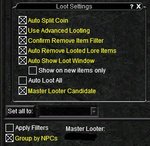
5. Ensure the plugin is actually running by typing the command /autoloot turn on on each character.
6. Sort your LOOT.INI file by typing the command /autoloot sort and then open in a text editor and review the entries for the quest items, make sure there aren't duplicates or text corruption.
7. When all else fails reboot your PC and start over. I'm convinced that client crashes were 90% of my problem and left corrupted memory structures for the plugin.
So my lowbie team is doing Scout Madu's quest arc in Goru`Kar Mesa. His quests take on the form of looting a number of tradeskill drops from wolfs, bears, spiders, and snakes and then turning them in to him. The important caveat is that each character actually has to loot the items from the corpse, you can't just trick the quest by handing pre-looted items to a pet or an npc. A secondary caveat is that all the items he wants are traditional tradeskill things (High Quality Bear Skin for example) which you probably already have rules for.
The problem I kept encountering is that the plugin would lose track of which toon needed which items. If the quest called for 5 HQ Bear I would loot one on the Master Looter, then pick it up and type /setitem quest 5. Then the plugin would proceed to hand out 5 to the next toon, then 5 to the toon after that, then it would just give an unlimited number to the 4th toon while completely skipping and ignoring the 5th and 6th toons and the ML himself!
1.) So to cut to the chase, after performing many (MANY!) steps trying to resolve and troubleshoot it suddenly dawned on me that my Master Looter toon had crashed to the desktop at some point during the killing. Once a toon crashes to desktop the plugin can no longer determine the proper count of items! So step one of the troubleshooting guide should be to restart the whole process once a toon crashes to desktop! (I know this seems completely obvious now but it wasn't so obvious yesterday!)
2. Another really obvious thing I missed, if you already have a stack of quest drops on a toon you need to get rid of them! My master looter already had hundreds of these tradeskill drops assigned as "Keep". Now suddenly I switched the mode to "Quest | 5" and the plugin calculates that I've already got my 5! It turns out that putting the items in the bank doesn't help because the plugin counts those as well! So the solution for me was to Parcel the drops that conflicted with the quest to a tradeskill mule BEFORE I started killing mobs for the quest. (A corollary action is once everyone in the team has looted their required amount you MUST reassign the item as "Keep" otherwise the Master Looter will just leave the items on the corpse!)
3. If things are screwed up and you can't seem to get them working again, temporarily set the items to "Ignore". Then switch to the characters who need the items and loot them the old-fashioned way!
Finally, there are some generic troubleshooting steps to take just to make sure the plugin is working as you intend...
1. In your ..\mq2\release folder ensure you have a mq2autoloot.ini file that has these lines for each of your toons (I share one global loot.ini file!)
Code:
[Toon1]
lootini=C:\MQ2\Release\Macros\Loot.ini
UseAutoLoot=1
2. In your character's KIssAssist INI file General section ensure you have...
Code:
LootOn=03. In your Macros folder ensure you have a loot.ini file AND that the Settings section is properly configured...
Code:
[Settings]
|======================================================================|
Version=6.09
AddNewSales=1
LootForage=1
LootMobs=TRUE
CorpseRadius=100
MobsTooClose=40
ReportLoot=FALSE
LootChannel=g
SpamLootInfo=1
LootForageSpam=1
GlobalLootOn=1
CombatLooting=1
GMLSelect=1
ExcludeBag1=Extraplanar Trade Satchel
ExcludeBag2=Extraplanar Trade Satchel
QuestKeep=10
StackPlatValue=0
NoDropDefault=Quest
LootLagDelay=0
SaveBagSlots=1
LogLoot=0
RaidLoot=0
BarMinSellPrice=1
DistributeLootDelay=5
CursorDelay=5
GuildItemPermission=View Only
4. In-game ensure your characters all are set like this...
5. Ensure the plugin is actually running by typing the command /autoloot turn on on each character.
6. Sort your LOOT.INI file by typing the command /autoloot sort and then open in a text editor and review the entries for the quest items, make sure there aren't duplicates or text corruption.
7. When all else fails reboot your PC and start over. I'm convinced that client crashes were 90% of my problem and left corrupted memory structures for the plugin.
I just spent the last hour mass slaying shit with my testing toons and couldn't reproduce the crash. Though it was only with a single group and not a raid. When I've tested the raid stuff I don't make a large raid as my laptop I code on can't support more then 6 toons reliably.
The plugin waits till the master looter received information about whether the toon you passed out the item to received the item or not. Additionally, it won't continue to the next person while EQ still thinks the looting is in progress. Thus the delay is related to the network latency between your characters and the DBG servers. I could slow it down, but I suspect the crash is unrelated to the speed... I just need to find out where the crash occurs and hopefully I can make the plugin more reliable and not be forced to artificially slow down the plugin (if slowing down the plugin is the only solution then so be it, but I'd prefer to find where the crash is happening at first).
Sorry, was operator error. I haven't played for a while and for some reason all my toons loot settings for advloot got changed, which was what caused all the problems.
Updated to version 1.12 (1/15)
- When items are marked “destroy” MQ2Autoloot will ignore your “SaveBagSlots” limit and will keep looting and destroying items. This means that if you want to clear all the corpses in your camp your loot.ini needs to have SaveBagSlots greater then 0.
- There is a new loot setting. “NewItemDelay”, this allows people who are playing manually to pass out any new items before the plugin decides where they go. The command to change this setting is: /AutoLoot newitemdelay #n -> Master looter waits #n seconds when a new item drops before looting that item.
- Fixed CTD related to “/autoloot buy “Item Name” #Quantity” command.
- Removed the patterns code stuff by eqholic, it was only implemented for people not grouped. Since no one was using it, I pulled the code out.
Posted a fix when passing out loot, it was related to not putting in the proper checks from the changes to the advloot struct last year.
Eqmule and I made some changes to /autoloot buy/sell/barter/deposit that should make them more stable, please send me any crash reports you get to we can nail down these functions.
Eqmule and I made some changes to /autoloot buy/sell/barter/deposit that should make them more stable, please send me any crash reports you get to we can nail down these functions.
Started a new group of characters and am having an odd issue with MQ2Autoloot that I didn't have before. My masterlooter keeps giving loot to the second member of my group instead of keeping it himself even though he has plenty of bag slots and raid loot is not on. As well as he is leaving items that are set to destroy in my loot.ini on the corpses.

Redbot updated MQ2AutoLoot with a new update entry:
Fixes
Read the rest of this update entry...
Fixes
Fixed several crashes related to /AutoLoot sell.
Read the rest of this update entry...
Suggestion for an improvement during an edit session. if you have autoloot going and you encounter an item that isn't in the ini, but it's nodrop. Regardless of setting, if it's a piece of worn gear and your class isn't in the list, could it be set to a default of noloot? I can't count the number of times I've encountered a new piece of gear and didn't spend the time to fiddle with the autoloot window and it eventually defaulted to my ML, and I find out later that the ML can't even use the item, so I lost the opportunity to do something meaningful with it. Maybe others would disagree, but I'd rather have a few unlooted corpses around with those nodrop items, and when I have a few minutes of downtime I'll go look at what's on them and then I can identify "woo! new item, but this guy can't use it, I need to give it to someone else, and set up a flag in my ini for the next time I see it."
Suggestion for an improvement during an edit session. if you have autoloot going and you encounter an item that isn't in the ini, but it's nodrop. Regardless of setting, if it's a piece of worn gear and your class isn't in the list, could it be set to a default of noloot? I can't count the number of times I've encountered a new piece of gear and didn't spend the time to fiddle with the autoloot window and it eventually defaulted to my ML, and I find out later that the ML can't even use the item, so I lost the opportunity to do something meaningful with it. Maybe others would disagree, but I'd rather have a few unlooted corpses around with those nodrop items, and when I have a few minutes of downtime I'll go look at what's on them and then I can identify "woo! new item, but this guy can't use it, I need to give it to someone else, and set up a flag in my ini for the next time I see it."
I don't think that there is ctually access to that sort of information about an item while it's in the advloot window. You can, however, set the NoDropDefault to Ignore and it will leave the items on the corpse.
Last edited:
I still have problems when there are multiple drops from a single mob and the first item is set to Destroy. It will hand out the 2nd item in the list to someone else in the group even though the master looter already has a stack of them. Then it will go back to processing the remaining items correctly unless there are more 'destroy' items found.

LorDeth
<<NO GIF ATTACHED>>
@B_I_G__D_A_D_D_Y
I'll look into it.
also seeing similar activity on mine.. I didnt notice if it was just destroy flag, rather a delay introduced by a first item, then the second item in the queue was delayed, and for some reason it gives to the next person in the group.. everyone in my case is set to use the default loot.ini file, so everyone should NEED or NEVER the same items based on flags in the ini..
otherwise, works great! still my favorite plugin for mq!! ive built quite the full and detailed loot ini with class flags and stuff for all the class specific gear.. its getting to be a large file
Users who are viewing this thread
Total: 1 (members: 0, guests: 1)
Share: