• You've discovered RedGuides, an EverQuest multi-boxing and scripting community 🧙‍♀️⚙️. We want you to play several EQ characters at once, come join us and say hello! 👋

  • A TLP without truebox has thawed (Very Vanilla ready)
    Frostreaver
Resource icon

Release MQ2AutoForage (1 Viewer)

Ive been running this plugin for a month now and do not have any ini files for my toons
Plugin .ini files will generally always go in the folder where plugins are, which is the Release folder.
Macro .ini files will generally go where the macros are, in the Macros folder.

Same with Sic, I have dozens of forage files, auto generated.
 
so, if i put destroy functions in general, can it destroy of that type all items regardless of zone? It doesn't appear to work. I get fishing grubs in dozens of zones and I don't want them anywhere.
 
so, if i put destroy functions in general, can it destroy of that type all items regardless of zone? It doesn't appear to work. I get fishing grubs in dozens of zones and I don't want them anywhere.
Unfortunately, no, you need to set fishing grubs to destroy in each zone you encounter them individually. It's a limitation of the plugin.
 
so, if i put destroy functions in general, can it destroy of that type all items regardless of zone? It doesn't appear to work. I get fishing grubs in dozens of zones and I don't want them anywhere.
I just bite the bullet on those items, and let them stack in my inventory. But, they are in my SellStuff macro to auto-dump when I get to a merchant.
 
Happen to have a config with every zone in EQ in it so I can just copy + paste? :P
What I did was open all my mq2forage .ini files for all characters, and using notepad++, did a find & replace in all open documents, in one fell swoop. Fishing Grub=Keep to Fishing Grub=destroy, or whatever the text was. Make sure to get the PoK book worm and ToV velium ball things, while you're there. I'm at work atm, sorry =p
 
Noticed a lot of items ending up in the autoforage.ini file, such as items that you don't normally forage. Could be some items that were on the cursor when forage activated or other summoned items that were placed in inventory. Haven't noticed anything harmful as of yet. Mostly mage weapon packs and stuff set to keep, but they do end up destroyed after sending the chosen weapons to pet. I assume they save to inventory and then kiss takes over and deals with the items after.
 
Don't be me! I keep forgetting to /stopforage and have a very stringent auto-destroy. So far I've lost a Shrunken Goblin Skull Earring and a Wurmslayer. :'(
 
Don't be me! I keep forgetting to /stopforage and have a very stringent auto-destroy. So far I've lost a Shrunken Goblin Skull Earring and a Wurmslayer. :'(
sorry to hear that, here, have some redcents.
 
Don't be me! I keep forgetting to /stopforage and have a very stringent auto-destroy. So far I've lost a Shrunken Goblin Skull Earring and a Wurmslayer. :'(
You can forage items like that?! Looks like i've been neglecting a skill badly!
 
I get random items added to my forage .ini when I pick them up out of my bags at the same time forage runs. He's obviously destroying new items when they get added, which is really kinda his fault. I've personally never wanted to have something automatically destroyed by a computer, because of situations like that. There is no "un-destroy" button or method, like there is if you just drop something.
 
No, as far as i know the only method atm is to avoid picking up things in your bags when you autoforage
 
Foraged Items remaining on mousepointer sometimes is disturbing. Dont remember if it always has been that way, but lately often when I want to click something on my toons, I first have to empty the mousepointer.
Did anything change lately or can it be, that my new hardware with maybe faster cycling times forages faster than the plugin is aware of?
Is there any config.ini where I may set, how often "autoinv" is called after a sucessful forage?
 
There anyone out there willing to tackle making it just one master file instead of individual files for each character? I have :rc wafting for you!!!! Lots of them!!!
 
One master file with the same settings for all characters or one master file with each character as a section? Or both as an option?
 
Would be convenient for an option to only forage while standing or mounted.. I've had to disable it for med routines, unless there's another way?
 
One master file with all items to keep, destroy for every zone, not separated by zone. Like the loot.ini file, or maybe even use the loot.ini file?
 
And maybe a way to limit the amount of items to forage? Pod of Water=keep|100 or something like that? Or is that already available?
 
Usually when I find any of my chars doing the sit/stand dance, I remember "ahh need to turn off the autoforage plugin"
 
Are there any items with the same name, but from different zones with differing item ID#, that would get caught up in trying to have a zone agnostic ini file?
 
Are there any items with the same name, but from different zones with differing item ID#, that would get caught up in trying to have a zone agnostic ini file?
Mushroom from dawnshroud peaks comes to mind, same name different id. Would be nice if the file was <name>|<id>then we would know the correct one is destroyed/kept/whatever. Way to add it is then through having it on cursor, without the itemid by editing the file directly use then accepts responsibility for duplicate deletes.
e.g
mushroom|22231
 
Last edited:
Has anyone considered updating this plugin in to read the [AN], [AG], [NV] flags on the item description screen to update the INI?
 
I needed fruit for the Frostfell cooking quest, so I set up the MQ2AutoForage on my six Guild Hall Groupees (I am a super-soloer from way back and basically only use these toons for when I need a group to do a mission). I literally had hundreds of fruit, berries and rabbit meats overnight.

Great plugin!!
 
If you're sitting and it wants to forage it doesn't sit you back down on a failed forage, only a successful one.
Doesn't clear the sitting flag either so it will sit you down on the next successful forage even if you were standing.
 
Last edited:
Ahh, fair enough. I'll keep my eyes open and report it if it shows up again. It wasn't a huge issue to begin with so I just ignored it. My gut tells me the pulse check is going to fix it. *grin*
Hey buddy! A post said that MQ2AutoForage was part of Very Vanilla and no need to download ....however it is not there. If there a download for any good autoforage? Thank you my friend.
 
Have you tried watching the thread? I have it but I also have the thread set to watch.
 
Hey buddy! A post said that MQ2AutoForage was part of Very Vanilla and no need to download ....however it is not there. If there a download for any good autoforage? Thank you my friend.
you sure? its a plugin
INI:
/plugin mq2autoforage load
/startforage - commence autoforaging.
/stopforage - stop autoforaging.
/keepitem {item} - add/change the item in the .ini file to auto-keep.
/destroyitem {item} - add/change the item in the .ini file to auto-destroy.
 
you sure? its a plugin
INI:
/plugin mq2autoforage load
/startforage - commence autoforaging.
/stopforage - stop autoforaging.
/keepitem {item} - add/change the item in the .ini file to auto-keep.
/destroyitem {item} - add/change the item in the .ini file to auto-destroy.
Yes, I am sure that is what it said. However, how do you get and .ini file to work on it's own. An .ini, as I am sure you are aware, is a config file. How do you get it to work? https://www.redguides.com/community/resources/mq2autoforage.99/
 
Well the ini file works if its there... Not sure what you mean
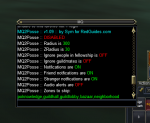
I fixed that yesterday and should have replied that I had fixed it. Not sure what I did, but it is working fine now. Another question, off this subject. When I download a plugin, what files do I move, where do they go, or do they just stay in an extracted file folder within the main directory. I hope that made sense. Is this the right command line to launch a Plugin? /plugin MQ2Posse it always fails the first time (which is weird in itself) but loads on second try. The reason I asked in the first place about the .inc files and what you use to tweak them is because when I launch mine ...it says that audio file is off. As you can see the MQ2Posse is Disabled???? 1610645186433.png I would like to have audio alerts turned on.
 
I fixed that yesterday and should have replied that I had fixed it. Not sure what I did, but it is working fine now. Another question, off this subject. When I download a plugin, what files do I move, where do they go, or do they just stay in an extracted file folder within the main directory. I hope that made sense. Is this the right command line to launch a Plugin? /plugin MQ2Posse it always fails the first time (which is weird in itself) but loads on second try. The reason I asked in the first place about the .inc files and what you use to tweak them is because when I launch mine ...it says that audio file is off. As you can see the MQ2Posse is Disabled???? View attachment 27369 I would like to have audio alerts turned on.
if it fails the first time, maybe its already loaded? and you unload it? Most things are already included in VeryVanilla already.

And if you look in the mq2posse plugin thread, you find most info needed
INI:
Commands
/posse - Lists command syntax
/posse on|off - Toggles checking of new pc's. Default is OFF
/posse status - Shows the current status and settings
/posse load - Loads ini file.
/posse save - Saves settings to ini. Changes DO NOT auto save.
/posse add NAME - Adds NAME to friendly list.
/posse del NAME - Deletes NAME from friendly list
/posse clear - Clears all char names.
/posse radius # - Sets check radius to # (ex: /posse radius 300).
/posse list - Lists current names and commands.
/posse notify on|off - Toggles notification alerts. Default is ON.
/posse friendnotify on|off - Toggles notification alerts for friends. Default is ON.
/posse strangernotify on|off - Toggles notification alerts for strangers. Default is ON.
/posse guild on|off - Toggles ignoring guild members, meaning guild members are invisible to all checks. Default is OFF.
/posse audio on|off - Toggles audio alerts. Default is OFF.
/posse testaudio - Test plays the audio alert.
/posse cmdadd "COMMAND" - Adds COMMAND that is executed when a stranger is near
/posse cmddel # - Deletes a command that is executed when a stranger is near

plugins (which need to be compiled, but You dont need to do that since they are included in VV) go in the Release folder and macros go in the macro folder, ini can be modified with a text editor, I use notedpad++
 
if it fails the first time, maybe its already loaded? and you unload it? Most things are already included in VeryVanilla already.

And if you look in the mq2posse plugin thread, you find most info needed
INI:
Commands
/posse - Lists command syntax
/posse on|off - Toggles checking of new pc's. Default is OFF
/posse status - Shows the current status and settings
/posse load - Loads ini file.
/posse save - Saves settings to ini. Changes DO NOT auto save.
/posse add NAME - Adds NAME to friendly list.
/posse del NAME - Deletes NAME from friendly list
/posse clear - Clears all char names.
/posse radius # - Sets check radius to # (ex: /posse radius 300).
/posse list - Lists current names and commands.
/posse notify on|off - Toggles notification alerts. Default is ON.
/posse friendnotify on|off - Toggles notification alerts for friends. Default is ON.
/posse strangernotify on|off - Toggles notification alerts for strangers. Default is ON.
/posse guild on|off - Toggles ignoring guild members, meaning guild members are invisible to all checks. Default is OFF.
/posse audio on|off - Toggles audio alerts. Default is OFF.
/posse testaudio - Test plays the audio alert.
/posse cmdadd "COMMAND" - Adds COMMAND that is executed when a stranger is near
/posse cmddel # - Deletes a command that is executed when a stranger is near

plugins (which need to be compiled, but You dont need to do that since they are included in VV) go in the Release folder and macros go in the macro folder, ini can be modified with a text editor, I use notedpad++


Thank you very much for taking the time to do this for me. Very nice of you!
 
And inis will either be in the release folder (for plugin-based) and macros folder for macro-based INI's.
 
I have used this plugin for a long time and never really had a problem until lately. I completed all the ranks of forage and now the refresh timer is down to like 40 seconds. I thought this would be great. Only downside is for some odd reason it will not always destroy items I forage that are in the ini to destroy. So I end up having to manually delete the chunks of Velium. funny thing is some times this times when I forage and it will delete it on my cursor. So does the timing of the destroy needed modified?
 
Release MQ2AutoForage

Users who are viewing this thread

Back
Top
Cart