
-
 Hail, we're RedGuides. We want you to play six (yes, 6!) EverQuest characters at once. We have scripts and a friendly community to help, please join our playstyle and say hello! 👋
You are using an out of date browser. It may not display this or other websites correctly.
You should upgrade or use an alternative browser.
You should upgrade or use an alternative browser.
Resource icon
Release MQ2AutoForage
- Thread starter Redbot
- Start date

I've just been using the forage.mac
can't run that and another mac tho
Last edited:

Boring
Well-known member
Yep that did it. I unloaded it and reloaded it and now it is working. Thanks. Red cent to you.i found that if you unload the plugin and then load it back then it works for me

I just submitted a merge request, I believe I know what the problem is and how to fix it.
When I was updating mq2feedme, chat caught that with the IAmCamping function, there is nothing to set it back to false should we go to character select screen or otherwise not leave the game --- which would then cause the plugin to assume we are in a constant state of camping if we went to char screen or swapped characters - so we added an onZoned check to return that back to false.
tested it and it works great!
just for shits - next time your dude won't forage, try /camping and then stand back up so it does the "You abandon your preparations to camp." message, and see if forage starts working again? this OnIncomingChat resets to false (but as you can see, if you don't interrupt it, or go to camp select and back it wouldn't reset it)
When I was updating mq2feedme, chat caught that with the IAmCamping function, there is nothing to set it back to false should we go to character select screen or otherwise not leave the game --- which would then cause the plugin to assume we are in a constant state of camping if we went to char screen or swapped characters - so we added an onZoned check to return that back to false.
tested it and it works great!
just for shits - next time your dude won't forage, try /camping and then stand back up so it does the "You abandon your preparations to camp." message, and see if forage starts working again? this OnIncomingChat resets to false (but as you can see, if you don't interrupt it, or go to camp select and back it wouldn't reset it)

Redbot updated MQ2AutoForage with a new update entry:
fixed bug when going to character select
Read the rest of this update entry...
fixed bug when going to character select
@Sic
-Fixed the plugin from not working if we went to a char screen or swapped characters - the IAmCamping had nothing to reset it to "false". I noticed this because I just did this with the update to mq2feedme.
Read the rest of this update entry...

I responded to the other thread you made --- tl;dr it should get written to the mq2autoforage.ini file in your release folder.after I added forage items to my destroy command how do I save that so i don't have to redo it everytime I log in?
I'll give it some tests to ensure its happening
doesn't look like its currently writing to that ini - I'll look into it.
********* Edit *********
@spudz90
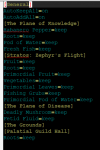
Looks like the original author made it write to MQ2Forage.ini (which is why i couldn't find mq2autoforage.ini).
@ChatWithThisName updated some other stuff with the plugin to be more up to date and robust - (which will be updated likely with next build) - but at this time it does appear to write to that ini file with the settings
********* Edit *********
@spudz90
Looks like the original author made it write to MQ2Forage.ini (which is why i couldn't find mq2autoforage.ini).
@ChatWithThisName updated some other stuff with the plugin to be more up to date and robust - (which will be updated likely with next build) - but at this time it does appear to write to that ini file with the settings
Last edited:
Redbot updated MQ2AutoForage with a new update entry:
new functions
Read the rest of this update entry...
new functions
2.1 - ChatWithThisName && Sic
No longer requires a hotkey in "Actions" to use forage.
Added new functions MyUseAbility, AbilityReady, atob, InGame
and VerifyINI.
Added Keeping the last state for /startforage and /stopforage
Defaults to on. It's assumed if they loaded the plugin that they
wanted to start foraging.
Significantly slowed down the plugin, to only check forage to be
ready once every 100 pulses.
Read the rest of this update entry...
Redbot updated MQ2AutoForage with a new update entry:
plays nice
Read the rest of this update entry...
plays nice
Sic - Lowered pulsedelay to better avoid conflicts with other plugins and macros
Read the rest of this update entry...

Redbot updated MQ2AutoForage with a new update entry:
plays nice
Read the rest of this update entry...
@Sic - Any idea if this will also reduce notification spam I've seen recently? This may have been due to conflicts with KA during combat and what not. Didn't dig into it too deep.
would need to know more about what notification spam you've been seeing - first i've heard about it so not sure what you're referring to@Sic - Any idea if this will also reduce notification spam I've seen recently? This may have been due to conflicts with KA during combat and what not. Didn't dig into it too deep.
Ahh, fair enough. I'll keep my eyes open and report it if it shows up again. It wasn't a huge issue to begin with so I just ignored it. My gut tells me the pulse check is going to fix it. *grin*would need to know more about what notification spam you've been seeing - first i've heard about it so not sure what you're referring to

Current version is crashing/hanging a lot for me and at least one other I have talked to. I think it's either when your inventory is full and/or when there's something on your cursor already (e.g. mod rod). Disabling mq2autoforage has stopped the hangs/crashes. I think it probably needs some checks for a) at least one free inventory slot (simplifies the problem) and b) whether something is already on cursor. The crash comes out as an EQ dx9 dlll crash. Spotted this after @eqmule suggestion over email, as I was wrongly accusing mq2eqwire of causing the issue.
Yah mule was debugging it yesterday, a bunch of the code is very old and needs some love, mule said he was gonna spruce it up because of the inventory crashCurrent version is crashing/hanging a lot for me and at least one other I have talked to. I think it's either when your inventory is full and/or when there's something on your cursor already (e.g. mod rod). Disabling mq2autoforage has stopped the hangs/crashes. I think it probably needs some checks for a) at least one free inventory slot (simplifies the problem) and b) whether something is already on cursor. The crash comes out as an EQ dx9 dlll crash. Spotted this after @eqmule suggestion over email, as I was wrongly accusing mq2eqwire of causing the issue.
Redbot updated MQ2AutoForage with a new update entry:
fixed a crash
Read the rest of this update entry...
fixed a crash
Fixed a crash in MQ2AutoForage when inventory was full.
This crash would result in the EQGraphicsDX9.dll dumps some people has sent me. (Thank you.) - eqmule
Read the rest of this update entry...

turnittotheright
Well-known member
Is there a way to add a master list of items that i do not want to keep? Like destroying roots in every zone not just pok.


One way to make this a little easier is to edit the ini file directly, rather than using the command line. Go out and forage in a bunch of zones so that the plugin creates entries for the applicable items, then open the ini file in notepad (notepad++) and do a "find and replace" for "roots=keep" to "roots=destroy" and then click "replace all".Yes this badly needs a global ini. There's no reason why I would want to keep an item in one zone and destroy it in another. I either want the item or I don't. It's a pain having to continously set roots, vegetables and rabbit meat to destroy whenever I go to a new zone.

Redbot updated MQ2AutoForage with a new update entry:
code cleanup
Read the rest of this update entry...
code cleanup
- Removed unnecessary defines
- Removed unused variables
- Abstracted ini name setting from the places it was called
- Moved Pulse checks into OnPulse
- Removed IsBardClass
- Removed tolower from atob (was already a case insensitive check)
- Removed mixed tabs and spaces (more tabs, tabs win)
MQ2AutoForage - Cleanup (!307) · Merge Requests · RG Creators / VeryVanilla
- Removed unnecessary defines - Removed unused variables - Abstracted ini name setting from the places it was called - Moved Pulse checks into OnPulse - Removed IsBardClass - Removed...gitlab.com
Read the rest of this update entry...
DoubleShotW
Member
I would very much like to see a global ini for this as well. I would also like to to have it apply to all characters so that I don't have to update them for each character.Yes this badly needs a global ini. There's no reason why I would want to keep an item in one zone and destroy it in another. I either want the item or I don't. It's a pain having to continously set roots, vegetables and rabbit meat to destroy whenever I go to a new zone.
Howdy Winstonso i have Vanilla and i have a folder for auto forage but none of the commands seem to fire up the auto forage. i can kill and works great but just not auto forage, i use use kissassist and then what would i do?
you need to load the plugin
/plugin mq2autoforage load then you should be able to /startforage and be good to go
I have been running mq2forage while hunting and I think it interferes with mq2ninjaloot. I had trash set on destroy, but not all the foraged trash got destroyed. However, some of my weapons got destroyed I have been using on Bandolier.
If others run into similar challenges, it might worth investigating.
If others run into similar challenges, it might worth investigating.

I agree that it is quite cumbersome. To have to stop game play when you forage something you don't want or need and then type /destroyitem Itemname just to not forage it or add it to your bags. And this has to happen on every character that can forage. So with a ranger 3x and druid 3x that would be switching to each character and then destroy the item. That is a lot of work. That is just one foraged item in one zone and you can start to see that its multiplied by other items and zones.
It works great to a point but maybe someone with more programing expertise than me might want to poke around with it.
It works great to a point but maybe someone with more programing expertise than me might want to poke around with it.
/StopforageHow do you turn it off?
Or you van /plugin mq2autoforage unload if u want to unload it
it will make itIn the overview it discusses character ini files for this plugin, yet I dont have any for that. Do i need to make them?
BayouGator
Member
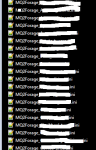
The autoforage ini files are in the release folder not the macro folder. The file will read MQ2Forage_toon name_server name.ini. I kept looking in the wrong place when I first started using it.
Ive been running this plugin for a month now and do not have any ini files for my toons
are you sure you don't have any mq2forage_toonanme_server.ini in your release folder? I have dozens of them and i have never created one manually.
Users who are viewing this thread
Total: 1 (members: 0, guests: 1)
Share: