• You've discovered RedGuides, an EverQuest multi-boxing and scripting community 🧙‍♀️⚙️. We want you to play several EQ characters at once, come join us and say hello! 👋

  • A TLP without truebox has thawed (Very Vanilla ready)
    Frostreaver
Mouseover comparison of equipped gear

Release Mouseover comparison of equipped gear 2021-12-06

No permission to download

ChatWithThisName

⚔️🛡️🗡️
Moderator
Joined
Dec 29, 2017
RedCents
23,978¢
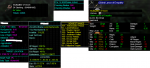
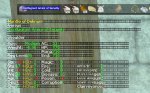
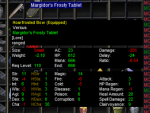
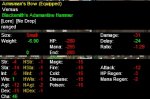
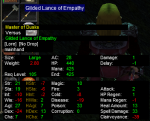
Recently created a mouseover HUD to show stat comparisons for gear that is currently equipped. Please see example photo.

Stat comparison ignores Augmentations, so you can compare the raw stats of gear against each other without having to remove your augments.

Displays stats with improvements in green, stats with losses in red.

Displays most information by simply moving your mouse over a wearable item in your bag. Both items must be in your inventory for the comparison to work correctly.

Other things can be added.

Easy to turn off if it gets in the way, /unloadhud mouseover
Easy to turn on if you need it back, /loadhud mouseover

Looking to share this work of art (and many hours of my life) for donations per user. Contact me via PM on here or discord to get a copy today. Expected compensation isn't high at all. For now, I will simply accept offers for it based on what you feel it's worth and we can discuss it from there.
 

Attachments
  • mouseoverhud.png
    mouseoverhud.png
    89.1 KB · Views: 323
Last edited:
This is a great add on for your Everquest experience. The item comparison is very useful. Worth your donation!
 
If you've already donated for my mouseover HUD and other elements and haven't been awarded a license to access it again from your purchases, please let me know so that I can manually add the license.
 
ChatWithThisName updated Mouseover comparison of equipped gear with a new update entry:

Performance and QoL improvements

Where able I converted statements that were comparing strings to use ID's with ${Select[,,]} and ${Range.Between instead of checking each item slot by string comparison to reduce CPU Usage.

Added a check for Item Slot to be NULL to avoid showing the mouseover HUD when non-equippable items (such as tradeskill items) were being hovered over.

Cut the parsing required to draw the background by 2/3rds by drawing the entire line all at once instead of doing it when the particular item applied...

Read the rest of this update entry...
 
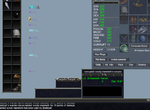
So, I get the feeling I'm either doing something wrong, or I've got a conflict somewhere. I did the /loadhud mouseover command, and now I've got gibberish on my mouse all the time, and when I try to hover over an item, or right click it I get new gibberish, but it's showing nothing to compare. I've tried saving the ini file with unicode characters preserved, and as ANSI and get the same result either way.mouseover-freespace.png
just moving my mouse around the screen this is what it looks like.

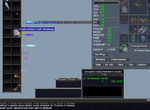
mouseover-compare.png
And this is what I see when hovering over an item. Right clicking and holding shows the typical stat view, with no comparisons. I've tried with the item in main inventory as opposed to a bag, but no love there either. Am I doing something incorrectly?

Thanks
 
Scratch my ignorance, but this is a learning opportunity for others. I included the ini sample that used font sizes, which I do not typically use, so I've not got them turned on, and that was the visual effect I got as a result.

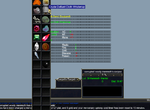
Using the nofontsizes gave me results, albeit not nearly as clean as the examples above.

So now the issue is that there's no clear background to the compare, and it sits behind the container, so the left side of the data is not visible. Suggestions on how to fix?

mouseover-nofontsize.png
 
I do apologize for the long wait for a response. You will get a response 1000% faster by getting on discord and messaging me there as I'm usually online and haven't been on the forums daily as I should as my wife recently had some surgery. For the initial issues and appearance I'm willing to bet the issue was because you have the option to get the one that uses font sizes and one that doesn't use font sizes. The background is an ASCII coded character to create the blocked background and the format my files are saved in have always worked for me without an issue. Perhaps download the No font sizes file, then rename it to MQ2Hud.ini (as that was the original name for both of the files) and then load into the game so it generates the required other INI entries. That should enable you to view it as I do. Alternately I can click on history under this resource and download the original one which is named MQ2Hud.ini and doesn't use font sizes and use that as a test and see the results. For direct access to me and my ability to troubleshoot this issue personally using a screenshare again, hop on discord and hit me with a message by right clicking my name and sending me a message https://www.redguides.com/community/ewr-discord/
 
Sorry to necro toadwarts post but, were you ever able to figure out what cleared the background up? I just tried using the font size and no-font size ini's with the exact same result. I also downloaded the original MQ2HUD.ini file and let it build the other required entries on startup. Any ideas? Thanks for your help and for all the contributions you have made to the community!

Edit - Just an FYI, I can see the black background being solid when i load the ini into Notepad++.

compare.jpg
 
Last edited:
1577141640571.png

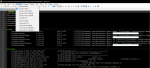
It looks fine on my end. Likely need to grab a copy of Notepad++ and open it with that, then in the top there should be an option called "Encoding", you'll want to ensure it's set to UTF-8 encoding

1577141698517.png
 
I figured it out. Apparently, you either have to use the Arial font to make it work or the Verdana font is not supported. As soon as I changed my font to Arial it worked perfectly. Thank you for all your help today. :)works.jpg
 
Release Mouseover comparison of equipped gear

Users who are viewing this thread

Back
Top
Cart