Only other thing I could think of is if master looter is out of zone (dead/wandering, whatever) when loot is assigned, which will cause EQ to reassign ML to next in line, and Lootly would then assign based on that toon's group list, i.e. to them first, then down the group list on their screen. Have never noticed Lootly work any differently. Generally if something seems random, I can find something that happened like maybe I picked up aggro as I was running to ZL, and ML hit zoneline, one or more in group didn't zone and mob died, loot went to whoever was still in zone. If it is happening with low level stuff, I'd suggest that is probably what is happening - Not uncommon to run through a zone that is much lower level and have stuff that should know better still attack you, and beat themselves to death on DS, or get pet killed, etc. and not even notice, resulting in low level junk ending up in whatever inventory was still able to loot.

Install the app
How to install the app on iOS
Follow along with the video below to see how to install our site as a web app on your home screen.
Note: This feature may not be available in some browsers.
-
 You've discovered RedGuides, an EverQuest multi-boxing and scripting community 🧙♀️⚙️. We want you to play several EQ characters at once, come join us and say hello! 👋
You are using an out of date browser. It may not display this or other websites correctly.
You should upgrade or use an alternative browser.
You should upgrade or use an alternative browser.
Resource icon
Release Lootly (1 Viewer) 2024-01-24.1
No permission to download
- Thread starter SpecialEd
- Start date

et508
Member
- Joined
- Sep 4, 2016
- RedCents
- 127¢
So if master looter has aggro he wont loot and it will go down the line? If that is true, that could have been what was happening. As my MT MA and puller is also the ML, so maybe he would go puller or grab aggro and it would make the other person loot the item.
No, master looter can have aggro and loot fine. but if master looter is not alive/inzone for some reason, then EQ changes to someone who IS still in zone, which Lootly sees and starts treating them as master looter. You would need to catch something going to another toon, and see if you can determine a why from there. As far as the Lootly program goes, the only way it diverts loot is in cases of Lore, or current looter hit keep limit ( =Keep|#), or current looter has reached the minimum number of free bag slots set in the INI. As far as bag slots go, if you have excluded bags, that can get kinda screwy in terms of excluded slots, particularly if the excluded bag is "special" - tradeskill only, collection only, etc. Also at lower levels, before you get most if not all bags that hold giant sized loot, that can mess things up - if your bag space remaining is say medium, and a large or giant item drops, it's going to probably bounce to another toon.

I apologize if this was answered already but I can't seem to find the answer. Does the Keep|1 function mean each character will keep 1 copy of the item or just the master looter? I'm trying to have it set up where each one of my toons will take a specific no trade item that drops instead of my master looter always taking the item.
I appreciate y'alls time and am loving Lootly
I appreciate y'alls time and am loving Lootly

- Joined
- Dec 1, 2006
- RedCents
- 1,889¢
As rare as the luck augs in the SOR expansion are, I just keep it set for the current class I am looting for, and then the next class. Get 10 to max it out then work on the next. I use Lootier to maintain the list normally.
Shard of Unbound Fate=Class|10|WAR,ROG
Shard of Unbound Fate=Class|10|WAR,ROG
I followed the directions but I don't see a file named "Lootly.Lua" in the zip file. I only see a file named "Init", "LIP", and "Write" that show as Lua files. I'm sure I'm missing a step or something, but can't figure it out. Can you assist? Lastly does anyone have a comprehensive loot file (keep/destroy) they could share?
You drop that folder into your Lua folder. In game, you can type /Lua run lootly.I followed the directions but I don't see a file named "Lootly.lua" in the zip file. I only see a file named "Init", "LIP", and "Write" that show as LUA files. I'm sure I'm missing a step or something, but can't figure it out. Can you assist? Lastly does anyone have a comprehensive loot file (keep/destroy) they could share?
It's best to use the watch feature. Click on the watch button at the top of this thread and reload your launcher. Click on Lua tab and have it install for files for you. This way, the launcher will keep the script updated.

yeah, its been updated since the instructions was written.I followed the directions but I don't see a file named "Lootly.lua" in the zip file. I only see a file named "Init", "LIP", and "Write" that show as LUA files. I'm sure I'm missing a step or something, but can't figure it out. Can you assist? Lastly does anyone have a comprehensive loot file (keep/destroy) they could share?
/Lua run lootly makes it run the init.Lua in the Lootly folder, this is for all Lua nowadays
the instructions should probably be updated
Ok thank you for the help!You drop that folder into your Lua folder. In game, you can type /lua run lootly.
It's best to use the watch feature. Click on the watch button at the top of this thread and reload your launcher. Click on lua tab and have it install for files for you. This way, the launcher will keep the script updated.
Thank you for helping. It looks like my Raidhud has a file in that folder also called init.Lua too. I did the watch feature option and it looks like Red Fetch knew what to do. Thank you for the quick help from everyone!yeah, its been updated since the instructions was written.
/lua run lootly makes it run the init.lua in the Lootly folder, this is for all lua nowadays
the instructions should probably be updated

I just took the huge one from autoloot and converted it using the lootly convert. Hope someone shares a good one for you!Would someone mind sharing a more populated lootly_loot.ini ? Just looking to have common drop names already populated (tradeskill stuff) rather then checking the file every couple of hours.
This one too: https://www.redguides.com/community/resources/chase-loot-ultra-rares-advloot-loot-ini-megathread.76/
- Joined
- Mar 16, 2014
- RedCents
- 80¢
I'm getting nothing running lootly.
/Lua run lootly
set master looter
/lootly on
Nothing happens, no looting. What am I missing?
/Lua run lootly
set master looter
/lootly on
Nothing happens, no looting. What am I missing?
Last edited:
- Joined
- Mar 16, 2014
- RedCents
- 80¢
Along the same vein, is there a wiki or other documentation somewhere? I'm pretty late to this party and I'd like to catch upenough to at least ask intelligent questions.
Are you rolling everything?I'm getting nothing running lootly.
/lua run lootly
set master looter
/lootly on
Nothing happens, no looting. What am I missing?
- Joined
- Mar 16, 2014
- RedCents
- 80¢
No, I have advance looting shut off for all of my toons. Never could understand the attraction.Are you rolling everything?

Gykrossin
Well-known member
- Joined
- Dec 17, 2022
- RedCents
- 1,039¢
I am going to look into Lootly this weekend, and see about it getting it fixed.Need to have advanced looting ON, lootly running on all toons. Turn off Filters in AdvLoot, main ones that screw with Lootly is Never Loot. Also should make sure to have No Drop item selection in Options set to Never.
- Joined
- Mar 16, 2014
- RedCents
- 80¢
Thanks nitraneb. Lots to do yet, but that got me on the path.
I've found that there is quite some configuration to go with Lootly. I have 1 toon who is only meant to loot tradeskill components, another CASH loot, then the other toons split everything else.
If it can't be sold - and not a tradeskill - never want it unless it's equipable.
I found lootly is hard to deal with these rules
If it can't be sold - and not a tradeskill - never want it unless it's equipable.
I found lootly is hard to deal with these rules
All resolved by updating both MQ and EQ with latest hotfix on 6/24. Disregard
Just installed lootly after remembering it from the past few years of playing. It seems to be a little broken for me. Is there any known issue with this or did I do something wrong? This was the very first item that dropped, and subsequent items after that. If I loot them manually and set them to KEEP, they go into the ini correctly.
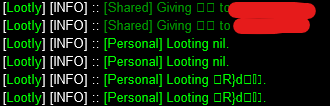
----EDIT----
It is now actually assigning me the "Icepaw Kobold Paw" and looting it succesfully, although now there are new items and it stopped again with no further messaging. The ini file wrote this as
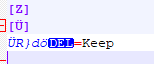

It doesnt appear this is a LOOTLY issue, it is the TLO feeding the advloot window data. I just did another test where I killed a snake and had some items in window. When I do a /echo ${AdvLoot.SList[1].Name} it is echoing back bad data as well.
----EDIT----
It is now actually assigning me the "Icepaw Kobold Paw" and looting it succesfully, although now there are new items and it stopped again with no further messaging. The ini file wrote this as
It doesnt appear this is a LOOTLY issue, it is the TLO feeding the advloot window data. I just did another test where I killed a snake and had some items in window. When I do a /echo ${AdvLoot.SList[1].Name} it is echoing back bad data as well.
Last edited:
Users who are viewing this thread
Total: 2 (members: 0, guests: 2)
Share: