
• Hail, we're RedGuides. We want you to play six (yes, 6!) EverQuest characters at once. We have scripts and a friendly community to help, please join our playstyle and say hello! 👋
  • We've added LLM sections to our Terms & Rules and Resource Rules, for everyone's sanity & in-game safety.
    Read more
    a. Do not replace your voice with an LLM. This goes for your posts and your scripts. Drafting and editing with a tool is fine, but don't take you out of what you share.
    b. Do not replace your EQ character's voice with an LLM. We don't want scripts that speak over /ooc, /shout or other public channels. This has been an unwritten rule that's kept casino scripts off the site for decades, but we're now compelled to make it clear: keep automated communication private.

    Why Does RG Review Scripts?
    Nearly every LLM-written Lua script we see is making your character do impossible things, and rarely in a way that's beneficial to you. We've seen heavy server hammering, /target over impossible distances when /nav spawn would passively accomplish the same thing, a spawn search that fires 20+ times per second, and other pointless actions that are likely annoying GMs.

    You are welcome to use LLMs as a tool to structure, draft, and edit your work, but please read critically before hitting /lua run

IRL - GPU utilization and 54 boxing

Warhound

Member
Hi all,

When I am boxing 54, videos played on my 2nd monitor are choppy. I look at my GPU utilization in task manager and see that it is near maxed out at 98%. When i ask others that have a similar set up to mine, they say they dont have that problem and their GPU isn't maxed even without implementing all the below optimizations, so i think theres something wrong, or something i am missing. I have scoured the interwebs trying to find a solution or explanation to no avail. I am hoping one of yall can help!

Ryzen 7 3700x CPU 3.6 ghz, 8 cores (16 cpus)
RTX 2070 SUPER 8 gb VRAM
64 gb RAM
two 27'' monitors, 1920x1080p

I am running 6 toons in one directory with playable settings and the rest of the 54 in another directory with stripped down globalload.txt and eqclient files, including stick figures
I have implemented every optimization strategy in this thread https://ezserver.online/forums/index.php?topic=2988.0

I also run the following EQAffinity script after loading toons in to distribute them among cores. Without that, toons are incredibly laggy.
#change 255 to fit your purpose. 255 spreads across all 8 cores. # to use = 2^N - 1 where N=num cores
powershell "$process=GET-PROCESS eqgame; foreach ($i in $process) {$i.ProcessorAffinity=65535}"

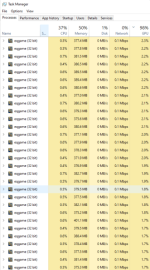
This is my utilization via task manager

1733663270998.png

This shows the GPU itilization with each bot taking ~1.5-2.5% of my GPU utilization
1733663340034.png

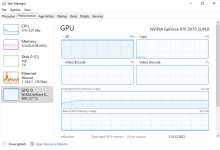
and finally, this is a closer look at the GPU performance
1733663411260.png
Does anyone have some insight into what might be causing this issue, or some validation that your rig with similar specs doesn't have this issue? I am hearing that EQ is all RAM and CPU - is this Ryzen 7 3700x a problem?

Thank you!!
 
Hi all,

When I am boxing 54, videos played on my 2nd monitor are choppy. I look at my GPU utilization in task manager and see that it is near maxed out at 98%. When i ask others that have a similar set up to mine, they say they dont have that problem and their GPU isn't maxed even without implementing all the below optimizations, so i think theres something wrong, or something i am missing. I have scoured the interwebs trying to find a solution or explanation to no avail. I am hoping one of yall can help!

Ryzen 7 3700x CPU 3.6 ghz, 8 cores (16 cpus)
RTX 2070 SUPER 8 gb VRAM
64 gb RAM
two 27'' monitors, 1920x1080p

I am running 6 toons in one directory with playable settings and the rest of the 54 in another directory with stripped down globalload.txt and eqclient files, including stick figures
I have implemented every optimization strategy in this thread https://ezserver.online/forums/index.php?topic=2988.0

I also run the following EQAffinity script after loading toons in to distribute them among cores. Without that, toons are incredibly laggy.
#change 255 to fit your purpose. 255 spreads across all 8 cores. # to use = 2^N - 1 where N=num cores
powershell "$process=GET-PROCESS eqgame; foreach ($i in $process) {$i.ProcessorAffinity=65535}"

This is my utilization via task manager
View attachment 67035

This shows the GPU itilization with each bot taking ~1.5-2.5% of my GPU utilization
View attachment 67036

and finally, this is a closer look at the GPU performance
View attachment 67037
Does anyone have some insight into what might be causing this issue, or some validation that your rig with similar specs doesn't have this issue? I am hearing that EQ is all RAM and CPU - is this Ryzen 7 3700x a problem?

Thank you!!
Use framelimiter
 
Turning the playable/main toons to maxFPS=60 and maxBGFPS=9, and the non-played toons to 9 for both, decreased my GPU utilization from 98 to 70 and videos are no longer lagging. Thank you!
 
Turning the playable/main toons to maxFPS=60 and maxBGFPS=9, and the non-played toons to 9 for both, decreased my GPU utilization from 98 to 70 and videos are no longer lagging. Thank you!
please don't do this.
just use framelimiter and then you don't have to do that at all.
 
Turning the playable/main toons to maxFPS=60 and maxBGFPS=9, and the non-played toons to 9 for both, decreased my GPU utilization from 98 to 70 and videos are no longer lagging. Thank you!

To elaborate a bit more on Sic's answer ...

You want to leave the in game frame limiter set to max ( or 60 fps ) and use MQ's frame limiter instead.

The EQ's frame limiter will simply pause the game between frames to hit the lower the FPS target. The pause also effects MQ so now your MQ code is also getting paused. This leads to things like auto follow breaking, MQ scripts or Lua's running super slow, etc.

Ideally, you leave the EQ frame limiter set to max. Then you use MQ's frame limiter to bypass the rendering code but leaving the main game logic running at full speed. This lowers the GPU resources required, while letting your MQ/EQ react at normal speeds.

If needed, you can use the MQ frame limiter to slow down the game logic processing.
 
To elaborate a bit more on Sic's answer ...

You want to leave the in game frame limiter set to max ( or 60 fps ) and use MQ's frame limiter instead.

The EQ's frame limiter will simply pause the game between frames to hit the lower the FPS target. The pause also effects MQ so now your MQ code is also getting paused. This leads to things like auto follow breaking, MQ scripts or lua's running super slow, etc.

Ideally, you leave the EQ frame limiter set to max. Then you use MQ's frame limiter to bypass the rendering code but leaving the main game logic running at full speed. This lowers the GPU resources required, while letting your MQ/EQ react at normal speeds.

If needed, you can use the MQ frame limiter to slow down the game logic processing.
couldn't have said it better myself.
 
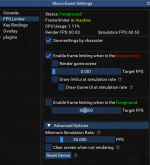
I've always been confused on the settings of the framelimiter. What are the ideal settings to maximize the number of toons you can run smoothly on a single PC?

1733690213918.png
 
I've always been confused on the settings of the framelimiter. What are the ideal settings to maximize the number of toons you can run smoothly on a single PC?

View attachment 67068
that is pretty great right there imo (and looks like my snip lol)

but basically you want to enable frame limiting in the background.
you *dont* want to render gamescreen or draw imgui/draw gameui
you could limit foreground if you wanted to, but meh

you really want minimum simulation rate at 30, this allows your background toons to "do work" with a simulation rate as if they were rendering at 30fps
 
IRL - GPU utilization and 54 boxing

Users who are viewing this thread

Back
Top
Cart