
-
 Hail, we're RedGuides. We want you to play six (yes, 6!) EverQuest characters at once. We have scripts and a friendly community to help, please join our playstyle and say hello! 👋
You are using an out of date browser. It may not display this or other websites correctly.
You should upgrade or use an alternative browser.
You should upgrade or use an alternative browser.

Release Explore.Mac - An Explorer / Traveler Achievement Macro (1 Viewer) 1.3.1
- Thread starter Denethor
- Start date


Good one! Nice of you to share the fix of the problemwas having trouble with this - it would load up the mac but would not move - thanks to @hytiek figured out it was my extended target having ppl on their I look for to heal. Removing those of ext target and zoning worked.


Did you download denecore?
There's a ink in the faq to denecore


Here is a linkie to watch it, so you can download with the launcher
I've been using this today on some toons and I'm running into a few different issues.
It absolutely refuses to use my Bard AAs for levi or invis. The bard is max AA and when I start the macro it says the bard needs to buy lev potions. If I manually click Shauri's and then start the macro it will run, but every time it zones and shrinks itself I have to reclick the AA for invis for the toon to move. The bard also has a lev clicky from UF (Orb of Suspension) but it doesn't pick that up either (maybe because the spell there is called "Flight"?).
On the other toon (warrior) it worked pretty much fine until I got to SSra and then it wouldn't nav. Not a big deal, that's a funky zone, I ran the toon out.
The real issues on the warrior though have been with LDoN. In EF whenever it had to nav to one of the cave looking ZIs (far north ZI) the toon would nav to the ZI and stand outside it unless I zoned it in. In BB it would nav to one of the ZIs that looked like a trap door and just bounce back and forth on top of the ZI until I clicked it. In NRo it navs across the undead ruins, gets aggro, kills the mob, uses an invis potion, aggro another undead, kills the mob, uses an invis potion, over and over until eventually nav breaks and the macro has to be restarted. The warrior is through LDoN now but it took a lot of babysitting it to get there. After getting out of LDoN it has worked fine again (currently up to DoDH).
I'm using the Denethor nav meshes, with the exception of greatdividetwo and maybe one or two of the other ToV/CoV zones that I've messed with in the mesh generator. I have checked and double checked to be sure and all of the nav meshes in the nav folder match the size/date (1/2/21) in both the zip and the nav folder.
It absolutely refuses to use my Bard AAs for levi or invis. The bard is max AA and when I start the macro it says the bard needs to buy lev potions. If I manually click Shauri's and then start the macro it will run, but every time it zones and shrinks itself I have to reclick the AA for invis for the toon to move. The bard also has a lev clicky from UF (Orb of Suspension) but it doesn't pick that up either (maybe because the spell there is called "Flight"?).
On the other toon (warrior) it worked pretty much fine until I got to SSra and then it wouldn't nav. Not a big deal, that's a funky zone, I ran the toon out.
The real issues on the warrior though have been with LDoN. In EF whenever it had to nav to one of the cave looking ZIs (far north ZI) the toon would nav to the ZI and stand outside it unless I zoned it in. In BB it would nav to one of the ZIs that looked like a trap door and just bounce back and forth on top of the ZI until I clicked it. In NRo it navs across the undead ruins, gets aggro, kills the mob, uses an invis potion, aggro another undead, kills the mob, uses an invis potion, over and over until eventually nav breaks and the macro has to be restarted. The warrior is through LDoN now but it took a lot of babysitting it to get there. After getting out of LDoN it has worked fine again (currently up to DoDH).
I'm using the Denethor nav meshes, with the exception of greatdividetwo and maybe one or two of the other ToV/CoV zones that I've messed with in the mesh generator. I have checked and double checked to be sure and all of the nav meshes in the nav folder match the size/date (1/2/21) in both the zip and the nav folder.
- Seller
- #526
Tibberu -
The Bard thing sounds like an issue I patched well over a year ago. How did you install the macro (I.e. Manually, or via launcher)? If manually, try the launcher instead.
As for Ssra, the only "Problem" area still in that one is usually the one-way wall. Is that where it goofed?
LDoN... Don't get me started on how much a piece of crap those meshes are... The entranced and exits are buried inside objects. I tried to fix most of them, but am limited by EQ's fuckery.
The Bard thing sounds like an issue I patched well over a year ago. How did you install the macro (I.e. Manually, or via launcher)? If manually, try the launcher instead.
As for Ssra, the only "Problem" area still in that one is usually the one-way wall. Is that where it goofed?
LDoN... Don't get me started on how much a piece of crap those meshes are... The entranced and exits are buried inside objects. I tried to fix most of them, but am limited by EQ's fuckery.


@Sic @Denethor I am not sure what I am doing wrong, I am running MQ2 now  that was the issue before.
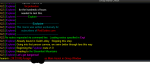
Now it prints this and just waits there, The macro is still running, but it is not clear what it is doing.
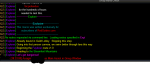
I assume here it is because I am missing some clickers, and some of the potions are not in the bazaar.
I made some levitation potions (Philer of Gulon's Impurity), but it is not clear what is needed.
I have the Shrink clickly, but nothing in the output tells me what it is doing.
It seems to indicate it is ready to go but he does not move to steamfront.
Also note that my mage does seem to work. So I assume it is a casting ability that I am missing.
that was the issue before.Now it prints this and just waits there, The macro is still running, but it is not clear what it is doing.
I assume here it is because I am missing some clickers, and some of the potions are not in the bazaar.
I made some levitation potions (Philer of Gulon's Impurity), but it is not clear what is needed.
I have the Shrink clickly, but nothing in the output tells me what it is doing.
It seems to indicate it is ready to go but he does not move to steamfront.
Also note that my mage does seem to work. So I assume it is a casting ability that I am missing.
Attachments
Last edited:
This is only happening for my main tank (warrior) it worked fine on my SK.
Also If I use
/mac explore tss
it outputs that it wants to go to moors
and then
/travelto moors does navigate to moors.
So for some reason explore is not calling travelto.
I feel like I am doing something really dumb
Is there a debug setting that I can set to figure it out?
Also If I use
/mac explore tss
it outputs that it wants to go to moors
and then
/travelto moors does navigate to moors.
So for some reason explore is not calling travelto.
I feel like I am doing something really dumb
Is there a debug setting that I can set to figure it out?
- Seller
- #534
So for some reason explore is not calling travelto.
I feel like I am doing something really dumb
FYI - Explore.mac NEVER calls /travelto that I can recall. If it does, it's maybe a single instance of the command across all 14K lines of code. (Wanders off....)
Yep, Just found it. I call it one time in the code for binding in the Lobby to nav us back to PoK. That's it.
Make sure your Extended Target window has all slots set to Auto.
That was the problem.
Negative. It visited them. Either EQ failed to pick up on the fact you visited (rare event), or more commonly, the achievement window needs to be refreshed. Click around on other achievements in another xpac then click back. Or log off / on.
I think I found the problem when I was redoing kunark.
When it went to Cab East / West, it kept going back and forth and I intervened, I think I may have made it mess up and made it skip a few places.
Last edited:

Den has mesh listed earlier to bypass the back and forth thing. The failure to register zone, depending on server can happen some, just have to either edit the zone visit and run the mac again, or just walk out there.. cant really account for hamster servers..I think I found the problem when I was redoing kunark.
When it went to Cab East / West, it kept going back and forth and I intervened, I think I may have made it mess up and skip a few places.
Den has mesh listed earlier to bypass the back and forth thing. The failure to register zone, depending on server can happen some, just have to either edit the zone visit and run the mac again, or just walk out there.. cant really account for hamster servers..
I ran the nav mesh updater I thought that got the latest meshes?
- Seller
- #541
Those are the latest from Wired420. At one time, over 50% of those were actually copied over from my repository. Over time, people have submitted new ones to him to overcome issues they were having with their macros / use-cases. However, addressing their use cases, they broke the use-case for Explore.mac. So over time, a few of the introduced meshes have become problematic. That's why I maintain my repro and make it available. The meshes there (https://github.com/BDeakins/DeneCore-Meshes) are the ones originally used to verify Explore.mac. There were over a thousand hours of testing put it by Sic alone.
Anyways, East Cabilis is one such problem zone. So it East Freeport. I'd recommend only pulling down the meshes that actually give you issues.
Anyways, East Cabilis is one such problem zone. So it East Freeport. I'd recommend only pulling down the meshes that actually give you issues.
VERY BAD BUG explore seems to pick at random to buy an insanely amount of invis and ivu pots it has bought over 1k worth of pots on toons that have both ivu and invis AAs ad when i tried to pause it continued to purchase from the bazaar and the toon already had 2 stacks of ivu and invis pots on them <i anticipated it purchasing them anyway from past experience> it would not allow mqp or end to function i ended up closing the accounts out to break the mac
....maybe if something could be added in to allow you to select what you wish to use for invis and ivu instead of trying to read for itself it would be helpful ....also when traveling VoA it continuously runs toons off of the stairs into beast domain ..killing theem ...if it could slow to a walk here and possibly when health drops from falls on some toons to allow merc to heal without running oor of the merc ....it also continues to buy lev pots on toons that have lev AA ....ty hope this helps
....maybe if something could be added in to allow you to select what you wish to use for invis and ivu instead of trying to read for itself it would be helpful ....also when traveling VoA it continuously runs toons off of the stairs into beast domain ..killing theem ...if it could slow to a walk here and possibly when health drops from falls on some toons to allow merc to heal without running oor of the merc ....it also continues to buy lev pots on toons that have lev AA ....ty hope this helps
Last edited:
did you try editing your ini?VERY BAD BUG explore seems to pick at random to buy an insanely amount of invis and ivu pots it has bought over 1k worth of pots on toons that have both ivu and invis AAs ad when i tried to pause it continued to purchase from the bazaar and the toon already had 2 stacks of ivu and invis pots on them <i anticipated it purchasing them anyway from past experience> it would not allow mqp or end to function i ended up closing the accounts out to break the mac
....maybe if something could be added in to allow you to select what you wish to use for invis and ivu instead of trying to read for itself it would be helpful ....also when traveling VoA it continuously runs toons off of the stairs into beast domain ..killing theem ...if it could slow to a walk here and possibly when health drops from falls on some toons to allow merc to heal without running oor of the merc ....it also continues to buy lev pots on toons that have lev AA ....ty hope this helps
you can change these to whatever items you want, and whatever number value you want
INI:
[General]
invisClickie=Cloudy Potion
invisClickie2=Cloudy Potion
shrinkClickie=Humanoid Reductionizer
levClickie=Philter of Gulon's Impunity
minimumInvisPots=60
minimumShrinkPots=60- Seller
- #546
VERY BAD BUG explore seems to pick at random to buy an insanely amount of invis and ivu pots it has bought over 1k worth of pots on toons that have both ivu and invis AAs ad when i tried to pause it continued to purchase from the bazaar and the toon already had 2 stacks of ivu and invis pots on them <i anticipated it purchasing them anyway from past experience> it would not allow mqp or end to function i ended up closing the accounts out to break the mac
....maybe if something could be added in to allow you to select what you wish to use for invis and ivu instead of trying to read for itself it would be helpful ....also when traveling VoA it continuously runs toons off of the stairs into beast domain ..killing theem ...if it could slow to a walk here and possibly when health drops from falls on some toons to allow merc to heal without running oor of the merc ....it also continues to buy lev pots on toons that have lev AA ....ty hope this helps
Sic pretty much answered, but I want to break with down a bit more.
First, there is only one behavior of the macro that's random. It randomly chooses a 1, 2, or 3 second delay later the displaying the "Loading Explore.mac" message on startup.
    /message Loading \agExplore.mac\ay, one moment
    /delay ${Math.Rand[1,3]}s
The invis and ivu potion quantities purchased are controlled via the INI setting quoted by Sic. Further, I used a high default as, well, they're cheap and the consequence of not having enough could be having to repeat an entire 2-hour long route.
Invis and IVU AA's will and are preferred by the macro. If they are not being used, my first question would be what are the names of the AA's? And correspondingly, what is the level of the characters?
/mqp absolutely works with the macro. I have no way of disabling it that I know of, nor any need. And we paused it plenty during the 6+ months of testing.
As for VoA - What meshes are you using? It may not be a macro-issue (as that zone was tested a large number of times for just that reason); but instead may be a mesh issue. The meshes used during testing are here (https://github.com/BDeakins/DeneCore-Meshes) as Wired420 has updated some in the two years since the macro released.
Hope these tips help.


What isn’t working?
[2021/09/07 14:00:23] WARNING: Undefined Variable DanNet used on line [email protected] /call createDeneCoreINIMacro Paused.
do you have mq2dannet loaded?[2021/09/07 14:00:23] WARNING: Undefined Variable DanNet used on line [email protected] /call createDeneCoreINIMacro Paused.
- Seller
- #553
You have one now, sir.I don’t have this macro, but it looks like you don’t have DeneCore.

Decayingitch
Member
I seem to be running into a problem at the moment with the macro, or rather it in combination with Denecore. The first time loading it I got this Error:

And that keeps on being sent even if I end the macro, causing me to close out of the game completely. I have mq2posse loaded, and tried to run the macro without it and got a different error code that was similar. Any help would be appreciated.
And that keeps on being sent even if I end the macro, causing me to close out of the game completely. I have mq2posse loaded, and tried to run the macro without it and got a different error code that was similar. Any help would be appreciated.

Decayingitch
Member
Wanted to give an update on my problem, as I fiddled around with a few things, unloading plugins one after another. Found out that it was part of Mq2Hud that was causing the issue. I was using the hud that CWTN made, which split the hud into different parts, and one of them is named Posse. Don't know why that would end up causing problems unless Mq2Posse was something that needed to be unloaded. Hope this helps out someone later on down the line.
My rogue is asked to get Invus potion, she can sneak hide.
In Cabilis she chain zoned from East to West in loop, i must pause the macro (if i got time).
For some zone, we zone in and out too fast, so i do not have travel achivement for this zone (Akheva for exemple)
PS : really great macro.
In Cabilis she chain zoned from East to West in loop, i must pause the macro (if i got time).
For some zone, we zone in and out too fast, so i do not have travel achivement for this zone (Akheva for exemple)
PS : really great macro.
- Seller
- #558
My rogue is asked to get Invus potion, she can sneak hide.
In Cabilis she chain zoned from East to West in loop, i must pause the macro (if i got time).
For some zone, we zone in and out too fast, so i do not have travel achivement for this zone (Akheva for exemple)
PS : really great macro.
Is your rogue buying INVIS or IVU potions?
It shouldn't be buying invis pots. ROG is specifically checked for in that routine. I do have rogues buy IVU's. I forget why. (It's been 2 years since I wrote that... I've slept since then. :P)
Cabilis East/West is a known issue NOT caused by this macro. It's caused by the mesh provided by the Mesh Updater tool. At one time, over 50% of those were meshes provided by me and used to verify Explore.mac. In the two years since release, a number of been swapped out for versions that create issues for Explore. You can get the mesh that works with Explore.mac from my personal repo: https://github.com/BDeakins/DeneCore-Meshes
The lack of updating isn't something I can fix. It's a server-side issue. I could make the pause in-zone longer, but then folks would complain their toon was standing around doing nothing. I can't wait for the achievement, as (at the time of writing) - We didn't have a way to check if you needed the achievement ofr a specific zone.
Thank you, I hope it serves you well. (Oh, and expect an issue with the mesh of E. Freeport to NRO when doing LDoN Xpac. There, the mesh was altered and we stop a hair short of zone line.)

- Seller
- #560
Yes, it checks.
So, what that does is sets the quantity to buy equal to the minimum number specified in the INI minus the on-hand quantity. So, if you have 60 on you, and the min is 60, intQtyToBuy would be zero. (FYI - Class checks are done prior to this. This bit below is actually executed before the snippet above. So, it verifies you actually need to buy potions twice before buying any.)
    /if (${strPotionType.Equal[cloudy]}) {
        /declare        intQtyToBuy            int      local       ${Math.Calc[${intMinCloudyCount}-${FindItemCount[=Cloudy Potion]}]}
So, what that does is sets the quantity to buy equal to the minimum number specified in the INI minus the on-hand quantity. So, if you have 60 on you, and the min is 60, intQtyToBuy would be zero. (FYI - Class checks are done prior to this. This bit below is actually executed before the snippet above. So, it verifies you actually need to buy potions twice before buying any.)
    /if (!${invisAbility} && ${Me.Class.ShortName.NotEqual[ROG]}) {
        /if ((${invisClickie.Equal[Cloudy Potion]} || ${invisClickie2.Equal[Cloudy Potion]}) && ${FindItemCount[Cloudy Potion]}<${intMinCloudyCount}) /call restockPotions cloudy
    }
Last edited:
Users who are viewing this thread
Total: 2 (members: 0, guests: 2)
Share: