• You've discovered RedGuides, an EverQuest multi-boxing and scripting community 🧙‍♀️⚙️. We want you to play several EQ characters at once, come join us and say hello! 👋

  • A TLP without truebox has thawed (Very Vanilla ready)
    Frostreaver
Explore.Mac - An Explorer / Traveler Achievement Macro

Release Explore.Mac - An Explorer / Traveler Achievement Macro 1.3.1

bought your tool, haven't had to use on Next.. but if your burnt/away from the life.. see if you have somebody who will take over?
 
This is broken with Live as well as Next just FYI. Fails immediately after zoning into zones like ROF and a few others. Same error for both next and live. Think task window pops up goes away and fails at that point. I hope that helps.
 
This is broken with Live as well as Next just FYI. Fails immediately after zoning into zones like ROF and a few others. Same error for both next and live. Think task window pops up goes away and fails at that point. I hope that helps.
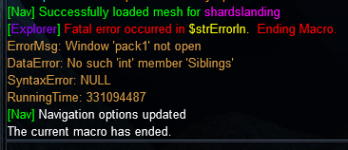
First incident report of this. Can you provide me some more info? What's the exact error? Does it occur on first zone in, or after a certain point into the script?
 
1642188182789.png
Same issue. Crashes at the RoF explore. Did the pre-req quests and gets to this step, opens and closes the quest window, and crashes. Tried going back to PoK and restarting, same result.
 
As previously discussed on this thread, MQ (Next) is not supported at current. The macro was written for MQ2 as Next wasn't available at the time of authorship.
 
best I can tell the issue occurs in the denecore -nav.inc in the function toggleNavDoors
The function calls for Sub fatalError take a parameter, but the usage of the parameter isn't being wrapped in curly brackets. so it's not outputting where the error is.
The error message and /endmac is triggered because Sub toggleNavDoors is making it to the end and doing a /return unknownError.

Since you're on next, you could do a couple of things.
1. One being change the path of the INI calls to reference the correct location and see if that corrects the issue.
2. replace the final return from unknownError with /return toggleNavDoorsSuccessful

either of those two things in theory should prevent the check from passing directly following the /call toggleNavDoors and thus prevent the fatalError sub from being called which is ending the macro.
 
If it isnt running properly with next it should be clearly stated in Overview, FAQ and Instructions.

In Launcher the current version is now called MQ and not Next anymore. So new people come here, not even knowing about the existence of a legacy version, then buy the mac and it might not be running for them.

I'd suggest to eitehr remove it as a payed ressource or make it running with he new MQ.
 
or if the author is not playing anymore and having trouble fixing the issues, perhaps it can just be dropped to a free resource and other folks can work on fixing it up to a working state. the content is several expansions old, anyhow.
 
I went over some options with Denethor, but we've been on MQ stable for about 2 days so let's give him a bit to adjust.
 
While I understand that perspective, MQ has been in the launcher for a year and the solution to this problem (which is also a problem in MQ2) has been posted multiple times with multiple recommendations. CWTN’s is just the latest suggestion, but hardcoding paths is always a bad idea. I’ve posted about the fix for that specifically and brainiac has posted about how to not need the path at all.

I totally understand not wanting to work on it, or not having time. But at this point I agree that the resource should be clearly marked until the issues are resolved or a decision is made.
 
Probably not a permanent fix, but if anyone is like me and just now getting around to doing these things, here's what I did to get it to work with MQ(Next):
in \macros\Denecore, edit these two lines in the toggleNavDoors function of denecore-nav.inc, adding \..\config:
Code:
/declare iniSetting string local ${Ini[..\..\config\MQ2Nav.ini,Settings,OpenDoors]}

   ...

/varset iniSetting ${Ini[..\..\config\MQ2Nav.ini,Settings,OpenDoors]}
Then place the downloaded explore.mac and Explore folder from the zip file into your macros folder.

I've only done the faydwer one so far but it seems to be working fine. Also, I realize this is what others have been suggesting in this thread, but I wanted to explicitly post what needed changed to hopefully help others,
 
Not sure if there's anything you can do other than maybe a cleanup on crash function if that's even a thing, but when the macro crashes, my mq2nav settings are jacked up. I've run into it a few times today where after explore.mac crashes, my nav settings to autoclick doors is turned off.

Also, for the record I'm running into the same RoF crash other posters are.
 
The fix for both of those (they're related) is discussed up-thread.

That issue, and a number of other fixes (some discussed, some that were never needed but discovered during code review over the holidays) are in testing currently. The macro takes 16-18hr to run, so generic (not a specific issue) testing is a long process. (And no, I'm not the only tester.)
 
Ah gotcha sorry. I guess I misread and thought the issue was doors wouldn't get clicked during the macro. I didn't realize the problem was it messing with nav settings. Eagerly awaiting the update and thanks for all you do!
 
Ah gotcha sorry. I guess I misread and thought the issue was doors wouldn't get clicked during the macro. I didn't realize the problem was it messing with nav settings. Eagerly awaiting the update and thanks for all you do!
At the time it was written, I had to path close to certain "scripted doors" (zone-activators, like port stones) but didn't want to go activate them. MQ2Nav, if we got too close, would click them anyways. Brainiac added detection for "scripted doors", but certain ones weren't detected properly and it'd still click them and screw me up. So, I would have to toggle the activation of doors in general.

So, what happens is if the macro toggles the doors off, then errors out, there's nothing to re-enable the doors. That toggle is only a couple seconds long, so it's a narrow window it had be break in. But, obviously, it can and is currently happening. The new code both fixes the use of the hardcoded relative path, the func that's causing the break, and several things within the toggle func itself.
 
Trying to run this again for the first time in awhile. Broken .... /mac explore RoF .... Started it in shards landing it CTD .... downloaded latest version
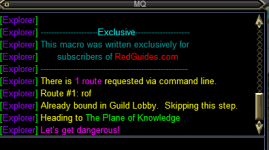
( Running Next ) Ran /mac explore RoF ... in guild lobby and Pok ..... Just stands there and doesn't Navigate anywhere?
 

Attachments

  • Screenshot 2022-01-27 071131.png
    Screenshot 2022-01-27 071131.png
    15.5 KB · Views: 3
MQ(Next) is not yet supported. An update will be forthcoming. (I was waiting on some info that I finally got last night, but too late to act upon it.)
 
Trying to run this again for the first time in awhile. Broken .... /mac explore RoF .... Started it in shards landing it CTD .... downloaded latest version
( Running Next ) Ran /mac explore RoF ... in guild lobby and Pok ..... Just stands there and doesn't Navigate anywhere?
You'll have to run it with Legacy (MQ2) for now. It works as intended there. I, personally, edited my copy of the macro to remove combat and invis potions as I run through the first 15-ish expansions, as stopping to do combat with super grey-con mobs really seemed to slow exploration progress down!
 
Denethor updated Explore.Mac - An Explorer / Traveler Achievement Macro with a new update entry:

v1.3.0 - For MQ(Next) Compatibility

v1.3 FixesChanges-
- Updated to reflect switch from MQ2 to MQ (Next)
- Fixed spelling of "Bobbing Corpse" in levAbility detection routine
- Fixed (as far as possible) error message echo upon macro termination
- Fixed INI hardcoded relative reference to MQ2NAV.ini location.
- Fixed inescapable macro-pausing loop when evac / gate / Throne / etc abilities and potions are exhausted
- Fixed invalid invocation of the window DoOpen method in SpecialEvents and RoF routes...

Read the rest of this update entry...
 
Using the latest updated version on Next gives me the following error:

"Subroutine normalizeNavINI was not found"

I did not get this error on the previous release under Next.
 
Using the latest updated version on Next gives me the following error:

"Subroutine normalizeNavINI was not found"

I did not get this error on the previous release under Next.
DeneCore was updated as well. You need the v1.1.0 DeneCiore
 
One thing I have noticed every time I run this macro on a toon is that when running the ROK route it skips over EJ, CoM, Trak, Seb and I have to run these manually on the toon. Also the zone line between West and East Cab puts the toon in a forever loop bouncing between the zones. You have to pause the macro in just the right moment to kill the loop and manually zone the toon through then un-pause when you reach the other side to continue on to FoB.
 
One thing I have noticed every time I run this macro on a toon is that when running the ROK route it skips over EJ, CoM, Trak, Seb and I have to run these manually on the toon. Also the zone line between West and East Cab puts the toon in a forever loop bouncing between the zones. You have to pause the macro in just the right moment to kill the loop and manually zone the toon through then un-pause when you reach the other side to continue on to FoB.

My understanding is you need to grab the mesh files @Denethor has which work with his macro.
 
I still get Warning: Undefined Variable CWTN used on line [email protected]
/cleanup

if I comment that out, I get [email protected] /call createDeneCoreINI.
undefined variable CWTN warnings in macros are usually going to be boxhud interfering with something, i.e. trying to use a dannet observer on a toon that doesn't have a CWTN plugin loaded.
you'll want to make sure CWTN stuff is set to only be observed for classes that have the plugins. If its a class which does have a plugin but you unloaded it for whatever reason, that'd make it unhappy too.
 
undefined variable CWTN warnings in macros are usually going to be boxhud interfering with something, i.e. trying to use a dannet observer on a toon that doesn't have a CWTN plugin loaded.
you'll want to make sure CWTN stuff is set to only be observed for classes that have the plugins. If its a class which does have a plugin but you unloaded it for whatever reason, that'd make it unhappy too.

if I stop boxhud, and remove CWTN plugin could I bypass this?
 
I still get Warning: Undefined Variable CWTN used on line [email protected]
/cleanup

if I comment that out, I get [email protected] /call createDeneCoreINI.
/cleanup is a documented command of MQ and should not cause a macro to error out. If boxhud or something else is interfering with the MQ-native command, I'd contend that's indeed a problem with boxhud.

I can dig in further when I return home next week. I'm currently travelling with one of my children as then undergo medical treatment.

 
/cleanup is a documented command of MQ and should not cause a macro to error out. If boxhud or something else is interfering with the MQ-native command, I'd contend that's indeed a problem with boxhud.

I can dig in further when I return home next week. I'm currently travelling with one of my children as then undergo medical treatment.

an undefined variable like CWTN almost certainly means he has something trying to access ${CWTN} in some capacity, like boxhud, or mq2melee holy/down or mq2react, and has no plugin loaded to provide that ${CWTN} portion.

the macro parser just spits out where the macro is where it catches that, it doesn't necessarily mean it is a fault of the macro.

I would bet it has nothing to do with cleanup, and it is exactly as @aquietone said
 
I go off what I'm told for that class. I don't have a necro myself. This is the line that tries to find the lev AA. What value should be present for Necros?

/varset levAbility ${Select[TRUE,${Me.AltAbilityReady[Group Perfected Levitation]},${Me.AltAbilityReady[Perfected Dead Men Floating]},${Me.AltAbilityReady[Shauri's Sonorous Clouding]},${Me.AltAbilityReady[Perfected Levitation]},${Me.AltAbilityReady[Perfected Dead Man Floating]},${Me.AltAbilityReady[Bobbing Corpse]},${Me.AltAbilityReady[Elemental Form: Air]},${Me.AltAbilityReady[Noteworthy Disguise: Blue Drake II]},${Me.AltAbilityReady[Divine Steed]},${Me.AltAbilityReady[Steed of Souls]}]}

How would I specify Dead Man Floating for my necro it keeps trying to buy potions even if I edit the ini and put Dead Man Floating as the levi clicky?
 
Release Explore.Mac - An Explorer / Traveler Achievement Macro

Users who are viewing this thread

Back
Top
Cart