• You've discovered RedGuides, an EverQuest multi-boxing and scripting community 🧙‍♀️⚙️. We want you to play several EQ characters at once, come join us and say hello! 👋

  • A TLP without truebox has thawed (Very Vanilla ready)
    Frostreaver
(YALM) Yet Another Loot Manager

Release (YALM) Yet Another Loot Manager (1 Viewer) 0.12.7

No permission to download
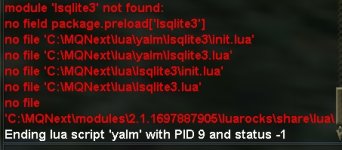
Well, I just back into the game and still want to use this my favorite loot Lua. I downloaded the newest version yet after /Lua run yalm, it says:

1.jpg
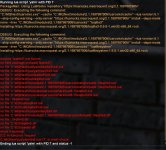
I clicked Install, a cmd window with no hints just pop then when I closed it, it says:
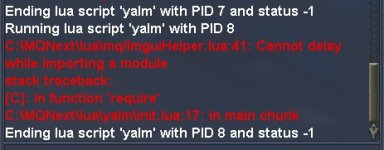
2.jpg
Any idea to fix this plz? I really love this one..

P. S. I also tried as Brainiac said in another post "%appdata%/local/luarocks delete it and stop running as admin" and still no go. (that action used to fix the similar error on Boxhud though)
 
P. S. I also tried as Brainiac said in another post "%appdata%/local/luarocks delete it and stop running as admin" and still no go. (that action used to fix the similar error on Boxhud though)

I did some cleanup just now, but I'm not in a place where I can test it. I also don't think my cleanup was related to your issue. The only folder that matters is your Modules folder and you can delete the whole thing without impact. Besides that, just make sure you're up to date.
 
I did some cleanup just now, but I'm not in a place where I can test it. I also don't think my cleanup was related to your issue. The only folder that matters is your Modules folder and you can delete the whole thing without impact. Besides that, just make sure you're up to date.
Sir, I downloaded the newest version and deleted the module folder under my MQNext folder, yet it still shows
1.jpg
And then it shows a little bit different yet still error:
2.jpg
Thank you for the help!

P. S. Everytime I deleted my modules folder, it will regenerate a new one, dunno if that matters.
 
P. S. Everytime I deleted my modules folder, it will regenerate a new one, dunno if that matters.
I meant make sure your MacroQuest is up to date (but the script too). You can try opening mq\PackageMan.Lua and flipping PackageMan.debug to true and it should output more information.

You only needed to delete the modules folder one time, it puts it back when it runs.
 
I meant make sure your MacroQuest is up to date (but the script too). You can try opening mq\PackageMan.lua and flipping PackageMan.debug to true and it should output more information.

You only needed to delete the modules folder one time, it puts it back when it runs.
Changed PackageMan.debug = true, now it shows:
3.jpg
 
Well, that wasn't meant to be the actual answer. Sounds like I need to add more debug output to packageman.
 
Thank you, can finally donate for tribute in mass. Will there be any plan to adding error checking for when tribute is full? Right now it seems to just hang if you can no longer donate due to tribute cap.
 
Regarding tribute, I made the following changes on my system:

[CODE lang="Lua" title="Tribute.Lua"]...
local function action(global_settings, char_settings, args)
if args[2] then
if not (args[2] == "guild" or args[2] == "me") then
Write.Error("That is not a valid option")
end
end
...[/CODE]

and
[CODE lang="Lua" title="helpers.Lua"]...
helpers.ready_tribute_window = function(travel, tribute_master)
if
tribute_master == "me"
or (tribute_master == nil and mq.TLO.Target.Class() ~= "Guild Tribute Master" and mq.TLO.NearestSpawn('class "Tribute Master"').Class() == "Tribute Master")
or (tribute_master == nil and mq.TLO.Target.Class() == "Tribute Master")
then
return helpers.ready_npc_window("TributeMasterWnd", "Tribute Master", travel)
elseif
tribute_master == "guild"
or (tribute_master == nil and mq.TLO.Target.Class() ~= "Tribute Master" and mq.TLO.NearestSpawn('class "Guild Tribute Master"').Class() == "Guild Tribute Master")
or (tribute_master == nil and mq.TLO.Target.Class() == "Guild Tribute Master")
then
return helpers.ready_npc_window("TributeMasterWnd", "Guild Tribute Master", travel)
end
...[/CODE]

Now guild/personal tribute is working fine for me.
 
Thank you, can finally donate for tribute in mass. Will there be any plan to adding error checking for when tribute is full? Right now it seems to just hang if you can no longer donate due to tribute cap.
I wonder if we could add an event to trigger a variable, then have the main code for tribute have a loop where it checks that variable? I have just started trying to use this script again, and I am still learning the ins and outs of the configuration.
 
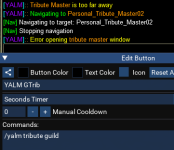
Trying out the guild tribute feature, and running into an issue. I do the /yalm tribute guild, and the toon navigates to the Personal Tribute master, not the Guild tribute Master I have targeted.
1709608686648.png

Some minor bug fixes: yalm>config>commands>Tribute.Lua, line 63
if args[2] ~= "guild" and args[2] == "me" then (old)
if args[2] ~= "guild" and args[2] ~= "me" then (new, should be not equal to "me")

yalm>core>helpers.Lua lines 118-128 ( I had to change or to and, then enclose the second and third conditions in a parenthesis)
[CODE lang="Lua" highlight="3,4,9,10"]
if
tribute_master == "me"
and (mq.TLO.NearestSpawn('class "Tribute Master"').Class() == "Tribute Master"
or mq.TLO.Target.Class() == "Tribute Master")
then
return helpers.ready_npc_window("TributeMasterWnd", "Tribute Master", travel)
elseif
tribute_master == "guild"
and (mq.TLO.NearestSpawn('class "Guild Tribute Master"').Class() == "Guild Tribute Master"
or mq.TLO.Target.Class() == "Guild Tribute Master")
then
[/CODE]

was
[CODE lang="Lua" highlight="3,4,9,10"]
if
tribute_master == "me"
or mq.TLO.NearestSpawn('class "Tribute Master"').Class() == "Tribute Master"
or mq.TLO.Target.Class() == "Tribute Master"
then
return helpers.ready_npc_window("TributeMasterWnd", "Tribute Master", travel)
elseif
tribute_master == "guild"
or mq.TLO.NearestSpawn('class "Guild Tribute Master"').Class() == "Guild Tribute Master"
or mq.TLO.Target.Class() == "Guild Tribute Master"
then
[/CODE]


There was some timing issues with the guild tribute running too fast, so it would skip items, but I am troubleshooting that. I reached the favor cap, so I will keep testing later on. There also seemed to be an issue with items being added to either the all or me list, still trying to verify this issue.

If I did /yalm setitem Tribute me - the YALM.Lua was not updated (I am not sure where the character items are stored, if anywhere?)
If I ran the command /yalm setitem Tribute all, the item would appear in the config/YALM.Lua file as I expected.
 
Trying out the guild tribute feature, and running into an issue. I do the /yalm tribute guild, and the toon navigates to the Personal Tribute master, not the Guild tribute Master I have targeted.
View attachment 58377

Some minor bug fixes: yalm>config>commands>Tribute.lua, line 63
if args[2] ~= "guild" and args[2] == "me" then (old)
if args[2] ~= "guild" and args[2] ~= "me" then (new, should be not equal to "me")

yalm>core>helpers.lua lines 118-128 ( I had to change or to and, then enclose the second and third conditions in a parenthesis)
[CODE lang="lua" highlight="3,4,9,10"]
if
tribute_master == "me"
and (mq.TLO.NearestSpawn('class "Tribute Master"').Class() == "Tribute Master"
or mq.TLO.Target.Class() == "Tribute Master")
then
return helpers.ready_npc_window("TributeMasterWnd", "Tribute Master", travel)
elseif
tribute_master == "guild"
and (mq.TLO.NearestSpawn('class "Guild Tribute Master"').Class() == "Guild Tribute Master"
or mq.TLO.Target.Class() == "Guild Tribute Master")
then
[/CODE]

was
[CODE lang="lua" highlight="3,4,9,10"]
if
tribute_master == "me"
or mq.TLO.NearestSpawn('class "Tribute Master"').Class() == "Tribute Master"
or mq.TLO.Target.Class() == "Tribute Master"
then
return helpers.ready_npc_window("TributeMasterWnd", "Tribute Master", travel)
elseif
tribute_master == "guild"
or mq.TLO.NearestSpawn('class "Guild Tribute Master"').Class() == "Guild Tribute Master"
or mq.TLO.Target.Class() == "Guild Tribute Master"
then
[/CODE]


There was some timing issues with the guild tribute running too fast, so it would skip items, but I am troubleshooting that. I reached the favor cap, so I will keep testing later on. There also seemed to be an issue with items being added to either the all or me list, still trying to verify this issue.

If I did /yalm setitem Tribute me - the YALM.lua was not updated (I am not sure where the character items are stored, if anywhere?)
If I ran the command /yalm setitem Tribute all, the item would appear in the config/YALM.lua file as I expected.
Been a while but I remember these issues. If you actually opened up the guild tribute master and ran it then it would work otherwise would run to personal. There is a timing issue as well, I can't remember where , but I remember changing the delay and it worked great.
 
Been a while but I remember these issues. If you actually opened up the guild tribute master and ran it then it would work otherwise would run to personal. There is a timing issue as well, I can't remember where , but I remember changing the delay and it worked great.
Even if I had the right vendor opened up, it would still run to the wrong vendor. I wonder if it is possible to get these fixes into the codebase? I am not sure who maintains this codebase currently.
 
Dunno if this is still been actively maintained, but I just could not get this work again. What I want to do is ignore basically collectibles, keep TS/Quest stuff. And here is my rules under my config/yalm.Lua,
Code:
['rules'] = {
        ['Farm'] = {
            ['category'] = '',
            ['items'] = {},
            ['name'] = 'Farm',
            ['conditions'] = {
                [1] = {
                    ['quantity'] = 1,
                    ['name'] = 'Collectible',
                    ['setting'] = 'Ignore',
                },
                [2] = {
                    ['name'] = 'Poisons',
                    ['setting'] = 'Ignore',
                },
                [3] = {
                    ['name'] = 'Venom',
                    ['setting'] = 'Ignore',
                },
                [4] = {
                    ['name'] = 'Augmentation',
                    ['setting'] = 'Keep',
                },
                [5] = {
                    ['name'] = 'Temporary',
                    ['setting'] = 'Ignore',
                },
                [6] = {
                    ['name'] = 'Defiant',
                    ['setting'] = 'Ignore',
                },
                [7] = {
                    ['name'] = 'Ornament',
                    ['setting'] = 'Ignore',
                },
                [8] = {
                    ['name'] = 'FoodDrink',
                    ['setting'] = 'Ignore',
                },
                [9] = {
                    ['name'] = 'Quest',
                    ['setting'] = 'Keep',
                },
                [10] = {
                    ['name'] = 'Tradeskill',
                    ['setting'] = 'Keep,
                },
                [11] = {
                    ['name'] = 'LowStack',
                    ['setting'] = 'Ignore',
                },
                [12] = {
                    ['name'] = 'NoValue',
                    ['setting'] = 'Ignore',
                },
            },
        },
    },

Here is what under my config/yalm/yalm-server-character.Lua,

Code:
return {
    ['settings'] = {
          unmatched_item_rule = {
            setting = 'Keep',
        },
    },
    ['items'] = {},
    ['save'] = {},
    ['rules'] = {
        {
            name = 'Farm',
            enabled = true,
        },
    },
}

I'm in a group, the group leader also as the master looter /Lua run yalm, yet still he looted everything, included the collectibles and other junkies which supposed to be ignored.

Any ideas?

P. S. I used /yalm check for the collectibles on my cursor, and it said correctly should be ignoreed blahblah... However the actual loot behavior is looting the collectibles, which is really confusing..
 
yalm>core>helpers.lua lines 118-128 ( I had to change or to and, then enclose the second and third conditions in a parenthesis)
[CODE lang="lua" highlight="3,4,9,10"]
if
tribute_master == "me"
and (mq.TLO.NearestSpawn('class "Tribute Master"').Class() == "Tribute Master"
or mq.TLO.Target.Class() == "Tribute Master")
then
return helpers.ready_npc_window("TributeMasterWnd", "Tribute Master", travel)
elseif
tribute_master == "guild"
and (mq.TLO.NearestSpawn('class "Guild Tribute Master"').Class() == "Guild Tribute Master"
or mq.TLO.Target.Class() == "Guild Tribute Master")
then
[/CODE]

was
[CODE lang="lua" highlight="3,4,9,10"]
if
tribute_master == "me"
or mq.TLO.NearestSpawn('class "Tribute Master"').Class() == "Tribute Master"
or mq.TLO.Target.Class() == "Tribute Master"
then
return helpers.ready_npc_window("TributeMasterWnd", "Tribute Master", travel)
elseif
tribute_master == "guild"
or mq.TLO.NearestSpawn('class "Guild Tribute Master"').Class() == "Guild Tribute Master"
or mq.TLO.Target.Class() == "Guild Tribute Master"
then
[/CODE]
check out the modifications I made to the same code a few posts above, for the conditions you might want to reconsider (either just rely on the me/guild setting, or define the conditions if the setting is missing).
 
Dunno if this is still been actively maintained, but I just could not get this work again. What I want to do is ignore basically collectibles, keep TS/Quest stuff. And here is my rules under my config/yalm.lua,
Code:
['rules'] = {
        ['Farm'] = {
            ['category'] = '',
            ['items'] = {},
            ['name'] = 'Farm',
            ['conditions'] = {
                [1] = {
                    ['quantity'] = 1,
                    ['name'] = 'Collectible',
                    ['setting'] = 'Ignore',
                },
                [2] = {
                    ['name'] = 'Poisons',
                    ['setting'] = 'Ignore',
                },
                [3] = {
                    ['name'] = 'Venom',
                    ['setting'] = 'Ignore',
                },
                [4] = {
                    ['name'] = 'Augmentation',
                    ['setting'] = 'Keep',
                },
                [5] = {
                    ['name'] = 'Temporary',
                    ['setting'] = 'Ignore',
                },
                [6] = {
                    ['name'] = 'Defiant',
                    ['setting'] = 'Ignore',
                },
                [7] = {
                    ['name'] = 'Ornament',
                    ['setting'] = 'Ignore',
                },
                [8] = {
                    ['name'] = 'FoodDrink',
                    ['setting'] = 'Ignore',
                },
                [9] = {
                    ['name'] = 'Quest',
                    ['setting'] = 'Keep',
                },
                [10] = {
                    ['name'] = 'Tradeskill',
                    ['setting'] = 'Keep,
                },
                [11] = {
                    ['name'] = 'LowStack',
                    ['setting'] = 'Ignore',
                },
                [12] = {
                    ['name'] = 'NoValue',
                    ['setting'] = 'Ignore',
                },
            },
        },
    },

Here is what under my config/yalm/yalm-server-character.lua,

Code:
return {
    ['settings'] = {
          unmatched_item_rule = {
            setting = 'Keep',
        },
    },
    ['items'] = {},
    ['save'] = {},
    ['rules'] = {
        {
            name = 'Farm',
            enabled = true,
        },
    },
}

I'm in a group, the group leader also as the master looter /lua run yalm, yet still he looted everything, included the collectibles and other junkies which supposed to be ignored.

Any ideas?

P. S. I used /yalm check for the collectibles on my cursor, and it said correctly should be ignoreed blahblah... However the actual loot behavior is looting the collectibles, which is really confusing..
Not sure what is different here, figured I would share my files as a reference. I am ignoring all Defiant and Ornaments.
Code:
return {
    ['categories'] = {},
    ['functions'] = {},
    ['settings'] = {
        ['save_slots'] = 3,
        ['always_loot'] = true,
        ['unmatched_item_rule'] = {
            ['setting'] = 'Keep',
        },
    },
    ['rules'] = {
        ['Defiant'] = {
            ['items'] = {},
            ['category'] = '',
            ['conditions'] = {
                [1] = {
                    ['setting'] = 'Ignore',
                    ['name'] = 'Defiant',
                },
            },
            ['name'] = 'Defiant',
        },
        ['Ornament'] = {
            ['items'] = {},
            ['category'] = '',
            ['conditions'] = {
                [1] = {
                    ['setting'] = 'Ignore',
                    ['name'] = 'Ornament',
                },
            },
            ['name'] = 'Ornament',
        },
    },
    ['preferences'] = {},
    ['items'] = {
        ['Descending Moon Idol of Adroitness'] = {
            ['setting'] = 'Keep',
        },
        ['Twisted Gorilla Hand'] = {
            ['setting'] = 'Keep',
        },
        ['Chainmail Collar Template Pattern'] = {
            ['setting'] = 'Sell',
        },
        ['Engineer\'s Toolbox'] = {
            ['setting'] = 'Destroy',
        },
        SHORTENED HERE AS THERE ARE 1000s more items.
Toon File
Code:
do local _ = {
   settings = {},
   items = {},
   save = {},
   ['rules'] = {
      {
          name = "Defiant",
          enabled = true,
      },
      {
         name = "Ornament",
         enabled = true,
     },
  },
}
return _
end
 
Not sure what is different here, figured I would share my files as a reference. I am ignoring all Defiant and Ornaments.
Code:
return {
    ['categories'] = {},
    ['functions'] = {},
    ['settings'] = {
        ['save_slots'] = 3,
        ['always_loot'] = true,
        ['unmatched_item_rule'] = {
            ['setting'] = 'Keep',
        },
    },
    ['rules'] = {
        ['Defiant'] = {
            ['items'] = {},
            ['category'] = '',
            ['conditions'] = {
                [1] = {
                    ['setting'] = 'Ignore',
                    ['name'] = 'Defiant',
                },
            },
            ['name'] = 'Defiant',
        },
        ['Ornament'] = {
            ['items'] = {},
            ['category'] = '',
            ['conditions'] = {
                [1] = {
                    ['setting'] = 'Ignore',
                    ['name'] = 'Ornament',
                },
            },
            ['name'] = 'Ornament',
        },
    },
    ['preferences'] = {},
    ['items'] = {
        ['Descending Moon Idol of Adroitness'] = {
            ['setting'] = 'Keep',
        },
        ['Twisted Gorilla Hand'] = {
            ['setting'] = 'Keep',
        },
        ['Chainmail Collar Template Pattern'] = {
            ['setting'] = 'Sell',
        },
        ['Engineer\'s Toolbox'] = {
            ['setting'] = 'Destroy',
        },
        SHORTENED HERE AS THERE ARE 1000s more items.
Toon File
Code:
do local _ = {
   settings = {},
   items = {},
   save = {},
   ['rules'] = {
      {
          name = "Defiant",
          enabled = true,
      },
      {
         name = "Ornament",
         enabled = true,
     },
  },
}
return _
end
Though the structure seems the same, but still a big thanks and I will try this later(one rule with one condition of item and maybe the condition name should be the same as the rule name?)
 
Not sure what is different here, figured I would share my files as a reference. I am ignoring all Defiant and Ornaments.
Code:
return {
    ['categories'] = {},
    ['functions'] = {},
    ['settings'] = {
        ['save_slots'] = 3,
        ['always_loot'] = true,
        ['unmatched_item_rule'] = {
            ['setting'] = 'Keep',
        },
    },
    ['rules'] = {
        ['Defiant'] = {
            ['items'] = {},
            ['category'] = '',
            ['conditions'] = {
                [1] = {
                    ['setting'] = 'Ignore',
                    ['name'] = 'Defiant',
                },
            },
            ['name'] = 'Defiant',
        },
        ['Ornament'] = {
            ['items'] = {},
            ['category'] = '',
            ['conditions'] = {
                [1] = {
                    ['setting'] = 'Ignore',
                    ['name'] = 'Ornament',
                },
            },
            ['name'] = 'Ornament',
        },
    },
    ['preferences'] = {},
    ['items'] = {
        ['Descending Moon Idol of Adroitness'] = {
            ['setting'] = 'Keep',
        },
        ['Twisted Gorilla Hand'] = {
            ['setting'] = 'Keep',
        },
        ['Chainmail Collar Template Pattern'] = {
            ['setting'] = 'Sell',
        },
        ['Engineer\'s Toolbox'] = {
            ['setting'] = 'Destroy',
        },
        SHORTENED HERE AS THERE ARE 1000s more items.
Toon File
Code:
do local _ = {
   settings = {},
   items = {},
   save = {},
   ['rules'] = {
      {
          name = "Defiant",
          enabled = true,
      },
      {
         name = "Ornament",
         enabled = true,
     },
  },
}
return _
end
I've noticed that your toon file is a bit different from mine regarding on structure, even they should be same effect though.

Mine was like:
Code:
return {
    ['settings'] = {
          unmatched_item_rule = {
            setting = 'Keep',
        },
    },
    ['items'] = {},
    ['save'] = {},
    ['rules'] = {
        {
            name = 'Farm',
            enabled = true,
        },
    },
}

the return is very similar, but I've tested both structure, and none of them works on customized rules...sad=(
 
I've updated the items.db file for the new expansion. You'll have to manually unzip it as I haven't figured out how to automatically do it.


Also set up for auto release from git, so people can submit pull requests.
 
So with this can i set so each person loots the correct amour drop for them?
 
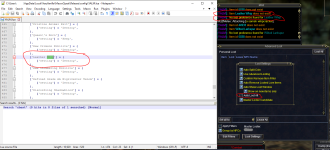
What am I doing wrong here? Instead of destroying them, it just times out and leaves them on corpse.

1714276570265.png
 
Release (YALM) Yet Another Loot Manager

Users who are viewing this thread

Back
Top
Cart