• You've discovered RedGuides, an EverQuest multi-boxing and scripting community 🧙‍♀️⚙️. We want you to play several EQ characters at once, come join us and say hello! 👋

  • A TLP without truebox has thawed (Very Vanilla ready)
    Frostreaver
(YALM) Yet Another Loot Manager

Release (YALM) Yet Another Loot Manager 0.12.7

No permission to download
Core functionality is done. Right now I'm working on the configuration aspect to make it easier.

As for how it works, whenever a preference is checked for an item it will:
  1. check if item is in the character configuration under items
  2. check if item is in the global configuration under items
  3. evaluate each rule in order they are listed for a character configuration
    1. check if item is in the rule under items
    2. evaluate conditions in order they are listed to see if the item passes the condition
  4. if none of these apply, then the character's default preference is used
  5. if the character doesn't have a default preference, then it will use the global configuration preference
Anything that requires getting an item preference will go through this list. So all the commands you mentioned along with looting as well.

For example, i have this configuration on a DRU that i'm leveling:

Lua:
return {
    items = {},
    rules = {
        {
            name = "DRU",
            enabled = true,
        },
        {
            name = "Defiant",
            enabled = true,
        },
        {
            name = "Leveling",
            enabled = true,
        },
    },
    settings = {
        unmatched_item_rule = {
            setting = "Sell",
        },
    },
}

By default, everything will be marked as sell if it doesn't pass one of the rules above. As for those rules, lets looka t leveling:

Lua:
        ['Leveling'] = {
            ['category'] = '',
            ['items'] = {},
            ['name'] = 'Leveling',
            ['conditions'] = {
                [1] = {
                    ['name'] = 'NoValue',
                    ['setting'] = 'Destroy',
                },
                [2] = {
                    ['name'] = 'Tradeskill',
                    ['setting'] = 'Sell',
                },
                [3] = {
                    ['name'] = 'Quest',
                    ['setting'] = 'Sell',
                },
                [4] = {
                    ['name'] = 'Augmentation',
                    ['setting'] = 'Destroy',
                },
                [5] = {
                    ['name'] = 'Poisons',
                    ['setting'] = 'Destroy',
                },
                [6] = {
                    ['name'] = 'FoodDrink',
                    ['setting'] = 'Keep',
                },
                [7] = {
                    ['name'] = 'Temporary',
                    ['setting'] = 'Destroy',
                },
                [8] = {
                    ['quantity'] = 1,
                    ['name'] = 'Collectible',
                    ['setting'] = 'Keep',
                },
            },
        },

If an item isn't in the DRU list (right now it's just Fire Beetle Eye set to buy), or a Defiant item, it will evaluate these rules going in order.

  1. Items that have no value will be set to destroy
  2. Tradeskill items will be sold
  3. Quest items set to sell
  4. Augmentations set to destroy
  5. Poisons set to destroy
  6. Keep food or drink items
  7. Destroy temporary items
  8. Keep collectibles.
If the item doesn't pass one of these conditions, it will default to Sell.

Here's an example of a condition, this one is "Temporary" which will match temporary items.

Lua:
local function(item)
    return item.NoRent()
end

return { condition_func = condition }
I see the boundless potential of this script, but I didn't see any rules folder or file in yalm folder. Could you give me a example file so I can learn from it please?

Like code snippets I saw above, but I still confused since 1. I didn't see yalm/config/rules. 2. I dunno which file or which part I should insert/edit to create my own rules and then apply it?

Thanks in advance:cool:
 
I see the boundless potential of this script, but I didn't see any rules folder or file in yalm folder. Could you give me a example file so I can learn from it please?

Like code snippets I saw above, but I still confused since 1. I didn't see yalm/config/rules. 2. I dunno which file or which part I should insert/edit to create my own rules and then apply it?

Thanks in advance:cool:
They will be in the Lua MQ directory. I haven't been able to work on this lately but I started working on the configuration commands again yesterday. So creation/deletion/editing files should be a bit easier until I can get to GUI. GUI is also going to introduce a breaking change, so there's a lot to work on.
 
fuddles updated (YALM) Yet Another Loot Manager with a new update entry:

Configurations

This is an important release that will lead up to a GUI. I've started fleshing out commands for configuration.

Now you can add or remove, create or delete, list, and edit character settings, global settings, rules, conditions, commands, preferences, categories via commands. For example:

View attachment 46978

Doing using the edit subcommand will open the specified condition in your favorite editor. This also works for characters configurations and the global configuration...

Read the rest of this update entry...
 
Ok I tried 30mins and still can't get this right.

I edited my Yaml.Lua in mqnext/config
Code:
return {
    ['rules'] = {
        ['Farm'] = {
            ['category'] = '',
            ['items'] = {},
            ['name'] = 'Farm',
            ['conditions'] = {
                [1] = {
                    ['name'] = 'NoValue',
                    ['setting'] = 'Ignore',
                },
                [2] = {
                    ['name'] = 'Tradeskill',
                    ['setting'] = 'Keep',
                },
                [3] = {
                    ['name'] = 'Quest',
                    ['setting'] = 'Ignore',
                },
                [4] = {
                    ['name'] = 'Augmentation',
                    ['setting'] = 'Ignore',
                },
                [5] = {
                    ['name'] = 'Poisons',
                    ['setting'] = 'Ignore',
                },
                [6] = {
                    ['name'] = 'FoodDrink',
                    ['setting'] = 'Keep',
                },
                [7] = {
                    ['name'] = 'Temporary',
                    ['setting'] = 'Destroy',
                },
                [8] = {
                    ['quantity'] = 1,
                    ['name'] = 'Collectible',
                    ['setting'] = 'Ignore',
                },
                [9] = {
                    ['name'] = 'Defiant',
                    ['setting'] = 'Ignore',
                },
            },
        },
    },
    ['conditions'] = {},
    ['preferences'] = {},
    ['timestamp'] = 1678278656,
    ['items'] = {},
    ['categories'] = {},
    ['functions'] = {},
    ['commands'] = {},
    ['settings'] = {
        ['unmatched_item_rule'] = {
            ['setting'] = 'Leave',
        },
        ['save_slots'] = 3,
        ['always_loot'] = true,
    },
}


Then I edited my yalm-server-char.Lua (the toon is an Enchanter) in mqnext/config/yalm, looks like this,
Code:
return {
    ['settings'] = {
          unmatched_item_rule = {
            setting = "Sell",
        },
    },
    ['items'] = {},
    ['save'] = {},
    ['rules'] = {
        {
            name = "ENC",
            enabled = true,
        },
        {
            name = "Farm",
            enabled = true,
        },
    },

Btw I didn't find where is this ENC rule locate, I just imitate the previous post.

Somehow it didn't work, I used /yalm check on couple Tradeskill items, it all shows no rules been applied and it will be set as default preference - "Sell". While the Enc list has zero items on it, it should fall into the "Farm" rule and been set to "Keep" right? Any ideas what I did wrong please?
 
Last edited:
Ok I tried 30mins and still can't get this right.

I edited my Yaml.lua in mqnext/config
Code:
return {
    ['rules'] = {
        ['Farm'] = {
            ['category'] = '',
            ['items'] = {},
            ['name'] = 'Farm',
            ['conditions'] = {
                [1] = {
                    ['name'] = 'NoValue',
                    ['setting'] = 'Ignore',
                },
                [2] = {
                    ['name'] = 'Tradeskill',
                    ['setting'] = 'Keep',
                },
                [3] = {
                    ['name'] = 'Quest',
                    ['setting'] = 'Ignore',
                },
                [4] = {
                    ['name'] = 'Augmentation',
                    ['setting'] = 'Ignore',
                },
                [5] = {
                    ['name'] = 'Poisons',
                    ['setting'] = 'Ignore',
                },
                [6] = {
                    ['name'] = 'FoodDrink',
                    ['setting'] = 'Keep',
                },
                [7] = {
                    ['name'] = 'Temporary',
                    ['setting'] = 'Destroy',
                },
                [8] = {
                    ['quantity'] = 1,
                    ['name'] = 'Collectible',
                    ['setting'] = 'Ignore',
                },
                [9] = {
                    ['name'] = 'Defiant',
                    ['setting'] = 'Ignore',
                },
            },
        },
    },
    ['conditions'] = {},
    ['preferences'] = {},
    ['timestamp'] = 1678278656,
    ['items'] = {},
    ['categories'] = {},
    ['functions'] = {},
    ['commands'] = {},
    ['settings'] = {
        ['unmatched_item_rule'] = {
            ['setting'] = 'Leave',
        },
        ['save_slots'] = 3,
        ['always_loot'] = true,
    },
}

Then I edited my yalm-server-char.lua (the toon is an Enchanter) in mqnext/config/yalm, looks like this,
Code:
return {
    ['settings'] = {
          unmatched_item_rule = {
            setting = "Sell",
        },
    },
    ['items'] = {},
    ['save'] = {},
    ['rules'] = {
        {
            name = "ENC",
            enabled = true,
        },
        {
            name = "Farm",
            enabled = true,
        },
    },

Btw I didn't find where is this ENC rule locate, I just imitate the previous post.

Somehow it didn't work, I used /yalm check on couple Tradeskill items, it all shows no rules been applied and it will be set as default preference - "Sell". While the Enc list has zero items on it, it should fall into the "Farm" rule and been set to "Keep" right? Any ideas what I did wrong please?
Ah. So i've still got some fixing to do for default values. I had started making default class rules that will eventually be added to newly created character configurations as a baseline. You can check in the Lua folder yalm/config/defaults/global_settings.Lua


The one thing i hadn't put into the base global config is the conditions. Put the following in your YALM.Lua

Lua:
    ['conditions'] = {
        ['FoodDrink'] = {
            ['category'] = '',
            ['name'] = 'FoodDrink',
        },
        ['Tradeskill'] = {
            ['category'] = '',
            ['name'] = 'Tradeskill',
        },
        ['Money'] = {
            ['category'] = '',
            ['name'] = 'Money',
        },
        ['Temporary'] = {
            ['category'] = '',
            ['name'] = 'Temporary',
        },
        ['Ornament'] = {
            ['category'] = '',
            ['name'] = 'Ornament',
        },
        ['Defiant'] = {
            ['category'] = '',
            ['name'] = 'Defiant',
        },
        ['Quest'] = {
            ['category'] = '',
            ['name'] = 'Quest',
        },
        ['Scrolls'] = {
            ['category'] = '',
            ['name'] = 'Scrolls',
        },
        ['Augmentation'] = {
            ['category'] = '',
            ['name'] = 'Augmentation',
        },
        ['Collectible'] = {
            ['category'] = '',
            ['name'] = 'Collectible',
        },
        ['NoValue'] = {
            ['name'] = 'NoValue',
        },
        ['Poisons'] = {
            ['category'] = '',
            ['name'] = 'Poisons',
        },
    },
 
Ah. So i've still got some fixing to do for default values. I had started making default class rules that will eventually be added to newly created character configurations as a baseline. You can check in the lua folder yalm/config/defaults/global_settings.lua


The one thing i hadn't put into the base global config is the conditions. Put the following in your YALM.lua
Thank you! I finally get it to work, now I added couple selfmade rules and conditions, and all of them worked as I want! :hfive:

Here still got more findings to discuss though:

1. I can put the rules in mqnext/yalm.Lua, but as you mentioned, I can also put them in yalm/config/defaults/global_settings.Lua right? (Because that is the place where all default class rules in)

2. this my "LowStack" condition right now:

Code:
---@type Mq
local mq = require("mq")

local function condition(item)
    return item.StackSize() <= 20 or not item.StackSize()
end

return { condition_func = condition }

It worked, but this one didn't work,
Code:
---@type Mq
local mq = require("mq")

local function condition(item)
    return ( item.Value() <=300 or not item.Value() ) and ( item.StackSize() <= 20 or not item.StackSize() )
end

return { condition_func = condition }

Seems all brackets won't work in return line?

3. Is this will work on Raid Looting? By default it will disable autoloot when you joined or formed a raid or you have to /Lua stop yalm? Since normally I'm the Raid Leader and Master Looter so I don't want to mess up shits lol. Or any other suggestion please?
 
Last edited:
Thank you! I finally get it to work, now I added couple selfmade rules and conditions, and all of them worked as I want! :hfive:

Here still got more findings to discuss though:

1. I can put the rules in mqnext/yalm.lua, but as you mentioned, I can also put them in yalm/config/defaults/global_settings.lua right? (Because that is the place where all default class rules in)

2. this my "LowStack" condition right now:

Code:
---@type Mq
local mq = require("mq")

local function condition(item)
    return item.StackSize() <= 20 or not item.StackSize()
end

return { condition_func = condition }

It worked, but this one didn't work,
Code:
---@type Mq
local mq = require("mq")

local function condition(item)
    return ( item.Value() <=300 or not item.Value() ) and ( item.StackSize() <= 20 or not item.StackSize() )
end

return { condition_func = condition }

Seems all brackets won't work in return line?

3. Is this will work on Raid Looting? By default it will disable autoloot when you joined or formed a raid or you have to /lua stop yalm? Since normally I'm the Raid Leader and Master Looter so I don't want to mess up shits lol. Or any other suggestion please?
1. Don't put them in the yalm/config/defaults/global_settings.Lua file. That one is for application defaults, so any update will overwrite that file. YALM.Lua is the correct place.

2. So just an FYI item.Value() is the base price for a merchant selling the item. It's annoying that there's no base sell to merchant price, so it gives a lot of false positives. Is that what you might be hitting? or it could be you need to reorder your conditions as the item is hitting an earlier one?

3. It does handle raid loot, but i could add a setting that turns it off for raid loot.
 
fuddles updated (YALM) Yet Another Loot Manager with a new update entry:

Added raid loot setting

Added a new setting called do_raid_loot. This will instruct YALM to handle master looting for a raid or not. Turn it off so you can manually handle loot. This goes in the settings section in YALM.lua or your character file. By default it is true.

Lua:
    ["settings"] = {
        ["always_loot"] = true,
        ["dannet_delay"] = 250,
        ["distribute_delay"] = "1s",
        ["do_raid_loot"] = true,
        ["frequency"] = 250...

Read the rest of this update entry...
 
1. Don't put them in the yalm/config/defaults/global_settings.lua file. That one is for application defaults, so any update will overwrite that file. YALM.lua is the correct place.

2. So just an FYI item.Value() is the base price for a merchant selling the item. It's annoying that there's no base sell to merchant price, so it gives a lot of false positives. Is that what you might be hitting? or it could be you need to reorder your conditions as the item is hitting an earlier one?

3. It does handle raid loot, but i could add a setting that turns it off for raid loot.
Thanks for the answer sir, awesome script, fabulous.
 
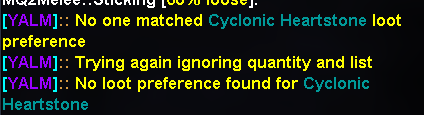
Another problem is that I found for all those item don't match with any rules, the distribute is significantly slow, like even over 1 minute.
yalm slow loot.png
Any idea about this?Is this a setting problem, if so, where can i edit plz?
 
Last edited:
You can turn off the always_loot setting. This setting is so that you will still loot items that may not pass the quantity and list setting. You can also try lowering the dannet_delay setting. The default is 250 i believe. I have mine set to 150.
 
Last edited:
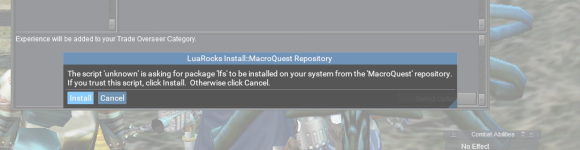
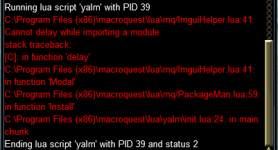
I wanted to give this a whirl because of the Tribute aspect and overall flexibility. However after starting the Lua I get this message

1679843774980.png

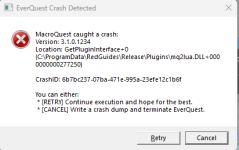
and when I install I get a cmd shell and an error that happens so quick I can't catch it, but then my client crashes

1679843820148.png

any ideas of what I may be doing wrong?
 
I wanted to give this a whirl because of the Tribute aspect and overall flexibility. However after starting the LUA I get this message

View attachment 47401

and when I install I get a cmd shell and an error that happens so quick I can't catch it, but then my client crashes

View attachment 47402

any ideas of what I may be doing wrong?
Do you have DanNet plugin loaded?
Do you have the modules folder in your MQNext folder?

What operating system are you using?
 

Attachments

It was the modules folder, Cannon. Thank you! I had it, but it was empty
 
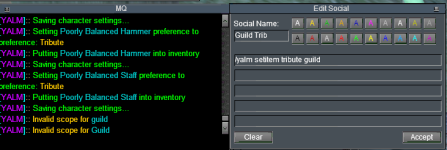
Is there an additional command to use when setting something for guild tribute? I am using a hot-button with /yalm setitem tribute guild The same format works with "tribute me"

1679860572527.png
 
Is there an additional command to use when setting something for guild tribute? I am using a hot-button with /yalm setitem tribute guild The same format works with "tribute me"

View attachment 47407
With the item on the cursor. That part you were you have guild is going to be either me (just yourself) or all (everyone/global)
Code:
/yalm setitem Destroy all (with item on cursor is global)
/yalm setitem Destroy me (with item on cursor is individual)
/yalm setitem Guild all
/yalm setitem Sell all
/yalm setitem Keep all
/yalm setitem Tribute all
/yalm setitem Destroy all

/yalm Guild (for guild deposits items marked Guild)
/yalm Tribute (for tribute items marked Tribute)
/yalm Sell (sell all sell items marked sell)
/yalm Destroy (destroy items in inventory marked Destroy)
 
With the item on the cursor. That part you were you have guild is going to be either me (just yourself) or all (everyone/global)
Code:
/yalm setitem Destroy all (with item on cursor is global)
/yalm setitem Destroy me (with item on cursor is individual)
/yalm setitem Guild all
/yalm setitem Sell all
/yalm setitem Keep all
/yalm setitem Tribute all
/yalm setitem Destroy all

/yalm Guild (for guild deposits items marked Guild)
/yalm Tribute (for tribute items marked Tribute)
/yalm Sell (sell all sell items marked sell)
/yalm Destroy (destroy items in inventory marked Destroy)
Thank you again Cannon, you rock! I was following the instructions here which is why I was using guild

1679921049085.png
 
That NPC command - Donates designated items. Open up either the Guild Tribute Master or the Personal Tribute Master. If you run /yalm tribute without opening a Tribute master first it will use the Personal one.
 
How do people handle no-drop items? I'd prefer to not even loot something if it's no-drop and the char can't equip it, but I can't figure out how to make a condition that does that without hard-coding a class-specific rule for each of my toons. Any suggestions? For now, I've been lazy and just kill yalm before each named fight but I guess worst-case I could just make configure to not loot no-drop stuff at all (that's better than looting all the cleric/mnk only gear on the SK!)
 
How do people handle no-drop items? I'd prefer to not even loot something if it's no-drop and the char can't equip it, but I can't figure out how to make a condition that does that without hard-coding a class-specific rule for each of my toons. Any suggestions? For now, I've been lazy and just kill yalm before each named fight but I guess worst-case I could just make configure to not loot no-drop stuff at all (that's better than looting all the cleric/mnk only gear on the SK!)
I usually hunt camps long enough that every toon gets one of everything. But yah, you would have to create a condition based on class and then enable it to specific class or set the specific item to only be looted by a certain class.
 
is there still an example character config for this? Maybe it's in the files already and i'm just not getting it. I tried clicking for the one near the start of this thread but got the 'Hey Stud' page, also couldn't find a yalm-server-character.sample.Lua anywhere.

Thanks
 
is there still an example character config for this? Maybe it's in the files already and i'm just not getting it. I tried clicking for the one near the start of this thread but got the 'Hey Stud' page, also couldn't find a yalm-server-character.sample.lua anywhere.

Thanks
In the conf/YALM folder should have character configs. Should look something like this.
Code:
return {
    ['settings'] = {},
    ['items'] = {},
    ['save'] = {},
    ['rules'] = {},
}
 
Sorry for no updates lately. I've been dealing with health issues and now I need to write some software for my wife's new business. 🤣
 
Does YALM have a way to pass out items to whichever character (out of a list of classes) has the least of them?
 
I have one (probably dumb) question. Do I run yalm on all my characters or just the master looter?
 
I have one (probably dumb) question. Do I run yalm on all my characters or just the master looter?
Yes. At the very least so the characters will auto loot stuff assigned to them. If you only want one char looting, you can just run it on that one.
 
Why do my looters keep leaving a lore item on the corpse? This happens if I have the item in the shared bank. I do not have the item in my inventory, only in the shared bank. It does not leave it if I have it in the hoard. I have tried every setting I can think of and it still happens.
 
I downloaded YALM and when I try running /Lua run yalm, I get a popup windwo:

LuaRocks Install::MacroQuest Repository

The script 'unknown' is asking for package 'lfs' tobe installed on your system from the 'macroquest' repository. If you trust this script, click Install. Otherwise click Cancel.

Trying to run it causes a MacroQuest crash:

Version 3.1.0.1408
Location: GetPluginInterface + 0
C:Users...........\Plugins\mq2lua.DLL+0000000000278190

CrashID: ae35baca-9e14d-486b-8fe1-7cd509f90dd7
 
Getting a funky error since yesterdays patch. Deleted everything related to yalm and reinstalled still no go. Error persists on two computers. Any ideas?
EDIT: So it seems to have healed itself. I believe I installed another Lua that reinstalled the Lua tools and this spring to life again.
yalm.png
 
Last edited:
Might there be a way to disable the first step of /yalm guild ? ("Promote all items that may be in the deposit list")

It might be my ping in EU, but it often hangs trying to promote items (and sometimes crashes toon). I'm loving the deposit feature, but often can not get there because of the promote phase being hit or miss.
 
Does someone have an example of properly configuring something like "Give all TS items to characterA, Give all Collectibles to characterB"? I have read all 4 pages of this thread twice, and for some reason I cannot even begin to figure out how to use this script.
 
Hey there! First off, this is an awesome plugin, thank you! I do have some questions though as I'm a returning player and haven't used lootly or yalm before. So how is the /yalm convert advloot command supposed to work?

I have settings for items in advloot to never loot certain items, but yalm keeps trying to loot them until I do a /yalm setitem "item name" Ignore. When I run /yalm convert advloot it seems to find all my settings, but then it doesn't seem to take. I've tried reloading yalm after doing this too.

I've checked the \config\YALM.lua and \config\YALM\yalm-<server_name>-<character_name>.lua files and neither are updated after running the convert. Just trying to figure out if I'm doing something wrong...


Also, how is the scope parameter supposed to function with the setitem command? When I try /yalm setitem "item name" Ignore global it tells me "Invalid scope for global". Also informs me of invalid scope with "character" and "character name". So I'm not sure how to set the character scope either. I presume the scope is for telling it which config file to apply the setting to, and it seems to default to the global config if no scope is specified.

Edit: nevermind with the second question. I found in an example in one of the comments that the scope is set by "all"|"me".
Follow-up question though, is there a way to do something like /yalm setitem "item name" Ignore [Classname (CLR, WAR, etc.)]?
 
Release (YALM) Yet Another Loot Manager

Users who are viewing this thread

Back
Top
Cart