someone wrote that this solved his issues with windows 11Why run anything as administrator?

-
 Hail, we're RedGuides. We want you to play six (yes, 6!) EverQuest characters at once. We have scripts and a friendly community to help, please join our playstyle and say hello! 👋
You are using an out of date browser. It may not display this or other websites correctly.
You should upgrade or use an alternative browser.
You should upgrade or use an alternative browser.

Vanilla - Very Vanilla MQ (Live Servers) (6 Viewers) 3.1.52471.42
- Thread starter Knightly
- Start date

My eqclient.ini file is basically empty! Is there something wrong with it? I am having an issue with screen resolution that I have not had before in game. My graphics drivers for my dual 1080Ti 11GB Graphics cards updated and now my two 28in. 4K Resolution monitors are great, however, my game screens have all miniature everything. I am 60 years old and blind. I need a magnifying glass to see this stuff. I had it figured out once before but can't remember what I did to fix it. Any help would be greatly appreciated. I saw a possible fix by turning off DPI Scaling in the eqgame.exe but that did not fix it. Thanks for anyone and everyone that can throw some ideas my way. PEACE!models just come from your eqclient.ini

Glad I ran into this thread! I really need to take a time out and upgrade to "THE NEXT" version of Macroquest!! Thanks for the reminder ...just been busy with health issues and wife being in and out of the hospital, then I got her home and I had to go in with F'ing Kidney Stones ...you don't ever want those let me tell you!!! Thanks for all your hard work and support as it doesn't go unnoticed. Peace!
Patch - - Oct 21 (and now Oct 22) - New eqgame.exe + hotfix notes
EQ did an emergency patch and pushed a new .exe this means if you patched eq, you will need to wait on a new mq2 / mq "next" build. the mq2 and next devs know. redbot knows I know. don't panic. as soon as a re-build is available they will be updated in their respective places. You can watch...www.redguides.com
5. if you want the functionality of the MQ2 "MQ2TargetInfo"
- They are now in 3 separate plugins:
/plugin groupinfo
/plugin targetinfo
/plugin xtarinfo

@Sifter228 you had mentioned that EQBCS wouldn't launch from the tray utility. I added some error handling so it should give you an error message if you're still having that problem. I don't know if that's the problem you were having or not, but take a look and see if that helps at all.

I ran the updater for next and clicked the icon to manually start the eqbcs and it worked perfectly. No errors were reported.@Sifter228 you had mentioned that EQBCS wouldn't launch from the tray utility. I added some error handling so it should give you an error message if you're still having that problem. I don't know if that's the problem you were having or not, but take a look and see if that helps at all.

So I deleted everything on my computer and reinstalled vanilla through the launcher. I purchased the plugins from chatwiththisname some time ago and i enjoyed using them. I am so confused atm because now I cant get anything to work for me. I clicked the mqnext on the launcher and then tried to connect to the server but it tells me EQBCS 1.5 waiting for connections on port : 2112. I would always launch mq and a box would appear with debug and standalone options and I don't get that with the mqnext . To be very honest it took me so long to figure this out the first time and now I am totally lost on what to do. I have tried to play the game with out using all this stuff but its no bueno.

you might have a second eqbc server running. I would suggest a computer restart and get a glass of water and start fresh.So I deleted everything on my computer and reinstalled vanilla through the launcher. I purchased the plugins from chatwiththisname some time ago and i enjoyed using them. I am so confused atm because now I cant get anything to work for me. I clicked the mqnext on the launcher and then tried to connect to the server but it tells me EQBCS 1.5 waiting for connections on port : 2112. I would always launch mq and a box would appear with debug and standalone options and I don't get that with the mqnext . To be very honest it took me so long to figure this out the first time and now I am totally lost on what to do. I have tried to play the game with out using all this stuff but its no bueno.
did you check out my "Next Migration, Functions, and Features" guide? it should be pretty straightforward (and faster than the video for the guide is)
currently, the VV launcher doesn't have the "launch eqbc" buttons and some of the other things that it does for "live" selection (i explain it a bit in the link above), but you can right-click on the MacroQuest icon in your systray and click "Start EQBC Server" to get it running

Last edited:
Hi folks-
So, I've downloaded and setup RedGuides launcher and followed all the videos to get MQ2, meshes, etc. going. I've got my characters connected (and autoconnected) and setup some preliminary buttons. I could send commands from one lead character and everything done in the first 5 videos.
I just bought 6 CWTN plugins for the 6 characters I want to play (for the record: SK, Cleric, Beastmaster, Berzerker, Shaman, Enchanter). They are loaded, I bought the missing spells for first level and they are all acting appropriately (mem'ing spells, casting buffs etc.).
So, yesterday I read about MQNext and thought before I get really started playing, I might as well upgrade. I believe I followed the instructions. However, I have the following problems now:
1. The Cleric is autospamming Yaulp (which is fine) but was also spam casting Courage on one character which didn't appear to land and was causing the Cleric to do nothing but keep casting that. I finally moved the Cleric away from the rest of the group to get him to stop.
2. More importantly, the COME TO ME button on the group isn't working. In fact, I can't seem to send any bcaa commands from the main that get through. I've verified the other toons are connected to EQBCS, but they aren't receiving any commands either manual or from buttons created by the VV.
Any ideas? I'm sure it is an absolutely beginner thing I'm missing that I glossed over in the instructions.
Thanks in advance, I've cleared the day to play today and want to get started LOL...
So, I've downloaded and setup RedGuides launcher and followed all the videos to get MQ2, meshes, etc. going. I've got my characters connected (and autoconnected) and setup some preliminary buttons. I could send commands from one lead character and everything done in the first 5 videos.
I just bought 6 CWTN plugins for the 6 characters I want to play (for the record: SK, Cleric, Beastmaster, Berzerker, Shaman, Enchanter). They are loaded, I bought the missing spells for first level and they are all acting appropriately (mem'ing spells, casting buffs etc.).
So, yesterday I read about MQNext and thought before I get really started playing, I might as well upgrade. I believe I followed the instructions. However, I have the following problems now:
1. The Cleric is autospamming Yaulp (which is fine) but was also spam casting Courage on one character which didn't appear to land and was causing the Cleric to do nothing but keep casting that. I finally moved the Cleric away from the rest of the group to get him to stop.
2. More importantly, the COME TO ME button on the group isn't working. In fact, I can't seem to send any bcaa commands from the main that get through. I've verified the other toons are connected to EQBCS, but they aren't receiving any commands either manual or from buttons created by the VV.
Any ideas? I'm sure it is an absolutely beginner thing I'm missing that I glossed over in the instructions.
Thanks in advance, I've cleared the day to play today and want to get started LOL...
1. you'll want to determine what/why those things are happening. in the case of yaulp if you have useyaulp on, and you don't have the buff from it we're going to cast it (during combat), - you don't get mana regen from it until 56 (at which point if useyaulp is on we'd cast it like a buff), but you have useyaulp so you're gonna use it when you're in combatHi folks-
So, I've downloaded and setup RedGuides launcher and followed all the videos to get MQ2, meshes, etc. going. I've got my characters connected (and autoconnected) and setup some preliminary buttons. I could send commands from one lead character and everything done in the first 5 videos.
I just bought 6 CWTN plugins for the 6 characters I want to play (for the record: SK, Cleric, Beastmaster, Berzerker, Shaman, Enchanter). They are loaded, I bought the missing spells for first level and they are all acting appropriately (mem'ing spells, casting buffs etc.).
So, yesterday I read about MQNext and thought before I get really started playing, I might as well upgrade. I believe I followed the instructions. However, I have the following problems now:
1. The Cleric is autospamming Yaulp (which is fine) but was also spam casting Courage on one character which didn't appear to land and was causing the Cleric to do nothing but keep casting that. I finally moved the Cleric away from the rest of the group to get him to stop.
2. More importantly, the COME TO ME button on the group isn't working. In fact, I can't seem to send any bcaa commands from the main that get through. I've verified the other toons are connected to EQBCS, but they aren't receiving any commands either manual or from buttons created by the VV.
Any ideas? I'm sure it is an absolutely beginner thing I'm missing that I glossed over in the instructions.
Thanks in advance, I've cleared the day to play today and want to get started LOL...
I would start > here < in each of the plugins there is an overview/commands/FAQ tab, with information about various things, including if you run into any mq/eq discrepancies with buff stacking. it woulud be immeasurably better posting an mq2cleric question in the mq2cleric thread.
2. You will need to ensure that you are on eqbc with
/bccmd names if you don't see them - then they're not connected to the eqbc that you think they are - a computer restart might be in order as you might be running more than 1 eqbc server. I would also ensure you did the migration utility so you have your meshes.> MQ "Next" Migration, Functions, and Features - Oh My! <
Thanks Sic, you were correct on number 2. I rebooted the computer and then opened the MQNext folder and launched it and EQBCS from there, and now it works! I will take part one over to MQCleric section!1. you'll want to determine what/why those things are happening. in the case of yaulp if you have useyaulp on, and you don't have the buff from it we're going to cast it (during combat), - you don't get mana regen from it until 56 (at which point if useyaulp is on we'd cast it like a buff), but you have useyaulp so you're gonna use it when you're in combat
I would start > here < in each of the plugins there is an overview/commands/FAQ tab, with information about various things, including if you run into any mq/eq discrepancies with buff stacking. it woulud be immeasurably better posting an mq2cleric question in the mq2cleric thread.
2. You will need to ensure that you are on eqbc with/bccmd namesif you don't see them - then they're not connected to the eqbc that you think they are - a computer restart might be in order as you might be running more than 1 eqbc server. I would also ensure you did the migration utility so you have your meshes.
> MQ "Next" Migration, Functions, and Features - Oh My! <
I have a question in this area as far as the EQBC Server. On MQ2, you just had to hit Launch MQ2 and the EQBC server would load ...on MQNext I don't see that option. Am I missing something or does this have to be loaded manually as I did??? Thanks.1. you'll want to determine what/why those things are happening. in the case of yaulp if you have useyaulp on, and you don't have the buff from it we're going to cast it (during combat), - you don't get mana regen from it until 56 (at which point if useyaulp is on we'd cast it like a buff), but you have useyaulp so you're gonna use it when you're in combat
I would start > here < in each of the plugins there is an overview/commands/FAQ tab, with information about various things, including if you run into any mq/eq discrepancies with buff stacking. it woulud be immeasurably better posting an mq2cleric question in the mq2cleric thread.
2. You will need to ensure that you are on eqbc with/bccmd namesif you don't see them - then they're not connected to the eqbc that you think they are - a computer restart might be in order as you might be running more than 1 eqbc server. I would also ensure you did the migration utility so you have your meshes.
> MQ "Next" Migration, Functions, and Features - Oh My! <
currently the launcher does not have those buttons for macroquest "Next" they eventually will once it is the "prime time main stable version". I explain this in further detail in the > MQ "Next" migration, functions, and features vid <I have a question in this area as far as the EQBC Server. On MQ2, you just had to hit Launch MQ2 and the EQBC server would load ...on MQNext I don't see that option. Am I missing something or does this have to be loaded manually as I did??? Thanks.
you can just right click on macroquest in your sys tray and start eqbc server

or you can go into your next install and double click on the eqbcs.exe
Thank you sir! That is what I did ....just checking to make sure I didn't do anything wrong.currently the launcher does not have those buttons for macroquest "Next" they eventually will once it is the "prime time main stable version". I explain this in further detail in the > MQ "Next" migration, functions, and features vid <
you can just right click on macroquest in your sys tray and start eqbc server
View attachment 34793
or you can go into your next install and double click on the eqbcs.exe
did you run the migrator that moves your meshes to the correct location for you?None of my Nav Meshes are working since I switched over to Next. Any advice or suggestions on fixing this issue??? Thanks!!
Utility - MacroQuest Migrator
This will help you migrate from MQ2 to MacroQuest (MQNext). Right click and run with Powershell and it should walk you through the steps.
www.redguides.com
Yes sir! I used the migrator and it said there were ZERO errors. I assumed that it would be ok but I am in Western Wastes and nothing on the Find Window works. I keep getting that stupid Mysterious Forces message no matter where in the zone I am.did you run the migrator that moves your meshes to the correct location for you?
Utility - MacroQuest Migrator
This will help you migrate from MQ2 to MacroQuest (MQNext). Right click and run with Powershell and it should walk you through the steps.
ok, that doesn't sound like you don't have a mesh.Yes sir! I used the migrator and it said there were ZERO errors. I assumed that it would be ok but I am in Western Wastes and nothing on the Find Window works. I keep getting that stupid Mysterious Forces message no matter where in the zone I am.
as mentioned in the migration guide video tutorial - should just be a couple of things thare are slightly different
Code:
mental notes:

1. mq2map click is Control+Shift+Click
2. new easyfind self travel is Control+Click (reminder in find window title bar)
3. new easyfind group travel is Control+Shift+Click
4. If you selected a destination in your zone guide and want to activate it you /travelto activate
Last edited:
I broke my MQNext installation :-(
Already addicted to MQNext (can't play EQ without my homemade NuqerMage script, work in progress, will share when less crappy).
But I somehow broke my installation yesterday.
It looks like:
I start MQNext, then start a profile (toon) --> EQ tries to start, but then immediately crashes.
I have tried:
- updating my EQ client by starting it with the regular EQ launcher --> no effect
- Using the Vanilla RG launcher's "reinstall" feature to reinstall both MQNext and MQ2 --> no effect
- Starting MQ2 --> launching profile --> game starts as normal, but I want to run MQNext.
- attaching a .dmp (dump) file from the windows task manager --> nothing happens, unable to attach
I am a bit of a loss of what to try next, could you perhaps give me some ideas of what to try? Thanks in advance...
Additional information: normally also running ISBoxer, but for above experimentations I did not load ISB, to make debugging simpler...
DadBod
Already addicted to MQNext (can't play EQ without my homemade NuqerMage script, work in progress, will share when less crappy).
But I somehow broke my installation yesterday.
It looks like:
I start MQNext, then start a profile (toon) --> EQ tries to start, but then immediately crashes.
I have tried:
- updating my EQ client by starting it with the regular EQ launcher --> no effect
- Using the Vanilla RG launcher's "reinstall" feature to reinstall both MQNext and MQ2 --> no effect
- Starting MQ2 --> launching profile --> game starts as normal, but I want to run MQNext.
- attaching a .dmp (dump) file from the windows task manager --> nothing happens, unable to attach
I am a bit of a loss of what to try next, could you perhaps give me some ideas of what to try? Thanks in advance...
Additional information: normally also running ISBoxer, but for above experimentations I did not load ISB, to make debugging simpler...
DadBod
Unload eq from the tasktray, rightclick icon->exitI have tried:
- updating my EQ client by starting it with the regular EQ launcher --> no effect
Then you need to get the eq client started without mq. If you cannot mq won't fix your eq problem. Unless Im misunderstand that the client does start ?

Are you able to screenshot the crash dialog?I broke my MQNext installation :-(
Already addicted to MQNext (can't play EQ without my homemade NuqerMage script, work in progress, will share when less crappy).
But I somehow broke my installation yesterday.
It looks like:
I start MQNext, then start a profile (toon) --> EQ tries to start, but then immediately crashes.
I have tried:
- updating my EQ client by starting it with the regular EQ launcher --> no effect
- Using the Vanilla RG launcher's "reinstall" feature to reinstall both MQNext and MQ2 --> no effect
- Starting MQ2 --> launching profile --> game starts as normal, but I want to run MQNext.
- attaching a .dmp (dump) file from the windows task manager --> nothing happens, unable to attach
I am a bit of a loss of what to try next, could you perhaps give me some ideas of what to try? Thanks in advance...
Additional information: normally also running ISBoxer, but for above experimentations I did not load ISB, to make debugging simpler...
DadBod
I can start EQ without MQNext without any problems, as well as start EQ via MQ2.Unload eq from the tasktray, rightclick icon->exit
Then you need to get the eq client started without mq. If you cannot mq won't fix your eq problem. Unless Im misunderstand that the client does start ?
Are you able to screenshot the crash dialog?
When I start a profile (right-click MQNext -> profiles --> <name of set of toons> --> <name of toon>, EQ starts and immediately crashes, and there is nothing really to screenshot, it is just a black screen.
Output from NQNext console below:
[2021-11-08 15:19:14.775] [MQ2] [debug] [MacroQuest.cpp:194] Logging Initialized
[2021-11-08 15:19:14.776] [MQ2] [info] [MacroQuest.cpp:1208] Starting MacroQuest Loader. Built Tue Nov 2 10:54:18 2021
[2021-11-08 15:19:14.777] [MQ2] [info] [Crashpad.cpp:97] Initializing crashpad handler
[2021-11-08 15:19:14.777] [MQ2] [debug] [Crashpad.cpp:98] Handler Path: C:\Users\Decco\AppData\Local\VeryVanilla\MQNext\Release\mq_crash_handler.exe
[2021-11-08 15:19:14.778] [MQ2] [info] [Crashpad.cpp:103] Crash report submission is: enabled
[2021-11-08 15:19:14.778] [MQ2] [info] [Crashpad.cpp:107] Crash report guid: 780f2f6a-2fb1-46f8-8134-aa23fe1ef378
[2021-11-08 15:19:14.778] [MQ2] [info] [Crashpad.cpp:117] Using shared crash reporter for all MacroQuest instances
[2021-11-08 15:19:15.011] [MQ2] [info] [NamedPipes.cpp:593] Starting NamedPipeServer thread for \\.\pipe\mqpipe
[2021-11-08 15:19:15.270] [MQ2] [info] [ProcessMonitor.cpp:396] Process monitor using WMI started
[2021-11-08 15:19:15.270] [MQ2] [info] [MacroQuest.cpp:1149] MQ2Main Path: C:\Users\Decco\AppData\Local\VeryVanilla\MQNext\Release\MQ2Main.dll
[2021-11-08 15:19:15.273] [MQ2] [info] [MacroQuest.cpp:1187] Build: MacroQuest2 [Oct 22 2021 (Live)]
[2021-11-08 15:19:15.275] [MQ2] [debug] [ProcessList.cpp:754] Initializing injector
[2021-11-08 15:19:15.477] [MQ2] [info] [ProcessList.cpp:758] MQ2Auth code: mqd4876ba4a7c2800f89679e7335a236de (With Net): mq55bff2b496a968cba2bebd78a74421d7
[2021-11-08 15:19:15.480] [MQ2] [info] [ProcessList.cpp:361] Performing injections on any existing eqgame.exe processes
[2021-11-08 15:19:15.480] [MQ2] [debug] [ProcessList.cpp:683] Injector thread started
[2021-11-08 15:19:17.556] [MQ2] [info] [MacroQuest.cpp:1287] Waiting for events...
[2021-11-08 15:20:01.707] [MQ2] [info] [MacroQuest.cpp:1122] New process detected: 25576
[2021-11-08 15:20:01.708] [MQ2] [info] [ProcessList.cpp:343] Requesting injection into process id 25576 with delay 1000ms
[2021-11-08 15:20:02.721] [MQ2] [debug] [ProcessList.cpp:563] Injecting MQ2 into eqgame.exe: pid=25576
[2021-11-08 15:20:02.741] [MQ2] [debug] [ProcessList.cpp:605] eqgame.exe version: Oct 22 2021 11:46:02 pid=25576
[2021-11-08 15:20:02.748] [MQ2] [info] [ProcessList.cpp:677] Injection completed on process id 25576
[2021-11-08 15:20:10.651] [MQ2] [debug] [NamedPipes.cpp:226] Created PipeConnection: connectionId=1 pid=25576
[2021-11-08 15:32:34.637] [MQ2] [info] [MacroQuest.cpp:1122] New process detected: 25352
[2021-11-08 15:32:34.637] [MQ2] [info] [ProcessList.cpp:343] Requesting injection into process id 25352 with delay 1000ms
[2021-11-08 15:32:35.643] [MQ2] [debug] [ProcessList.cpp:563] Injecting MQ2 into eqgame.exe: pid=25352
[2021-11-08 15:32:35.662] [MQ2] [debug] [ProcessList.cpp:605] eqgame.exe version: Oct 22 2021 11:46:02 pid=25352
[2021-11-08 15:32:35.669] [MQ2] [info] [ProcessList.cpp:677] Injection completed on process id 25352
[2021-11-08 15:32:38.601] [MQ2] [debug] [NamedPipes.cpp:226] Created PipeConnection: connectionId=2 pid=25352
[2021-11-08 15:37:42.838] [MQ2] [info] [MacroQuest.cpp:1122] New process detected: 20568
[2021-11-08 15:37:42.840] [MQ2] [info] [ProcessList.cpp:343] Requesting injection into process id 20568 with delay 1000ms
[2021-11-08 15:37:43.851] [MQ2] [debug] [ProcessList.cpp:563] Injecting MQ2 into eqgame.exe: pid=20568
[2021-11-08 15:37:43.871] [MQ2] [debug] [ProcessList.cpp:605] eqgame.exe version: Oct 22 2021 11:46:02 pid=20568
[2021-11-08 15:37:43.874] [MQ2] [info] [ProcessList.cpp:677] Injection completed on process id 20568
[2021-11-08 15:37:46.180] [MQ2] [debug] [NamedPipes.cpp:323] PipeConnection::HandleReadComplete: pipe closed. connectionId=2
[2021-11-08 15:37:46.181] [MQ2] [debug] [NamedPipes.cpp:910] Closing connection. connectionId=2
[2021-11-08 15:37:46.185] [MQ2] [debug] [NamedPipes.cpp:233] Destroyed PipeConnection: connectionId=2 pid=25352
[2021-11-08 15:37:47.145] [MQ2] [debug] [MacroQuest.cpp:1128] Process closed: 20568
[2021-11-08 15:37:47.146] [MQ2] [debug] [MacroQuest.cpp:1128] Process closed: 25352
[2021-11-08 15:37:57.630] [MQ2] [debug] [NamedPipes.cpp:323] PipeConnection::HandleReadComplete: pipe closed. connectionId=1
[2021-11-08 15:37:57.630] [MQ2] [debug] [NamedPipes.cpp:910] Closing connection. connectionId=1
[2021-11-08 15:37:57.631] [MQ2] [debug] [NamedPipes.cpp:233] Destroyed PipeConnection: connectionId=1 pid=25576
[2021-11-08 15:37:57.688] [MQ2] [debug] [MacroQuest.cpp:1128] Process closed: 25576
[2021-11-08 15:19:14.776] [MQ2] [info] [MacroQuest.cpp:1208] Starting MacroQuest Loader. Built Tue Nov 2 10:54:18 2021
[2021-11-08 15:19:14.777] [MQ2] [info] [Crashpad.cpp:97] Initializing crashpad handler
[2021-11-08 15:19:14.777] [MQ2] [debug] [Crashpad.cpp:98] Handler Path: C:\Users\Decco\AppData\Local\VeryVanilla\MQNext\Release\mq_crash_handler.exe
[2021-11-08 15:19:14.778] [MQ2] [info] [Crashpad.cpp:103] Crash report submission is: enabled
[2021-11-08 15:19:14.778] [MQ2] [info] [Crashpad.cpp:107] Crash report guid: 780f2f6a-2fb1-46f8-8134-aa23fe1ef378
[2021-11-08 15:19:14.778] [MQ2] [info] [Crashpad.cpp:117] Using shared crash reporter for all MacroQuest instances
[2021-11-08 15:19:15.011] [MQ2] [info] [NamedPipes.cpp:593] Starting NamedPipeServer thread for \\.\pipe\mqpipe
[2021-11-08 15:19:15.270] [MQ2] [info] [ProcessMonitor.cpp:396] Process monitor using WMI started
[2021-11-08 15:19:15.270] [MQ2] [info] [MacroQuest.cpp:1149] MQ2Main Path: C:\Users\Decco\AppData\Local\VeryVanilla\MQNext\Release\MQ2Main.dll
[2021-11-08 15:19:15.273] [MQ2] [info] [MacroQuest.cpp:1187] Build: MacroQuest2 [Oct 22 2021 (Live)]
[2021-11-08 15:19:15.275] [MQ2] [debug] [ProcessList.cpp:754] Initializing injector
[2021-11-08 15:19:15.477] [MQ2] [info] [ProcessList.cpp:758] MQ2Auth code: mqd4876ba4a7c2800f89679e7335a236de (With Net): mq55bff2b496a968cba2bebd78a74421d7
[2021-11-08 15:19:15.480] [MQ2] [info] [ProcessList.cpp:361] Performing injections on any existing eqgame.exe processes
[2021-11-08 15:19:15.480] [MQ2] [debug] [ProcessList.cpp:683] Injector thread started
[2021-11-08 15:19:17.556] [MQ2] [info] [MacroQuest.cpp:1287] Waiting for events...
[2021-11-08 15:20:01.707] [MQ2] [info] [MacroQuest.cpp:1122] New process detected: 25576
[2021-11-08 15:20:01.708] [MQ2] [info] [ProcessList.cpp:343] Requesting injection into process id 25576 with delay 1000ms
[2021-11-08 15:20:02.721] [MQ2] [debug] [ProcessList.cpp:563] Injecting MQ2 into eqgame.exe: pid=25576
[2021-11-08 15:20:02.741] [MQ2] [debug] [ProcessList.cpp:605] eqgame.exe version: Oct 22 2021 11:46:02 pid=25576
[2021-11-08 15:20:02.748] [MQ2] [info] [ProcessList.cpp:677] Injection completed on process id 25576
[2021-11-08 15:20:10.651] [MQ2] [debug] [NamedPipes.cpp:226] Created PipeConnection: connectionId=1 pid=25576
[2021-11-08 15:32:34.637] [MQ2] [info] [MacroQuest.cpp:1122] New process detected: 25352
[2021-11-08 15:32:34.637] [MQ2] [info] [ProcessList.cpp:343] Requesting injection into process id 25352 with delay 1000ms
[2021-11-08 15:32:35.643] [MQ2] [debug] [ProcessList.cpp:563] Injecting MQ2 into eqgame.exe: pid=25352
[2021-11-08 15:32:35.662] [MQ2] [debug] [ProcessList.cpp:605] eqgame.exe version: Oct 22 2021 11:46:02 pid=25352
[2021-11-08 15:32:35.669] [MQ2] [info] [ProcessList.cpp:677] Injection completed on process id 25352
[2021-11-08 15:32:38.601] [MQ2] [debug] [NamedPipes.cpp:226] Created PipeConnection: connectionId=2 pid=25352
[2021-11-08 15:37:42.838] [MQ2] [info] [MacroQuest.cpp:1122] New process detected: 20568
[2021-11-08 15:37:42.840] [MQ2] [info] [ProcessList.cpp:343] Requesting injection into process id 20568 with delay 1000ms
[2021-11-08 15:37:43.851] [MQ2] [debug] [ProcessList.cpp:563] Injecting MQ2 into eqgame.exe: pid=20568
[2021-11-08 15:37:43.871] [MQ2] [debug] [ProcessList.cpp:605] eqgame.exe version: Oct 22 2021 11:46:02 pid=20568
[2021-11-08 15:37:43.874] [MQ2] [info] [ProcessList.cpp:677] Injection completed on process id 20568
[2021-11-08 15:37:46.180] [MQ2] [debug] [NamedPipes.cpp:323] PipeConnection::HandleReadComplete: pipe closed. connectionId=2
[2021-11-08 15:37:46.181] [MQ2] [debug] [NamedPipes.cpp:910] Closing connection. connectionId=2
[2021-11-08 15:37:46.185] [MQ2] [debug] [NamedPipes.cpp:233] Destroyed PipeConnection: connectionId=2 pid=25352
[2021-11-08 15:37:47.145] [MQ2] [debug] [MacroQuest.cpp:1128] Process closed: 20568
[2021-11-08 15:37:47.146] [MQ2] [debug] [MacroQuest.cpp:1128] Process closed: 25352
[2021-11-08 15:37:57.630] [MQ2] [debug] [NamedPipes.cpp:323] PipeConnection::HandleReadComplete: pipe closed. connectionId=1
[2021-11-08 15:37:57.630] [MQ2] [debug] [NamedPipes.cpp:910] Closing connection. connectionId=1
[2021-11-08 15:37:57.631] [MQ2] [debug] [NamedPipes.cpp:233] Destroyed PipeConnection: connectionId=1 pid=25576
[2021-11-08 15:37:57.688] [MQ2] [debug] [MacroQuest.cpp:1128] Process closed: 25576

I can start EQ without MQNext without any problems, as well as start EQ via MQ2.
When I start a profile (right-click MQNext -> profiles --> <name of set of toons> --> <name of toon>, EQ starts and immediately crashes, and there is nothing really to screenshot, it is just a black screen.
Tell me if I'm reading this right:
1. Standalone EQ without MQ runs.
2. EQ will launch while MQ is running (using MQ to launch EQ)
3. Launching EQ via an MQ profile fails
Is that right?
Have you tried building a new autologin profile? Maybe your autologin profile has been corrupted?
Tell me if I'm reading this right:
1. Standalone EQ without MQ runs.
2. EQ will launch while MQ is running (using MQ to launch EQ)
3. Launching EQ via an MQ profile fails
Is that right?
Have you tried building a new autologin profile? Maybe your autologin profile has been corrupted?
Not exactly:
If MQNext is running, starting EQ in any way will crash EQ immediately
If MQ2 is running, starting EQ is as expected, including via profiles
Thanks a lot, sent you a PMThe only thing that will help here is the dmp from task manager. Upload or use a sync service and send me a link via PM
Thank you so much @brainiac , deleting the MacroQuest_Overlay.Ini file worked perfectly!!!The only thing that will help here is the dmp from task manager. Upload or use a sync service and send me a link via PM
I installed Next last week and since then I have had a ton of crashes if any have any idea would be great . It was not a new install i had been useing live MQ2 for months and didn't have this problem. I like the way next runs better < minus the crashes >.
Thanks in advance. Btw when it goes it mostly cascade crashes all accounts on the 1 pc.
Thanks in advance. Btw when it goes it mostly cascade crashes all accounts on the 1 pc.
Attachments
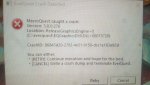
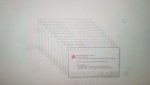
are you playing in full screen and trying to alt-tab? this was kaen's guess, i haven't looked up your crashID yet (not that I would likely be able to tell you anything)I installed Next last week and since then I have had a ton of crashes if any have any idea would be great . It was not a new install i had been useing live MQ2 for months and didn't have this problem. I like the way next runs better < minus the crashes >.
Thanks in advance. Btw when it goes it mostly cascade crashes all accounts on the 1 pc.
@brainiac
86843d2027834e519150cbc1e163e92d here is the ID so you don't have to transcribeIts another issue where the graphics device is reset while in a loading screen. I am assuming t
It looks like these are occurring at loading screens. This is a known EQ bug where the graphics engine is reset during loading screen, and the loading screen crashes rather than handling. I've been trying to narrow down the cause but so far this is all I've got.
Do you have any other issues that appear when this happens like monitor flickering, desktop resetting, etc? Trying to figure out whats causing this.
The crash is literally:
EQ_LoadingS::draw() -> CRender: rawWrappedText ->DeferCachedTextW() -> AddCachedText() -> C2DPrimitiveManager::AddCachedText -> crash (C2DPrimitiveManager is null)
I can try putting some checks around AddCachedText() but the problem is that without a way to reproduce this, its probably just going to crash somewhere else.
edit: screw it, gonna add a check to look for the null C2DPrimitiveManager
no I play in windowed mode , this pc I run 18 off of. it didnt have this problem under mq2, but next runs so much smoother when its not crashing i would love to figure this out.
It looks like these are occurring at loading screens. This is a known EQ bug where the graphics engine is reset during loading screen, and the loading screen crashes rather than handling. I've been trying to narrow down the cause but so far this is all I've got.
Do you have any other issues that appear when this happens like monitor flickering, desktop resetting, etc? Trying to figure out whats causing this.
The crash is literally:
EQ_LoadingS::draw() -> CRender:
rawWrappedText ->DeferCachedTextW() -> AddCachedText() -> C2DPrimitiveManager::AddCachedText -> crash (C2DPrimitiveManager is null)I can try putting some checks around AddCachedText() but the problem is that without a way to reproduce this, its probably just going to crash somewhere else.
edit: screw it, gonna add a check to look for the null C2DPrimitiveManager

I have run into an issue after a long play session that my chars will start crashing. I’ll get one that crashes then a random time later the next, followed by all the remaining if I left it long enough. Usually when I see this I just camp them all and relog.not that I know of its random as hell .... and didn't start till I switched to Next . when it starts tho it will crash most if not all accounts in matter of secs. this is sitting at a camp not loading zones or anything if that helps.
Mine isn’t in seconds it’s usually 2-3min apart when it starts. 18 toons as well.
rarely my main driver.
not that I know of its random as hell .... and didn't start till I switched to Next . when it starts tho it will crash most if not all accounts in matter of secs. this is sitting at a camp not loading zones or anything if that helps.
Been looking at this all night, not having a whole lot of luck, will probably need work with you to figure it out. However a lot of your other crashes are out of memory errors. It might be related.
The first one you posted (the ReleaseGraphicsEngine one) is definitely a loading screen crash. I can't really see how the 2d prim manager would be null. it should be impossible given the calls that are in the crash. The only possibility i can see is that its an out of memory error too, causing the 2d prim manager to fail to get created.
The other one (with the whole lot of dialogs stacked up) is all of them out of memory errors.
How much memory do you have? Do you have page file enabled? whats the memory model for eq set to? whats the size of the process memory usage when they crash?
I sent you in a PM my stats on my PC < brainiac > . last nite I got fed up with this and did a full wipe of my PC and reinstalled all . I run 18 accounts have reinstalled with only mqnext < didnt update mq2> which plugins are suggested to run on a new clean install ? wanna try to see if it was something I had loaded on other setup.
About a month or two ago I started to notice my paladin would crash infrequently in the middle of play. I was on MQ2 at the time and when he'd crash I'd get an error like this one:
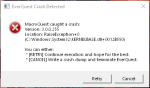
I wound up switching to Next for a number of reasons, and one of them was hopes that these crashes would stop. I've never seen it on any of my other toons, just the paladin (who I'm usually driving from).
After I switched to Next, the error message above stopped popping up, but the crashes have continued.
I'm not really sure where to begin troubleshooting. I never had any luck locating the crash dump referenced in the above screenshot; I'm not sure if one was even being created then, nor if there's an equivalent for Next. It's odd to me that it only happens on this one character. I'm typically running MuleAssist, but I'm 99% sure these crashes happen even when it's not running (or is pause) on the paladin.
With MQ2 I had to reboot my machine to log back in; killing the process and using Autologin was not sufficient. With Next, I can kill the process and use Autologin to get him loaded back in, which is certainly an improvement, but still problematic.
Any ideas on where to start with this?
I wound up switching to Next for a number of reasons, and one of them was hopes that these crashes would stop. I've never seen it on any of my other toons, just the paladin (who I'm usually driving from).
After I switched to Next, the error message above stopped popping up, but the crashes have continued.
I'm not really sure where to begin troubleshooting. I never had any luck locating the crash dump referenced in the above screenshot; I'm not sure if one was even being created then, nor if there's an equivalent for Next. It's odd to me that it only happens on this one character. I'm typically running MuleAssist, but I'm 99% sure these crashes happen even when it's not running (or is pause) on the paladin.
With MQ2 I had to reboot my machine to log back in; killing the process and using Autologin was not sufficient. With Next, I can kill the process and use Autologin to get him loaded back in, which is certainly an improvement, but still problematic.
Any ideas on where to start with this?
Users who are viewing this thread
Total: 7 (members: 0, guests: 7)
Share: