Follow along with the video below to see how to install our site as a web app on your home screen.
Note: This feature may not be available in some browsers.

Cool thanksThe slow transition is a work in progress we hope to improve
https://gitlab.com/macroquest/next/mqnext/-/issues/380Window switching is extremely slow and feels like a window maximizing or minimizing instead of an already maximized window being made "on top". Is there a setting to control this behavior I'm missing? Alt tabbing between windows is extremely fast still.

I was told it was me but... Installed next, EQBCS wasn't working, used PS to migrate, then had to reinstall dx and vc... rebooted and my system boot sector wouldn't read. Reinstalled windows 10 pro et al and everything worked using.
I know Next is going to be current, "soon". Doesn't change the basic fact that people are paying to spend hours fixing things during beta, things that they would never have done except for the beta testing they are doing for redguides, and paying redguides to do for them.
Never liked paying to beta test for a company that's paying some "special" folks to beta test and letting others pay to beta test. Redguides is a for profit company, it's not like they would have the time or budget to focus on an issue affecting 1% of their customers.
sorry to hear about the woes Sifter. I can understand that things not working as you'd expect is a frustrating experience.I was told it was me but... Installed next, EQBCS wasn't working, used PS to migrate, then had to reinstall dx and vc... rebooted and my system boot sector wouldn't read. Reinstalled windows 10 pro et al and everything worked using.
I know Next is going to be current, "soon". Doesn't change the basic fact that people are paying to spend hours fixing things during beta, things that they would never have done except for the beta testing they are doing for redguides, and paying redguides to do for them.
Never liked paying to beta test for a company that's paying some "special" folks to beta test and letting others pay to beta test. Redguides is a for profit company, it's not like they would have the time or budget to focus on an issue affecting 1% of their customers.
Delete the entry for eqgame.exe

Correct. Check in your bios if the Onboard is still on. Just because it's on doesn't mean it will show up on the device list. It's something odd I saw on my client's computer.
The DirectX reinstall is new information but I can’t think of a reason that you would need to reinstall DirectX. Are you still having a problem there?I was told it was me but... Installed next, EQBCS wasn't working, used PS to migrate, then had to reinstall dx and vc... rebooted and my system boot sector wouldn't read. Reinstalled windows 10 pro et al and everything worked using.
I know Next is going to be current, "soon". Doesn't change the basic fact that people are paying to spend hours fixing things during beta, things that they would never have done except for the beta testing they are doing for redguides, and paying redguides to do for them.
Never liked paying to beta test for a company that's paying some "special" folks to beta test and letting others pay to beta test. Redguides is a for profit company, it's not like they would have the time or budget to focus on an issue affecting 1% of their customers.
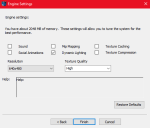
How do you launch EQ? Are you doing it through the patcher? Through a batch file? From the MQ tray icon? What is your EQ path?today, i just logged in 3 toons, not al at once, one at a time. What is interesting they loaded in full screen windowed mode this time, when usually they don't. The last toon i loaded up has this for a resolutions:
View attachment 34505
Obviously that isnt' correct. but, i didn't receive any crash messages like i normally would have.
the eqclient.ini file half reverted back. What i mean by that is the "good" version ahs, for example, UseLuclinHumanMale=0 (and all luclin models), but this version has UseLuclinHumanMale=FALSE.
Now, when i re-loaded that toon, this time, it loaded the account in the small version, allowing me to maximize the window, which it didn't do when it crashed.
How do you launch EQ? Are you doing it through the patcher? Through a batch file? From the MQ tray icon? What is your EQ path?
There is a similar issue to this that occurs when you run the old settings exe that resets settings, but it should only happen the one time. I’m curious if there are artifacts left over from that, but I will be out of town for a bit so I can’t look. Might be worth reviewing though.


The slow transition is a work in progress we hope to improve
One thing i noticed on the transition (although when all is running i think it's fine), is when one toon is zoning or loading, then you cant' swap to any other toons at all. I'll zone one guy, try to swap to another, then 2 or 3 other guys, remember that i have to wait for the first guy to zone, then it will swap to everyone i tried to swap to. MQ queues up the swaps then performs all swaps after the original guy is done loading.
This is actually the OS doing it because the game doesn't respond to windows messages while its loading.
make sense, but i don't remember it being a thing previous to Next. Maybe it was, just not as prominent or something.
https://gitlab.com/macroquest/next/mqnext/-/issues/380
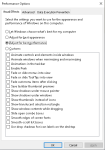
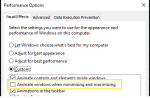
Settings --> Performance --> Settings --> Uncheck Animate Windows when minimizing or maximizing
View attachment 34501
View attachment 34500

Still having issues, same as before, logged some in on auto login, crash half way through, screen goes to the large font crap resolution, then crash message. Remaining toons logging in have new eqclient.ini file. I have to camp everyone out and do it again cause i can't run all my toons with shitty eqclient ini file. This may make me revert away from next if can't figure it out, which would really suck, since next will soon be the only thing supported moving forward.
View attachment 34520
this time it crashed my already logged in banker toon also, don't think it ever crashed him before. I've also attached my eqclient.ini file to see if anything there is out of sorts causing it. this is the file directly after a crash
right-click for inspecting it? like a hold right-click? or right-click like using it?Hello, my BL account is freezing each time i right click on his BP. I've crashed maybe 5 times in a row trying to check his augs for upgrade. If i left click no problem, if i right click on another item no problem. Any idea ?
brainiac has found the issue and pushing the fixHello, my BL account is freezing each time i right click on his BP. I've crashed maybe 5 times in a row trying to check his augs for upgrade. If i left click no problem, if i right click on another item no problem. Any idea ?
nah, not the same issue, but brain got it sorted out and build 274 is liveWasnt this a problem a few Patches ago - with the UI?
Something changed when they added the Item Comparison thingy.
0 is a valid number, why not use it :PPS. Personally I'd have loved Python support but Lua is a fine choice. 1-based indexing ugh![]()
Thanks. Sorry for the wrong posting again. It was not obvious for me that it was a MQ issue.brainiac has found the issue and pushing the fix
Dragon, I already moved your other post to the MQ "Next" Thread. no need to keep reposting and sending PMs. you can reply hereswitched to window 11 ... will report my attempts
![]()
eq solo works fine, starting mqnext = crash
1 attempt: Reinstall MQNext .. no change
You have moved it about the same time I posted it. It wasn't shown where I posted it, so I thought it wasn't send and I sent it again. Sorry for the double-post, deleted one. Your fast reaction confused me.Dragon, I already moved your other post to the MQ "Next" Thread. no need to keep reposting and sending PMs. you can reply here
np, tho to be clear, your posts were over 20 minutes apart =)You have moved it about the same time I posted it. It wasn't shown where I posted it, so I thought it wasn't send and I sent it again. Sorry for the double-post, deleted one. Your fast reaction confused me.
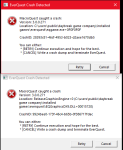
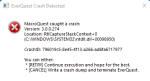
- Runing everquest Launcher as administrator and starting MQNext result in same error-messages.View attachment 34600
after "retry"
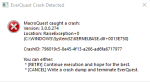
View attachment 34601
this second one returns after further retries
Why run anything as administrator?- Runing everquest Launcher as administrator and starting MQNext result in same error-messages.
- running everquest -patchme as administrator and starting MQNext result in same error-messages.
Do you have crash reporting turned off? I don't see this crash.View attachment 34600
after "retry"
View attachment 34601
this second one returns after further retries