• You've discovered RedGuides, an EverQuest multi-boxing and scripting community 🧙‍♀️⚙️. We want you to play several EQ characters at once, come join us and say hello! 👋

  • A TLP without truebox has thawed (Very Vanilla ready)
    Frostreaver
Very Vanilla MQ (Live Servers)

Vanilla - Very Vanilla MQ (Live Servers) (6 Viewers) 3.1.52471.11

No permission to download
that image is from build 255 from like September.

do you have a more recent crash? which would show the crash ID? - Despite not being able to "highlight" on the crash dialog, you can control+c the window and then past the content details which would include the CrashID
 
When it crashes, does the window close out or do you mean it freezes? What plugins do you have loaded? Are you on the latest version of Next? (You can use the tray util to check for updates)

The crash dumps for Next are in a sub folder of the logs folder.

It freezes; if I hover my mouse over the taskbar I can see the last good visual from that window, but I can't actually get it to open back up although it doesn't close (to kill it I open the Task Manager and end the process).

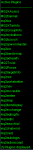
Here are my active plugins (which I haven't fiddled with):

1637129591509.png

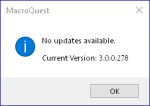
I appear to be on the latest version:

1637129624000.png

I crashed again tonight which prompted me to ask about this and I seem to have three logs relevant to my playtime today/tonight - are the answers in here?
[CODE title="MacroQuest-20211116T140354.995335Z"]D 2021-11-16 09:03:54.995705 [MQ2] Logging Initialized
I 2021-11-16 09:03:57.811225 [MQ2] Starting NamedPipeClient thread for \\.\pipe\mqpipe
I 2021-11-16 09:03:57.811515 [MQ2] Connected to named pipe server.
D 2021-11-16 09:03:57.811562 [MQ2] Created PipeConnection: connectionId=1 pid=25952
I 2021-11-16 09:03:57.844264 [MQ2] Toggle console keybind: ctrl+`
D 2021-11-16 09:03:57.918118 [MQ2] Initializing module: FrameLimiter
D 2021-11-16 09:03:57.920623 [MQ2] Initializing module: DeveloperTools
D 2021-11-16 09:03:57.923540 [MQ2] Initializing module: Windows
D 2021-11-16 09:03:57.924427 [MQ2] Initializing module: ImGuiAPI
D 2021-11-16 09:03:57.925026 [MQ2] Initializing module: Spells
D 2021-11-16 09:03:57.925071 [MQ2] Initializing module: DataAPI
D 2021-11-16 09:03:57.925080 [MQ2] Initializing module: GroundSpawns
D 2021-11-16 09:03:57.925091 [MQ2] Initializing module: Spawns
D 2021-11-16 09:03:57.945945 [MQ2] Initializing module: Items
I 2021-11-16 09:03:59.072065 [MQ2] IDirect3DDevice9::EndScene: TestCooperativeLevel was successful, reacquiring device.
D 2021-11-16 09:03:59.072163 [MQ2] MQ2Overlay: InvalidateDeviceObjects
D 2021-11-16 09:03:59.072172 [MQ2] MQ2Overlay: CreateDeviceObjects
I 2021-11-16 09:03:59.084871 [MQ2] Received crashpad pipe name: \\.\pipe\crashpad_21996_FDVFHFKHGQFWWQXR
I 2021-11-16 09:03:59.085581 [MQ2] Enabling shared crash reporter. Crash report guid: 8b37bb7f-a49d-46b5-beeb-e1797bcc2fe4
D 2021-11-16 09:03:59.085778 [MQ2] Launcher process ID: 21996
I 2021-11-16 09:04:01.438271 [MQ2] IDirect3DDevice9::Reset hook: device instance is the acquired device.
D 2021-11-16 09:04:01.438297 [MQ2] MQ2Overlay: InvalidateDeviceObjects
I 2021-11-16 09:04:11.449837 [MQ2] IDirect3DDevice9::EndScene: TestCooperativeLevel was successful, reacquiring device.
D 2021-11-16 09:04:11.449866 [MQ2] MQ2Overlay: CreateDeviceObjects
I 2021-11-16 09:04:31.633540 [MQ2] MQ2Overlay: Resetting overlay
D 2021-11-16 09:04:31.633557 [MQ2] MQ2Overlay: InvalidateDeviceObjects
I 2021-11-16 09:04:33.181009 [MQ2] IDirect3DDevice9::EndScene: TestCooperativeLevel was successful, reacquiring device.
D 2021-11-16 09:04:33.181046 [MQ2] MQ2Overlay: InvalidateDeviceObjects
D 2021-11-16 09:04:33.181064 [MQ2] MQ2Overlay: CreateDeviceObjects
I 2021-11-16 09:04:57.325655 [MQ2] MQ2Overlay: Resetting overlay
D 2021-11-16 09:04:57.325685 [MQ2] MQ2Overlay: InvalidateDeviceObjects
I 2021-11-16 09:04:57.786021 [MQ2] IDirect3DDevice9::EndScene: TestCooperativeLevel was successful, reacquiring device.
D 2021-11-16 09:04:57.786057 [MQ2] MQ2Overlay: InvalidateDeviceObjects
D 2021-11-16 09:04:57.786068 [MQ2] MQ2Overlay: CreateDeviceObjects
D 2021-11-16 11:45:18.211681 [MQ2] CRender::ResetDevice: Resetting device
I 2021-11-16 11:45:18.233253 [MQ2] IDirect3DDevice9::Reset hook: device instance is the acquired device.
D 2021-11-16 11:45:18.233281 [MQ2] MQ2Overlay: InvalidateDeviceObjects
D 2021-11-16 11:45:18.619239 [MQ2] CRender::ResetDevice: result=true
I 2021-11-16 11:45:18.761491 [MQ2] IDirect3DDevice9::EndScene: TestCooperativeLevel was successful, reacquiring device.
D 2021-11-16 11:45:18.761519 [MQ2] MQ2Overlay: CreateDeviceObjects
D 2021-11-16 11:45:31.804748 [MQ2] CRender::ResetDevice: Resetting device
I 2021-11-16 11:45:31.814004 [MQ2] IDirect3DDevice9::Reset hook: device instance is the acquired device.
D 2021-11-16 11:45:31.814172 [MQ2] MQ2Overlay: InvalidateDeviceObjects
D 2021-11-16 11:45:32.127631 [MQ2] CRender::ResetDevice: result=true
I 2021-11-16 11:45:32.256295 [MQ2] IDirect3DDevice9::EndScene: TestCooperativeLevel was successful, reacquiring device.
D 2021-11-16 11:45:32.256323 [MQ2] MQ2Overlay: CreateDeviceObjects
D 2021-11-16 12:13:29.949396 [MQ2] CRender::ResetDevice: Resetting device
I 2021-11-16 12:13:29.955876 [MQ2] IDirect3DDevice9::Reset hook: device instance is the acquired device.
D 2021-11-16 12:13:29.955899 [MQ2] MQ2Overlay: InvalidateDeviceObjects
D 2021-11-16 12:13:30.196464 [MQ2] CRender::ResetDevice: result=true
I 2021-11-16 12:13:30.285949 [MQ2] IDirect3DDevice9::EndScene: TestCooperativeLevel was successful, reacquiring device.
D 2021-11-16 12:13:30.286136 [MQ2] MQ2Overlay: CreateDeviceObjects
D 2021-11-16 12:27:22.093870 [MQ2] CRender::ResetDevice: Resetting device
I 2021-11-16 12:27:22.105248 [MQ2] IDirect3DDevice9::Reset hook: device instance is the acquired device.
D 2021-11-16 12:27:22.105294 [MQ2] MQ2Overlay: InvalidateDeviceObjects
D 2021-11-16 12:27:22.404137 [MQ2] CRender::ResetDevice: result=true
D 2021-11-16 12:27:24.956390 [MQ2] CRender::ResetDevice: Resetting device
I 2021-11-16 12:27:24.963972 [MQ2] IDirect3DDevice9::Reset hook: device instance is the acquired device.
D 2021-11-16 12:27:24.963996 [MQ2] MQ2Overlay: InvalidateDeviceObjects
D 2021-11-16 12:27:25.187953 [MQ2] CRender::ResetDevice: result=true
I 2021-11-16 12:27:25.328000 [MQ2] IDirect3DDevice9::EndScene: TestCooperativeLevel was successful, reacquiring device.
D 2021-11-16 12:27:25.328037 [MQ2] MQ2Overlay: CreateDeviceObjects
D 2021-11-16 13:48:30.224717 [MQ2] CRender::ResetDevice: Resetting device
I 2021-11-16 13:48:30.230454 [MQ2] IDirect3DDevice9::Reset hook: device instance is the acquired device.
D 2021-11-16 13:48:30.230481 [MQ2] MQ2Overlay: InvalidateDeviceObjects
D 2021-11-16 13:48:30.520954 [MQ2] CRender::ResetDevice: result=true
I 2021-11-16 13:48:30.640585 [MQ2] IDirect3DDevice9::EndScene: TestCooperativeLevel was successful, reacquiring device.
D 2021-11-16 13:48:30.640611 [MQ2] MQ2Overlay: CreateDeviceObjects
D 2021-11-16 13:48:42.009244 [MQ2] CRender::ResetDevice: Resetting device
I 2021-11-16 13:48:42.014588 [MQ2] IDirect3DDevice9::Reset hook: device instance is the acquired device.
D 2021-11-16 13:48:42.016231 [MQ2] MQ2Overlay: InvalidateDeviceObjects
D 2021-11-16 13:48:42.322975 [MQ2] CRender::ResetDevice: result=true
I 2021-11-16 13:48:42.421264 [MQ2] IDirect3DDevice9::EndScene: TestCooperativeLevel was successful, reacquiring device.
D 2021-11-16 13:48:42.421296 [MQ2] MQ2Overlay: CreateDeviceObjects
D 2021-11-16 15:54:23.273106 [MQ2] CRender::ResetDevice: Resetting device
I 2021-11-16 15:54:23.277134 [MQ2] IDirect3DDevice9::Reset hook: device instance is the acquired device.
D 2021-11-16 15:54:23.277154 [MQ2] MQ2Overlay: InvalidateDeviceObjects
D 2021-11-16 15:54:23.575526 [MQ2] CRender::ResetDevice: result=true
D 2021-11-16 15:54:29.063538 [MQ2] CRender::ResetDevice: Resetting device
I 2021-11-16 15:54:29.067838 [MQ2] IDirect3DDevice9::Reset hook: device instance is the acquired device.
D 2021-11-16 15:54:29.067876 [MQ2] MQ2Overlay: InvalidateDeviceObjects
D 2021-11-16 15:54:29.287321 [MQ2] CRender::ResetDevice: result=true
I 2021-11-16 15:54:29.458330 [MQ2] IDirect3DDevice9::EndScene: TestCooperativeLevel was successful, reacquiring device.
D 2021-11-16 15:54:29.458365 [MQ2] MQ2Overlay: CreateDeviceObjects
D 2021-11-16 16:49:46.748782 [MQ2] CRender::ResetDevice: Resetting device
I 2021-11-16 16:49:46.754120 [MQ2] IDirect3DDevice9::Reset hook: device instance is the acquired device.
D 2021-11-16 16:49:46.754147 [MQ2] MQ2Overlay: InvalidateDeviceObjects
D 2021-11-16 16:49:47.063063 [MQ2] CRender::ResetDevice: result=true
D 2021-11-16 16:49:49.391487 [MQ2] CRender::ResetDevice: Resetting device
I 2021-11-16 16:49:49.399911 [MQ2] IDirect3DDevice9::Reset hook: device instance is the acquired device.
D 2021-11-16 16:49:49.400267 [MQ2] MQ2Overlay: InvalidateDeviceObjects
D 2021-11-16 16:49:49.684188 [MQ2] CRender::ResetDevice: result=true
I 2021-11-16 16:49:49.847212 [MQ2] IDirect3DDevice9::EndScene: TestCooperativeLevel was successful, reacquiring device.
D 2021-11-16 16:49:49.847247 [MQ2] MQ2Overlay: CreateDeviceObjects
D 2021-11-16 18:49:48.751486 [MQ2] CRender::ResetDevice: Resetting device
I 2021-11-16 18:49:48.765683 [MQ2] IDirect3DDevice9::Reset hook: device instance is the acquired device.
D 2021-11-16 18:49:48.765714 [MQ2] MQ2Overlay: InvalidateDeviceObjects
D 2021-11-16 18:49:49.083737 [MQ2] CRender::ResetDevice: result=true
D 2021-11-16 18:49:51.287292 [MQ2] CRender::ResetDevice: Resetting device
I 2021-11-16 18:49:51.292281 [MQ2] IDirect3DDevice9::Reset hook: device instance is the acquired device.
D 2021-11-16 18:49:51.292358 [MQ2] MQ2Overlay: InvalidateDeviceObjects
D 2021-11-16 18:49:51.549211 [MQ2] CRender::ResetDevice: result=true
I 2021-11-16 18:49:51.678502 [MQ2] IDirect3DDevice9::EndScene: TestCooperativeLevel was successful, reacquiring device.
D 2021-11-16 18:49:51.678537 [MQ2] MQ2Overlay: CreateDeviceObjects
D 2021-11-16 20:20:47.977667 [MQ2] CRender::ResetDevice: Resetting device
I 2021-11-16 20:20:47.983653 [MQ2] IDirect3DDevice9::Reset hook: device instance is the acquired device.
D 2021-11-16 20:20:47.983671 [MQ2] MQ2Overlay: InvalidateDeviceObjects
D 2021-11-16 20:20:48.308411 [MQ2] CRender::ResetDevice: result=true
D 2021-11-16 20:20:50.871858 [MQ2] CRender::ResetDevice: Resetting device
I 2021-11-16 20:20:50.876829 [MQ2] IDirect3DDevice9::Reset hook: device instance is the acquired device.
D 2021-11-16 20:20:50.876854 [MQ2] MQ2Overlay: InvalidateDeviceObjects
D 2021-11-16 20:20:51.143119 [MQ2] CRender::ResetDevice: result=true
I 2021-11-16 20:20:51.292548 [MQ2] IDirect3DDevice9::EndScene: TestCooperativeLevel was successful, reacquiring device.
D 2021-11-16 20:20:51.292581 [MQ2] MQ2Overlay: CreateDeviceObjects
[/code]
Code:
D 2021-11-16 23:25:21.967436 [MQ2] Logging Initialized
I 2021-11-16 23:25:25.239842 [MQ2] Starting NamedPipeClient thread for \\.\pipe\mqpipe
I 2021-11-16 23:25:25.249821 [MQ2] Connected to named pipe server.
D 2021-11-16 23:25:25.249889 [MQ2] Created PipeConnection: connectionId=1 pid=27736
I 2021-11-16 23:25:25.344547 [MQ2] Toggle console keybind: ctrl+`
D 2021-11-16 23:25:25.498129 [MQ2] Initializing module: FrameLimiter
D 2021-11-16 23:25:25.505752 [MQ2] Initializing module: DeveloperTools
D 2021-11-16 23:25:25.513956 [MQ2] Initializing module: Windows
D 2021-11-16 23:25:25.514966 [MQ2] Initializing module: ImGuiAPI
D 2021-11-16 23:25:25.519617 [MQ2] Initializing module: Spells
D 2021-11-16 23:25:25.519646 [MQ2] Initializing module: DataAPI
D 2021-11-16 23:25:25.519658 [MQ2] Initializing module: GroundSpawns
D 2021-11-16 23:25:25.519669 [MQ2] Initializing module: Spawns
D 2021-11-16 23:25:25.593226 [MQ2] Initializing module: Items
I 2021-11-16 23:25:25.986300 [MQ2] IDirect3DDevice9::EndScene: TestCooperativeLevel was successful, reacquiring device.
D 2021-11-16 23:25:25.986410 [MQ2] MQ2Overlay: InvalidateDeviceObjects
D 2021-11-16 23:25:25.986420 [MQ2] MQ2Overlay: CreateDeviceObjects
I 2021-11-16 23:25:26.010076 [MQ2] Received crashpad pipe name: \\.\pipe\crashpad_21996_FDVFHFKHGQFWWQXR
I 2021-11-16 23:25:26.013911 [MQ2] Enabling shared crash reporter. Crash report guid: 8b37bb7f-a49d-46b5-beeb-e1797bcc2fe4
D 2021-11-16 23:25:26.014134 [MQ2] Launcher process ID: 21996
I 2021-11-16 23:26:09.995629 [MQ2] IDirect3DDevice9::Reset hook: device instance is the acquired device.
D 2021-11-16 23:26:09.995652 [MQ2] MQ2Overlay: InvalidateDeviceObjects
I 2021-11-16 23:26:18.307318 [MQ2] IDirect3DDevice9::EndScene: TestCooperativeLevel was successful, reacquiring device.
D 2021-11-16 23:26:18.307345 [MQ2] MQ2Overlay: CreateDeviceObjects
I 2021-11-16 23:26:25.221245 [MQ2] MQ2Overlay: Resetting overlay
D 2021-11-16 23:26:25.221269 [MQ2] MQ2Overlay: InvalidateDeviceObjects
I 2021-11-16 23:26:26.574782 [MQ2] IDirect3DDevice9::EndScene: TestCooperativeLevel was successful, reacquiring device.
D 2021-11-16 23:26:26.574817 [MQ2] MQ2Overlay: InvalidateDeviceObjects
D 2021-11-16 23:26:26.574825 [MQ2] MQ2Overlay: CreateDeviceObjects
[CODE title="MacroQuest-20211117T042713.565330Z"]D 2021-11-16 23:27:13.565871 [MQ2] Logging Initialized
I 2021-11-16 23:27:16.316028 [MQ2] Starting NamedPipeClient thread for \\.\pipe\mqpipe
I 2021-11-16 23:27:16.316494 [MQ2] Connected to named pipe server.
D 2021-11-16 23:27:16.316649 [MQ2] Created PipeConnection: connectionId=1 pid=26288
I 2021-11-16 23:27:16.395889 [MQ2] Toggle console keybind: ctrl+`
D 2021-11-16 23:27:16.535222 [MQ2] Initializing module: FrameLimiter
D 2021-11-16 23:27:16.542733 [MQ2] Initializing module: DeveloperTools
D 2021-11-16 23:27:16.548048 [MQ2] Initializing module: Windows
D 2021-11-16 23:27:16.549181 [MQ2] Initializing module: ImGuiAPI
D 2021-11-16 23:27:16.549857 [MQ2] Initializing module: Spells
D 2021-11-16 23:27:16.549880 [MQ2] Initializing module: DataAPI
D 2021-11-16 23:27:16.549894 [MQ2] Initializing module: GroundSpawns
D 2021-11-16 23:27:16.549906 [MQ2] Initializing module: Spawns
D 2021-11-16 23:27:16.596491 [MQ2] Initializing module: Items
I 2021-11-16 23:27:16.839027 [MQ2] IDirect3DDevice9::EndScene: TestCooperativeLevel was successful, reacquiring device.
D 2021-11-16 23:27:16.839156 [MQ2] MQ2Overlay: InvalidateDeviceObjects
D 2021-11-16 23:27:16.839173 [MQ2] MQ2Overlay: CreateDeviceObjects
I 2021-11-16 23:27:16.857277 [MQ2] Received crashpad pipe name: \\.\pipe\crashpad_21996_FDVFHFKHGQFWWQXR
I 2021-11-16 23:27:16.858672 [MQ2] Enabling shared crash reporter. Crash report guid: 8b37bb7f-a49d-46b5-beeb-e1797bcc2fe4
D 2021-11-16 23:27:16.858878 [MQ2] Launcher process ID: 21996
I 2021-11-16 23:27:58.878617 [MQ2] IDirect3DDevice9::Reset hook: device instance is the acquired device.
D 2021-11-16 23:27:58.878647 [MQ2] MQ2Overlay: InvalidateDeviceObjects
I 2021-11-16 23:28:08.904601 [MQ2] IDirect3DDevice9::EndScene: TestCooperativeLevel was successful, reacquiring device.
D 2021-11-16 23:28:08.904634 [MQ2] MQ2Overlay: CreateDeviceObjects
I 2021-11-16 23:28:15.076858 [MQ2] MQ2Overlay: Resetting overlay
D 2021-11-16 23:28:15.076888 [MQ2] MQ2Overlay: InvalidateDeviceObjects
I 2021-11-16 23:28:16.666551 [MQ2] IDirect3DDevice9::EndScene: TestCooperativeLevel was successful, reacquiring device.
D 2021-11-16 23:28:16.666584 [MQ2] MQ2Overlay: InvalidateDeviceObjects
D 2021-11-16 23:28:16.666595 [MQ2] MQ2Overlay: CreateDeviceObjects
I 2021-11-16 23:28:38.108683 [MQ2] MQ2Overlay: Resetting overlay
D 2021-11-16 23:28:38.108714 [MQ2] MQ2Overlay: InvalidateDeviceObjects
I 2021-11-16 23:28:38.521259 [MQ2] IDirect3DDevice9::EndScene: TestCooperativeLevel was successful, reacquiring device.
D 2021-11-16 23:28:38.521296 [MQ2] MQ2Overlay: InvalidateDeviceObjects
D 2021-11-16 23:28:38.521310 [MQ2] MQ2Overlay: CreateDeviceObjects
D 2021-11-16 23:40:15.834113 [MQ2] CRender::ResetDevice: Resetting device
I 2021-11-16 23:40:15.842865 [MQ2] IDirect3DDevice9::Reset hook: device instance is the acquired device.
D 2021-11-16 23:40:15.842891 [MQ2] MQ2Overlay: InvalidateDeviceObjects
D 2021-11-16 23:40:16.188993 [MQ2] CRender::ResetDevice: result=true
D 2021-11-16 23:40:18.608038 [MQ2] CRender::ResetDevice: Resetting device
I 2021-11-16 23:40:18.612647 [MQ2] IDirect3DDevice9::Reset hook: device instance is the acquired device.
D 2021-11-16 23:40:18.612673 [MQ2] MQ2Overlay: InvalidateDeviceObjects
D 2021-11-16 23:40:18.852406 [MQ2] CRender::ResetDevice: result=true
I 2021-11-16 23:40:18.995643 [MQ2] IDirect3DDevice9::EndScene: TestCooperativeLevel was successful, reacquiring device.
D 2021-11-16 23:40:18.995727 [MQ2] MQ2Overlay: CreateDeviceObjects
D 2021-11-17 00:35:46.433947 [MQ2] CRender::ResetDevice: Resetting device
I 2021-11-17 00:35:46.443734 [MQ2] IDirect3DDevice9::Reset hook: device instance is the acquired device.
D 2021-11-17 00:35:46.443795 [MQ2] MQ2Overlay: InvalidateDeviceObjects
D 2021-11-17 00:35:46.833173 [MQ2] CRender::ResetDevice: result=true
I 2021-11-17 00:35:47.099554 [MQ2] IDirect3DDevice9::EndScene: TestCooperativeLevel was successful, reacquiring device.
D 2021-11-17 00:35:47.099589 [MQ2] MQ2Overlay: CreateDeviceObjects
D 2021-11-17 00:35:52.735875 [MQ2] CRender::ResetDevice: Resetting device
I 2021-11-17 00:35:52.744039 [MQ2] IDirect3DDevice9::Reset hook: device instance is the acquired device.
D 2021-11-17 00:35:52.744073 [MQ2] MQ2Overlay: InvalidateDeviceObjects
D 2021-11-17 00:35:53.046596 [MQ2] CRender::ResetDevice: result=true
I 2021-11-17 00:35:53.176192 [MQ2] IDirect3DDevice9::EndScene: TestCooperativeLevel was successful, reacquiring device.
D 2021-11-17 00:35:53.176218 [MQ2] MQ2Overlay: CreateDeviceObjects[/code]
 
that image is from build 255 from like September.

do you have a more recent crash? which would show the crash ID? - Despite not being able to "highlight" on the crash dialog, you can control+c the window and then past the content details which would include the CrashID

Yeah I just happened to take a screenshot of it back then so was using it as an example. After I switched from MQ2 to Next the crash dialogue boxes stopped appearing, but I posted some logs above in response to Knightly's questions, perhaps they will help.
 
About a month or two ago I started to notice my paladin would crash infrequently in the middle of play. I was on MQ2 at the time and when he'd crash I'd get an error like this one:

View attachment 34996

I wound up switching to Next for a number of reasons, and one of them was hopes that these crashes would stop. I've never seen it on any of my other toons, just the paladin (who I'm usually driving from).

After I switched to Next, the error message above stopped popping up, but the crashes have continued.

I'm not really sure where to begin troubleshooting. I never had any luck locating the crash dump referenced in the above screenshot; I'm not sure if one was even being created then, nor if there's an equivalent for Next. It's odd to me that it only happens on this one character. I'm typically running MuleAssist, but I'm 99% sure these crashes happen even when it's not running (or is pause) on the paladin.

With MQ2 I had to reboot my machine to log back in; killing the process and using Autologin was not sufficient. With Next, I can kill the process and use Autologin to get him loaded back in, which is certainly an improvement, but still problematic.

Any ideas on where to start with this?
Same deal. How do i post crash dumps?
 
Hope people are honest. I'd really like the crashes cause discovered.
dmps are automatically submitted if you're using the RG launcher to install/run MacroQuest, there is no reason to post them. and in fact, it may include personal information like character names and i would recommend not posting them

and what do you mean "hope people are honest?"
 
You answered your own question. I made a mistake but i saw a request for dmp...

When it crashes, does the window close out or do you mean it freezes? What plugins do you have loaded? Are you on the latest version of Next? (You can use the tray util to check for updates)

The crash dumps for Next are in a sub folder of the logs folder.
This prompted me to post the dmp files.
 
I was answering the question about where they are since Kambic said they couldn’t find them. From our side all we need to find a specific crash is the crash ID from the pop-up you get.
 
I was answering the question about where they are since Kambic said they couldn’t find them. From our side all we need to find a specific crash is the crash ID from the pop-up you get.

Is expected that I no longer get crash popups with Next like I did with MQ2?
 
Is expected that I no longer get crash popups with Next like I did with MQ2?
No, but the pop up you showed was from Next. Hard freezing we’ll need to force a memory dump so we can look at it. Next time it happens, before you end the process (but in the same menu) right click and choose “Create Dump File”
 
No, but the pop up you showed was from Next. Hard freezing we’ll need to force a memory dump so we can look at it. Next time it happens, before you end the process (but in the same menu) right click and choose “Create Dump File”

Oh interesting. I didn't realize I'd already swapped by then; time flies haha.

I'll get a dump file created next time it happens. It's not happening to me every day, and I've yet to figure out how to reproduce it, but it happens at least once a week, so this shouldn't take too long to get. I've heard reports in my guild of similar crashes, so would really like to help hunt this down in any way I can (assuming others' crashes are related to mine).
 
The way we usually handle crashes is to look at the crash reporter and sort by the most frequent crash. If it’s not getting into the crash reporter (hard freeze) we wouldn’t see it, but I don’t think that kind of crash is very common.

Otherwise we look at crashes people specifically request (especially if they’re frequent for them and reproducible). The harder it is to reproduce, the more information that we need.
 
Who do i send crashes dumps?
dumps are automatically sent.

you can reference your crashID if you want to bring it to the attention of one of the devs, or me/cwtn (tho we're much less useful in the generic eq crashes

Despite not being able to "highlight" on the crash dialog, you can control+c the window and then past the content details which would include the CrashID
 
That's really cool to see it sent automagically, next time i'll post it here since i just deleted all log files by mistake.
 
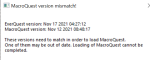
using Next:
1637180574723.png

Like many, except that I've patched both.

Edit: Still works fine though! I was able to auto-login a toon, run overseer.mac, etc.
2nd edit: Okay, wait. Maybe this wasn't triggered from Live. Maybe this is because I have an account logged into Beta? Does MQ look at the memory and detect all EQ sessions, no matter their install location?
 
Last edited:
@BlankStare You posted in the VV thread, but you probably meant to post here. It doesn't look like you're on the latest version of Next even though your post was like 5 minutes ago.
 
I'll try and get you the hard crash data dumps. Anecdotal but it looks like my two monk accounts hard crash the most and often together. Pretty much daily.
 
you can rightclick the ps1 file and click "Run with PowerShell"
View attachment 31073
Thank you so much for this Question Zimm888 I have been reading and watching for days... I seen the text file tonight when I got to that Extract point and made a folder. Yepp all I seen was Text info as well and I was Blah another dead end ... easy to think after days of restores and reading and watching... trying fail fail fail
Not to mention wife agro... I finally got my red gen and Blu circles....... Sic you ROCK !!! and everyone you Team with Thank You !!!
 
I have a very low priority suggestion! Please add the code (and the option to disable it) to delete log and dump files over 30 days old. I noticed recently I was accumulating a ton of small 4k log files.
 
I have a very low priority suggestion! Please add the code (and the option to disable it) to delete log and dump files over 30 days old. I noticed recently I was accumulating a ton of small 4k log files.
there are utilities that do that for you. imo kind of outside the scope of macroquest itself

RedBot has > LogRotate <
 
I keep MQ2 updated, then use the tool on that launcher option to DL the meshes.. drag them over and say *replace all*.. maybe not the right answer, but easy and hasnt blown my PC up yet...
 
I'm not understanding. Is there several different version of the RedGuides Launcher? I see the drop down, for Live, Test, ect. I was just picking Test, as that is the server i play on. I'm i doing this right?
 
I'm not understanding. Is there several different version of the RedGuides Launcher? I see the drop down, for Live, Test, ect. I was just picking Test, as that is the server i play on. I'm i doing this right?
the launcher is the thing you're looking at when you see the dropdown.

the dropdowns are for the macroquest / server type.

live has mq2 and macroquest "Next" for live servers
then there is "test" for test server
and emu for emu servers

keep in mind, test was patched today, so it is currently down and unavailable until it is rebuilt, which happens every time eq patches (and you're posting in the macroquest "next" live thread)
 
The way we usually handle crashes is to look at the crash reporter and sort by the most frequent crash. If it’s not getting into the crash reporter (hard freeze) we wouldn’t see it, but I don’t think that kind of crash is very common.

Otherwise we look at crashes people specifically request (especially if they’re frequent for them and reproducible). The harder it is to reproduce, the more information that we need.

Alrighty, just had a crash that was unique to my tank (my other 5 did not crash) which didn't generate a popup (I only suspected a crash because my screen froze and I confirmed in Task Manager that eqgame.exe was in Not Responding status). I followed the instructions to create a dump file from Task Manager; this generated a 1 GB .DMP file.

There is somewhere I could upload this where it would be helpful?
 
Getting the following error on the latest next release (284) under Linux/Wine

Error accessing values in HKEY_LOCAL_MACHINE: -1
Error accessing values in HKEY_CURRENT_USER: -1

I have not seen this on any previous release. MacroQuest still loads and performs as expected after the popup error presented.
 
Getting the following error on the latest next release (284) under Linux/Wine

Error accessing values in HKEY_LOCAL_MACHINE: -1
Error accessing values in HKEY_CURRENT_USER: -1

I have not seen this on any previous release. MacroQuest still loads and performs as expected after the popup error presented.
I believe this was @Knightly looking for compatibility stuff upon launch.

I dunno what the solution is, but i suspect the "i'm running under fake windows" is the cause
 
Getting the following error on the latest next release (284) under Linux/Wine

Error accessing values in HKEY_LOCAL_MACHINE: -1
Error accessing values in HKEY_CURRENT_USER: -1

I have not seen this on any previous release. MacroQuest still loads and performs as expected after the popup error presented.
I suspected this might be the case for wine. Open your MacroQuest.ini and add:
INI:
[MacroQuest]
DisableAppCompatCheck=true
 
Vanilla - Very Vanilla MQ (Live Servers)

Users who are viewing this thread

Back
Top
Cart