the mqbc was meant to have a :p on the end of it, sorry
but yeah should be no problems



the mqbc was meant to have a :p on the end of it, sorry
Are you talking about MQ2 or MQ? MQ is this resource. The “your integrity has been preserved” message that causes you to freeze in MQ2 doesn’t exist in MQ. Although, to be clear, MQ2 doesn’t offer any more protection than what is offered in MQ.Wonder if the lag spikes I recently got comes from Mq2, every time a process is made I got a stuttering in the game.
The icon is actually purple, not blue. But on what information are you basing the assumption that that’s the only thing that we changed? You can look at the repo in the first post to see the number of bugs that have been fixed, and while we did eventually stop tagging them the majority of bugs tagged “legacy” still exist in MQ2. But I am genuinely curious why you believe the only thing we changed was the icon?I doubt there really is any advantage to use this one.. make the icon blue does not really change the overall performance =P
I think the important take away for others from the trouble you had was just — run the migrator. I think it handles everything you ran into.The stupid thing is apparently not reading Sic's spoiler post. I think I can get all the normal items back up....
You need to repatch. The initial build on Wednesday needed an update.I just switched to mqnext a few days ago. At first everything worked great. Now over the last day or so I no longer have any mobs OR camp/puller circles showing on map. It makes no difference if I click on any of the layer buttons or the label button. The only thing showing is hunter mob labels no other npc's or mobs. I've restarted. loaded and unloaded plugins, etc and nothing makes any change.
I'm using brewall maps.
Thank you sic will do that now!You need to repatch. The initial build on Wednesday needed an update.
Hi @Peppe ,I doubt there really is any advantage to use this one..
that sounds like a setup error.The servers came down last night a couple of times (I'min the UK so cant translate to US times im sorry) and since then corpses dont get looted and autogroup doesnt invite everyone when I log in? Is this rtelated to the patch (my game is up to date and i reinstalled next and updated all addons0 but corpses just keep piling up around me and advloot doesnt show anything for the end crates for The call or Zlandicar. The group thing i can handle but might be indicative of something more serious wrong with my install if its not an expected error. Anyone able to clarify if this is just me or expected or something else i havent thought of?
well autogroup needs you connected with your toons using eqbc and eqbcs for example. it is a common issue folks run into where they end up with 2 eqbcs running and then can't connect properly. I'd suggest maybe rebooting and relaunching your crew.I already migrated to next last week or the week before and everything was running smoothly until last night when these 2 errors appeared. Ive farmed dead otters in CS for the past week without these issues they appeared yesterday just looking for a way to fix them. Ive tried searching for similar issues and checking in with autogroup and mq2autoloot but nothing similar appears in their listings

haven't seen any autogroup issues here on multiple pcs with multi different groupsmy auto group started acting odd yesterday when i got home. On Next.. not sure if MQ2 is being weird.
Just switched to Next, everything going smooth so far after setting up frame limiters
Question about MQ2Events...
Where do these "MQEvents_Charactername.ini" files get put now?
thanks
thanksIn the config folder, just after your kiss' inis.
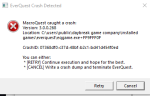
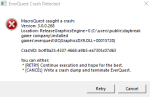

Sorry, I'm not saying that it's not next related. I'm saying that I can't reproduce it and there's nothing in the call stack to help me narrow it down, so I need more to go on in order to figure out what's going on. But the eqclient.ini isn't something we touch, so that part of it isn't something next is directly causing (it may be related to the crash, but we're not writing to the eqclient.ini).
if you're able to swing by discord sometime brain (and the rest of us) would like to try and see if we can figure out what is causing your issues in real time.View attachment 34444
View attachment 34445
Still happening, auto login works for about 1/2 of toons, sometiems more, sometimes less, then everyone logged in crashes with these errors. When that happens, eqclient.ini gets rest to defaults, all future toons are logged in with new models, no mapped keys, mouse settings jacked, etc. When i log everyone back in, their UI is all out of sorts as it sizes the window to a different resolution. Only started happening when i went to next, no issues, ever, prior to next.
I do play in windowed mode already. whats odd is on next, the window starts like extremely small, then "full screens" itself to windowed mode. aka, i can see the taskbar, the minimize button, x button, etc of a normal windows window.The simple fix to this is, loading your toons in Windowed mode. If you load your toons full screen you will constantly get this crash because you are trying to load too many at a time and its graphic intensive for computers with built in graphics cards rather than external graphics cards. Now the kicker to this is. Once you have loaded all your toons, you will want to keep them windowed, because if you plan to play a while , zoning will cause you the same crash eventually.
if you're able to swing by discord sometime brain (and the rest of us) would like to try and see if we can figure out what is causing your issues in real time.
also between then and now can you take a peak at your registry to see if anything was added in these two locations for your compat flags?
Need to check if windows added something to your compat layer? Check these locations in your registry for anything eq/mq2 related and delete. HKEY_CURRENT_USER\Software\Microsoft\WindowsNT\CurrentVersion\AppCompatFlags\Layers
and
HKEY_LOCAL_MACHINE\Software\Microsoft\WindowsNT\CurrentVersion\AppCompatFlags\Layers


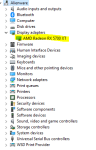
Just a thought, I've noticed an issue with one of my clients where I had to turn off in his bios the existing intel onboard graphics card, so that he could use his Radeon, because he was having some major lag issues running games. I'm not sure if you are running a system with an integrated graphics card and a Radeon. But if you are see if in your bios, you have the onboard working at the same time. Could be a handling issue.I do play in windowed mode already. whats odd is on next, the window starts like extremely small, then "full screens" itself to windowed mode. aka, i can see the taskbar, the minimize button, x button, etc of a normal windows window.
The root of the issue is that the graphics device is getting reset early and the game will crash if that happens during a loading screen. It isn't clear to me at all why this is happening except for some unique configuration that you have.
As far as the eqclient.ini getting reset, this is likely due to the file getting corrupted because of the crash during loading where it is probably reading/writing to the file.
Just a thought, I've noticed an issue with one of my clients where I had to turn off in his bios the existing intel onboard graphics card, so that he could use his Radeon, because he was having some major lag issues running games. I'm not sure if you are running a system with an integrated graphics card and a Radeon. But if you are see if in your bios, you have the onboard working at the same time. Could be a handling issue.
Delete the entry for eqgame.exei can hop on discord. I have noticed that the more i am "doing" while the auto login is happening, the better chance of crash. Specifically, i havent' fully tested, but I think Microsoft Teams and/or Outlook, while actively working on those two programs while logging in, seems to cause crash more. It feels if i do nothing and let them log in, chances are better of not crashing. Here are the the reg keys. Interesting, my registry was open to the first path already, so either i already checked that, or did something there in the past (i used to have nav issues just stop working)
View attachment 34447
View attachment 34448
It's gone. I'll report back the next time I autologon everyone, thanks for the info!Delete the entry for eqgame.exe
Correct. Check in your bios if the Onboard is still on. Just because it's on doesn't mean it will show up on the device list. It's something odd I saw on my client's computer.
I'll check it on next reboot!Correct. Check in your bios if the Onboard is still on. Just because it's on doesn't mean it will show up on the device list. It's something odd I saw on my client's computer.