
-
 Hail, we're RedGuides. We want you to play six (yes, 6!) EverQuest characters at once. We have scripts and a friendly community to help, please join our playstyle and say hello! 👋
You are using an out of date browser. It may not display this or other websites correctly.
You should upgrade or use an alternative browser.
You should upgrade or use an alternative browser.

Vanilla - Very Vanilla MQ (Live Servers) (4 Viewers) 3.1.52471.42
- Thread starter Knightly
- Start date


Sorry, I'm not saying that it's not next related. I'm saying that I can't reproduce it and there's nothing in the call stack to help me narrow it down, so I need more to go on in order to figure out what's going on. But the eqclient.ini isn't something we touch, so that part of it isn't something next is directly causing (it may be related to the crash, but we're not writing to the eqclient.ini).But why would i have never, ever, received this crash until i switched to next? And, now, i receive it often?


rocketman8181
Active member
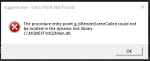
Hoping someone out there has the same issue as me and can point me into the right direction. MQNext was working great until I updated it last week sometime.. I am now getting this entry point error and it has me all bent out of shape. I removed EVERY process running, Reinstalled, Moved all the files and did a fresh install.. Nothing seems to get this to launch. I have 3 PC's and this is the only one that just wont inject a working EQ.exe.
That being said I can still launch live with no issues and have resorted back to old faithful until I can figure this one out.
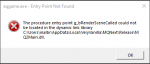
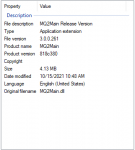
That being said I can still launch live with no issues and have resorted back to old faithful until I can figure this one out.
Sounds like you somehow got a copy of mq2main.dll in your folder that needs to be removed. I believe that plugin isn't needed anymore
Defintiely _not_ this, mq2main.dll is the main component to macroquest
Hoping someone out there has the same issue as me and can point me into the right direction. MQNext was working great until I updated it last week sometime.. I am now getting this entry point error and it has me all bent out of shape. I removed EVERY process running, Reinstalled, Moved all the files and did a fresh install.. Nothing seems to get this to launch. I have 3 PC's and this is the only one that just wont inject a working EQ.exe.
That being said I can still launch live with no issues and have resorted back to old faithful until I can figure this one out.
Try updating again, looks like one of your files failed to patch. (your eqlib.dll doesn't look like it got updated when mq2main.dll got updated)
Check the date on eqlib and make sure that it matches mq2main.dll.
rocketman8181
Active member
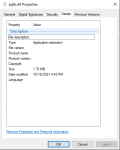
Also disabled all antivirus to try to launch this.
rocketman8181
Active member
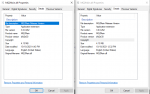
Edition Windows 10 Home
Version 21H1
Installed on 9/15/2020
OS build 19043.1288
Experience Windows Feature Experience Pack 120.2212.3920.0
Processor AMD Ryzen 7 3700X 8-Core Processor 3.59 GHz
Installed RAM 32.0 GB (31.9 GB usable)
Device ID B2CB992B-21A3-464D-B0C2-3B320A6FD81A
Product ID 00326-10000-00000-AA565
System type 64-bit operating system, x64-based processor
Version 21H1
Installed on 9/15/2020
OS build 19043.1288
Experience Windows Feature Experience Pack 120.2212.3920.0
Processor AMD Ryzen 7 3700X 8-Core Processor 3.59 GHz
Installed RAM 32.0 GB (31.9 GB usable)
Device ID B2CB992B-21A3-464D-B0C2-3B320A6FD81A
Product ID 00326-10000-00000-AA565
System type 64-bit operating system, x64-based processor
rocketman8181
Active member
I'm getting crashes on multiple characters when selecting AG in the advanced loot dialog. Not sure if it's only AG as I'm not really keen on crashing my characters over and over to find out. I'm running the latest (262, updated about 40 minutes ago).
do you have a crash id?
rocketman8181
Active member
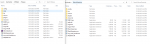
I just took the DL folder the site (Not Patcher) and ran the files from Desktop and still same error.. Has to be a PC issue and nothing wrong with the build, but I am clueless as to what lol.

I just took the DL folder the site (Not Patcher) and ran the files from Desktop and still same error.. Has to be a PC issue and nothing wrong with the build, but I am clueless as to what lol.
Lotsa options still. In no particular order...
) Run all Windows patches, reboot, repeat until no new patches are offered. Then reboot one more time.
) Temporarily turn off "Real-time protection" in Windows Security and try running Next.
) Search for and delete every possible "Next" folder / installation, then create a folder at the root of C: called MQNext and install to that folder and try it.
) Open a command prompt As Administrator and type
chkdsk c: /f and then reboot and let your hard drive be tested and repaired if necessary.) Delete all existing Next installation folders and then copy the folder (via flash drive or network) from one of your working PCs and try it.
) Create a new local user on the PC and make sure it's Administrator access, reboot and login to that new user's account and then try Next using that login.
rocketman8181
Active member
✔ Run all Windows patches, reboot, repeat until no new patches are offered. Then reboot one more time.
✔ Temporarily turn off "Real-time protection" in Windows Security and try running Next.
✔ Search for and delete every possible "Next" folder / installation, then create a folder at the root of C: called MQNext and install to that folder and try it.
✔ Open a command prompt As Administrator and type chkdsk c: /f and then reboot and let your hard drive be tested and repaired if necessary.
✔ Delete all existing Next installation folders and then copy the folder (via flash drive or network) from one of your working PCs and try it.
✔ Create a new local user on the PC and make sure it's Administrator access, reboot and login to that new user's account and then try Next using that login.
All options completed and same result.. MQNext was working great until I updated it last week...
Next step I just might wipe the PC and start over =(
✔ Temporarily turn off "Real-time protection" in Windows Security and try running Next.
✔ Search for and delete every possible "Next" folder / installation, then create a folder at the root of C: called MQNext and install to that folder and try it.
✔ Open a command prompt As Administrator and type chkdsk c: /f and then reboot and let your hard drive be tested and repaired if necessary.
✔ Delete all existing Next installation folders and then copy the folder (via flash drive or network) from one of your working PCs and try it.
✔ Create a new local user on the PC and make sure it's Administrator access, reboot and login to that new user's account and then try Next using that login.
All options completed and same result.. MQNext was working great until I updated it last week...
Next step I just might wipe the PC and start over =(
do you have a crash id?
Sorry. No. I didn't take any screenshots. Happened once on my driver. Brought him back up and tried it again. Same crash. Swapped over to another character to see if it was isolated. It wasn't. After the servers come back up I'll try it again and grab the dialog.
rocketman8181
Active member
I took a leap of faith and installed windows 11 and now MQNext is working again.


there is no such thing as mqbc@Sic this is OT but I’m thinking about taking the plunge to next. Does mqbc work? Or, do I have to learn a new language? Is there a list for all the plugins that have been ported over?
if you mean eqbc, yup, of course
and in fact, there is a neq eqbcs.exe which has all the good shit from the 75 versions of eqbcs and none of the bad stuff
there is not a new language to learn
just about everything except mule's private plugins have been moved over.

"next" is just the next major version of the macroquest system.What is this and what will this one do?
Sure looks like more trouble for the end user like me. .. not fun.
much like how windows isn't still windows 3.1 or windows 98 - macroquest has been working on a full overhaul.
soon macroquest "Next" will be *the* version that we have here at redguides.
I'm sorry you think that it is not fun. keep in mind the performance increases and utilities and access that we have with next are such huge quality of life increases it is hard to imagine that someone would want *less*
I would strongly encourage you to keep and open mind and try it - at least this way you can transition at your own pace
I see.
Wonder if the lag spikes I recently got comes from Mq2, every time a process is made I got a stuttering in the game.
My system is.
AMD 5600x
32GB RAM 3600mhz
RX5700 8GB
Nvme 1TB
Yea, problem 1 already found.
My Toon does not see any mobs, yet they are within 50m.. my pull range is 1500 feet..
Will the old one still be live? I doubt there really is any advantage to use this one.. make the icon blue does not really change the overall performance =P
Wonder if the lag spikes I recently got comes from Mq2, every time a process is made I got a stuttering in the game.
My system is.
AMD 5600x
32GB RAM 3600mhz
RX5700 8GB
Nvme 1TB
Yea, problem 1 already found.
My Toon does not see any mobs, yet they are within 50m.. my pull range is 1500 feet..
Will the old one still be live? I doubt there really is any advantage to use this one.. make the icon blue does not really change the overall performance =P
Last edited:
as i mentioned MQ "next" will soon be the version we have at redguides, as in *the* version.Will the old one still be live?
that's just factually incorrect, i'm sorry you feel that way. I don't think you're being genuine when you're asking these questions, but if you are i'm happy to answer you and happy to help you migrate over.I doubt there really is any advantage to use this one.. make the icon blue does not really change the overall performance =P
soon macroquest "Next" will be *the* version that we have here at redguides.So the old one will still be in the game?
as i mentioned MQ "next" will soon be the version we have at redguides, as in *the* version.
in the near future the sole, single, solitary, only version of macroquest for Live serversthat redguides will have will be MacroQuest "Next", that will be slightly slower for test server and for emu but eventually, Next will be the platform
Nihkasilma
Well-known member
I've made the brave leap of switching across to MQNext - annoyingly I have teething problems (has to be me)
- My come to me, mimic me etc buttons are no longer auto populating in the group window and I'm having to type /bccmd connect
(I've obviously done something stupid)
The stupid thing is apparently not reading Sic's spoiler post. I think I can get all the normal items back up....
- My come to me, mimic me etc buttons are no longer auto populating in the group window and I'm having to type /bccmd connect
(I've obviously done something stupid)
The stupid thing is apparently not reading Sic's spoiler post. I think I can get all the normal items back up....
Last edited:
I've made the brave leap of switching across to MQNext - annoyingly I have teething problems (has to be me)
- My come to me, mimic me etc buttons are no longer auto populating in the group window and I'm having to type /bccmd connect
(I've obviously done something stupid)
The stupid thing is apparently not reading Sic's spoiler post. I think I can get all the normal items back up....

Patch - - Oct 21 (and now Oct 22) - New eqgame.exe + hotfix notes
EQ did an emergency patch and pushed a new .exe this means if you patched eq, you will need to wait on a new mq2 / mq "next" build. the mq2 and next devs know. redbot knows I know. don't panic. as soon as a re-build is available they will be updated in their respective places. You can watch...
 www.redguides.com
5. if you want the functionality of the MQ2 "MQ2TargetInfo"
- They are now in 3 separate plugins:
/plugin groupinfo
/plugin targetinfo
/plugin xtarinfo
Nihkasilma
Well-known member
Yeah, sorry, realised and rushed to type my apologies prior to your very quick posting hehe.Patch - - Oct 21 (and now Oct 22) - New eqgame.exe + hotfix notes
EQ did an emergency patch and pushed a new .exe this means if you patched eq, you will need to wait on a new mq2 / mq "next" build. the mq2 and next devs know. redbot knows I know. don't panic. as soon as a re-build is available they will be updated in their respective places. You can watch...
5. if you want the functionality of the MQ2 "MQ2TargetInfo"
- They are now in 3 separate plugins:
/plugin groupinfo
/plugin targetinfo
/plugin xtarinfo
will that resolve the /bccmd connect or should I just make a macro for them all to do it?
well if you have to manually bccmd connect, that means you don't have it setup to autoconnectYeah, sorry, realised and rushed to type my apologies prior to your very quick posting hehe.
will that resolve the /bccmd connect or should I just make a macro for them all to do it?
/bccmd set autoconnect onnow keep in mind, the VV launcher for next doesn't currently launch eqbc server
Nihkasilma
Well-known member
Thanks Sic again, for all you help - appreciated. I imagine that's because I've just moved to Next.
I don't mean to appear to be the person whos struggling with idiocy constantly although it may appear to be so. So thanks in advance for your patience...
I'm having an issue with the zone meshing. When I tye /rg DoPull 1 - I get an error message saying "no mesh available" and then SK wont pull and if I pull manually then the other characters don't have the mesh to assist. I've typed:
I can see the mesh sitting in my VV folder and have tried /plugin MQ2Nav, /Mac MQ2Nav and /Load MQ2Nav I just can't seem to get it working.
I don't mean to appear to be the person whos struggling with idiocy constantly although it may appear to be so. So thanks in advance for your patience...
I'm having an issue with the zone meshing. When I tye /rg DoPull 1 - I get an error message saying "no mesh available" and then SK wont pull and if I pull manually then the other characters don't have the mesh to assist. I've typed:
I can see the mesh sitting in my VV folder and have tried /plugin MQ2Nav, /Mac MQ2Nav and /Load MQ2Nav I just can't seem to get it working.
Make sure you run the migrator so all your meshes get moved over. Without meshes your mq2nav won't know what to doThanks Sic again, for all you help - appreciated. I imagine that's because I've just moved to Next.
I don't mean to appear to be the person whos struggling with idiocy constantly although it may appear to be so. So thanks in advance for your patience...
I'm having an issue with the zone meshing. When I tye /rg DoPull 1 - I get an error message saying "no mesh available" and then SK wont pull and if I pull manually then the other characters don't have the mesh to assist. I've typed:
I can see the mesh sitting in my VV folder and have tried /plugin MQ2Nav, /Mac MQ2Nav and /Load MQ2Nav I just can't seem to get it working.
Nihkasilma
Well-known member
yeah, sorry Sic. you are right.Make sure you run the migrator so all your meshes get moved over. Without meshes your mq2nav won't know what to do
I watched the video with sound off and didn't do that.
Should be resolving now.... (sorry)
EDIT - Resolved. If I'd have not been stupid and just followed the clear steps I'd have been fine... thanks.
Last edited:
Users who are viewing this thread
Total: 5 (members: 0, guests: 5)
Share: