
There is only 1 tradeskill Lua guy, btw, but we can have honorary members.Having somewhat of a similar issue with the tradeskill lua, so I thought I would check this out. Went to clean all and as soon as it tried to load the depot got 7 crashes. Tradeskill lua guys are saying disable depot and that will run but since this uses the depot, figured I would check it out.

-
 Hail, we're RedGuides. We want you to play six (yes, 6!) EverQuest characters at once. We have scripts and a friendly community to help, please join our playstyle and say hello! 👋
 -
 We've added LLM sections to our Terms & Rules and Resource Rules, for everyone's sanity & in-game safety.
Read more
a. Do not replace your voice with an LLM. This goes for your posts and your scripts. Drafting and editing with a tool is fine, but don't take you out of what you share.
b. Do not replace your EQ character's voice with an LLM. We don't want scripts that speak over/ooc,/shoutor other public channels. This has been an unwritten rule that's kept casino scripts off the site for decades, but we're now compelled to make it clear: keep automated communication private.
Why Does RG Review Scripts?
Nearly every LLM-written Lua script we see is making your character do impossible things, and rarely in a way that's beneficial to you. We've seen heavy server hammering,/targetover impossible distances when/nav spawnwould passively accomplish the same thing, a spawn search that fires 20+ times per second, and other pointless actions that are likely annoying GMs.
You are welcome to use LLMs as a tool to structure, draft, and edit your work, but please read critically before hitting/lua run
You are using an out of date browser. It may not display this or other websites correctly.
You should upgrade or use an alternative browser.
You should upgrade or use an alternative browser.

Release TsC – Automated Inventory Management & Consolidation For Your Whole Crew (1 Viewer) 4.1.6
- Thread starter raw
- Start date
 but I forgot your screen name so assumed most would know who I was talking about
- Seller
- #523
- Are you using the latest version of TSC?i just tried after rebooting and updating MQ and EQ to just make sure. and it crashed out...no errors or anything. Just crash to desktop.
- Are you using the default EQ skin?
- Can you tell me precisely what the program is doing (or trying to do) when it crashes?

- Are you using the latest version of TSC?
- Are you using the default EQ skin?
- Can you tell me precisely what the program is doing (or trying to do) when it crashes?
everything is updated and I am using the default UI/skin

that's how I got it set up on my screen and I hit cleantoon.
do self clean.
now I get this.
---------------------------
EverQuest Crash Detected
---------------------------
MacroQuest caught a crash:
Process ID: 11780
Version: 3.1.1.3583
Location: mq::datatypes::MQ2SpawnType::GetMember+0 (C:\Users\rhick\Desktop\MQ\MQ2Main.dll+0000000000085C20)
CrashID: 5b254453-1289-4d60-81f7-dde76236986f
You can either:
* [RETRY] Continue execution and hope for the best.
* [CANCEL] Write a crash dump and terminate EverQuest.
Copy the contents of this dialog to your clipboard by pressing Ctrl+C
---------------------------
Retry Cancel
---------------------------
Last edited:
- Seller
- #525
Thanks. I'll do some testing later today.everything is updated and I am using the default UI/skin
View attachment 74780
that's how I got it set up on my screen and I hit cleantoon.
View attachment 74781
do self clean.
now I get this.
---------------------------
EverQuest Crash Detected
---------------------------
MacroQuest caught a crash:
Process ID: 11780
Version: 3.1.1.3583
Location: mq::datatypes::MQ2SpawnType::GetMember+0 (C:\Users\rhick\Desktop\MQ\MQ2Main.dll+0000000000085C20)
CrashID: 5b254453-1289-4d60-81f7-dde76236986f
You can either:
* [RETRY] Continue execution and hope for the best.
* [CANCEL] Write a crash dump and terminate EverQuest.
Copy the contents of this dialog to your clipboard by pressing Ctrl+C
---------------------------
Retry Cancel
---------------------------

Lots of times, when I am not sure redfetch did an update correctly, I go in and run the rglauncher to select the updates manually. I still like that granularity, plus it lets me see exactly what is getting updated when.
- Seller
- #529
Could you provide some more details? A screenshot of the error message. A description of what you're trying to do. Thanks.hey im trying to use this and it tells me that none of my toons have any items that can be moved.
Hello. This is still an issue. Is there somewhere else that I should post for support or post issues or is this resource now unmaintained?Hello. When I run a consolidate all, it is trying to use the find window to remove items from the depot, which does not work. It endlessly spams grab item with no result. Using the default ui.
- Seller
- #532
Hi dude, thanks for flagging this.Hello. When I run a consolidate all, it is trying to use the find window to remove items from the depot, which does not work. It endlessly spams grab item with no result. Using the default ui.
Please have a bit of patience before you leave a 1-star review.
I've been really busy this month with my day job.
When EQ changes things it takes time to debug and fix things.
Anyway, I'm looking into this now.
- Seller
- #535
raw updated TsC – Automated Inventory Management & Consolidation For Your Whole Crew with a new update entry:
4.1.5
Read the rest of this update entry...
4.1.5
 Commits
Read the rest of this update entry...
- Seller
- #537
raw updated TsC – Automated Inventory Management & Consolidation For Your Whole Crew with a new update entry:
4.1.6
Read the rest of this update entry...
4.1.6
Read the rest of this update entry...
- Seller
- #539
Strange. I can't reproduce that. Depositing is working fine in all my tests.Its working pretty well now, much faster than the initial depot workaround. The only issue I'm running into is putting items into the depot. It hovers over the window to deposit, but does not click. If I manually click each item, it'll go through all of the items without issue.

Not via the lau, but once you've sorted your mats to the correct character (class), it becomes very simple to keep your inventories clean and sorted.Is it possible for TSC to have all Poison Crafting supplies go to my rogue and Alchemy mats go to my shaman?
Dang, that's unfortunate. I'll have to sort it then make sure I lock them or w/e in the Lua then.Not via the lau, but once you've sorted your mats to the correct character (class), it becomes very simple to keep your inventories clean and sorted.
I use the Parcel Helper to have a poison material section, to then parcel all the items I have in inventory to my rogue.
This is something I need to look into, wasn’t aware of custom listsI use the Parcel Helper to have a poison material section, to then parcel all the items I have in inventory to my rogue.
Edit: personal hoard lists
Last edited:
- Seller
- #546
If you have a text list of all poison items, you can import that into your Rogue's hoard list. Then all those items wil always go to your Rogue.Is it possible for TSC to have all Poison Crafting supplies go to my rogue and Alchemy mats go to my shaman?
You have to provide the list yourself because there is no way via MQ to know which craft a tradeskill item is for.
I’ve been slowly building that and an alchemy list. Might do the same with collectibles since there isn’t an easy way to categorize collections anymore.If you have a text list of all poison items, you can import that into your Rogue's hoard list. Then all those items wil always go to your Rogue.
You have to provide the list yourself because there is no way via MQ to know which craft a tradeskill item is for.
you could use the INI from the shiny.mac to make your list, it already has the collections broken down by expansion...I’ve been slowly building that and an alchemy list. Might do the same with collectibles since there isn’t an easy way to categorize collections anymore.
- Seller
- #550
TsC relies on the find item window and I've heard emu servers don't have that. Sorry.Do this plugin work with Emu servers? Would be great if it did.
Thanks, yes, rof2 doesn't have that sadly. How hard would it be to adapt it to use the functions provided in https://www.redguides.com/community/resources/find-item-window.2669/ . Just wondering, not asking for you to do it.TsC relies on the find item window and I've heard emu servers don't have that. Sorry.
Last edited:
- Seller
- #552
More work than I personally have time for at the moment.Thanks, yes, rof2 doesn't have that sadly. How hard would it be to adapt it to use the functions provided in https://www.redguides.com/community/resources/find-item-window.2669/ . Just wondering, not asking for you to do it.
This handles TS or Collectibles, EZInventory Lua might be a solution for other items...Is there any way to get this to trade stackable items it isn't flagging as Tradeskill items in the scan?
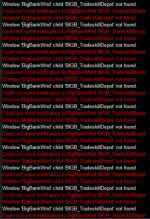
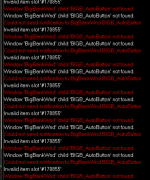
- Seller
- #557
Hey. Did anything change in your setup? Are you using the default skin?
I have default UI except my targeting ring, yes. I have not changed anything other than turning auto banking tradeskill mats off cause i dont want to turn in my trophies and food everytime i go in the bank.Hey. Did anything change in your setup? Are you using the default skin?
- Seller
- #559
Trophies? Wait is this a TSC issue, or TCN?I have default UI except my targeting ring, yes. I have not changed anything other than turning auto banking tradeskill mats off cause i dont want to turn in my trophies and food everytime i go in the bank.
Users who are viewing this thread
Total: 2 (members: 0, guests: 2)
Share: