
-
 Hail, we're RedGuides. We want you to play six (yes, 6!) EverQuest characters at once. We have scripts and a friendly community to help, please join our playstyle and say hello! 👋
You are using an out of date browser. It may not display this or other websites correctly.
You should upgrade or use an alternative browser.
You should upgrade or use an alternative browser.
Release Tradeskill Construction Set |Quests:GOD,TSS,POK,POR Freebie Assister [Deleted] (1 Viewer)
- Thread starter jb321
- Start date
- Status
- Not open for further replies.

Didn’t you just post more updates like 2 days ago? You are a machine! Thanks for the skills my manTCS is not dead, but double XP and Anniversary > TCS right now..
Magically Delicious - https://special.eqresource.com/magicallydelicious.php
Untested... Has ALL recipes for the cookies, water, and bouquet
Usage: /mac tsc make Jimothy
does subcombines and then the main combines..
as an afterthought, not sure if TSC_Core has the jimothy vase support included..
Untested... Has ALL recipes for the cookies, water, and bouquet
Usage: /mac tsc make Jimothy
does subcombines and then the main combines..
as an afterthought, not sure if TSC_Core has the jimothy vase support included..
Attachments
Last edited:
Been awhile since I posted..
A Fool's Errand - https://special.eqresource.com/afoolserrand.php
Buys the ingredients and makes the pies for the quest
Usage: /mac tsc shopmr fool 1 10 10
if you fail some pies just adjust
If you need 4 pies do this then..
Usage: /mac tsc shopmr fool 1 4 4
- Bristlebane Day - A Fool's Errand
A Fool's Errand - https://special.eqresource.com/afoolserrand.php
Buys the ingredients and makes the pies for the quest
Usage: /mac tsc shopmr fool 1 10 10
if you fail some pies just adjust
If you need 4 pies do this then..
Usage: /mac tsc shopmr fool 1 4 4
Attachments
Last edited:

You crazy wild fool you ! :PBeen awhile since I posted..
- Bristlebane Day - A Fool's Errand
A Fool's Errand - https://special.eqresource.com/afoolserrand.php
Buys the ingredients and makes the pies for the quest
Usage: /mac tsc shopmr fool 1 10 10
if you fail some pies just adjust
If you need 4 pies do this then..
Usage: /mac tsc shopmr fool 1 4 4
I see people give me red cents for my work, but no one is using my work :P (the anniversary quests) :p
I know tradeskills is always the hot and sexy!


- Commits
- 2
Posted a page back or so, were these updated to the download or will these files affect overwriting the old ones? My latest version works perfect hate to mess it up;. hahafor testing...
/mac tsc shopmss <ts.ini>
can change the command to whatever just this for now..
TSC_Core goes in the TSC folder
TSC.mac goes in the macro dir
Posted a page back or so, were these updated to the download or will these files affect overwriting the old ones? My latest version works perfect hate to mess it up;. haha
Not released yet, that was for testing.
Need some guidance on what I need to do to get TSC to run for skill ups using what I think is the already available logic. I'm clearly not understanding something.
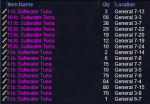
To preface: I previously used a recipe file from this thread to skill up baking to 191. I then created a recipe file with all the crab and tuna recipes up to skill 252 (attached). I went to Abysmal Sea and fished for hours. I caught hundreds of lbs (collectively) of both crab and tuna (tuna inventory provided for reference).
I then ran a test. I issued the command

From what I can gather, this should tell TSC to use the supplied file, target recipe 41 in that file (in this case, Beer-Battered Tuna Rolls), shopping for 20 of that recipe, and stopping when 20 are made.
It processed for several minutes. The shopping list created (attached) doesn't seem to be for 20 of the item. And the actual work bears this out.
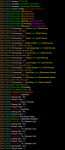
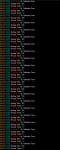
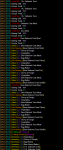
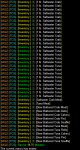
After several minutes it stopped. And it didn't even make one of the requested item. I really could use some insight here.
To preface: I previously used a recipe file from this thread to skill up baking to 191. I then created a recipe file with all the crab and tuna recipes up to skill 252 (attached). I went to Abysmal Sea and fished for hours. I caught hundreds of lbs (collectively) of both crab and tuna (tuna inventory provided for reference).
I then ran a test. I issued the command
From what I can gather, this should tell TSC to use the supplied file, target recipe 41 in that file (in this case, Beer-Battered Tuna Rolls), shopping for 20 of that recipe, and stopping when 20 are made.
It processed for several minutes. The shopping list created (attached) doesn't seem to be for 20 of the item. And the actual work bears this out.
After several minutes it stopped. And it didn't even make one of the requested item. I really could use some insight here.
Attachments
- Commits
- 2
Did you try /mac tsc ShopMR BakingSkill252 41 20 20
if the recipe calls for subcombines, might have to adjust the recipes.
if the recipe calls for subcombines, might have to adjust the recipes.
As best I can determine, every sub-combine is included in the recipe file. And I have to say, if it's not (and the recipe is completely unknown), I expect TSC is stop trying to do anything and tell me it doesn't have enough info to continue.
That said, I did not try ShopMR. Mainly because I'm after skill ups and nothing about that particular action suggests it will take the skill ups path in the logic. In fact, I can't even find documentation (on the Commands page) to tell me what ShopMR will do. But hey...I'll give it a shot now. <pause/> And that didn't take long.

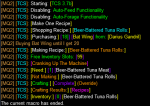
Still didn't even make one requested item.
That said, I did not try ShopMR. Mainly because I'm after skill ups and nothing about that particular action suggests it will take the skill ups path in the logic. In fact, I can't even find documentation (on the Commands page) to tell me what ShopMR will do. But hey...I'll give it a shot now. <pause/> And that didn't take long.
Still didn't even make one requested item.
- Commits
- 2
First thing I notice is the item id is wrong for this one. I haven't kept up with all the commands, looks like the MR is make one recipe. Probably no good if you don't have all of the subcombines done. could try /mac TSC ShopMakeSkill bakingskill252 (not sure how this buys components ignoring the qty. might buy everything for one then go back and buy again.)
Beer-Battered Tuna Souffle
This is a Banquet
CHA: +2 INT: +4 HP: +10 MANA: +10
SV DISEASE: +5 SV POISON: +2
WT: 2.0 Size: LARGE
Class: ALL
Race: ALL
Stackable up to 20
NPCs sell this at 6g4s8c
NPCs buy this at 5g8s9c
EQ item ID: 58467
Beer-Battered Tuna Souffle
This is a Banquet
CHA: +2 INT: +4 HP: +10 MANA: +10
SV DISEASE: +5 SV POISON: +2
WT: 2.0 Size: LARGE
Class: ALL
Race: ALL
Stackable up to 20
NPCs sell this at 6g4s8c
NPCs buy this at 5g8s9c
EQ item ID: 58467
Last edited:
Yeah. That's why I'm asking the question. I can hard-code a number to make in the recipe file, but that's highly inflexible. Ideally, I just want to give it the file and tell it to continue making until it runs out of mats (i.e., crab/fish) or it reaches the top skill in the file. I get that I may have to tell the batch size, but I still expect it to just work.
Thanks for the ID update. I'm not sure it really makes a difference yet, but I haven't dug into the macro code that much either. In any case, I wasn't asking TSC to make that particular recipe. I don't see how that could possibly make a difference on making/not making another recipe in the file.
Thanks for the ID update. I'm not sure it really makes a difference yet, but I haven't dug into the macro code that much either. In any case, I wasn't asking TSC to make that particular recipe. I don't see how that could possibly make a difference on making/not making another recipe in the file.
- Commits
- 2
I think something was added to the recipe file for doing subcombines. This line Recipe1BuyTotal=2 (not sure). Have to look through the boards. haha
- Commits
- 2
How do I avoid buying 50 sculpting tools when I want to make 50 items that re use the tool?
- Commits
- 2
Need some guidance on what I need to do to get TSC to run for skill ups using what I think is the already available logic. I'm clearly not understanding something.
Set your sub-combines to make 100 for the recipe you want to skill up and type /mac tsc shopmake bakingskill252
Thank once that buys your ingredients you can purchase the remainder of the ingredients for the skillup recipe and type /mac tsc skillup backingskill252
or set all of your sub-combines and the main recipe to make 100 and /mac tsc shopmake bakingskill252 , then run the /mac tsc skillup backingskill252
if you have any ingredients left.
I haven't read everything, and dunno what is going on, buut... /mac tsc shopmake should ,if I remember correctly, cycle through each recipe one time and continue on until it has reach the last recipe and try to make each one.
.. taking a quick look it is skipping all the pre-combines based on the skill up being met, and thus won't make the final combines because it didn't make the other ones.
.. taking a quick look it is skipping all the pre-combines based on the skill up being met, and thus won't make the final combines because it didn't make the other ones.
I haven't read everything, and dunno what is going on, buut... /mac tsc shopmake should ,if I remember correctly, cycle through each recipe one time and continue on until it has reach the last recipe and try to make each one.
.. taking a quick look it is skipping all the pre-combines based on the skill up being met, and thus won't make the final combines because it didn't make the other ones.
The quick work around is to have 2 separate recipe files, one to make the pre-combines in quantity and one to make the final product using skill ups. I was/am working on a side macro that allowed for batch combining, so it would treat one set of combines as skill ups and others as mass production.
The quick work around is to have 2 separate recipe files, one to make the pre-combines in quantity and one to make the final product using skill ups. I was/am working on a side macro that allowed for batch combining, so it would treat one set of combines as skill ups and others as mass production.
I think a feature could be to set a arbitrary skill up # which corresponds with the final product as long as it is higher than the sub-combines, but unsure if we could guarantee that.
Or, have a range of recipes to ignore skill ups on and ones to pay attention to.
But wait there's more.. the easiest I think may be to add a entry to the recipe file that denotes the range to ignore for skillups.. otherwise you would be typing stuff like mac tsc shopmakeskill range 3-32 tacos or something like that
I've been encountering an issue starting today. Now, I note there was an update for VV early this morning, so it very well could be related to that. I've used a couple different macros this morning that pick up items from the top inventory and only this one encountered the issue I'm relaying here.
The specifics: I told TSC to make an item from the smithingtrophy file (Skinning Knife). I had one top inventory slot open. I issued the command
I tested further by moving the empty slot elsewhere. TSC grabbed a bag next to the item in the top inventory slot. Really weird. As TSC was working fine before the VV update (i.e., yesterday), I'm wondering what has changed to make this sort of impact. See screenshot for message detail.
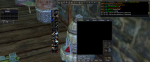
The specifics: I told TSC to make an item from the smithingtrophy file (Skinning Knife). I had one top inventory slot open. I issued the command
/mac tsc shopmr smithingtrophy 7 1 1. The process bought all the required items placing one of them (the Dagger Blade Mold) in that open inventory slot. When it moved to the Forge, the process presented an error. Moving the item to a bag allowed the process to complete the process successfully. I did other things on other characters (finished up some beginner trophies). All had the same issue. I ended up moving another item (bottle of wine, sewing kit, etc.) to plug up the inventory slot. Doing so allowed the process to carry on as expected.I tested further by moving the empty slot elsewhere. TSC grabbed a bag next to the item in the top inventory slot. Really weird. As TSC was working fine before the VV update (i.e., yesterday), I'm wondering what has changed to make this sort of impact. See screenshot for message detail.
- Commits
- 2
Go to options/general/open tradeskill list with ctrl right click and see if it is check. if so uncheck it. other than that, not sure.
Go to options/general/open tradeskill list with ctrl right click and see if it is check. if so uncheck it. other than that, not sure.
It's not checked on any of my characters (the issue is affecting them all). And to reiterate, it's a recent development (since yesterday). Meaning, even if that were checked, it wasn't causing an issue before.
- Commits
- 2
Sounds like something to do with using an item from a primary inventory slot. Did you say it works fine if you have a bag in that slot?
Sounds like something to do with using an item from a primary inventory slot. Did you say it works fine if you have a bag in that slot?
I think you're right. I spun up a heroic toon for tinkering, so lots of open inventory and only 2 bags, and /mac tsc beginner tinkering failed hard on combines. As soon as I threw some empty toolboxes in there so there was only "bag space", the macro went zoom zoom.
Attempted the beginner research portion of the macro this morning on a character with absolutely no Research skill at all. Combine failed without giving any sort of message. This may have been discussed previously, but it seems at least 1 skill point must be allocated to the Research skill before the process will work at all. Workaround is to go to the appropriate class master and spend that point on Research.
I guess this is more of a feature request to shuffle off to that class master and train the skill once before proceeding to attempt the combines in TSS.
Edit to add that when I go to manually train, it auto bumps the character to at least skill 100. :/
I guess this is more of a feature request to shuffle off to that class master and train the skill once before proceeding to attempt the combines in TSS.
Edit to add that when I go to manually train, it auto bumps the character to at least skill 100. :/
Last edited:
Sounds like something to do with using an item from a primary inventory slot. Did you say it works fine if you have a bag in that slot?
I believe I specifically touched on this in my initial presentation. Doesn't matter what fills that spot. It just has to be filled for the macro to function as intended.

craggyisland
Unwise Decision Designator
EDIT: Figured out my problem.
If you change your tradeskill ini file you will need to delete your shopping list file and make a new SL_file.ini.
Just switched from Roosters tradeskill.mac since this is getting updated and that is not. Plus I have not tradeskilled in awhile. Anyway sorted now!
If you change your tradeskill ini file you will need to delete your shopping list file and make a new SL_file.ini.
Just switched from Roosters tradeskill.mac since this is getting updated and that is not. Plus I have not tradeskilled in awhile. Anyway sorted now!
Last edited:
- Commits
- 2
Just noticed that the macro is called Tradeskill Construction Set but the macro is TSC haha

TradeSkill ConstructionJust noticed that the macro is called Tradeskill Construction Set but the macro is TSC haha
- Commits
- 2
Why not TSCS ? lol

Attempted the beginner research portion of the macro this morning on a character with absolutely no Research skill at all. Combine failed without giving any sort of message. This may have been discussed previously, but it seems at least 1 skill point must be allocated to the Research skill before the process will work at all. Workaround is to go to the appropriate class master and spend that point on Research.
I guess this is more of a feature request to shuffle off to that class master and train the skill once before proceeding to attempt the combines in TSS.
Edit to add that when I go to manually train, it auto bumps the character to at least skill 100. :/
Since I had to go do research at an apprentice level instead of beginner, I made a file appropriate to creating the items for that level of test (attached). I looked into making modifications to TSC_POR.inc for handing the necessary make/turn-in steps, but I currently lack the understanding of the whole process.
Attachments
Since I had to go do research at an apprentice level instead of beginner, I made a file appropriate to creating the items for that level of test (attached). I looked into making modifications to TSC_POR.inc for handing the necessary make/turn-in steps, but I currently lack the understanding of the whole process.
Many pages ago, there was a dirty primer on how to do it..
modifying the .inc file is a relatively small process. The two things that have to jive are the recipe file and the answer file. The answer file determines if the recipe has sub-recipes or is a stand alone or has multiple recipes to make the main recipe.. using
This is the entry for the tinkering trophy beginner
[Tinkering]
SkillName=Tinkering
DataUsed=Tinker_Data
BagName=Toolbox
[BeginnerTinkeringTrophy]
TaskName=Beginner Mechanist Test
QuestNPC=Judge Marion Teld`Mare
ScoreCardName=Beginner Mechanist Scorecard
TS_FileName=TinkeringTrophy
I added a little info here.. 1 for the whole recipe is storebought in POK, or 0 for some farmed items or bought elsewhere
|All Vendor Bought 1 = Yes 0 = No
Recipe1SB=1
Recipe2SB=1
Recipe3SB=1
Recipe4SB=1
Recipe5SB=1
Recipe6SB=0
Recipe7SB=1
Recipe8SB=1
Recipe9SB=1
Recipe10SB=1
Recipe11SB=1
Recipe12SB=0
Recipe13SB=0
0 means it has no other dependencies and is just a combine, the other numbers means it relies on that other recipe to complete the task..
so there is 1, 3, 7, 6, 12 .. looking at them recipe 13 relies on recipe 12 and recipe 12 relies on recipe 6.
|Create Task Dependencies
Recipe1CTD=0
Recipe2CTD=1
Recipe3CTD=0
Recipe4CTD=0
Recipe5CTD=3
Recipe6CTD=0
Recipe7CTD=0
Recipe8CTD=7
Recipe9CTD=0
Recipe10CTD=0
Recipe11CTD=0
Recipe12CTD=6
Recipe13CTD=12
Here, tells you if the main recipe has sub-recipes that are not nested or in-line, meaning it takes 2 separate or more recipes to make the main recipe.
Just add R12 (recipe number) and then = 1 and it will consider it to have multiple recipes to make it.
|Multi combines
R4=1
R11=1
Here it associates the step in the task that is received from WFP to the recipe..
Step 1 is recipe 8, which is fireworks and so is step 2,3,4.
Step 5 is recipe 9
Recipes 1-8 are all sub-combines and not the final turn-in item
|Step to Recipe Matrix
Step1=8
Step2=8
Step3=8
Step4=8
Step5=9
Step6=10
Step7=11
Step8=13
Step9=8
Step10=8
Step11=8
Step12=8
Step13=9
Step14=10
Step15=11
Step16=13
Here is the final part it matches the turn-in steps to the item id to be turned in, so you don't grab anything by name you grab it by the ID to eliminate trying to turn in the wrong item with a similar name.
|Used for turn in to NPC
Turn9Step=16879
Turn10Step=16877
Turn11Step=16880
Turn12Step=16878
Turn13Step=16864
Turn14Step=16863
Turn15Step=16867
Turn16Step=14800
Current download is version 3.7b.
If you run a beginner task (tested: /mac tsc beginner smithing and /mac tsc beginner fletching) the macro takes items i am wearing (earrings, Shoulder, cloak, etc) and wants to combine them.
Not like there is any damage done, but it certainly aint working as intended.
If you run a beginner task (tested: /mac tsc beginner smithing and /mac tsc beginner fletching) the macro takes items i am wearing (earrings, Shoulder, cloak, etc) and wants to combine them.
Not like there is any damage done, but it certainly aint working as intended.
Last edited:
Macro just destroyed my wrist slot when destroying Thin Steel Wire on tsc beginner jewelry in Abysmal Sea.... Use this at your own peril.
This is a new development, The way I set it up was to destroy based on the name from the tradeskill file. Did the wrist item have a similar name?
- Status
- Not open for further replies.
Users who are viewing this thread
Total: 2 (members: 0, guests: 2)
Share: