- Seller
- #3,561
backup your current packageman and use this , it should provide some debugging..I didn't do any of that.



/ooc, /shout or other public channels. This has been an unwritten rule that's kept casino scripts off the site for decades, but we're now compelled to make it clear: keep automated communication private./target over impossible distances when /nav spawn would passively accomplish the same thing, a spawn search that fires 20+ times per second, and other pointless actions that are likely annoying GMs./lua run
backup your current packageman and use this , it should provide some debugging..I didn't do any of that.
ah ok i see, i was following the instructions tab where it said to extract it into base Lua, ill wipe it from pc and just use watch thanks! Confirmed that was the issue, thanks for clarificationWatch is the way, any other way, and I have to answer questions..
Thanks for the reply. I must have picked the recipe with the ice machine. I didnt even know such a thing existed. Sorry for the bother.Not sure that's what happened..
What it is supposed to do, if you pick a recipe that needs Ice that uses Ice of Velious it will compel you to make a tinkered glaciator and the use it in the churn.
If you select Ice (Ice of Velious) or Ice (Empowered Ice of Velious) it will use those specifically..
All that said, which recipe did you select, or what was it doing...
Not a bother just a lot of stuff going on with it, there is usually more than one way to achieve a goal..Thanks for the reply. I must have picked the recipe with the ice machine. I didnt even know such a thing existed. Sorry for the bother.

I will do it - where is it located in the system?backup your current packageman and use this , it should provide some debugging..
release - Lua - mqI will do it - where is it located in the system?
I only have 1release - lua - mq
also have you tested on another PC or a VM?
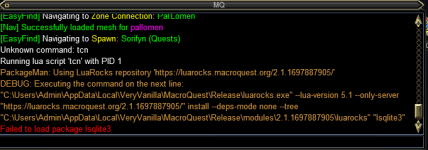
here is what i get now, this is becoming a source of irritation
View attachment 54838
I hope we can sort it for selfish reasons but if it helps others too, that's a plus.ok take the whole text from "C:\" to "lsqlite3" and paste it the cmd window, Go to Start -> Run -> cmd and please provide that output
Luarocks installs the required executable from Microsoft to use the DLL, if it is not doing that properly, that needs to be found out. I know it can be frustrating but if we get to the bottom of this we can alleviate the issues in the future for others who run into this problem.
The sure fire way is to do a complete reinstall of the OS, that is pretty much a 100% guarantee, but that is when all things have failed.
This issue came out of nowhere and affects some, so far less than 5-10 people..
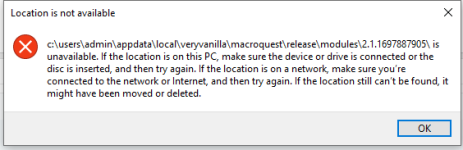
Are you running as admin or UAC? it looks like permissions.... is it possible to delete the folder in this location: %appdata%/local/luarocks and if possible not run UAC or admin if that is the case.I hope we can sort it for selfish reasons but if it helps others too, that's a plus.
Here is what i got on the run - and I assume i should use the quotes, otherwise i don't know how to do the luarocks" "lsqlite3"
"c:\users\admin\appdata\local\veryvanilla\macroquest\release\modules\2.1.1697887905\luarocks" "lsqlite3"
c:\users\admin\appdata\local\veryvanilla\macroquest\release\modules\2.1.1697887905\ is unavailable. If the location is on this PC, make sure the device or drive is connected or the disc is inserted, and then try again. If the location is on a network, make sure you’re connected to the network or Internet, and then try again. If the location still can’t be found, it might have been moved or deleted.
View attachment 54841
The modules folder appears to be empty - have view hidden enabled.
I don't know. Where do I check this and how would I change it? What is UAC?Are you running as admin or UAC? it looks like permissions.... is it possible to delete the folder in this location: %appdata%/local/luarocks and if possible not run UAC or admin if that is the case.
as in I mean do you run the cmd prompt as admin or is it default?

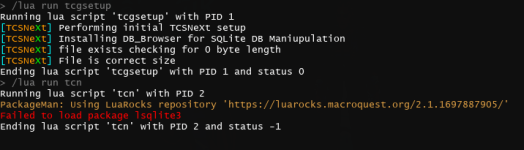
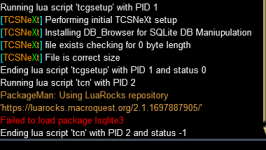
I really do not know how this is happening..Just got a new computer a few weeks ago. When attempting to run (/lua run tcn), I receive the following message after pressing the "install" option for PackageMan.lua:
View attachment 54891
I'm running a Windows 11 (home) x64 system with an i9 processor and 64 GB of RAM. Thank you in advance for your assistance.

This is the folder where sqlite should be:I'm having the same problems. I used tcn in the past, but today I ran it and got the same sqlite errors that have been listed for several pages now. I've wiped the appdata folder, I've wiped the tcn folder, reinstalled, etc. When trying to install sqlite3, it throws an error in the cmd box saying it's trying to use a wrong switch. There's a screen shot of this earlier.
Whenever I try to run tcnsetup or run tcn itself, the eq window locks and I cannot minimize it to see what the install window is doing. So all I can do is hover over the window and squint to read the text.
My guess would be if that changed then people have to re-add or add the folder:Not sure if linked, but since the last expansion, related or not to windows update or something else I have been getting warnings about EQBCS.exe in my MQNext folder and it's been going to Quarantine.

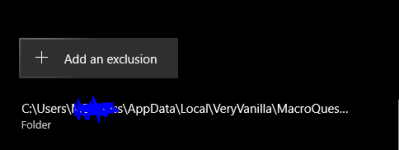
I ended up doing a complete system wipe and reload. Still getting an issue. Figured a wipe would have taken care of whatever gremlins were lurking on my system.Should print out a code
-- Returns:
-- 0 - success
-- 1 - luarocks not installed
-- 2 - user said no
-- 3 - package install failed
-- 4 - no package
-- 5 - prompt timed out
I used TCN yesterday without a problem, woke up and tried to make some blacksmith items, and brewing items and been crashing left and right when i use tcn. Anyone else having issues?
View attachment 55017
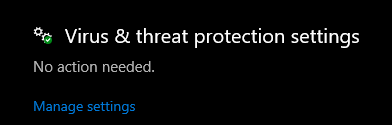
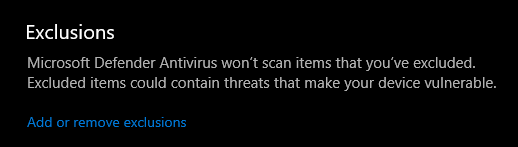
Did you do the exclusions for AV?I ended up doing a complete system wipe and reload. Still getting an issue. Figured a wipe would have taken care of whatever gremlins were lurking on my system.
AV meaning Antivirus? No antivirus running other than Windows Defender. I didn’t get kind of alert for a false positive or anything but I can check later when I am home.Did you do the exclusions for AV?
I mean if you look a few posts back I have the steps on this page.. I exclude the Appdata folder for redguides and also the install folder.AV meaning Antivirus? No antivirus running other than Windows Defender. I didn’t get kind of alert for a false positive or anything but I can check later when I am home.
Ok I added the exclusions + added sqlite file to base Lua folder and getting more of the same. Again this is on a fresh install of Windows with literally only EverQuest and MQ2 installed. Whatever the issue is I'm sure we'll get to the bottom of it.I mean if you look a few posts back I have the steps on this page.. I exclude the Appdata folder for redguides and also the install folder.

Luarocks install the redist from MS, but at this point you can try this:Ok I added the exclusions + added sqlite file to base lua folder and getting more of the same. Again this is on a fresh install of Windows with literally only EverQuest and MQ2 installed. Whatever the issue is I'm sure we'll get to the bottom of it.
Just tried this myself and it appears I don't have a Luarocks folder.please delete the folder in this location: %appdata%/local/luarocks
also run normally and not UAC, or Admin
the smell test usually indicates permissions.. if it doesn't write..Just tried this myself and it appears I don't have a Luarocks folder.
That was the case originally so that's what prompted me to do the whole OS wipe and reinstall. Hell, I even got a beefier hard drive. The only things I have MQ2 wise is MQ2Mage and TCN. MQ2Mage is working with no issues atm if that info is relevant.Ok I've gotta ask, did anyone copy from somewhere else or migrate from something else, because that is one of the causes of this.. Or even better having 2 redguides installations.. on different drives.. or random sqlite.dlls just hanging around..
System information in case it's relevant:the smell test usually indicates permissions.. if it doesn't write..
non-related but when I bought a used box, I restored it, but it still had elements from whatever they had on it, so I got a USB and did a restore from that. I am wondering if your OS has anything locked down by default or anything of that nature. I wonder if the account you are using is admin or has admin rights, longshot..
System information in case it's relevant:
Processor Intel(R) Xeon(R) CPU X5650 @ 2.67GHz 2.66 GHz
Installed RAM 12.0 GB
System type 64-bit operating system, x64-based processor
Edition Windows 10 Pro N
Version 22H2
Installed on 12/27/2023
OS build 19045.3803
Experience Windows Feature Experience Pack 1000.19053.1000.0
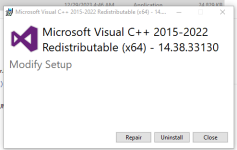
It looks like it did.. but I uninstalled and reinstalled it anyways. Still getting same results.Also since it didn't install to begin with can you install the redist.. https://aka.ms/vs/17/release/vc_redist.x64.exe



Please keep this in the LSO forum, and also, corrected.. next release

this isnt the thing from a couple months ago, the sub field divider is along the bottom and needs to be drug up?BTW, there seems to be a problem with IMGUI (I guess) and the Batch Recipe Window - the bottom part is always "scrolled out" and the components to purchase / or missing are not visible, even when scrolled down.
View attachment 55135
I did try dragging, but could not get it to move. Should I reset all imgui positions?this isnt the thing from a couple months ago, the sub field divider is along the bottom and needs to be drug up?
12/30/2023
3.999b - ChangeLog
Modifed: ItemLookup window was not working after recent changes, it now works.