• You've discovered RedGuides, an EverQuest multi-boxing and scripting community 🧙‍♀️⚙️. We want you to play several EQ characters at once, come join us and say hello! 👋

  • A TLP without truebox has thawed (Very Vanilla ready)
    Frostreaver
Scriber

Release Scriber (1 Viewer) 4.2.1

No permission to download
1682206516889.png
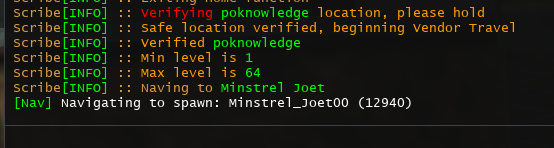
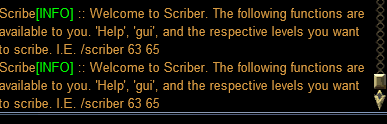
Didn't work at all. I tried loading the Lua, then doing /scriber 63 64 and separately, /scriber 64 64. Neither made a lick of difference, it's running the 1-64 PoK Vendor tour regardless of the launch arguments.

However, it DID throw an error, after scribing spells was finished, when running in this way:

D:\Games\VeryVanilla\MacroQuest-Live\lua\scriber\init.lua:1286: attempt to index field 'Zone' (a nil value) stack traceback: D:\Games\VeryVanilla\MacroQuest-Live\lua\scriber\init.lua: in function 'action' D:\Games\VeryVanilla\MacroQuest-Live\lua\scriber\init.lua:1521: in function <D:\Games\VeryVanilla\MacroQuest-Live\lua\scriber\init.lua:1495>
 
Last edited:
View attachment 47993
Didn't work at all. I tried loading the lua, then doing /scriber 63 64 and separately, /scriber 64 64. Neither made a lick of difference, it's running the 1-64 PoK Vendor tour regardless of the launch arguments.

However, it DID throw an error when running in this way:

D:\Games\VeryVanilla\MacroQuest-Live\lua\scriber\init.lua:1286: attempt to index field 'Zone' (a nil value) stack traceback: D:\Games\VeryVanilla\MacroQuest-Live\lua\scriber\init.lua: in function 'action' D:\Games\VeryVanilla\MacroQuest-Live\lua\scriber\init.lua:1521: in function <D:\Games\VeryVanilla\MacroQuest-Live\lua\scriber\init.lua:1495>
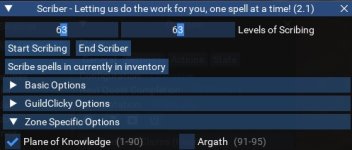
Did you try the sliders?
Untitled.jpg
 
Did you try the sliders?
View attachment 47996

Yes, I've tried the sliders, and they work great, but that's really not the issue I was trying to raise. I can successfully use Scriber. I like Scriber. I'm trying to use a feature of this Lua, which the documentation describes, that is not working as described.

From an ease-of-use perspective, it's MUCH easier on my team of six toons to type:
/dgae /lua run scriber /dgae /scriber 64 64

than it is to type /dgae /lua run scriber, then
Adjust slider on window 1, click off cloudy potions on window 1, click run on window 1
Switch to window 2, adjust slider on window 2, click off cloudy potions on window 2, click run on window 2,
switch to window 3, adjust slider on window 3, .....

You get the point.

It's not that Scriber doesn't work - it works, and it works great. I really like it. I was trying to ascertain if the specific feature - command-line operation - described in the .lua file itself worked. It either (a) does not, or (b) I am using it incorrectly.
 
Yes, I've tried the sliders, and they work great, but that's really not the issue I was trying to raise. I can successfully use Scriber. I like Scriber. I'm trying to use a feature of this lua, which the documentation describes, that is not working as described.

From an ease-of-use perspective, it's MUCH easier on my team of six toons to type:
/dgae /lua run scriber /dgae /scriber 64 64

than it is to type /dgae /lua run scriber, then
Adjust slider on window 1, click off cloudy potions on window 1, click run on window 1
Switch to window 2, adjust slider on window 2, click off cloudy potions on window 2, click run on window 2,
switch to window 3, adjust slider on window 3, .....

You get the point.

It's not that Scriber doesn't work - it works, and it works great. I really like it. I was trying to ascertain if the specific feature - command-line operation - described in the .lua file itself worked. It either (a) does not, or (b) I am using it incorrectly.
Yah, looking at the code, there may be some logic issues in the scriber function that hard sets the slider values and ignoring the bind /scriber.
 
Scriber is purchasing the Shaman version of Mawmun's Bite for a Beastlord. It's a level 108 spell.
 
Last edited:
Not sure if you are still updating this resource, but when using it, once getting to the navigation to Great Divide the Lua will just pause at "Enter GD" and sit there and do nothing. Doesn't crash. Just doesn't do anything. If I re-run the Lua, and de-select Great Divide, then it will work beyond that zone navigation. Just thought i'd mention it.
 
Broke my arm a few months ago and have been having multiple surgeries between my arm and spine. I'll get on soon and check through the issues people have been having.
 
Broke my arm a few months ago and have been having multiple surgeries between my arm and spine. I'll get on soon and check through the issues people have been having.
Take care of yourself brother. You don't need to worry about this much it's just about as good as any Lua I've ever used. I used it for every toon and I have 20-25.
 
Really sorry :(
I hope you have healed well.
This is still, a great Lua!!!
Really helps with managin at lower levels.
And I just would ask from higher authorities, of this forum, if it's possible to somene take over, and continue this awesome project?
 
Really sorry :(
I hope you have healed well.
This is still, a great lua!!!
Really helps with managin at lower levels.
And I just would ask from higher authorities, of this forum, if it's possible to somene take over, and continue this awesome project?
don't worry, I'll be updating it when I get more information of the new expansion.
 
I tried to use this and I have a problem. I read the instructions and after download unzipped it and copied the folder to the Lua folder, however I am not seeing the Lua for this. All I see is the three supporting files in the folder.
In Scriber folder after unzip I have init.Lua, merchants.Lua, and write.Lua. That is no scribe or scriber.Lua to put in the main Lua folder.
 
I tried to use this and I have a problem. I read the instructions and after download unzipped it and copied the folder to the LUA folder, however I am not seeing the Lua for this. All I see is the three supporting files in the folder.
In Scriber folder after unzip I have init.lua, merchants.lua, and write.lua. That is no scribe or scriber.lua to put in the main lua folder.
there shouldnt be, init.Lua will be the one starting the magic when you do /Lua run scriber (which tells it to look for init.Lua in the scriber folder in the Lua folder)

You dont use the Launcher btw?
 
I do use the launcher but even after Watching this Lua it hadn't shown up so I hit download to load it manually.. Finally showed up today. I was just going by the instructions page showing what the file structure was.

From Instructions page:
"
Lua (folder)
|--Scriber (folder)
|--|--Merchants.Lua
|--|--Write.Lua
|--Scriber.Lua <-- Missing when you hit download
"
 
Yes I did. It did finally show up on Laucher today.. seems it takes it awhile, or you need to logout of launcher and back in to catch new "watches".
 
I do use the launcher but even after Watching this Lua it hadn't shown up so I hit download to load it manually.. Finally showed up today. I was just going by the instructions page showing what the file structure was.

From Instructions page:
"
LUA (folder)
|--Scriber (folder)
|--|--Merchants.lua
|--|--Write.lua
|--Scriber.lua <-- Missing when you hit download
"
fixed the instructions. there is no scriber.Lua anymore. about 6 months ago the formats changed on how developers were using Lua and I never updated the instructions. thanks for the reminder
 
I have had the Lua buy the wrong spells a few times due to some spell names being substrings of others. Regrowth buying Regrowth of Dar Khura for example.

Could you edit line about 218 of init.Lua ? Add an equals to the beginning of the item name and it will do an exact match instead of a substring match.

Still haven't figured out how to handle the spells with same name but not same classes. (Merciful Light for example)


mq.TLO.Merchant.SelectItem(merchantItem.Name())

vs

mq.TLO.Merchant.SelectItem('='..merchantItem.Name())
 
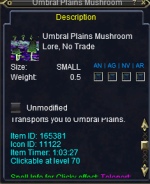
Adding Keyrings to Scriber. I'm aware of the new one from Laurion's Song, and I also have Umbral Plains mushroom that are both near or close enough and safe enough to vendors. any suggestions on other keyrings are welcome. please submit them via screenshot as such.
1700870013734.png
 
got more updates incoming. Gonna see if there is a way to properly buy spells by either id or full spell name. After reading the entire discussion page over again, seems like an issue I've constantly overlooked or been confused on and never fixed cause repetitive buying of spells you already have and not buying ones you need.
 
Did any hybrid classes get missed with their spells/tomes? I thought it was kinda weird there was only one vendor per class
 
When I /Lua run scriber, the GUI doesn't load by default, which creates the extra step of /scriber show to use it. I used to be able to buy the spells needing to be memmed and higher level spells in advance. It'll take care of the current levels needs, but won't purchase the higher level spells related to the slider setting.

This happened with a level 77 character, purchasing level 77 spells and wanting it to purchase level 78 spells in pok.

I notice adjusting the slider now clears unneeded checked locations. =-)

Thank you,
 
When I /lua run scriber, the GUI doesn't load by default, which creates the extra step of /scriber show to use it. I used to be able to buy the spells needing to be memmed and higher level spells in advance. It'll take care of the current levels needs, but won't purchase the higher level spells related to the slider setting.

This happened with a level 77 character, purchasing level 77 spells and wanting it to purchase level 78 spells in pok.

I notice adjusting the slider now clears unneeded checked locations. =-)

Thank you,
Thanks, I'll play with it when I get home. Gui sounds like it's doing what it's supposed to. Not sure why it isn't buying higher level spells. I just bought 121-125 with my 120 necromancer.
 
When I /lua run scriber, the GUI doesn't load by default, which creates the extra step of /scriber show to use it. I used to be able to buy the spells needing to be memmed and higher level spells in advance. It'll take care of the current levels needs, but won't purchase the higher level spells related to the slider setting.

This happened with a level 77 character, purchasing level 77 spells and wanting it to purchase level 78 spells in pok.

I notice adjusting the slider now clears unneeded checked locations. =-)

Thank you,
Also, you can use the command /sc 77 78 and it should buy everything between 77 and 78. The sliders can be a bit tedious and difficult to adjust properly
 
Release Scriber

Users who are viewing this thread

Back
Top
Cart