• You've discovered RedGuides, an EverQuest multi-boxing and scripting community 🧙‍♀️⚙️. We want you to play several EQ characters at once, come join us and say hello! 👋

  • A TLP without truebox has thawed (Very Vanilla ready)
    Frostreaver
RedGuides Launcher

RedGuides Launcher 1.1.0

No permission to download
I am not able to run on my three accounts any of the 3 plugins wiz, chanter, claric or kiss or RGMecs
I have not changed anything in my files when I click MQ Folder it is found, the path to EQ is still right. I have brought
them on manualy instead of auto and it is still the same no plugins. I can run other plugins like ground just not the main ones.
I had this happen before once but I can't remember how it was fixed.
I am not very computer capable. If anyone can help please simplify to not short terms I won't understand.
Thank You
It says
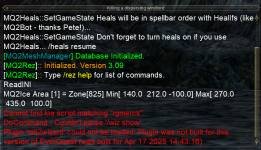
1748794767639.png
 
I am not able to run on my three accounts any of the 3 plugins wiz, chanter, claric or kiss or RGMecs
I have not changed anything in my files when I click MQ Folder it is found, the path to EQ is still right. I have brought
them on manualy instead of auto and it is still the same no plugins. I can run other plugins like ground just not the main ones.
I had this happen before once but I can't remember how it was fixed.
I am not very computer capable. If anyone can help please simplify to not short terms I won't understand.
Thank You
It says
View attachment 69834
Check however you are updating VV. You look like you didn't pull your plugins or luas
 
Check however you are updating VV. You look like you didn't pull your plugins or luas
I run the launcher updater and it shows them all I even tried refreshing and updating each many times, for the last two days.
Is this what you mean? I do get it all mixed up VV RG all of the terms what does it mean didn't pull?
Thank you...
I am not young and I am playing 3 by hand today 😂

UPDATE
I just noticed on the other computer the plugin updates show 6/1 last update but on my launcer was an earlier date and I had not scrolled all the way right,
it says N/A and then install so I did so sorry I have no idea what I did wrong but it is working now !!!
Appriciate...
 
Last edited:
I run the launcher updater and it shows them all I even tried refreshing and updating each many times, for the last two days.
Is this what you mean? I do get it all mixed up VV RG all of the terms what does it mean didn't pull?
Thank you...
here's the "regular" blurb about it.
> Check this link <
If you have already checked the RG Launcher Plugin Tab then read the following:
- The RG Launcher is unable to *delete* old files.
-- This means you will get an error box if you don't have a current plugin that matches the mq build
-- your options are:
--- a: purchase a license
--- b: delete the old .dll in your plugin folder, and/or
--- c: change your macroquest.ini to MQ2PluginName=0 under [Plugins]


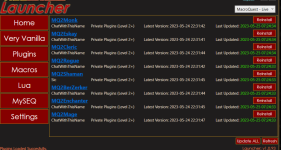
Here's a really old image - but the idea is the same.
if on the "plugins" tab you were all updated, they would be green
1748798745750.png

You should spend some time in the settings tab above ensuring that they are correct - and then ensure you're launching /updating/using the mq you're updating.

Imo >>> RedFetch <<< is easier and prone to fewer issues, and hopefully will be a fulltime replacement of the RG launcher in the future

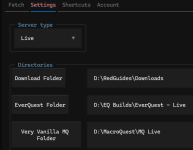
it has very clear and clean settings with the locations and information

1748799067037.png

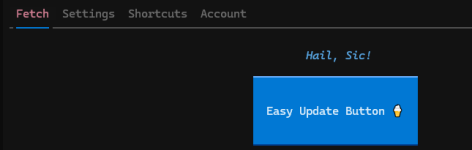
and then a very easy "Easy Update Button"
1748799093257.png

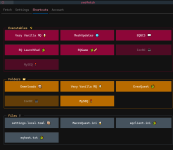
you can navigate to things you might need to open/launch

1748799118013.png
 
here's the "regular" blurb about it.
> Check this link <
If you have already checked the RG Launcher Plugin Tab then read the following:
- The RG Launcher is unable to *delete* old files.
-- This means you will get an error box if you don't have a current plugin that matches the mq build
-- your options are:
--- a: purchase a license
--- b: delete the old .dll in your plugin folder, and/or
--- c: change your macroquest.ini to MQ2PluginName=0 under [Plugins]


Here's a really old image - but the idea is the same.
if on the "plugins" tab you were all updated, they would be green
View attachment 69835

You should spend some time in the settings tab above ensuring that they are correct - and then ensure you're launching /updating/using the mq you're updating.

Imo >>> RedFetch <<< is easier and prone to fewer issues, and hopefully will be a fulltime replacement of the RG launcher in the future

it has very clear and clean settings with the locations and information

View attachment 69836

and then a very easy "Easy Update Button"
View attachment 69837

you can navigate to things you might need to open/launch

View attachment 69838
Thank you again, All of that is not easy to understand I do try to get the answers on my own searching things used to be so easy!!
My Son convinced me to move from MMOBugs to here and RG ( LOVE IT) but he is not available to help me anymore so I hate to ask questions since I have a hard time understanding the answers anyway.
It is working and I am thank you for responding so quickly!
 
hello,
i just bought mq2ranger license and mq2druid license. im new to mq2 so it may be a dumb noob mistake; however, when i try to do "/plugin mq2ranger" it says "MQ2Ranger cannot be loaded. plugin not found". i dont understand because it worked for the druid just fine. ive looked around different threads and pages with plugin commands and nothing is getting it to work so im going to try and post here for help. i found a "/plugin list" command and looked through it and the druid is there but the ranger is not. i removed and redownloaded mq2ranger and that didnt fix either.
please help
 
Thank you again, All of that is not easy to understand I do try to get the answers on my own searching things used to be so easy!!
My Son convinced me to move from MMOBugs to here and RG ( LOVE IT) but he is not available to help me anymore so I hate to ask questions since I have a hard time understanding the answers anyway.
It is working and I am thank you for responding so quickly!
Most of us would be happy to act in his stead. We can take it slow! Don't be afraid to ask.
 
Seeking help for something I'm sure is simple and I'm just missing...
Had to replace my motherboard and hard drive, and I'm setting things back up. I installed everything, logged into the RG Launcher. It found and installed my Macros, but Plugins are missing. I refresh and it goes to Fetching... then Processing... then I get the You have no "extra" plugins to be managed. But I should have a couple there, specifically looking for a couple that I purchased here.
Thoughts anyone?
 
Seeking help for something I'm sure is simple and I'm just missing...
Had to replace my motherboard and hard drive, and I'm setting things back up. I installed everything, logged into the RG Launcher. It found and installed my Macros, but Plugins are missing. I refresh and it goes to Fetching... then Processing... then I get the You have no "extra" plugins to be managed. But I should have a couple there, specifically looking for a couple that I purchased here.
Thoughts anyone?
make sure you're selecting "live" and not test or emu on the launcher
 
Seeking help for something I'm sure is simple and I'm just missing...
Had to replace my motherboard and hard drive, and I'm setting things back up. I installed everything, logged into the RG Launcher. It found and installed my Macros, but Plugins are missing. I refresh and it goes to Fetching... then Processing... then I get the You have no "extra" plugins to be managed. But I should have a couple there, specifically looking for a couple that I purchased here.
Thoughts anyone?
Did you update MQ itself in the RG launcher?
 
Did you update MQ itself in the RG launcher?
It's a fresh install on a new hard drive, installed RG Launcher, did the install option under Very Vanilla.
Just to make sure I turned off the firewall, rebooted, uninstalled RGL and installed it again.
I'm baffled.
 
It's a fresh install on a new hard drive, installed RG Launcher, did the install option under Very Vanilla.
Just to make sure I turned off the firewall, rebooted, uninstalled RGL and installed it again.
I'm baffled.
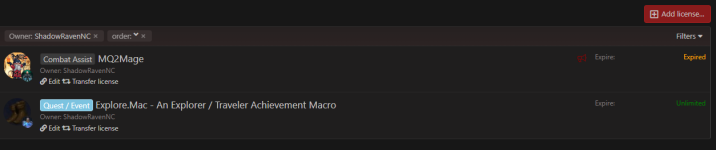
these are your licenses - looks like your mq2mage is expired
1748895423846.png
 
Did you update MQ itself in the RG launcher?
Yes... installed RGL... logged in... went to VV and did install. Have even uninstalled everything, installed again...
Rebooted multiple times, even turned off the firewall in case there was something blocking it.
 
So, I downloaded the software and able to log into the app. However, I cannot the directory to link it to in the setting on the app. Any help would be greatly appreciated. Thanks in advance.
 
After opening up the app to launch MQ I get a message about the MacroQuest.exe cannot be found. So when I go into settings inside the app, I cannot find the folder with MacroQuest.exe to list the directory in which it's housed on my hard drive to launch MQ.

I hope that makes sense.
 
After opening up the app to launch MQ I get a message about the MacroQuest.exe cannot be found. So when I go into settings inside the app, I cannot find the folder with MacroQuest.exe to list the directory in which it's housed on my hard drive to launch MQ.

I hope that makes sense.
Ok, I fixed it, but still cannot connect to the EQBCS. Thanks in advance for any assistance.
 
Not sure why, I am not receiving any type of error. The box comes up, but does not connect with characters.
'the box' is the server
do you know how it works? You connect to eqbc ingame with /bccmd connect 127.0.0.1 2112
and make sure you have the plugin loaded with /plugin mq2eqbc

more info here
 
'the box' is the server
do you know how it works? You connect to eqbc ingame with /bccmd connect 127.0.0.1 2112
and make sure you have the plugin loaded with /plugin mq2eqbc

more info here
I get invalid command when i try to connect to server
 
Not sure why, I am not receiving any type of error. The box comes up, but does not connect with characters.
In-game you need to load the plug-in
/Plugin eqbc
Then
/Bccmd reconnect (assuming it is setup)

You don't need to be connected to this if you don't plan on using eqbc the default connection method is using Dannet
 
In-game you need to load the plug-in
/Plugin eqbc
Then
/Bccmd reconnect (assuming it is setup)

You don't need to be connected to this if you don't plan on using eqbc the default connection method is using Dannet
Thanks it worked. Now, how do it get the box that was in the upper left hand corner that provided information like % of exp, % of AA exp, listed name mobs when they had spawned etc..? Thanks in advance for the assistance.
 
Sounds like one of several HUD things - if you can look on the other computer, in the MQ directory/Config, for a file named ingame.cfg, that may have the name, if it is a Lua. If it is a plugin, it'd be listed in the macroquest.ini file, same directory, in the plugins section. all there with a '1' after them are ones you had active. I don't recall any offhand that sow names that are spawned along with hp/exp/aaxp, etc. I use a HUD called QuickHud (Lua), that show character/zone info, and Alertmaster (Lua) that i can pop down to show mob info.

You might also consider copying over the Config and Lua folders from the other computer, most of the things that made your setup yours are in those two folders.
 
**EDIT** Ended up d/ling RG Launcher, installing VV that way, then opened Redfetch for updates, which worked. Will post on the Redfetch page to suggest being able to install VV from Redfetch.**

First time trying to install VV. Saw in another thread where Sic recommended using Redfetch, so I installed and ran that first. I had Redfetch install itself in the Public directory, and pointed it to the EQ directory. It then brought up a page here on the forum that asked me to grant permission, so I did. Then, it ran a lot of info across the screen, and closed itself without any further information I could read.

I have since tried re-opening Redfetch three more times, but it never stays up long enough for me to install VV. Do I need to install this RG Launcher first, then install VV, then run Redfetch? Did I mess things up by trying to run Redfetch first?

Sorry if these are stupid, noob questions, but I have tried for days to read up as much as I can on everything, and without the software running in front of me, I feel lost.

Thanks in advance for any help anyone can provide.
 
Last edited:
View attachment 70754
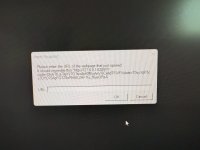
I am trying to open launcher and this keeps popping up? Any ideas?
- please post rg launcher questions in the rg launcher discussion thread (i moved it for you)
- your photo doesn't need to be the size of TX - texas toast is great, texas phone pics are not (i shrunk it for you)
- - you can use screen snip instead of the cell phone picture of your screen
- did you do what it says?

did you do the bit that it says to do?

it tells you to grab the URL that pops up, and copy it, and paste it in the box and press "ok"

did you do that?
 
Sorry I am old and stupid
we're all either already old or going to be soon - and stupid is a matter of perspective

does this mean you got it sorted out?

happy to help you dude

(also, no laughs at the texas toast?)
 
Yes I copied and pasted and it fixed it after several attempts I don’t copy and paste or click links without knowing it’s ok to do so .
 
Yes I copied and pasted and it fixed it after several attempts I don’t copy and paste or click links without knowing it’s ok to do so .
all good bro - that's why we are here.

don't be shy - lots of us hang out on discord 24/7 too - so if you have something like this where you're just twiddling your thumbs and need someone to talk to, feel free
 
my launcher is saying PATCH DAY NOT AVAILABLE it is Saturday july 19th Not Patchday and it will not let me update the launcher. any insight?

i have uninstalled and reinstalled launcher
 
RedGuides Launcher

Users who are viewing this thread

Back
Top
Cart