this doesn't have anything to do with the Redguide's launcher.
this is an eq graphics crash.
you should:
- ensure your video drivers are up to date
- ensure you have disabled the new everquest ui engine in your eqclient
UseNewUIEngine=0


this doesn't have anything to do with the Redguide's launcher.
UseNewUIEngine=0I just had this happen to my other PC after the update it wouldnt launch properly it trys to run testrunner.exe then closes out.That was one of the first things I tried, didnt work. I'll just unsub from RG and EQ until Rg is fixed. I pay for this and expect it to work correctly, I should never have to download something else, just to make the original work.
yes. it means you are running eqbcs (the eqbc server) you need to exit out so the launcher can update.I have been getting this error message when loading launcher but I have never seen it before. Any suggestions?
"Please exit out of the alternate EQBCS for an update: G:\Macroquest\3meh6fqs.exe"
Thanks in advance for your input.
Medic

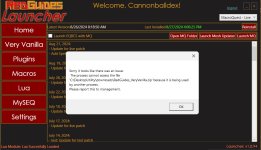
this almost always means that you have something like antivirus or file syncing like one-drive holding it hostage.Something new. Just reporting to management.View attachment 64342
Check your settings for each location you have it them pointing to. You should be using a different directory for different install typesI am trying to get MQ2 to launch the Emu version. I have the dropdown set to "Emu Servers" but it keeps loading the (Live) instead of Emu version?
View attachment 64532
View attachment 64531

That was it. TyCheck your settings for each location you have it them pointing to. You should be using a different directory for different install types
 Tried to redcent you but I spent all mine today apparently!
well be using the new launcher soon - should check that out and give feedback on thatI figured with some downtime today, I would play with a fresh install of RedGuides for the test server into a new folder. I noticed one discrepancy in the way the Macro page works versus the Lua page. On the Macro page, you have the install button for each watched resource, then teh Update All button at the bottom. The Update All button wil download all of the not yet installed macros, as well as update any you had installed previously.
On the Lua page/tab, if I click the Update All button it will only update ones I have already installed, not the ones I have yet to install. That means I have to click the Iinstall button for each row individually. I am not sure if this is deliberate or planned, just thought I would suggest the Update All to actually instal any modules that are watched but not yet installed.
Is that the one that Ionis is developing? I had been tesying that one out a bit, but last time I tried it was still being worked on. I think its time to dio anotehr test. Thankswell be using the new launcher soon - should check that out and give feedback on that
all plugins that come with the emu build are automatically in the emu build - there are no plugins to manage for emu currently.Is that why you cannot update any plugins when you are updating the Launcher on Emu? Do plugins not work on Emu?
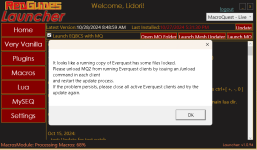

No, because all my toons were already out. I will issue /unload next time BEFORE camping them out.Did you do what it said? Issue the unload command in each process then restart the update?
imo, you should not /unload unless absolutely necessary - running eq without mq running but mq is loaded is a bad general practice.No, because all my toons were already out. I will issue /unload next time BEFORE camping them out.
EQ over the years has had issues with keeping a set of files "alive" even when all application instances are closed. Thats why one of the first questions that gets asked is "did you reboot". EQ is just bad at releasing its threads/processing loop.
seems launcher takes forever to get info from the forums ... any ideas ?Having in-game issues? Please use the appropriate discussion thread (not this one):
Live, Test, Emu
This is a discussion thread for the RedGuides Launcher.
You can read about the launcher here
Nope. Would suggest maybe trying a different default browserseems launcher takes forever to get info from the forums ... any ideas ?
Ok , tryed with google chrome & explorer , rebooting pc … nothing . What is happening : i run the launcher , log in is ok , grabbing my version ok installation ok , mesh updater ok , but on plug in , my sew, Lua tab : empty and clicking refresh nothing happensNope. Would suggest maybe trying a different default browser
Ok , tryed with google chrome & explorer , rebooting pc … nothing . What is happening : i run the launcher , log in is ok , grabbing my version ok installation ok , mesh updater ok , but on plug in , my sew, lua tab : empty and clicking refresh nothing happens

stay forever fetching available plugins , but nothing happens , black pagewhat happens when you hit refresh?
View attachment 66087
you show you've downloaded the extra plugins you have access to yesterday and again today - is it working for you now?stay forever fetching available plugins , but nothing happens , black page
not really , only workig twice after relaunchig several times , so i managed to grab as much as i can before it dontyou show you've downloaded the extra plugins you have access to yesterday and again today - is it working for you now?
restarting your pc should mean that you don't have eq running.OK I have updatr. I got pop up. It says it looks like am copy of EQ running has some files locked.
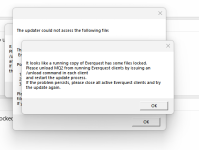
"Nothing has changed" you may not think so, but verily something has, since this is happening now and didn't before.Nothing has changed from before. I checked my anti and I stilll have EQ as not to be scanned.
View attachment 66154
Here is a pic
setting eq not to be scanned may not help mq.Nothing has changed from before. I checked my anti and I stilll have EQ as not to be scanned.
View attachment 66154
Here is a pic