• You've discovered RedGuides, an EverQuest multi-boxing and scripting community 🧙‍♀️⚙️. We want you to play several EQ characters at once, come join us and say hello! 👋

  • A TLP without truebox has thawed (Very Vanilla ready)
    Frostreaver
RedGuides Launcher

RedGuides Launcher (3 Viewers) 1.1.0

No permission to download
Getting quite tired of seeing this every time I try to do the update, particularly when I don't have any characters logged in. So, what's going on? I come back Several hours later or the next day and it works just fine. Any reason why I wouldn't be able to update when an update is available?
yes, something is still running and is unable to kill it

eqbcs
something installed as a service - like eqbcs

restart your pc and then patch
 
Getting quite tired of seeing this every time I try to do the update, particularly when I don't have any characters logged in. So, what's going on? I come back Several hours later or the next day and it works just fine. Any reason why I wouldn't be able to update when an update is available?
Just making sure you're aware, but SHIFT + WINDOWS BUTTON + S will allow you take a snipped of your screen so you don't have to take a picture of your screen with your phone.
 
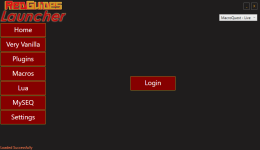
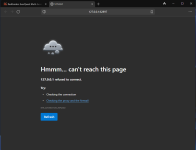
Getting an interesting error now. Launcher comes up and only displays a LOGIN button. Clicking that opens default browser to 127.0.0.1:62897 and page can't be reached. I have uninstalled the initial March and installed again after a fresh reboot. Still having this issue can't login or start MQ via launcher.

rg-1.png
rg-2.png
 
Getting an interesting error now. Launcher comes up and only displays a LOGIN button. Clicking that opens default browser to 127.0.0.1:62897 and page can't be reached. I have uninstalled the initial March and installed again after a fresh reboot. Still having this issue can't login or start MQ via launcher.

View attachment 62220
View attachment 62221
This looks like a firewall or browser blocking the redirect to validate your login?

I would check firewall to allow RG launcher to request through it, and can also clear cookies/swap browsers.

One of the smart folks can maybe give you a more exact answer.
 
Looks like a port issue on the PC. Are you running any other apps, firewalls, or antivir that could be blocking 62897?
 
This looks like a firewall or browser blocking the redirect to validate your login?

I would check firewall to allow RG launcher to request through it, and can also clear cookies/swap browsers.

One of the smart folks can maybe give you a more exact answer.
Good call but I disabled the firewall and ran again same issue. I had some Windows upda
Looks like a port issue on the PC. Are you running any other apps, firewalls, or antivir that could be blocking 62897?
No love even with disabled Windows 11 firewall and rebooted. This is a dedicated EQ laptop there is nothing installed other than EQ and default Windows 11 apps and RG/MQ. This only recently became a problem today with last working session on Memorial Day weekend. I will change my default browser from DDG to Firefox and see if that is related although I don't ever recall a browser window opening in the foreground and DDG browser has been my default on this rig since I set it up in late 2023. Open to suggestions and not opposed to log review just need to know where to look.

Looks like a port issue on the PC. Are you running any other apps, firewalls, or antivir that could be blocking 62897?
Thought the same - but this is a dedicated rig to running EQ, RG/MQ. Going to change default browser from DDG to Firefox (details in another reply above)
 
Confirmed. The DDG browser when set as default browser now consistently fails. Setting Firefox and Edge as default browser, login opens with message to return to the app and works as intended. I would suggest a bugfix with the launcher team to see if they can get this worked out, please :)
 
Confirmed. The DDG browser when set as default browser now consistently fails. Setting Firefox and Edge as default browser, login opens with message to return to the app and works as intended. I would suggest a bugfix with the launcher team to see if they can get this worked out, please :)
If it helps any, I use Brave Browser. Works wonderfully.
 
Getting quite tired of seeing this every time I try to do the update, particularly when I don't have any characters logged in. So, what's going on? I come back Several hours later or the next day and it works just fine. Any reason why I wouldn't be able to update when an update is available?

Some people have posted on the DBG forums about getting "Device Reset" errors when they try to camp out of their characters in EQ. When that happens EQ will stay resident in memory even though there isn't any visual indication. Next time this happens load up Windows Task Manager and see if there are leftover processes running which you can then close manually.
 
Start redguides launcher, I can see it start, then nothing. No launcher or process, restarted, checked processes, nothing. This worked yesterday, has NOT been updated and literally nothing on my system has changed or been updated.
 
Last edited:
Start redguides launcher, I can see it start, then nothing. No launcher or process, restarted, checked processes, nothing. This worked yesterday, has NOT been updated and literally nothing on my system has changed or been updated.
Try a reboot, if that doesn't work try the RG Manager:

 
Try a reboot, if that doesn't work try the RG Manager:

That was one of the first things I tried, didnt work. I'll just unsub from RG and EQ until Rg is fixed. I pay for this and expect it to work correctly, I should never have to download something else, just to make the original work.
 
Start redguides launcher, I can see it start, then nothing. No launcher or process, restarted, checked processes, nothing. This worked yesterday, has NOT been updated and literally nothing on my system has changed or been updated.
That was one of the first things I tried, didnt work. I'll just unsub from RG and EQ until Rg is fixed. I pay for this and expect it to work correctly, I should never have to download something else, just to make the original work.
sorry to hear that is your take, unfortunately that approach isn't really something that is going to help you.
there is *never* a situation where "literally nothing on my system changed or been updated" - it just isn't possible. what instead you mean is "i didn't intentionally make changes that i would think could cause this" - unfortunately windows does whacky stuff sometimes, and if you're running a vpn, or antivirus, or even file syncing software, there are circumstances, well outside of the RG launcher, that *can* change without you knowing which will cause a unique-to-you issue that will require some digging into why so it can be resolved on your end.

One of the reasons the new launcher was suggested, is because installing and doing that would be getting all new permissions for it to run, which, for some folks who have had windows permissions update and deny their RG launcher, they'd be starting fresh telling their PC to please allow the program.

One of the many things that RG and MQ are doing to try and help you avoid the wrath of dbg includes obfuscating exe names - so your computer might have permissions for aakjsdad.exe but if for some reason that changed to poiuupasd.exe, you no longer do.

unsubbing from RG and EQ is extreme, and is not going to result in anything for you being fixed, unless if you uninstall everything, then come back sometime in the future and reinstall it and now "finally they fixed it", when in reality it wasn't really realted to updates from RG.

now having said all that, RG launcher could indeed have an actual issue that is causing you woes - but you have to meet folks half way who are trying to help you - torches, pitchforks, and apathy don't make for good trouble shooting.

Hope you stick around (and your issue is swiftly resolved).

If you PM me i'd be happy to remote in and get you fixed.
 
Some people have posted on the DBG forums about getting "Device Reset" errors when they try to camp out of their characters in EQ. When that happens EQ will stay resident in memory even though there isn't any visual indication. Next time this happens load up Windows Task Manager and see if there are leftover processes running which you can then close manually.
I had a bat file with a single line for this with

taskkill /f /im:eqgame.exe
 
sorry to hear that is your take, unfortunately that approach isn't really something that is going to help you.
there is *never* a situation where "literally nothing on my system changed or been updated" - it just isn't possible. what instead you mean is "i didn't intentionally make changes that i would think could cause this" - unfortunately windows does whacky stuff sometimes, and if you're running a vpn, or antivirus, or even file syncing software, there are circumstances, well outside of the RG launcher, that *can* change without you knowing which will cause a unique-to-you issue that will require some digging into why so it can be resolved on your end.

One of the reasons the new launcher was suggested, is because installing and doing that would be getting all new permissions for it to run, which, for some folks who have had windows permissions update and deny their RG launcher, they'd be starting fresh telling their PC to please allow the program.

One of the many things that RG and MQ are doing to try and help you avoid the wrath of dbg includes obfuscating exe names - so your computer might have permissions for aakjsdad.exe but if for some reason that changed to poiuupasd.exe, you no longer do.

unsubbing from RG and EQ is extreme, and is not going to result in anything for you being fixed, unless if you uninstall everything, then come back sometime in the future and reinstall it and now "finally they fixed it", when in reality it wasn't really realted to updates from RG.

now having said all that, RG launcher could indeed have an actual issue that is causing you woes - but you have to meet folks half way who are trying to help you - torches, pitchforks, and apathy don't make for good trouble shooting.

Hope you stick around (and your issue is swiftly resolved).

If you PM me i'd be happy to remote in and get you fixed.

This Tasi person must be a very lonely soul because if this is how speaks to everyone in his life, as I said when he said this to me about Guild Buff Assistant when all I did was thank him for downloading the Macro and to let me know if it was doing anything he needed and I would correct the problem for him.
"Umm great, but I dont get why you even pm'd me. I downloaded it, tried it once and thought it was trash, so I stopped using it and wont use it again."
 
Apx since two MQ updates ago, when I close out of MQ on my PC by Right Clicking the MQ icon in the Task Tray then Exit/Close, this action no longer removes the Background Process from running as well. Before I can get the program up and running again without rebooting I have to open my Task Manager and close out the background process.

If this could be fixed again to where closing MQ from the task tray also closes the background process like it used to would be really appreciated. Until then I have a simple work-around.

Regards,
~TheFiddler~
 
hi,
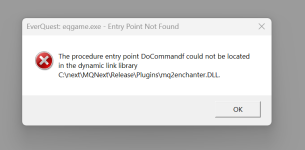
everything works great. Just getting this error now because i don't use this anymore. is there a way to remove it so i can have a smooth auto login ?
 

Attachments

  • Screenshot 2024-06-14 020008.png
    Screenshot 2024-06-14 020008.png
    25.5 KB · Views: 0
hi,
everything works great. Just getting this error now because i don't use this anymore. is there a way to remove it so i can have a smooth auto login ?
Yep, there are a few posts about this around. Go into your MacroQuest\plugins folder and delete the DLL. If you're having trouble finding this folder, you can use the systray app to open the root MQ folder and go from there
 
hi,
everything works great. Just getting this error now because i don't use this anymore. is there a way to remove it so i can have a smooth auto login ?
> Check this link <
If you have already checked the RG Launcher Plugin Tab then read the following:
- The RG Launcher is unable to *delete* old files.
-- This means you will get an error box if you don't have a current plugin that matches the mq build
-- your options are:
--- a: purchase a license
--- b: delete the old .dll in your plugin folder, and/or
--- c: change your macroquest.ini to MQ2PluginName=0 under [Plugins]
 
Apx since two MQ updates ago, when I close out of MQ on my PC by Right Clicking the MQ icon in the Task Tray then Exit/Close, this action no longer removes the Background Process from running as well. Before I can get the program up and running again without rebooting I have to open my Task Manager and close out the background process.

If this could be fixed again to where closing MQ from the task tray also closes the background process like it used to would be really appreciated. Until then I have a simple work-around.

Regards,
~TheFiddler~
Thanks for the work around. Sure beats rebooting every time. Would also like to see this fixed.
 
tried to do what it asked, and nothing happened or worked, does anyone know why this is happening
added the url but then when logging in, just vanishes and does nothing started this 4 times and same outcome

tried to do what it asked, and nothing happened or worked, does anyone know why this is happening
added the url but then when logging in, just vanishes and does nothing started this 4 times and same outcome
Trying to update via launcher
 

Attachments

  • ghjkghjkgh.PNG
    ghjkghjkgh.PNG
    47.2 KB · Views: 0
Getting an interesting error now. Launcher comes up and only displays a LOGIN button. Clicking that opens default browser to 127.0.0.1:62897 and page can't be reached. I have uninstalled the initial March and installed again after a fresh reboot. Still having this issue can't login or start MQ via launcher.

View attachment 62220
View attachment 62221
@Monkeyman618 read the replies starting at this post and go from there
 
tried to do what it asked, and nothing happened or worked, does anyone know why this is happening
added the url but then when logging in, just vanishes and does nothing started this 4 times and same outcome


Trying to update via launcher

I had a similar problem where DuckDuckGo browser was my default browser. Try setting Edge or Firefox as your default -- be aware that some plugins for these browsers can also get in the middle. Either your plugin or browser are interfering with the app to communicate with itself to allow the login prompt to appear from the service to the login for your account.
 
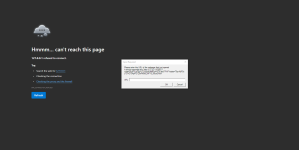
I have used this for a year, took a month off, now I cant get redguides program to launch, It opens and stays stuck on log in.... I click that, then it opens my web browser to these forums, i log in, then still can't use the program, it stays stuck on the log in open screen.
 
127.0.0.1 refused to connect.

Every browser, nothing working
That might be mq2eqbc, is that what you're talking about about?

You didn't post in mq2eqbc or say, but what you did say would point towards that.

Do you mean the RedGuides launcher?

If you looked in that discussion thread (and posted there) you'd see some folks using different browsers running into that issue.

I suspect you're talking about the rg launcher
 
For me that means eqbc for some reason whatever toon instance that is isnt connecting so that toon is not going to do anything you command it to do like //sit or something like that. The solution would be to check and make sure you didn't accidently close it out or can maybe type /bccmd connect localhost in the mq window and see if it will find it. If you arent using eqbc to run all your toons and using dannett can probably ignore that message but I don't use anything but eqbc so might be wrong. Hopefully somebody with more expertise will chime in
 
What does this mean , and how do I resolve it?

127.0.0.1 refused to connect.
This isn't a crash.

Is this the RG launcher or eqbcs?

I'm going to guess it is the launcher. Please see previous replies (now I've moved your post).
 
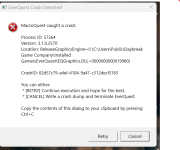
Yes RG launcher. I had six toons grinding away and then all 6 had a memory execution message and RG launcher went to login screen, I clicked login then received the 127.0.0.1 refused to connect message.
 
Yes RG launcher. I had six toons grinding away and then all 6 had a memory execution message and RG launcher went to login screen, I clicked login then received the 127.0.0.1 refused to connect message.
Browser is not the issue tried Duck, Chrome, and Firefox. Question is, why was RG Launcher working and the next minute it's not?
 
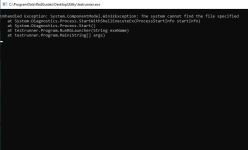
Well, I have read through these forums to find my issues regarding the Launcher with no success on my end. Here's my story: I had a power outage in the hot Midwest earlier today. When the power came back on, smooth sailing loading up the launcher had a new update (ok cool) then proceeded to load my toons up. Bam! The power went out again! It came back on immediately this time, but have not been able to load the launcher at all. I have uninstalled - rei-nstalled....pulled some hair out....I have checked firewalls, used a different browser, made sure I was paid up (lol) and now I'm groveling because I do not know what else to do. Any help would be appreciated. Thank you!

The second image is after troubleshooting compatibility. This came up briefly, but then showed ---Incompatible Windows 8 - fixed
 

Attachments

  • IMG_5687.mov
    IMG_5687.mov
    3.8 MB
  • Screenshot (436).png
    Screenshot (436).png
    16.5 KB · Views: 0
RedGuides Launcher

Users who are viewing this thread

Back
Top
Cart