• You've discovered RedGuides, an EverQuest multi-boxing and scripting community 🧙‍♀️⚙️. We want you to play several EQ characters at once, come join us and say hello! 👋

  • A TLP without truebox has thawed (Very Vanilla ready)
    Frostreaver
RedGuides Launcher

RedGuides Launcher (2 Viewers) 1.1.0

No permission to download
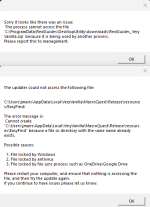
After this last update today (12/12) it seems I am no longer able to update VV, using the update button. When I do I get the following messages pop up see attached.

Steps I have taken
1. Uninstalled anti virus program atm (was using Bitdefender, currently uninstalled and fresh reboots since)
2. Turned off all VPN software (was using NordVPN) its currently not running/not connected
3. I have looked through all of Microsofts Windows Security, only thing I could see that might be holding things up was Firewall and I turned those off during testing)
I guess I wonder what it means by the message "Possibly locked" so if anyone has any suggestions I would appreciate it. Would like to make sure I have things working again.
I should mention the reason for this is everything was running good until today now in game, whenever I zone or such the game crashes at least 1 or 2 instances of the game. So I figure it might be something with this message. I am still able to login and play and all the scripts/etc seem to run. But the crashes are definately new to me.

Thoughts?
1700792683852-png.53512
errorRG.png
 
It took a couple minutes but just let the login to its thing even though it says "login" right away.

It will come up eventually and then was able to patch.

However, its not pulling and showing any plugins in case they need to be updated.
 
Thank you for your patience while everyone hits the patcher and the website, appears we're getting hammered pretty heavily.

At least us folks on the east coast are having a slow time patching atm.
 
not to pile on to everyone mobbing the site, and the launcher. I am getting an error message when I try to load the list for my plugins. I dunno how to take screenshots, but the main line says "Unexpected character encountered while parsing value: <.Path", line 0, position 0."
says to report to management, so thats what I be doin :D Love the software, and love the community.
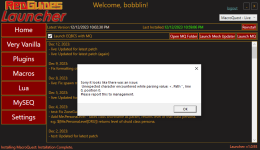
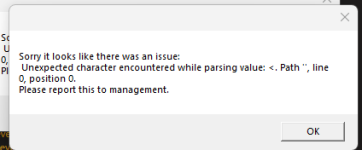
 
not to pile on to everyone mobbing the site, and the launcher. I am getting an error message when I try to load the list for my plugins. I dunno how to take screenshots, but the main line says "Unexpected character encountered while parsing value: <.Path", line 0, position 0."
says to report to management, so thats what I be doin :D Love the software, and love the community.
Thank you for your patience while everyone hits the patcher and the website, appears we're getting hammered pretty heavily.
 
I have been waiting all day for the patch (well at least since noon with the second EQ patch of the day.
Its almost 10pm my time (central)
When launching I now get an error on the opening screen
Sorry it looks like there was an issue:
Unexpected character encountered while parsing value: <. Path",line 0, postion 0.
Please report this to management.

Please fix this.
 
Thank you for your patience while everyone hits the patcher and the website, appears we're getting hammered pretty heavily.

You wait and try again in a bit.

Please don't duplicate post all over the place. Launcher discussion goes in the launcher thread - where you already posted.
 
Thank you for your patience while everyone hits the patcher and the website, appears we're getting hammered pretty heavily.

Please keep the launcher discussion in the RG launcher thread.

You will see it is actively being discussed

Thanks.
 
leave it on the updater it puts you in a que just wait click off pop ups and be patient they will load just like in a call waiting que i had to do this
 
I cant even get the launcher to load. Tried deleting the files like i read in the thread and uninstalling launcher and reinstalling. I haven't logged in since before patch, when I first tried it had an error saying I have EQ running but I did not. Tried restarting several times.
 
I cant even get the launcher to load. Tried deleting the files like i read in the thread and uninstalling launcher and reinstalling. I haven't logged in since before patch, when I first tried it had an error saying I have EQ running but I did not. Tried restarting several times.
sounds like AV or permission issue
 
I updated my macroquest this afternoon, now the button says reinstall. I don't remember it being like that. Also I am have trouble loading in a a group I created, it goes to the server select screen and stops if I try to manually select a server it goes to the character select screen and kicks me back out to the server select? Anyone else have this problem, I'm sure I am just missing something simple.
 
I updated my macroquest this afternoon, now the button says reinstall. I don't remember it being like that. Also I am have trouble loading in a a group I created, it goes to the server select screen and stops if I try to manually select a server it goes to the character select screen and kicks me back out to the server select? Anyone else have this problem, I'm sure I am just missing something simple.
If you are on the current version the button will say reinstall

It sounds like you did not update eq
 
That MQ debug dialog is because you turned it on in your mq tray icon. Doesn't mean anything
 
HI, I have installed MQ onto a new machine and when i launch the launcher i get a ''failed to authenticate with the forums error. Its been a while since i installed it, does vanilla need to be installed into a specific directory or can it be put anywhere? not sure if thats the issue or not
 
HI, I have installed MQ onto a new machine and when i launch the launcher i get a ''failed to authenticate with the forums error. Its been a while since i installed it, does vanilla need to be installed into a specific directory or can it be put anywhere? not sure if thats the issue or not
that depends on how you have your windows permissions - many folks have better results having it installed outside of the default location because of that.

I recommend c:/RedGuides or something like that

you'll also want to ensure you don't have your MQ/EQ/RG/VV folders being unnecessarily scanned by AV or sync'ing with things like one-drive as those can both cause similar issues
 
Open a web broswer, sign into the site, click launcher. Should use new credentials to log you in. If it still fails to validate, can clear cache data and revalidate login and try again. There has been once or twice people having straight launcher errors, but its super rare, most often its because launcher tries to go to site and its a mis-match between login.
 
Open a web broswer, sign into the site, click launcher. Should use new credentials to log you in. If it still fails to validate, can clear cache data and revalidate login and try again. There has been once or twice people having straight launcher errors, but its super rare, most often its because launcher tries to go to site and its a mis-match between login.
Unfortunately that didn't work for me. I tried clearing cache and even tried two different browsers. Still failing to authenticate.
 
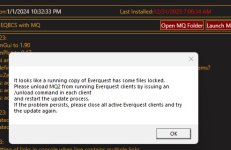
Just started receiving this error when trying to update- no EQ instances running (got error after rebooting also)- not sure what its picking up as being locked. Anyone know what I could be doing wrong?

error.jpg
 
I'll double check- its so odd though it did it even after a reboot with nothing from EQ running. I paused One Drive backup thinking maybe that might have been using the files but still wouldn't go.
 
I'll double check- its so odd though it did it even after a reboot with nothing from EQ running. I paused One Drive backup thinking maybe that might have been using the files but still wouldn't go.
please make sure to post launcher questions in the launcher thread, you might have seen other similar conversations.

almost always this ends up being an antivirus issue where a file is being held hostage.

clear that, then restart and you should be good to go.

also, if you're using some old "running old eqbcs as a service" that can cause it too, but that is less likely.
 
Wrong forum
So rebooted computer and tried to reload Redguides launcher for patch. Seems to quickly go through process and close self out, no firewall or anything I can see thats obviously, is there any fix for this ?>
 
So rebooted computer and tried to reload Redguides launcher for patch. Seems to quickly go through process and close self out, no firewall or anything I can see thats obviously, is there any fix for this ?>
almost always an AV or windows permission issue.

exit everything -> check AV -> fix/whitelist/etc
restart -> try again
 
AV was never an issue prior, isn't turned on, running as administrator atm as well. Still trying to troubleshoot atm, was fine loaded yesterday. Also I received an infraction, for asking for help could you please correct that. I also just fully turned off defender and problem still is persisting and defender was not a problem prior. Any advice is much appreciated.
 
AV was never an issue prior, isn't turned on, running as administrator atm as well. Still trying to troubleshoot atm, was fine loaded yesterday. Also I received an infraction, for asking for help could you please correct that. I also just fully turned off defender and problem still is persisting and defender was not a problem prior. Any advice is much appreciated.
your "infraction" was the "posted in the wrong location" for posting in the wrong location - it goes away
 
Ok what can we do about the bug should i reinstall the launcher and hope it goes away? I used winaero tweaker fully disabled antivirus defender and still nothing.
 
On reinstall it is still doing the same thing as well to note. I'm fresh out of ideas atm.
 
Shouldnt be running stuff at elevated levels (this is bad). However, turned off A/V and defender, did you check to make sure they didnt lock the files already? There as a update bout 2 weeks ago for defended that was flagging RG's as a false pos, so it might still have grabbed it this morning. Once you make sure nothing is being held, can white list and reboot.
 
I don't think anything is being held, I am currently looking through to make sure everything is whitelisted.

What I did to fix was uninstall and reinstall to a different path seemed to do the trick
 
I don't think anything is being held, I am currently looking through to make sure everything is whitelisted.

What I did to fix was uninstall and reinstall to a different path seemed to do the trick
almost certainly an av or permission issue then
 
Wrong forum
Been trying to update MQ2 but everytime I try I get an error message and to /unload in my eq clients. Even when doing this I still get the same error message. I've closed all/any running clients and even restarted the computer and it still gives me the same error message. Any help would be greatly appreciated.
 
RedGuides Launcher

Users who are viewing this thread

Back
Top
Cart