Wait for what?still waiting should i try loadind EQ game or keep waiting
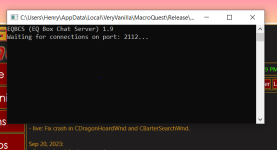
The eqbc window is going to show that until you connect from it in game.



Wait for what?still waiting should i try loadind EQ game or keep waiting
Yes.i mean the window just stopped there
View attachment 51507
Yep, probably.so i should try to start EQ now?

Hello
I bought a new computer (Finally) and I installed Everquest on my D:\ drive. Directory D:/Everquest
Then installed Redguides launcher on my D:\ Drive . D:\Redguides
Then I ran the launcher and it asked me to make a select a path or go with default path. So I copied the same type of path as my old computer and made a path
D:\Users\zak\Appdata\Local\VeryVanilla\MacroQuest\Release\
When I run click LANCH MQ on Red Guides launcher I get this Message ::
XX Eqgame.exe - Entry Point Not Found
X The Procedure entry point
?SetNextWindowSizeConstraints@lmGui@@YAXAEBUImVec2
Z@std@@@Z could not be located in dynamic link library
D:\Users\AppData\Local\VeryVanilla\MacroQuest\Release\MQ2Main.dll.
Please if anyone can help me find a solution to this problem in most simplistic way I would really appreciate it. ( Not super computer literate )

Hello
I bought a new computer (Finally) and I installed Everquest on my D:\ drive. Directory D:/Everquest
Then installed Redguides launcher on my D:\ Drive . D:\Redguides
Then I ran the launcher and it asked me to make a select a path or go with default path. So I copied the same type of path as my old computer and made a path
D:\Users\zak\Appdata\Local\VeryVanilla\MacroQuest\Release\
When I run click LANCH MQ on Red Guides launcher I get this Message ::
XX Eqgame.exe - Entry Point Not Found
X The Procedure entry point
?SetNextWindowSizeConstraints@lmGui@@YAXAEBUImVec2
Z@std@@@Z could not be located in dynamic link library
D:\Users\AppData\Local\VeryVanilla\MacroQuest\Release\MQ2Main.dll.
Please if anyone can help me find a solution to this problem in most simplistic way I would really appreciate it. ( Not super computer literate )
^ hit that vid there and follow the instructions.
based on your information above the location you said you told it to do and the location it is at is not the same. (users\zak\appdata vs users\appdata)
I'd double-check if you're using a custom directory, that it is what you want it to be, and then make sure to install.
if you haven't considered whitelisting your mq/eq/rg folders from AV, you might want to do that.
Hey I am having the same issue trying to start up the 2nd install and says firewall or proxy. I am having issues getting passed that part as well and can use some help. Tried everything I know. Can you help?if you're interested - I'm available atm to remote in and see if i can get you rolling (if so pm me and we can coordinate

you quoted me from 2 and a half years agoHey I am having the same issue trying to start up the 2nd install and says firewall or proxy. I am having issues getting passed that part as well and can use some help. Tried everything I know. Can you help?
I did turn both of them all and my Norton 360 to try and get the 2nd part to download and its keeps asking me for URL#.you quoted me from 2 and a half years ago
you'll want to figure out your firewall/proxy issues
I did turn both of them all and my Norton 360 to try and get the 2nd part to download and its keeps asking me for URL#.
I am wandering if the install is on the wrong drive as my EQ launcher is my issue? I have turned off proxy, firewall and my Norton 360. They only thing I have not tried yet was to remove it and install on the same drive as my EQ game launches from. Just not sure what to do as the auto download did not work for me after checking all boxes to ok them all.I did turn both of them all and my Norton 360 to try and get the 2nd part to download and its keeps asking me for URL#.
Thank you. this helped me realize i needed to install .net.look here, tips amd tricks for running eq+mq in non windows:
per PMs it appears windows 8.1 is your issue (which ended all support from microsoft Jan 23). You will need to run a "modern" OS like win 10/11 - something that is actively supported and updated by microsoftI did turn both of them all and my Norton 360 to try and get the 2nd part to download and its keeps asking me for URL#.
I am wandering if the install is on the wrong drive as my EQ launcher is my issue? I have turned off proxy, firewall and my Norton 360. They only thing I have not tried yet was to remove it and install on the same drive as my EQ game launches from. Just not sure what to do as the auto download did not work for me after checking all boxes to ok them all.

would double check you're not AV scanning your mq/eq/rg folders - it might be holding it hostage, or it might not be allowed on your windows depending on windows settings.I logged off yesterday and came back to a launcher that won't launch. I've tried clearing my browser cookies and restarting - nothing. Then I noticed I had over 200GB in logs on 4 different logs on my MQ folder that were literally stopping my computer from running because there was no more HD space. I deleted those, too, and restarted. No dice. As a last-ditch effort, I uninstalled and re-installed the launcher. Nothing.
What happens when I click the launcher shortcut is Windows does its dumb "do you actually want to run this program?" thing, the spinny wheel goes for about 1 second, then nothing.
I can manually launch MQ and obviously I can log in to the site, but I'm not sure where to go from here for troubleshooting.
HALP!
HKEY_CURRENT_USER\Software\Microsoft\WindowsNT\CurrentVersion\AppCompatFlags\Layers
and
HKEY_LOCAL_MACHINE\Software\Microsoft\WindowsNT\CurrentVersion\AppCompatFlags\LayersIt doesn't appear that either of those suggestions have solved the issue. There are no eq/mq entries in the registry locations you indicated. My AV hasn't caused an issue before, but I added EQ, MQ, RG to the exclusions list and I'm still getting a big fat nothin'. Any other ideas? :|would double check you're not AV scanning your mq/eq/rg folders - it might be holding it hostage, or it might not be allowed on your windows depending on windows settings.
other thing worth checking is:
Check these locations in your registry for anything eq/mq related and delete.
Code:HKEY_CURRENT_USER\Software\Microsoft\WindowsNT\CurrentVersion\AppCompatFlags\Layers and HKEY_LOCAL_MACHINE\Software\Microsoft\WindowsNT\CurrentVersion\AppCompatFlags\Layers
If you have already checked the RG Launcher Plugin Tab then read the following:mq throwing the no mq2grind i have removed it from my directory and still on every toon i load it pops up lol
hello arribone,Hello-
Ever since the latest redguides update, the redguides launcher does not load now. I double click it, and it asks for the program to make changes as usual then it minimizes and disappears.



did you skip all the stuff i responded to you with? or you checked/did them and just decided not to include that on this response?The redguides launcher will not open up. It prompts me to allow it to make changes as normal. I select yes as normal and for a brief second the box pops up like its going to open the launcher and it does not.
I did all the swapping out of the old mq2 to the new mq2 a long time ago when it was released. I followed the instructions that were given. I have had no problems with running any of it until the recent update on redguides. i logged on the launcher as normal and then seen there was an update. clicked update and after that it froze up and have not been able to load the launcher since. It vanishes and does not load.
I would try uninstalling and reinstall of the launcher.I do not run any av's. I did not skip anything. Thanks for asking though. RG launcher will not launch. Nothing has changed on my side since I have been running mq2.
View attachment 52980
oh ok, because no one is a mind reader and you didn't say that you checked any of the places previously suggested, so I apologize that i didn't know you already did that stuff.I do not run any av's. I did not skip anything. Thanks for asking though. RG launcher will not launch. Nothing has changed on my side since I have been running mq2.
View attachment 52980
please make sure to post in the correct location and look for existing threads/conversations about things.hello, tittle say it all.
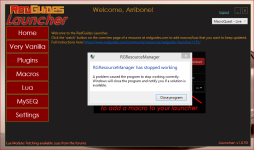
I double click on my icon.
The first windows appear, with the little sound. RGResourceManager
I click "yes"
And nothing. the launcher doesnt appear.
Any ideas?
regards
gerard
HKEY_CURRENT_USER\Software\Microsoft\WindowsNT\CurrentVersion\AppCompatFlags\Layers
and
HKEY_LOCAL_MACHINE\Software\Microsoft\WindowsNT\CurrentVersion\AppCompatFlags\Layers--Defender has nothing blocked.oh ok, because no one is a mind reader and you didn't say that you checked any of the places previously suggested, so I apologize that i didn't know you already did that stuff.
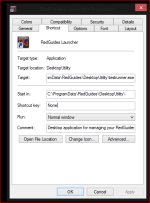
I have no idea what you think that image is showing/communicating - except maybe the install location being programdata (this goes back to my thought about permissions)
so let's recap on the things you did (but didn't say you did)
- checked you don't have AV blocking anything (you don't run AV --- i assume you still checked defender anyhow since you said you checked everything and didn't ask any followups).
- checked that windows is allowing programs to run
- checked that windows firewall isn't blocking anything
- checked that you don't have anything in your compat layers
since you already went through all of that stuff and it didn't turn up anything, I would suggest reinstalling the RG launcher in a more "root" drive location - instead of the default. something like c:\RedGuidesLauncher (and not in programdata), because as i mentioned it sounds like it could be a permission issue.
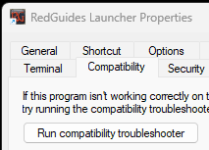
--Not sure what you mean compat layers. If you mean compatibility tab, then nothing is checked off