• You've discovered RedGuides, an EverQuest multi-boxing and scripting community 🧙‍♀️⚙️. We want you to play several EQ characters at once, come join us and say hello! 👋

  • A TLP without truebox has thawed (Very Vanilla ready)
    Frostreaver
RedGuides Launcher

RedGuides Launcher (3 Viewers) 1.1.0

No permission to download
No one drive or any file syncing software but of course I do have anti-virus (who doesn't??). I suppose that could be it, nothing to do with launcher itself but some recent update to the av/am software. Sucks though, launcher seems to be the only thing affected, if that is actually the problem, and I'm not about to turn it off.

Guess I'll wear out the Launcher icon with all my clicks on it....
 
No one drive or any file syncing software but of course I do have anti-virus (who doesn't??). I suppose that could be it, nothing to do with launcher itself but some recent update to the av/am software. Sucks though, launcher seems to be the only thing affected, if that is actually the problem, and I'm not about to turn it off.

Guess I'll wear out the Launcher icon with all my clicks on it....
well if your antivirus scans (hold hostage) files as they change, that can cause adverse effects to the launcher being able to download/update.
it is a pretty common thing that folks run into, and it is recommended to consider whitelisting your mq/eq folders from any form of scanning or syncing
 
well if your antivirus scans (hold hostage) files as they change, that can cause adverse effects to the launcher being able to download/update.
it is a pretty common thing that folks run into, and it is recommended to consider whitelisting your mq/eq folders from any form of scanning or syncing
AVG will do quarantining, not sure if that's the same thing, but wouldn't it HAVE to be whitelisted already? I mean, it does work eventually. I don't think AVG would let it through sometimes, because it's just tired of putting up with my dumb ass and letting it run would teach me a valuable lesson.
 
This last update created issues with Firewall... its the EQBCS that is doing it with the recreation each time it loads, so Firewall is detecting it as a new app each time it loads, easy work around as just click the allow. Not sure if this was an intended or not.
 
This last update created issues with Firewall... its the EQBCS that is doing it with the recreation each time it loads, so Firewall is detecting it as a new app each time it loads, easy work around as just click the allow. Not sure if this was an intended or not.
it is intended, mq is trying to help you. good_guy MQ


it is worth considering whitelisting your mq and EverQuest folders from things like scans and syncing. Help mq help you.

this is going to be for several executables
 
it is intended, mq is trying to help you. good_guy MQ


it is worth considering whitelisting your mq and EverQuest folders from things like scans and syncing. Help mq help you.

this is going to be for several executables

Thought as much love the evolution.. Thanks
 
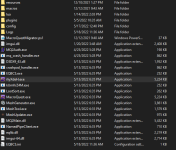
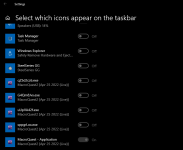
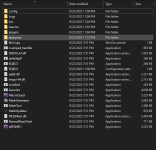
There's another issue with this change. Other than the firewall prompt every time MacroQuest.exe runs it seems to copy itself to a randomly named .exe file. Since it loads to the taskbar you can't selectively allow visibility of the taskbar icon for MQ. If you do enable the visibility you get a new, persistent entry in the allowed icon list for each copy.

Attached screen shots.
 

Attachments

  • files.PNG
    files.PNG
    47.5 KB · Views: 5
  • Icons.PNG
    Icons.PNG
    34.4 KB · Views: 5
There's another issue with this change. Other than the firewall prompt every time MacroQuest.exe runs it seems to copy itself to a randomly named .exe file. Since it loads to the taskbar you can't selectively allow visibility of the taskbar icon for MQ. If you do enable the visibility you get a new, persistent entry in the allowed icon list for each copy.

Attached screen shots.
You should create a shortcut to one of the randomly named EXE files. Then use that one for a bit. Should allow you to do that.
 
You should create a shortcut to one of the randomly named EXE files. Then use that one for a bit. Should allow you to do that.

I'll give that a shot after todays patch. I guess I'll need to do the same for the EQBCS.exe copy to prevent adding a new firewall exception to the ruleset each time.

Thanks for the response.

That should be fixed today.
Ahh. I should have refreshed. :-)

Thanks, I'll check it out after the update.
 
I have a problem/question. Last night I sat down to update and log in. But as I started to update the launcher the power to my house was knocked out. When the power came back on I tried but every time I opened the launcher it would pop up for a moment then just go away, every time. I've tried repairing it. I have uninstalled and reinstalled it. But it still does the same thing. Any ideas?
 
I have a problem/question. Last night I sat down to update and log in. But as I started to update the launcher the power to my house was knocked out. When the power came back on I tried but every time I opened the launcher it would pop up for a moment then just go away, every time. I've tried repairing it. I have uninstalled and reinstalled it. But it still does the same thing. Any ideas?
  • If the launcher had worked before but is now crashing on startup, open file explorer and go to %LocalAppData%\RedGuides and delete the contents, and then %LocalAppData%\RGResourceManager and delete the contents.
 
  • If the launcher had worked before but is now crashing on startup, open file explorer and go to %LocalAppData%\RedGuides and delete the contents, and then %LocalAppData%\RGResourceManager and delete the contents.
That did it. Thank you very much sir.
 
tiny QoL request that I thought of just now.. there's a table with various information on the plugins section of the launcher. Would it be possible to add the license expiration date (if any) to this table as well? It's probably not worth doing if it would take more than a few minutes to do, but I thought it might be useful.
 
Good Morning All,

When i am attempting to download the update my purchased plugins, and very vanilla i am getting an error that reads:

Sorry it looks like there was an issue:
Value cannot be null.
Parameter name:bytes
Please report this to management


No idea what that means. Hopefully someone here is management. Thank you for your help in advanced.

-Shankyas
 
restart your computer
double check you don't have any files locked with antivirus/defender/etc (consider whitelisting your eq and mq folders)
try again

would also make sure to check the settings tab - that you're running the current version of the launcher
1655386947158.png
 
Please see attached my settings page. The downloader gets stuck at 22% sometimes.

-Shankyas

Let me know if you cannot see the picture i attached.

-Shankyas
 
Please see attached my settings page. The downloader gets stuck at 22% sometimes.

-Shankyas

Let me know if you cannot see the picture i attached.

-Shankyas
it does not appear that you attached an image.

did you check and whitelist the mq/eq folders as suggested?

if you have anything scanning them or syncing them (like one drive) it can impact your usage
 
Hey guys,

Been having issues since last night getting a second PC set up. I had set up my primary PC earlier in the day (successfully), and went to try my second (basically nothing installed Win10 machine).

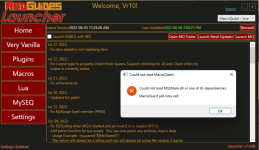
Any time I hit Launch MQ, I get the following:
1659833602283.png

So I went ahead and tried, unfortunately in no specific order:
  1. Clearing the Appdata/local folders commonly posted as a fix
  2. Rebooting
  3. Reinstalling MQ (Reinstall button)
  4. Reinstalling the Launcher AND reinstalling MQ
  5. Updating launcher from within itself (already up to date)
  6. Copying the files from my working PC to my non-working PC directly
  7. Setting AV exclusions (basic Windows Defender)
  8. Making sure I'm running as admin
So I thought maybe at this point my system was just fucked up, and called it a night.

Today I booted up a separate PC, fresh Windows 11 build... And have the same exact issue.

Now I think I'm either just screwing something up that I missed the first time, have a pre-req on my primary machine that's missing from both of my secondary machines, or something else is going on.

Any help would be great.

Thanks!
 
Hey guys,

Been having issues since last night getting a second PC set up. I had set up my primary PC earlier in the day (successfully), and went to try my second (basically nothing installed Win10 machine).

Any time I hit Launch MQ, I get the following:
View attachment 41264

So I went ahead and tried, unfortunately in no specific order:
  1. Clearing the Appdata/local folders commonly posted as a fix
  2. Rebooting
  3. Reinstalling MQ (Reinstall button)
  4. Reinstalling the Launcher AND reinstalling MQ
  5. Updating launcher from within itself (already up to date)
  6. Copying the files from my working PC to my non-working PC directly
  7. Setting AV exclusions (basic Windows Defender)
  8. Making sure I'm running as admin
So I thought maybe at this point my system was just fucked up, and called it a night.

Today I booted up a separate PC, fresh Windows 11 build... And have the same exact issue.

Now I think I'm either just screwing something up that I missed the first time, have a pre-req on my primary machine that's missing from both of my secondary machines, or something else is going on.

Any help would be great.

Thanks!

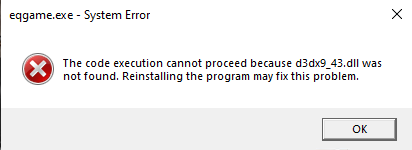
Derp, it was a missing Direct X installation on the new systems. The versions that come out of the box don't cover what's needed, and my stupid ass didn't bother to try actually running EQ manually because everything had gone so smoothly on my other PC.

1659835486077.png

Disregard.
 
Hey guys, 3 hours in and im at a loss. New computer, DL launcher and i got nothing. I did install the DX items and i have no current errors. Launcher doesnt give me option to download MQ2Next. Ive attached snips for your viewing pleasure of what has been downloaded. I have tried multiple times with no luck. I do however have acces to the files from my old computer and can copy via usb. Also tried that and no luck, gives me a loop for the launcher and doesnt stick. Please let me know i am very frustrated
 

Attachments

  • Capture1.PNG
    Capture1.PNG
    43.2 KB · Views: 4
  • Capture.PNG
    Capture.PNG
    104.3 KB · Views: 4
Hey guys, 3 hours in and im at a loss. New computer, DL launcher and i got nothing. I did install the DX items and i have no current errors. Launcher doesnt give me option to download MQ2Next. Ive attached snips for your viewing pleasure of what has been downloaded. I have tried multiple times with no luck. I do however have acces to the files from my old computer and can copy via usb. Also tried that and no luck, gives me a loop for the launcher and doesnt stick. Please let me know i am very frustrated

yup, like brain said there is just "MacroQuest"

>>> Official Release Party Thread <<<

here are some more links and other information that might be handy for you

There are a couple of small, yet important changes with MacroQuest vs the old MQ2 as explained > HERE <

Moving to MacroQuest mental notes:
1. mq2map click is Control+Shift+Click
2. new easyfind self travel is Control+Click (reminder in find window title bar)
3. new easyfind group travel is Control+Shift+Click
4. If you selected a destination in your zone guide and want to activate it you /travelto activate
5. /yes and /no are now aliases
6. your ini configuration files (like for kissassist) now reside in your "Config" folder and not your "Macro" folder
7. if you want the functionality of the MQ2 "MQ2TargetInfo" - They are now in 3 separate plugins: /plugin groupinfo /plugin targetinfo /plugin xtarinfo
 
So there is no download for next anymore? On my laptop i can still switch between live and next( I only use Next FYI). This was what is driving me crazy and in the setting section via migration says i need to have MQNext installed. This was what i was after.

Then, all new integrated into live version only now? nice

Thank you both and ill catch up on some reading after i cool off lol. FYI, i hate resetting this crap up
 
So there is no download for next anymore? On my laptop i can still switch between live and next( I only use Next FYI). This was what is driving me crazy and in the setting section via migration says i need to have MQNext installed. This was what i was after.

Then, all new integrated into live version only now? nice

Thank you both and ill catch up on some reading after i cool off lol. FYI, i hate resetting this crap up
click the stuff i shared plz and ty. should answer your questions, which is why i shared them :)

"MacroQuest" IS "MacroQuest Next" - next was just the work-in-progress name as brain mentioned
 
Hello RG folks,

I have had issues with the launcher for a very long time now (probably over a year) but today it seems to have just 'no more'.

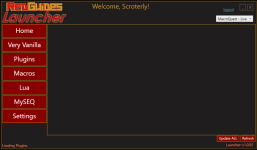
When I start the launcher it frequently won't load everything, but I close it and start it again and after a few times of this it will finally load everything and be ready to go. But today I'm on retry 23 (no exaggeration) and it's still not loading. The Plugins, Macros and Lua screens all are blank and as I move between them the message at the bottom is always "Loading <insert screen here>" but it never does.

1664469374340.png

The Very Vanilla screen usually fully loads, though on occasion even that one is blank.

Any suggestions? In the past someone suggested to whitelist it with my antivirus but 1) I did that months ago and 2) if it were an antivirus issue it wouldn't be intermittent (as it has been up until today).

Thanks.

~S
 
it could still definitely be av/defender and be intermittent

are you having internet issues?

have you restarted your pc and tried agian
 
I'd also suggest clearing out your cookies on your default browser as there was some recent (but resolved) cookies issue
 
it could still definitely be av/defender and be intermittent

are you having internet issues?

have you restarted your pc and tried agian

Fresh boot this morning. No internet issues; posting this from the same computer and running other online games as well. And it's no longer intermittent; on attempt 32 now.

I don't allow automatic windows updates, though it could be an av update. But again, I've whitelisted the entire MQ directory.

Fresh boot this morning. No internet issues; posting this from the same computer and running other online games as well. And it's no longer intermittent; on attempt 32 now.

I don't allow automatic windows updates, though it could be an av update. But again, I've whitelisted the entire MQ directory.
Interesting tidbit I just found; if I select the Settings screen the entire loader freezes and I have to kill the process from task manager.

Fresh boot this morning. No internet issues; posting this from the same computer and running other online games as well. And it's no longer intermittent; on attempt 32 now.

I don't allow automatic windows updates, though it could be an av update. But again, I've whitelisted the entire MQ directory.


Interesting tidbit I just found; if I select the Settings screen the entire loader freezes and I have to kill the process from task manager.
Since the Very Vanilla screen generally loads I tried a reinstall, which seemed to load up the Plugins and Lua screen but the Macros were still all blank. I've also rebooted, just in case. No change.

Fresh boot this morning. No internet issues; posting this from the same computer and running other online games as well. And it's no longer intermittent; on attempt 32 now.

I don't allow automatic windows updates, though it could be an av update. But again, I've whitelisted the entire MQ directory.


Interesting tidbit I just found; if I select the Settings screen the entire loader freezes and I have to kill the process from task manager.


Since the Very Vanilla screen generally loads I tried a reinstall, which seemed to load up the Plugins and Lua screen but the Macros were still all blank. I've also rebooted, just in case. No change.
I cleared cookies and cached data from my browser, rebooted, ran the launcher, I had to login, it opened the browser page and still isn't loading those 3 screens. I still have the occasional no-load for the Very Vanilla page as well, but it's infrequent.

Fresh boot this morning. No internet issues; posting this from the same computer and running other online games as well. And it's no longer intermittent; on attempt 32 now.

I don't allow automatic windows updates, though it could be an av update. But again, I've whitelisted the entire MQ directory.


Interesting tidbit I just found; if I select the Settings screen the entire loader freezes and I have to kill the process from task manager.


Since the Very Vanilla screen generally loads I tried a reinstall, which seemed to load up the Plugins and Lua screen but the Macros were still all blank. I've also rebooted, just in case. No change.


I cleared cookies and cached data from my browser, rebooted, ran the launcher, I had to login, it opened the browser page and still isn't loading those 3 screens. I still have the occasional no-load for the Very Vanilla page as well, but it's infrequent.
I even turned off my av just to see what happened and no change to the launcher's behavior. It just sits there with "Fetching available <xxx> from the forums:. So there appears to be something seriously bollixed between my launcher install and the forums from which it downloads.
Other things download fine so it's not networking; it's specific to RG somehow and I've no idea where to look next.
 
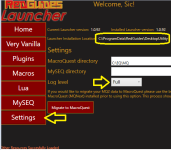
can you turn on full logging and see if there is anything in that file?

1664476288505.png

for me, from the image above the log file would be "C:\ProgramData\RedGuides\DesktopUtility\RGDesktopUtility.log"
 
can you turn on full logging and see if there is anything in that file?

View attachment 42362

for me, from the image above the log file would be "C:\ProgramData\RedGuides\DesktopUtility\RGDesktopUtility.log"
No. Every time I attempt to go to the Settings screen it locks up completely. Killing it from task manager is all I can do.

Can I enable it from some file instead?

No. Every time I attempt to go to the Settings screen it locks up completely. Killing it from task manager is all I can do.

Can I enable it from some file instead?
I looked in the log that exists and here is what it has for a given attempt to start.

2022-09-29 11:50:28,969 [1] INFO - AuthModule: AuthContentViewmodel VerifyLogin, attempting to call login
2022-09-29 11:50:28,981 [1] INFO - AuthModule: AuthContentViewmodel Login, attempting to call doauth
2022-09-29 11:50:28,985 [1] INFO - XFApiHelper DoAuth: Attempting to get stored token
2022-09-29 11:50:28,985 [1] INFO - Authorization.cs GetStoredTokenData: Attempting to get stored token from C:\Users\<me>\AppData\Local\RedGuides\ResourceManager
2022-09-29 11:50:28,985 [1] INFO - Authorization.cs GetStoredTokenData: C:\Users\<me>\AppData\Local\RedGuides\ResourceManager\tokens.txt existed, attempting to read
2022-09-29 11:50:28,993 [1] INFO - XFApiHelper DoAuth: We believe we found a token, continuing automatic auth process
2022-09-29 11:50:28,993 [1] INFO - XFApiHelper DoAuth: Attempting to call auth
2022-09-29 11:50:28,997 [1] INFO - Authorization.cs Auth: beginning auth
2022-09-29 11:50:28,997 [1] INFO - Authorization.cs Auth: we have a refresh token, calling codeexchange
2022-09-29 11:50:29,005 [1] INFO - Authorization.cs performCodeExchange: Have a refresh token that we believe is valid, asking for new access token
2022-09-29 11:50:29,274 [1] INFO - Authorization.cs performCodeExchange: Waiting for the token response
2022-09-29 11:50:29,276 [1] INFO - Authorization.cs performCodeExchange: Got the token response, decoding
2022-09-29 11:50:29,302 [1] INFO - Authorization.cs performCodeExchange: Encrypting and storing the tokens
2022-09-29 11:50:29,311 [1] INFO - Authorization.cs Auth: Token status is valid, saving data
2022-09-29 11:50:29,315 [1] INFO - Authorization.cs Auth: Got all the way to the end. Token status is Valid with reason:
2022-09-29 11:50:29,315 [1] INFO - AuthHelper: Getting API Key

Then it just sit there forever.

1664477553262.png
 
Ok, so check it. I gave up on the launcher and was just watching the thread waiting, hoping for some answer to come across. I hadn't rebooted, I hadn't updated windows or av or anything. I transferred a video to a usb stick. Did some work on a different computer.

Clicked on the launcher cause why the eff not and WHAM! Everything loaded as expected.

Did someone feed the gerbils or something? WTH?
 
Ok, so check it. I gave up on the launcher and was just watching the thread waiting, hoping for some answer to come across. I hadn't rebooted, I hadn't updated windows or av or anything. I transferred a video to a usb stick. Did some work on a different computer.

Clicked on the launcher cause why the eff not and WHAM! Everything loaded as expected.

Did someone feed the gerbils or something? WTH?
nope, nothing changed here, dunno :(

hopefully @r1pt1de might have some insight on those logs, but nothing jumping out at me atm
 
RedGuides Launcher

Users who are viewing this thread

Back
Top
Cart