• You've discovered RedGuides, an EverQuest multi-boxing and scripting community 🧙‍♀️⚙️. We want you to play several EQ characters at once, come join us and say hello! 👋

  • A TLP without truebox has thawed (Very Vanilla ready)
    Frostreaver
RedGuides Launcher

RedGuides Launcher (8 Viewers) 1.1.0

No permission to download
I have. Several times following the servers coming back up after the patch. And with multiple characters. But it still shows the old date. I don't know what to do about it.
I go to the Daybreak Games dashboard/launcher. Select my account. It checks all the files, updates everything then launches the character.
I then go into MQ and launch everything as usual.
In the past, this is all that was required to sync EQ with MQ. But this time it isn't working.
Am I missing something?
Has anyone else had a problem playing following this patch?
 
I have. Several times following the servers coming back up after the patch. And with multiple characters. But it still shows the old date. I don't know what to do about it.
I go to the Daybreak Games dashboard/launcher. Select my account. It checks all the files, updates everything then launches the character.
In the past, this is all that was required to sync EQ with MQ. But this time it isn't working.
Am I missing something?
Has anyone else had a problem playing following this patch?
nope many of us are playing and have been for yours

if you had a date/time mismatch you would get an error and it would tell you dates - if either of them say jan 5th, then that is the one that needs to be updated.

so the image you posts says "my everquest is from january 5th" which means your everquest is out of date
 
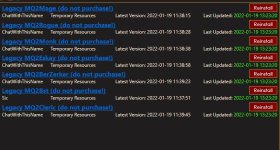
I went to Live in the DropDown and updated the plugins, I saw MQ2Next stuff on Live Plugins, on MQNext drop down I see this, when I try to load either in game, the plugins dont work
 

Attachments

  • legacy.JPG
    legacy.JPG
    67.5 KB · Views: 8
I went to Live in the DropDown and updated the plugins, I saw MQ2Next stuff on Live Plugins, on MQNext drop down I see this, when I try to load either in game, the plugins dont work
that says legacy

make sure you are using "MacroQuest - Live"


It is OFFICIAL! MacroQuest is the version of MacroQuest that we offer here at RedGuides.

You will see this with "MacroQuest - Live" in the RG Launcher.

Please, check out this link: >>> Functions & Features Demo + Migration to the new MacroQuest<<<

mental notes:
1. mq2map click is Control+Shift+Click
2. new easyfind self travel is Control+Click (reminder in find window title bar)
3. new easyfind group travel is Control+Shift+Click
4. If you selected a destination in your zone guide and want to activate it you /travelto activate
5. /yes and /no are now aliases, there is no mq2yes plugin
 
got it working, for some reason my patcher didnt update, when my patcher itself updated everything worked perfectly
 
got it working, for some reason my patcher didnt update, when my patcher itself updated everything worked perfectly
I've been wondering if I've been stuck in some sort of update hell like this for the last 2 hrs. The legacy doesn't work entirely right, and the new doesn't work at all. This at least gives me hope there's some voodoo magic I'm missing! (There's always computer voodoo magic...at least that's what I tell our customers when something I've worked on doesn't work right :P )


Edit: And of course as soon as I say that...I get the Legacy working...Guess tomorrows "work day" will consist of getting the new working now :D
 
Last edited:
I've been wondering if I've been stuck in some sort of update hell like this for the last 2 hrs. The legacy doesn't work entirely right, and the new doesn't work at all. This at least gives me hope there's some voodoo magic I'm missing! (There's always computer voodoo magic...at least that's what I tell our customers when something I've worked on doesn't work right :P )
This guide takes like 10 minutes to get you migrated and using MacroQuest.

Legacy is going to be completely gone soon.


It is OFFICIAL! MacroQuest is the version of MacroQuest that we offer here at RedGuides.

You will see this with "MacroQuest - Live" in the RG Launcher.

Please, check out this link: >>> Functions & Features Demo + Migration to the new MacroQuest<<<

mental notes:
1. mq2map click is Control+Shift+Click
2. new easyfind self travel is Control+Click (reminder in find window title bar)
3. new easyfind group travel is Control+Shift+Click
4. If you selected a destination in your zone guide and want to activate it you /travelto activate
5. /yes and /no are now aliases, there is no mq2yes plugin
 
No. Just my normal live server.
I have uninstalled and reinstalled EQ. Let's see if that fixes the problem. I'd wanted to avoid that step because of having to reset everything back up.
But we'll see.
Thanks.
 
This is the first patch day since switching to Next as live version from launcher, may want to make sure your updates are set for the correct locations
 
I uninstalled and reinstalled EQ and I still get the same message when launching characters in MQNext. The problem has to be there.
Maybe it is looking in a different place at an older version of EQ. I checked the INI in the profiles window and it points towards the correct place.
Should I be looking in a different place for where MQNext is going for the EQ folder?
This is the first EQ patch since I migrated from MQ2 to MQNext. It must be looking in a different place at an EQ folder that I created as a backup. But I don't know how to check where MQ is looking for EQ.
I just don't know.
 
I uninstalled and reinstalled EQ and I still get the same message when launching characters in MQNext. The problem has to be there.
Maybe it is looking in a different place at an older version of EQ. I checked the INI in the profiles window and it points towards the correct place.
Should I be looking in a different place for where MQNext is going for the EQ folder?
This is the first EQ patch since I migrated from MQ2 to MQNext. It must be looking in a different place at an EQ folder that I created as a backup. But I don't know how to check where MQ is looking for EQ.
I just don't know.
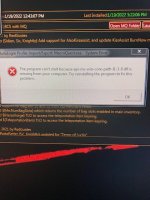
if it tells you that your everquest is january 5 it isn't macroquest

From your image:
1642636569367.png
your image says "everquest is from january 5th"
your image says "macro quest is looking for january 13th everquest (which is the eqgame.exe from today)
 
Look at the bottom tab in in the launcher where you launch MQ - Live, and make sure it is pointing to the files where the EQ patcher does it updates at, and make sure your MQ files are being read from the MQ - Live file location that the patcher updates to.

Edit: Being the 13th on MQ is why I was thinking it might of been Test version of MQ going on.
 
I have downloaded MacroQuest-live and now I am getting this error msg on Launch

RedGuide error.jpg
 
When you say look at the bottom tab, do you mean the settings tab?
Under the settings tab I don't see any place that indicates where the EQ files are being looked for. It only deals with where MQ is found on my drive.
 
are you using windows 7? windows 7 is not a supported (by microsoft) OS :( and thus isn't supported for macroquest
 
Look at the bottom tab in in the launcher where you launch MQ - Live, and make sure it is pointing to the files where the EQ patcher does it updates at, and make sure your MQ files are being read from the MQ - Live file location that the patcher updates to.

Edit: Being the 13th on MQ is why I was thinking it might of been Test version of MQ going on.
today's eqgame is the 13th as well, unfortch
 
Trying to go from memory still at work, was thinking the bottom tab of settings is where you direct MQ to look for launching everquest from, look through the other tabs and see if everything is going to the correct file locations
 
Thank you for your help.
Maybe I should just uninstall MQ and reinstall it so that both EQ and MQ are fresh.
 
Trying to go from memory still at work, was thinking the bottom tab of settings is where you direct MQ to look for launching everquest from, look through the other tabs and see if everything is going to the correct file locations
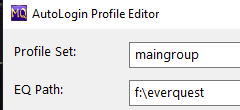
ah, you mean in your autologin settings?

definitely double check the location you're launching eq from is the location you're updating

1642637627831.png
 
Thank you for your help.
Maybe I should just uninstall MQ and reinstall it so that both EQ and MQ are fresh.
nah that is extreme, we just need to figure out why your everquest is still out of date.

start with ASmith's suggestion of checking where your autologin is pointing, and ensuring you're updating THAT everquest
 
Hello,

Ok So been using Redguides INI files , like the old style . After the patch , Red guides goes crazy and reverts to Legacy without me realizing it.

Then I run Redguides and my toons are not doing what they suppose to do and start doing basic moves. I quit EQ and changed to LIVE version and tried to go back in.

It would not let me , I had to uninstall Red Guides and make new files destination and all that.

Here where it gets weird:

After I run EQ , I get this list of PLUGINS like a whole list with some other weird windows I have never seen before , something about navigation and all that .

Anyone can help on what I am suppose to do ?

Also same thing happened on my Second computer, but this time NO matter what I did it would not me run RedGuides , its a older computer running Windows 7 , could this be a problem ?
 
well

without actual error messages "weird windows" doesn't realy give much information to go by.

it possibly sounds like you installed one version over another version (versus an independent installation directory for installation) which would result in a bunch of error and possibly error popup boxes.


macroquest IS the official RG version and soon mq2 legacy will go away entirely.

Unfortunately windows 7 is not supported by microsoft nor MacroQuest - so you will definitely want to update that computer to a modern, updated, and secure operating system


It is OFFICIAL! MacroQuest is the version of MacroQuest that we offer here at RedGuides.

You will see this with "MacroQuest - Live" in the RG Launcher.

Please, check out this link: >>> Functions & Features Demo + Migration to the new MacroQuest<<<

mental notes:
1. mq2map click is Control+Shift+Click
2. new easyfind self travel is Control+Click (reminder in find window title bar)
3. new easyfind group travel is Control+Shift+Click
4. If you selected a destination in your zone guide and want to activate it you /travelto activate
5. /yes and /no are now aliases, there is no mq2yes plugin


I merged your thread into the launcher thread

"MacroQuest - Live" is the correct version you want to use, but as mentioned windows 7 isn't going to work

in the mean time, for that win7 computer, you would have to use "Legacy - Live" in the launcher.

Keep in mind, legacy mq2 is not the same and there are huge differences as far as bugs, fixes, updates, functions, and features :(
 
I'm not sure where to post this- I updated EQ/RG Patcher today. What would cause the MacroQuest button to not show up under the EQ Button?
1642721310824.png

are you sure you're not running MQ2 "Legacy"?

you want to use "MacroQuest - Live" in the RG Launcher
 
Apparently, it took me forever to finally get all of this to work and since the latest patch 2 days ago, it is not working. Note for CWTN(per video) the ini files should be going to the default mq2folder/release etc etc . I have checked and cannot fine the files or subroots. I do believed in the beginning I might have switch file locations etc etc. It should not be this difficult. My question if I uninstall Redguides , will I lose my access to the CWTN plugins. (war, mage, ench, beast). Alternatively, is there a way to have redguide go back to its original default prior to me screwing it up/
I would like to start over fresh if possible
 
Apparently, it took me forever to finally get all of this to work and since the latest patch 2 days ago, it is not working. Note for CWTN(per video) the ini files should be going to the default mq2folder/release etc etc . I have checked and cannot fine the files or subroots. I do believed in the beginning I might have switch file locations etc etc. It should not be this difficult. My question if I uninstall Redguides , will I lose my access to the CWTN plugins. (war, mage, ench, beast). Alternatively, is there a way to have redguide go back to its original default prior to me screwing it up/
I would like to start over fresh if possible
cwtn plugins automatically create the ini files - you do not create any, place any, or edit them directly. the location they exist in MacroQuest is different than where they exist in the legacy MQ2.

you can certainly delete your installation folder, set your RG launcher to a new location, and have it install fresh - which you should certainly do.

you sound a little mixed up, but that's ok, we can get you sorted out


Make sure for the new installation you are selecting "MacroQuest - Live" in the launcher


the "MacroQuest - Live" is now the OFFICIAL Version we have here


It is OFFICIAL! MacroQuest is the version of MacroQuest that we offer here at RedGuides.

You will see this with "MacroQuest - Live" in the RG Launcher.

Please, check out this link: >>> Functions & Features Demo + Migration to the new MacroQuest<<<

mental notes:
1. mq2map click is Control+Shift+Click
2. new easyfind self travel is Control+Click (reminder in find window title bar)
3. new easyfind group travel is Control+Shift+Click
4. If you selected a destination in your zone guide and want to activate it you /travelto activate
5. /yes and /no are now aliases, there is no mq2yes plugin
 
Good day all, I received a message that I should update to MacroQuest (AkA Next). How am I to do this?
Thank you.
 
Good day all, I received a message that I should update to MacroQuest (AkA Next). How am I to do this?
Thank you.
It is OFFICIAL! MacroQuest is the version of MacroQuest that we offer here at RedGuides.

You will see this with "MacroQuest - Live" in the RG Launcher.

Please, check out this link: >>> Functions & Features Demo + Migration to the new MacroQuest<<<

mental notes:
1. mq2map click is Control+Shift+Click
2. new easyfind self travel is Control+Click (reminder in find window title bar)
3. new easyfind group travel is Control+Shift+Click
4. If you selected a destination in your zone guide and want to activate it you /travelto activate
5. /yes and /no are now aliases, there is no mq2yes plugin
 
Thanks for Replys - per Sic Guide installing Redguide video at 1:39 min marker , it mentions setting the default location to MacroQuest 2 Directory to your MQ2Folder - release etc etc. . I dont have a MQ2 Folder. I do believe this is my hiccup and almost certain this was my original hiccup. Searching my computer it does not find a folder with that name.
 
Thanks for Replys - per Sic Guide installing Redguide video at 1:39 min marker , it mentions setting the default location to MacroQuest 2 Directory to your MQ2Folder - release etc etc. . I dont have a MQ2 Folder. I do believe this is my hiccup and almost certain this was my original hiccup. Searching my computer it does not find a folder with that name.
you're looking at >>> THESE VIDS <<< ? because they were recently updated when we moved to "MacroQuest", the 1:39 mark is some FAQ stuff

you would no longer have a mq2 folder using the currenct MacroQuest
 
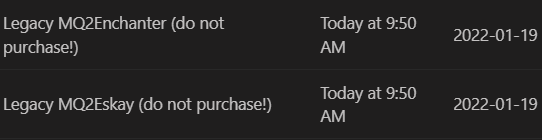
Hi all, I have an issue that I can't seem to figure out or find anything that may help. Ever since the patch on the 19th. I have not been able to use my Eskay or Enchanter plugins. I was using Next prior to the patch, but I have updated everything (plugins, macros, ect) on both Next and Live. And they still are not working. I've tried reloading my UI, nothing. Any help will be appreciated.
 
Hi all, I have an issue that I can't seem to figure out or find anything that may help. Ever since the patch on the 19th. I have not been able to use my Eskay or Enchanter plugins. I was using Next prior to the patch, but I have updated everything (plugins, macros, ect) on both Next and Live. And they still are not working. I've tried reloading my UI, nothing. Any help will be appreciated.
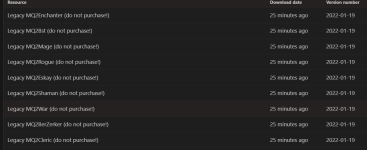
check the plugin tab of your VV launcher - make sure you're actually downloading and running from "MacroQuest - Live". you appear to be downloading legacy

1643126687907.png


definitely make sure you are selecting MacroQuest - Live

1643126707194.png

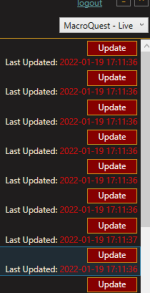
if you see "Update" or "install" click that.

1643126719966.png


then you need to make sure they are loaded

/plugin mq2eskay load
/plugin mq2enchanter load

and if they just loaded and were not before, you will need to /reloadui on ech of them to get the window up.

if the plugins are already running and you just don't see the class window you need to /shd show and /enc show
 
I just looked at your downloads again to follow up, you appear to have re-downloaded the legacy files again

Let's take a step back here.

This is the RG Launcher page. in the top right corner you should have selected MacroQuest - Live.

You will want to make sure in the bottom right hand site you see "Launcher: v1.0.74" if that is any other number you will want to hit that Settings button in the bottom left
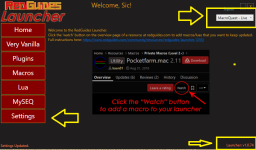
1643131160574.png

Once in that settings tab, on the far right hand side you will see a "Check For Updates" button. make sure to click that if your launcher version is incorrect

1643131218235.png

If will tell you "you already have the latest version" if you are already updated.
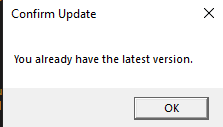
1643131253252.png

once you have done that you can click the "Plugins" tab on the left-hand side.

There is an "Update ALL" button in the bottom right side, you can either individually update/install each plugin, or if it shows "update" and not "install" then you can click update all - if it shows "install" make sure you hit them individually to install them.
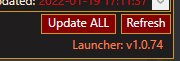
1643131292781.png


With the launcher changing versions you might just have some hiccup with not having downloaded things yet

When you launch macroquest, this should be the icon that you see - this is "MacroQuest" which we formerly referred to as "next". This is what you want, if you see the old MQ2 logo, then that is not what you want to be running.
1643131369745.png

In case you need to re-do migration or setup here is the Migration guide/tutorial and some notes about some minor differences.


It is OFFICIAL! MacroQuest is the version of MacroQuest that we offer here at RedGuides.

You will see this with "MacroQuest - Live" in the RG Launcher.

Please, check out this link: >>> Functions & Features Demo + Migration to the new MacroQuest<<<

There are a couple of small, yet important changes with MacroQuest:
1. mq2map click is Control+Shift+Click
2. new easyfind self travel is Control+Click (reminder in find window title bar)
3. new easyfind group travel is Control+Shift+Click
4. If you selected a destination in your zone guide and want to activate it you /travelto activate
5. /yes and /no are now aliases
6. your ini configuation files (like for kissassist) now reside in your "Config" folder and not your "Macro" folder
 
check the plugin tab of your VV launcher - make sure you're actually downloading and running from "MacroQuest - Live". you appear to be downloading legacy

View attachment 37367


definitely make sure you are selecting MacroQuest - Live

View attachment 37368

if you see "Update" or "install" click that.

View attachment 37369


then you need to make sure they are loaded

/plugin mq2eskay load
/plugin mq2enchanter load

and if they just loaded and were not before, you will need to /reloadui on ech of them to get the window up.

if the plugins are already running and you just don't see the class window you need to /shd show and /enc show
Turned out I noticed that I still hadn't updated the actual RG Launcher. It was the only thing I hadn't updated yet. After I did that everything started falling in to place, and all seems to be working now Thank you sir, for you assistance.
 
Turned out I noticed that I still hadn't updated the actual RG Launcher. It was the only thing I hadn't updated yet. After I did that everything started falling in to place, and all seems to be working now Thank you sir, for you assistance.
thanks for the followup.

i merged this discussion into the RG launcher thread
 
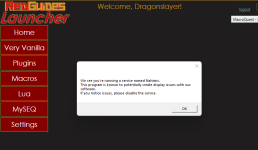
1643195046804.png
A Poppup which dissapears by itself would have been by far enought to give me this Information.
Please change it to a poppup or remove it.
I don't want to confirm this, for me now useless dialog box, for the rest of my life.


I got the message and understood it!

As one can see, the way a message is brought over is able to make it appear aggressive.
Just to be clear: as long as I dont see negative effects, I don't like to put my finger on a running system and change someting.
I feel you want me to force to disinstall something, because in some configurations it created trouble.
I don't like to be forced into something.
 
Last edited by a moderator:
RedGuides Launcher

Users who are viewing this thread

Back
Top
Cart