• You've discovered RedGuides, an EverQuest multi-boxing and scripting community 🧙‍♀️⚙️. We want you to play several EQ characters at once, come join us and say hello! 👋

  • A TLP without truebox has thawed (Very Vanilla ready)
    Frostreaver
RedGuides Launcher

RedGuides Launcher (2 Viewers) 1.1.0

No permission to download
I am sure I am doing something wrong or fucked it up somehow, but when I click on launcher it does the ask me to make changes thing and I say ok sure, and then it pulls up to the login button and then it disappears, it never logs in, never does anything.. I uninstalled and reinstalled it, and its still doing the same thing... i was able to bypass using it by going into my mq2 folder and clicking the mq2 app that way... but I would like to get the launcher working again. Sorry for the trouble.
 
I am sure I am doing something wrong or fucked it up somehow, but when I click on launcher it does the ask me to make changes thing and I say ok sure, and then it pulls up to the login button and then it disappears, it never logs in, never does anything.. I uninstalled and reinstalled it, and its still doing the same thing... i was able to bypass using it by going into my mq2 folder and clicking the mq2 app that way... but I would like to get the launcher working again. Sorry for the trouble.
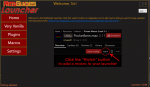
howdy @Isayhooah

I'm not sure i'm following you - the "login" window should just check with your browser, and go back to the launcher so you can patch (it should only show briefly)
if it "logs in correctly" you should see Welcome, Isayhooah at the top

1583280458803.png

Can you show what you're seeing?
 
I'm gonna meet up with Isayhooah when they're available to see if i can't help them get sorted out
 
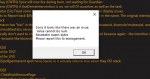
Noob here. I just created a RedGuides account. Paid for level 2, since level 1 doesn't do anything (and the web page never explicitly states you have to have level 2 in order to download the launcher, mq2, etc...). Regardless, I downloaded and installed the launcher using the beginners videos posted by Redbot. After logging in, I followed the directions to install Very Vanilla. I click the install button and get the message shown in the attached pic. The app doesn't install. The bottom of the screen says it is installed, but it's not and the button in the upper right hand corner still says install instead of update. Also the last installed field stays blank.

Help getting this resolved is appreciated.
 

Attachments

  • sorry.PNG
    sorry.PNG
    22.8 KB · Views: 29
Noob here. I just created a RedGuides account. Paid for level 2, since level 1 doesn't do anything (and the web page never explicitly states you have to have level 2 in order to download the launcher, mq2, etc...). Regardless, I downloaded and installed the launcher using the beginners videos posted by Redbot. After logging in, I followed the directions to install Very Vanilla. I click the install button and get the message shown in the attached pic. The app doesn't install. The bottom of the screen says it is installed, but it's not and the button in the upper right hand corner still says install instead of update. Also the last installed field stays blank.

Help getting this resolved is appreciated.
howdy @WOnce - sorry you're having issues - I'm unfamiliar with that particular error but let me tag in @r1pt1de or @Redbot and see if they're familiar with it
 
I've never seen that error either. Go to the settings tab and make sure there's a folder that exists. Also make sure you're using "live" and not "beta" or something
 
Thanks for the speedy response.

I can't find a folder. And the default path doesn't exist on my computer beyond the C:

But I created a folder and appears to be working now.
 
Hi guys. If I add some plugins to my watch list which aren't in the VV, do I have to manually add them into the macroquest.ini to enable them? I checked the folder and it looked like the dll's are there, but the macroquest.ini is only showing the default set of plugins. Just wondering what the right way to do it is.
 
Hi guys. If I add some plugins to my watch list which aren't in the VV, do I have to manually add them into the macroquest.ini to enable them? I checked the folder and it looked like the dll's are there, but the macroquest.ini is only showing the default set of plugins. Just wondering what the right way to do it is.
To load a plugin in-game, type
/plugin mq2pluginname load

The "Watch" feature is only for macros, not plugins (at this time).
 
i seem to be at the mercy of updates, I am getting errors for MQ2 stating differences in time on MQ2 and Game is there a work around for this?
 

Attachments

  • eqerror.png
    eqerror.png
    204.8 KB · Views: 3
You will need to wait for a new updated very vanilla. This occurs every time they have a patch unfortunately. I'm sure that the devs are hard at work trying to get it up and running as they always are.
 
i seem to be at the mercy of updates, I am getting errors for MQ2 stating differences in time on MQ2 and Game is there a work around for this?
yup at @notaplayer pointed out it is a patch day and there's a little bit of a delay this afternoon. VV is usually on target for 8pm est on patch days hopefully we will still be able to make that target

if you go this >> THIS Thread << you can hit the watch button
1584565094619.png
and then choose how you want to be notified when its up
1584565115451.png
 
hello i ran redguides update launcher last night with no issues but now i get nothing it shows up in task manager for a sec then poof its gone no error message nothing i unistalled and reinstalled still same results any ideas as to why this is happening? fyi my laptop did a windows update this morning im thinking that might have something to do with issue
 
hello i ran redguides update launcher last night with no issues but now i get nothing it shows up in task manager for a sec then poof its gone no error message nothing i unistalled and reinstalled still same results any ideas as to why this is happening? fyi my laptop did a windows update this morning im thinking that might have something to do with issue
Wait for the update tonight at 8pm EST
 
everything i have tried doesnt help still wont load
I had a user i remoted into last night and he ended up having an issue with his default browser which would stop the launcher from getting past the very first screen when you open it up - try switching your default browser and see if it will do the "login" thing
 
not sure if this goes in this thread ...Hello .. I redownloaded the new update keep saying the dates are wrong and it wont load says I need to patch mq or eq did both still wont load ,, worked fine yesterday after patch
 
not sure if this goes in this thread ...Hello .. I redownloaded the new update keep saying the dates are wrong and it wont load says I need to patch mq or eq did both still wont load ,, worked fine yesterday after patch
they patched the eq client again today unfortunately - so if you updated EQ you will either need to get a copy of yesterdays eqgame.exe, or you will need to wait until MQ2 and then VV is recompiled for today's exe
 
not sure if this goes in this thread ...Hello .. I redownloaded the new update keep saying the dates are wrong and it wont load says I need to patch mq or eq did both still wont load ,, worked fine yesterday after patch

There was another EQ patch pushed out about an hour ago. So if you ran the EQ patcher, you will need to wait until a new MQ2 is built and released.
 
I am having the same issue as sohagman. I started a separate post also
 
not sure if this goes in this thread ...Hello .. I redownloaded the new update keep saying the dates are wrong and it wont load says I need to patch mq or eq did both still wont load ,, worked fine yesterday after patch
there is a new client patch that happened this morning. MQ2 has not been updated. You can either wait it out, play sans MQ2 or try to get an old eqgame.exe file and bypass the launcher.
 
ok was wondering what was going on ty much should I donate again to speed it up ?
brain and mule always appreciate donations, but don't feel obligated "to speed it up" its just a nice way to show appreciation for all the hours and hard work and long term dedication they put in.

sounds like you already donated so you're fine, unless you're just oozing with generosity
 
having the same issue and ive tried switching default browser does nothing just stuck on Login screen

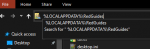
Didnt see redbots post the method of deleteing the folder works, i deleted it then relaunched redguides launcher and clicked login, open page I logged in and return to launcher and its works, Thanks!
 
Last edited:
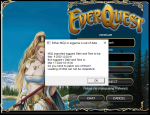
The issue that I am having with the launcher is the following message: MQ2 expected eqgame Date and Time to be: Mar 17 2020 18:15:36 But the eqgame's Date and Time is: Mar 18 2020 19:02:11 Do you need to patch one of them? Loading of MQ2 can not be completed.

I have followed the instructions above, but the issue persist. It appears to be an issue with the launcher not keeping up with the date and time.
 
RedGuides Launcher

Users who are viewing this thread

Back
Top
Cart