@toadwart The problem with not having an indicator on the download when updating the launcher is an issue that I am working to fix. However I have to replace the rest api that I am currently using as the curreny library doesnt have a way to ask for the status of the download. As for the install/update buttons. It doesnt know you have it until you "install" it from the launcher the first time. The button should be switching to updated immediately though and I will take a look at that.

-
 Hail, we're RedGuides. We want you to play six (yes, 6!) EverQuest characters at once. We have scripts and a friendly community to help, please join our playstyle and say hello! 👋
You are using an out of date browser. It may not display this or other websites correctly.
You should upgrade or use an alternative browser.
You should upgrade or use an alternative browser.

RedGuides Launcher (4 Viewers) 1.1.0
- Thread starter r1pt1de
- Start date


Redbot updated Very Vanilla MQ2 (Emulated servers) with a new update entry:
20191123
Read the rest of this update entry...
20191123
Nov 23 2019 by RedGuides
- MQ2Main (ChatWithThisName) Add /removelev command. typing /removelev will remove any levitation in the buff or shortbuff window.
- MQ2Berzerker, MQ2Rogue, MQ2EsKay, MQ2War (ChatWithThisName) updated
- MQ2Status (Sic) Added /status fellowship - returns some information on your fellowship (WIP)
Added /status campfire - returns information on your campfire
Added /status bagspace - returns how many free inventory spaces you have
Corrected a missing return; for...
Read the rest of this update entry...
What format would that be?
I'm writing a standards guideline, will post it soon.
posted:

Resource rules and guidelines
The rules and guidelines for macro, plugin, and other software authors to read before submitting to RedGuides
 www.redguides.com
Last edited:
I'm writing a standards guideline, will post it soon.
@r1pt1de correct me if I'm wrong:
We recommend all authors .zip their work, while treating the macroquest2 folder (the one containing macroquest2.exe) as root.
For example,
Macros:
If your project is just a single macro file, here's how you'd structure the .zip:
If you want to get crazy with folders, this is how you'd structure your zip:
- Macros
- macro.mac
Plugins:
- Macros
- MyMacroFolder
- macro.mac
- macro.inc
- macro.ini.default
Same rule for plugins, treat the mq2 root as a root folder. Just zip up the .dll naked. If you have extras, add them as well.
- mq2plugin.dll
The updater can handle single-file macros and plugins that are not zipped, but multi-file projects must be zipped. To keep things easy on the mods, please just zip everything.
Looks good @Redbot . This just allows the launcher to always place the files in the correct locations without having to special case each individual macro/plugin.
I've been using this the past few updates and have nothing to report. Really slick, keep up the great work!

I noticed we have an EQ file backup program distributed with the launcher. Any opportunity to have a MQ2 configuration backup for Live/Test/Emu/Beta? I've been working on a powershell script that backs this stuff up to a specified location but instead of releasing that as a stand-alone resource, it may be better to integrate the feature into a future launcher release?
That's a good idea. Here's the source for the backup utilitiy:I noticed we have an EQ file backup program distributed with the launcher. Any opportunity to have a MQ2 configuration backup for Live/Test/Emu/Beta? I've been working on a powershell script that backs this stuff up to a specified location but instead of releasing that as a stand-alone resource, it may be better to integrate the feature into a future launcher release?

EQBackupRestore · master · RG Creators / LegacyMQ2 · GitLab
An unmaintained legacy version of MacroQuest2 for 32-bit EQ clients.
 gitlab.com
I haven't talked to the author @rephaite in a couple years, so we'd need to modify it on our own
Awesome! Wasn't sure if it was public or not. I'll add it to the idea list. :-DThat's a good idea. Here's the source for the backup utilitiy:
EQBackupRestore · master · RG Creators / LegacyMQ2 · GitLab
An unmaintained legacy version of MacroQuest2 for 32-bit EQ clients.
I haven't talked to the author @rephaite in a couple years, so we'd need to modify it on our own
r1pt1de updated RedGuides Launcher - Beta with a new update entry:
Bug fixes, image update, formatting, and EQBCS Service support
Read the rest of this update entry...
Bug fixes, image update, formatting, and EQBCS Service support
- Fixed a bug where using Update All on the macros page would cause the app to close
- Updated the image and help text on the Home Tab per Redbot
- Last Installed on the Very Vanilla tab is now color coded based on the latest released version
- Installing/Updating Very Vanilla will now stop and restart EQBCS when running as a service (This only works for EQBCS.exe)
- Launching MQ2 with EQBCS set to also launch will check to see if the EQBCS service exists, if so it will start the...
Read the rest of this update entry...
I hadn't thought about this, but now that you brought it up it could be a really useful feature in the launcher itself. I have a couple other little things to work on first, but I can definitely look at adding MQ2/EQ back ups as a new module in the launcher.Awesome! Wasn't sure if it was public or not. I'll add it to the idea list. :-D
Hmmm, issue with today's updated RedGuides Launcher. As soon as it loads, displays 'settings updated' in the button left, the program will automatically close itself. No crash, just exits.
Windows 10 -- does it with a fresh install.
Update: Quickly clicked to the 'settings' window and it seemed to not exit out on itself this time... going to see if I can post a log for yah. (negative on the log -- log setting is at full but the log in the RG Loader dir is empty). And exited on itself again when attempting to launch eqbcs2 and MQ2. It successfully loaded MQ2 though.
Windows 10 -- does it with a fresh install.
Update: Quickly clicked to the 'settings' window and it seemed to not exit out on itself this time... going to see if I can post a log for yah. (negative on the log -- log setting is at full but the log in the RG Loader dir is empty). And exited on itself again when attempting to launch eqbcs2 and MQ2. It successfully loaded MQ2 though.
Hmmm, issue with today's updated RedGuides Launcher. As soon as it loads, displays 'settings updated' in the button left, the program will automatically close itself. No crash, just exits.
Windows 10 -- does it with a fresh install.
Update: Quickly clicked to the 'settings' window and it seemed to not exit out on itself this time... going to see if I can post a log for yah. (negative on the log -- log setting is at full but the log in the RG Loader dir is empty). And exited on itself again when attempting to launch eqbcs2 and MQ2. It successfully loaded MQ2 though.
Hmmm ok will take a look and see if I can find a reason it may be crashing. While I am trying to diagnose, can you try deleting the following folder? You will have to redo your settings. But I want to see if it will fix the closing.
"C:\Users\<Your Windows User Name>\AppData\Local\RGResourceManager"
Hmmm ok will take a look and see if I can find a reason it may be crashing. While I am trying to diagnose, can you try deleting the following folder? You will have to redo your settings. But I want to see if it will fix the closing.
"C:\Users\<Your Windows User Name>\AppData\Local\RGResourceManager"
That did not fix the issue. After deleting the directory and re-opening the app I hit 'Login'. It redirects me to the browser, browser says to click back to the app, by that point the app has performed some sort of processing and then closes itself.
r1pt1de updated RedGuides Launcher - Beta with a new update entry:
Release Notes integration, logging, and new default folders
Read the rest of this update entry...
Release Notes integration, logging, and new default folders
- Added a ton new logging. Some people are experiencing an errorless crash, so trying to figure out where the exception is being thrown. I havent been able to reproduce the crash locally yet.
- Removed the constant folder verification. If a folder has been set in settings, we will assume its good.
- Added the option to use a default folder if seleting install/update and no folder has been set in settings
- Added an "Open MQ2 Folder" option to the VV tab.
- Release notes now pull...
Read the rest of this update entry...
That did not fix the issue. After deleting the directory and re-opening the app I hit 'Login'. It redirects me to the browser, browser says to click back to the app, by that point the app has performed some sort of processing and then closes itself.
Grab the latest version @drwhomphd . If it still crashes there should a TON more logging in there now.
launching eqbcs as a service is working, but it's not launching as a non-service standalone.
This is fixed in the new version @Redbot . Missed a null ref, sorry :P
r1pt1de updated RedGuides Launcher - Beta with a new update entry:
Fixes
Read the rest of this update entry...
Fixes
- Fix the null ref in the very vanilla module when parsing the last installed date for a server type that hasnt yet been installed.
- Only allow Update All to run on the Plugins page if the current server type selection is set to Live
- Fix the coloring and sorting on the Plugins and Macros tabs to account for local time versus UTC time.
Read the rest of this update entry...
r1pt1de updated RedGuides Launcher - Beta with a new update entry:
Truely this time, I promise
Read the rest of this update entry...
Truely this time, I promise
- Actually fixed the coloring and sorting on the Plugins and Macros tabs.
Read the rest of this update entry...

- Commits
- 2
Great work with the launcher so far works great. One request is a notification that your membership expired during the update process. I continued to update several times and didn't realize it wasn't actually updating. Thank you for all you do for the project.

Ok, finally downloaded the launcher. set the folder. under plugins it lists mq2Berzerker. under macros theres nothing. im guessing i did something wrong. but for the life of me i cannot figure it out. when i click refresh ini the lower left corner it says other resources succesfully loaded. but its just blank.
logs show
<snip>
2019-12-11 16:48:07,069 [1] INFO - PluginsModule: Pulling version info for MQ2PvPAlert
2019-12-11 16:48:07,173 [1] INFO - PluginsModule: Pulling last installed date for MQ2PvPAlert
2019-12-11 16:48:07,177 [1] INFO - PluginsModule: Pulling version info for MQ2EQIM
2019-12-11 16:48:07,284 [1] INFO - PluginsModule: Pulling last installed date for MQ2EQIM
2019-12-11 16:48:07,289 [1] INFO - PluginsModule: Pulling version info for MQ2CustomSound
2019-12-11 16:48:07,395 [1] INFO - PluginsModule: Pulling last installed date for MQ2CustomSound
2019-12-11 16:48:07,400 [1] INFO - PluginsModule: All macro data created and formatted. Sorting the list.
2019-12-11 16:48:09,321 [1] INFO - MacrosModule: Formatting macro data
2019-12-11 16:48:09,326 [1] INFO - MacrosModule: All macro data created and formatted. Sorting the list.
2019-12-11 16:48:11,115 [3] INFO - SettingsModule: Checking for a new version of the Launcher from the forums
2019-12-11 16:48:11,231 [16] INFO - SettingsModule: Getting the current installed version of the launcher from the registry
2019-12-11 16:51:26,966 [1] INFO - MacrosModule: Update All requested
2019-12-11 16:51:29,767 [1] INFO - MacrosModule: Getting list of macros from the forums
2019-12-11 16:51:34,598 [1] INFO - MacrosModule: Formatting macro data
2019-12-11 16:51:34,602 [1] INFO - MacrosModule: All macro data created and formatted. Sorting the list.
logs show
<snip>
2019-12-11 16:48:07,069 [1] INFO - PluginsModule: Pulling version info for MQ2PvPAlert
2019-12-11 16:48:07,173 [1] INFO - PluginsModule: Pulling last installed date for MQ2PvPAlert
2019-12-11 16:48:07,177 [1] INFO - PluginsModule: Pulling version info for MQ2EQIM
2019-12-11 16:48:07,284 [1] INFO - PluginsModule: Pulling last installed date for MQ2EQIM
2019-12-11 16:48:07,289 [1] INFO - PluginsModule: Pulling version info for MQ2CustomSound
2019-12-11 16:48:07,395 [1] INFO - PluginsModule: Pulling last installed date for MQ2CustomSound
2019-12-11 16:48:07,400 [1] INFO - PluginsModule: All macro data created and formatted. Sorting the list.
2019-12-11 16:48:09,321 [1] INFO - MacrosModule: Formatting macro data
2019-12-11 16:48:09,326 [1] INFO - MacrosModule: All macro data created and formatted. Sorting the list.
2019-12-11 16:48:11,115 [3] INFO - SettingsModule: Checking for a new version of the Launcher from the forums
2019-12-11 16:48:11,231 [16] INFO - SettingsModule: Getting the current installed version of the launcher from the registry
2019-12-11 16:51:26,966 [1] INFO - MacrosModule: Update All requested
2019-12-11 16:51:29,767 [1] INFO - MacrosModule: Getting list of macros from the forums
2019-12-11 16:51:34,598 [1] INFO - MacrosModule: Formatting macro data
2019-12-11 16:51:34,602 [1] INFO - MacrosModule: All macro data created and formatted. Sorting the list.
@Grimm68 due to the sheer number of macros and other resources that are out there (aside from plugins) we weren't able to show the full list like we can do with plugins. Therefor to get the macros to show you need to "watch" the resource on the forums by following the directions on the Home tab of the launcher, or on the forum post for the launcher. Make sure you are watching the resource itself, and not the discussion tab of the resource.
Great work with the launcher so far works great. One request is a notification that your membership expired during the update process. I continued to update several times and didn't realize it wasn't actually updating. Thank you for all you do for the project.
Unfortunately we don't have access to that section of the forum software in the API. It is something that has been requested quite a few times, but we just don't have the capability at the moment

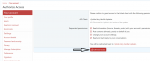
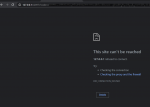
When I try to authorize access it appears to be trying to connect to my local machine and of course fails.
Is there anything unique or interesting about your home network or firewall?
Is there anything unique or interesting about your home network or firewall?
I fully disabled windows defender firewall and then it worked, I may have just missed that in the setup steps, thanks.
I fully disabled windows defender firewall and then it worked, I may have just missed that in the setup steps, thanks.
Glad you were able to get it to work. The app does need to be able to accept an incoming request during the auth process. I will put something on the front page about checking firewall exceptions if there are issues logging in.
r1pt1de updated RedGuides Launcher - Beta with a new update entry:
Fix for missing user state value
Read the rest of this update entry...
Fix for missing user state value
- Fix for missing user state value
Read the rest of this update entry...
I installed it but it won't do anything but show the login button. When I click it nothing happens. Doesn't matter what other buttons I clicked or servers I select it just has the non working login button. I am a beginner to medium skilled user of this stuff (MQ2 and KA and various plugins). I am curious if this might be a patch day thing? I have no reason to think that other than a lot of stuff goes screwy on patch days. I know the MQ2 has to be updated but I mean in my world the car has broken down, ac quit working in the house, got fired from my job, porch collapsed, wife left me, all on patch days.

- Commits
- 191
Not all on the same patchday I hope :-x
r1pt1de updated RedGuides Launcher with a new update entry:
Updated for new resource ID
Read the rest of this update entry...
Updated for new resource ID
- Resource ID for the MQ2 Live install package updated
- Settings page updated to be server type specific, hopefully this will make things a little more clear
- More work on trying to make the UI pretty in an attempt to get it ready for resizing
Read the rest of this update entry...
lol no worries bud, give it a go now.I installed it but it won't do anything but show the login button. When I click it nothing happens. Doesn't matter what other buttons I clicked or servers I select it just has the non working login button. I am a beginner to medium skilled user of this stuff (MQ2 and KA and various plugins). I am curious if this might be a patch day thing? I have no reason to think that other than a lot of stuff goes screwy on patch days. I know the MQ2 has to be updated but I mean in my world the car has broken down, ac quit working in the house, got fired from my job, porch collapsed, wife left me, all on patch days.
Do you have a unique firewall setting, or are you behind a proxy or restrictive VPN? What antivir software do you use?
would you like a username change by the way? message me with a name you'd like.
r1pt1de updated RedGuides Launcher with a new update entry:
Update live server last version label to pull the correct resource id
Read the rest of this update entry...
Update live server last version label to pull the correct resource id
- The "last installed" version on the very vanilla tab was still looking for the old resource ID in the saved installs list.
Read the rest of this update entry...
r1pt1de updated RedGuides Launcher with a new update entry:
Fix settings saving and crashing on button push
Read the rest of this update entry...
Fix settings saving and crashing on button push
- Settings the MQ2 install folder will once again save the setting properly
- Clicking on the "Open MQ2 Folder" and "Launch MQ2" buttons will no longer crash the app if the folder or files dont yet exist.
Read the rest of this update entry...
Suggestion on the macro tab: Autosort the entries by the "last updated" at the top, or simply sort for those macros that have a newer version than you do, so they show at the top, and all of the old stuff is at the bottom. As it is, I have to manually scan the entire list each time to find what needs to be updated.
Users who are viewing this thread
Total: 5 (members: 0, guests: 5)
Share: