
I have also downloaded redfetch. I am wondering what the difference in redguides launcher and redfetch are ? Thanks

-
 Hail, we're RedGuides. We want you to play six (yes, 6!) EverQuest characters at once. We have scripts and a friendly community to help, please join our playstyle and say hello! 👋
You are using an out of date browser. It may not display this or other websites correctly.
You should upgrade or use an alternative browser.
You should upgrade or use an alternative browser.


They do the same thing basically, but the launcher will be deprecated soon so it's best to move to redfetch.


"Soon" seriously, like days, years? Come on, can you at least explain why it's needed?

I like what I see so far with redfetch. Question: trying to make a shortcut for this, now the question. Do I need to just make a shortcut of the downloaded .exe file or will there be an .exe in the redfetch folder? It is a little cumbersom to keep going to the download folder to run redfetch. I can always pin to task bar the redfetch.exe or move it into the redfetch folder.

If using windows, can just type redf in the search bar and hit enter 

Stupid question, I once opened redfetch with admin privileges to see if it would clear some of the protected file issues. Now I need to run redfetch with admin privileges every time or it auto closes… probably wasn’t the best idea to run it as admin but I trust you guys  .
.
So, what is my fix here? Delete and reinstall?
.So, what is my fix here? Delete and reinstall?
Right click and remove the "run as elevated/admin" check box on it.Stupid question, I once opened redfetch with admin privileges to see if it would clear some of the protected file issues. Now I need to run redfetch with admin privileges every time or it auto closes… probably wasn’t the best idea to run it as admin but I trust you guys
So, what is my fix here? Delete and reinstall?

Is there a way to choose which resouce you are watching that you would like to install like the previous client that I haven't found yet (vs installing them all)?
Yes, can update by placing the script ID (or just the webpage URL) in the box on the first tab and click "update" single resource.Is there a way to choose which resouce you are watching that you would like to install like the previous client that I haven't found yet (vs installing them all)?
It’s really a non-issue, but the actual question was in the GUI you could choose to install a watched resource or not. It 'appears' the current Redfetch just grabs every watched resource and installs them regardless?Yes, can update by placing the script ID (or just the webpage URL) in the box on the first tab and click "update" single resource.

As long as it only grabs updated scripts since the last run, I am good with that. For dev purposes. I will normally have a dev version of the scripts I am working on, even if I am subscribed to the RG version. I did like being able to see what was just updated though.

The old one is supposed to update when you update, being able to force it if a hiccup occured is where the original one is at with that - not so you can skip updates.It’s really a non-issue, but the actual question was in the GUI you could choose to install a watched resource or not. It 'appears' the current Redfetch just grabs every watched resource and installs them regardless?
No author wants you to skip updates

Even outside of that, you can lock certain files and it will fail, or there is a built-in system to ignore certain files that I feel could be improved upon or made more visible.As long as it only grabs updated scripts since the last run, I am good with that. For dev purposes. I will normally have a dev version of the scripts I am working on, even if I am subscribed to the RG version. I did like being able to see what was just updated though.
There are some scripts I have customized and I have done that... some others, I have used version control with a git so I can rebase the code to reapply my changes on the updates.
For clarification.The old one is supposed to update when you update, being able to force it if a hiccup occured is where the original one is at with that - not so you can skip updates.
No author wants you to skip updates
The old launcher gave you the option to 'install' a resource you are watching. I could watch 50-60 different resources and not actually download and 'install' them. Friendly reminder or reference right there in the launcher for something I may want to try in the future with out having a ton of stuff actually installed. If it was installed you also had the ability to update those resources that were actually installed with out installing the others you were watching.
Again a non issue in the big scheme of things. Just something I personally liked. Not a deal breaker by any means.
that's what i mean tho. that was a byproduct of something not working in the way it was designed/intended/wanted/supposed-toFor clarification.
The old launcher gave you the option to 'install' a resource you are watching. I could watch 50-60 different resources and not actually download and 'install' them. Friendly reminder or reference right there in the launcher for something I may want to try in the future with out having a ton of stuff actually installed. If it was installed you also had the ability to update those resources that were actually installed with out installing the others you were watching.
Again a non issue in the big scheme of things. Just something I personally liked. Not a deal breaker by any means.
I get what your saying but having an 'install' option would have to be a deliberate thing to code into the patcher. That's where I'm getting confused as it being a "bug".that's what i mean tho. that was a byproduct of something not working in the way it was designed/intended/wanted/supposed-to
I was at work earlier and didn't have access to get the screenshot below.
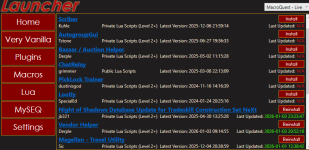
I understand that is how it is. This conversation is a byproduct of how that is, but not how it should/supposedI get what your saying but having an 'install' option would have to be a deliberate thing to code into the patcher. That's where I'm getting confused as it being a "bug".
I was at work earlier and didn't have access to get the screenshot below.
View attachment 74088
Well Red as far as I can tell this is working okay. So ran redfetch got the main screen and hit the blue easy update button and low and behold all kinds of thing got loaded and updated. GOOD Job, I like it. Next I went to settings and checked the different files locations and all looked right where they should be. Now we get to the shortcut page and first thing is to run Very Vanilla. Great but wait where is the Icon for MQ2? Its not on the screen or on the task bar? Hummmmm! Start looking for it and low and behold I find it in the hidden icon part of the task bar. (sure would be nice to have some mention to go look at the Autologin video by Grimmier). Anyway took a while to figure out what was what before I found Grimmier's vid. (nice job Grimmier) So now it's time to see if I can figure out Redfetch what is good and what is bad with it (see if I can mess it up hehehehe)
icons being in the hidden or otherwise is what you setup for your windows personalization. Personization -> Taskbar -> "Other system tray icons"Well Red as far as I can tell this is working okay. So ran redfetch got the main screen and hit the blue easy update button and low and behold all kinds of thing got loaded and updated. GOOD Job, I like it. Next I went to settings and checked the different files locations and all looked right where they should be. Now we get to the shortcut page and first thing is to run Very Vanilla. Great but wait where is the Icon for MQ2? Its not on the screen or on the task bar? Hummmmm! Start looking for it and low and behold I find it in the hidden icon part of the task bar. (sure would be nice to have some mention to go look at the Autologin video by Grimmier). Anyway took a while to figure out what was what before I found Grimmier's vid. (nice job Grimmier) So now it's time to see if I can figure out Redfetch what is good and what is bad with it (see if I can mess it up hehehehe)
no, once red is ready for it, he'll sayAsking a legitimate question so put your attack hats away. Do we have a timeline to make redfetch the primary launcher tool? I keep hearing it referred to as the primary tool however I know most people still use rglauncher and it's still on the main page of this website.

Right. So it's not the primary tool at this point. I deleted my comment but thanks for responding anyway.no, once red is ready for it, he'll say
Okay been messing around with Redfetch and finally got it to autologin a group. (might have been easier if I payed more attention to the vid.) Anyway (raises hand) I noticed that the shortcuts screen has a button for EQBCS and thats great cause I am used to that one but in the Video's its pushing DANNET as the group communation. Question: Is there going to be a button for Dannet as well as EQBCS in Redfetch? And now the big important question: How big is a peck? Cause Peter and his peppers need some place to store it.
redfetch just updates your mq.Okay been messing around with Redfetch and finally got it to autologin a group. (might have been easier if I payed more attention to the vid.) Anyway (raises hand) I noticed that the shortcuts screen has a button for EQBCS and thats great cause I am used to that one but in the Video's its pushing DANNET as the group communation. Question: Is there going to be a button for Dannet as well as EQBCS in Redfetch? And now the big important question: How big is a peck? Cause Peter and his peppers need some place to store it.
there is a button in the rg launcher and redfetch to launch the eqbcS (eqbc server) because eqbc requires the server running
dannet does not have a server, it is peer to peer
there is nothing for redfetch to run for dannet.
is it...There are some big issues with redfetch and the only way to fix them is to fix the backend, which is this website, so updates are on hold until I get the new site up.
too sexy for its shirt?
boot too big for feet?
ball so hard mf'ers tryina find him?
swag to on-point?
rizzin too hard?
You can click the MQ icon and drag it down to the bar and windows will stop hiding it int he future. No need to go digging through settings. Just drag it down next to an existing icon you can see.Its not on the screen or on the task bar? Hummmmm! Start looking for it and low and behold I find it in the hidden icon part of the task bar.
I heard you could just turn it all over to chatgpt and it'll fix it all, first try, every time, never fails.There are some big issues with redfetch and the only way to fix them is to fix the backend, which is this website, so updates are on hold until I get the new site up.
I've just installed redfetch and pointed it to my existing custom MQ folder. Everything updates ok and when I select run VV it seems to work and MQ appears in the icon box. However when I load EQ there is no MQ injected at all. Restarted a few times and get the same issue. Use the old launcher with the same MQ folder and everything works fine.
Thanks Sic - you were right. Took me ages to find the culprit - it was an option checked in Innerspace (ISBoxer) that automatically lauched EQ with admin access.Turn on debugging for mq, you'll probably see that you're trying to launch something as admin - you don't want that

DSHEP
Member
I'm also curious about this and didn't see an answer. I use RGMercs in some instances via my Very Vanilla MQ folder, but I may also use a separate MQ that supports E3N for some things. As it stands, I'm unable to update anything "included in Very Vanilla" using redfetch that resides in my E3N compatible MQ folder.This is probably a daft question But i play on laz and use a mix of RGmercs and E3N depending on what i am doing. Can i use this to just update any LUA files and leave actual MQ alone?
DSHEP
Member
Thanks, that's what I've done so far. For the 'Included in Very Vanilla' IDs however, it does not work (yet?). Example 'MQNearby' https://www.redguides.com/community/resources/mqnearby.3222/ results in error.You can. You'd just not hit the "update everything button" and instead put in the resource.id and update that.
@Redbot any cool tricks for updating a series of IDs?
"Downloading resource please wait...
Resource 3222 is not downloadable or has no files.
No valid resources found for IDs: ['3222']. Are you in the right server env? Did you opt_in in your settings.local.toml?
Some resources failed to update."
mynearby won't work on a not-rg buildThanks, that's what I've done so far. For the 'Included in Very Vanilla' IDs however, it does not work (yet?). Example 'MQNearby' https://www.redguides.com/community/resources/mqnearby.3222/ results in error.
"Downloading resource please wait...
Resource 3222 is not downloadable or has no files.
No valid resources found for IDs: ['3222']. Are you in the right server env? Did you opt_in in your settings.local.toml?
Some resources failed to update."
Redbot updated redfetch with a new update entry:
1.0.0
Read the rest of this update entry...
1.0.0
Added
- Staff picks: curated resources for LIVE/TEST/EMU. Turn it off if you don't care what we like.
Changed
- Authentication now uses OAuth2, though you can still use an API key if you prefer.
Fixed
publish:--messagecan be a file path. If it’s a Keep a Changelog file, we'll use the matching version entry; otherwise the file contents are posted. Empty...
Read the rest of this update entry...
Users who are viewing this thread
Total: 3 (members: 0, guests: 3)
Share: