

Yesdoes this replace RG launcher?

-
 Hail, we're RedGuides. We want you to play six (yes, 6!) EverQuest characters at once. We have scripts and a friendly community to help, please join our playstyle and say hello! 👋
You are using an out of date browser. It may not display this or other websites correctly.
You should upgrade or use an alternative browser.
You should upgrade or use an alternative browser.

I'm also curious about this and didn't see an answer. I use RGMercs in some instances via my Very Vanilla MQ folder, but I may also use a separate MQ that supports E3N for some things. As it stands, I'm unable to update anything "included in Very Vanilla" using redfetch that resides in my E3N compatible MQ folder.
We have you covered
 From the overview:
Tinkerers
If you self-compile MacroQuest or use a discord friend's copy, you can still keep your scripts and plugins in sync with redfetch by opting out of Very Vanilla:
Then assign the Very Vanilla MQ path to your self-compiled MacroQuest.Code:redfetch.exe config SPECIAL_RESOURCES.1974.opt_in false --server LIVE redfetch.exe config SPECIAL_RESOURCES.60.opt_in false --server EMU redfetch.exe config SPECIAL_RESOURCES.2218.opt_in false --server TEST
We ship plugins with the Very Vanilla zip (currently) so this is only for updating scripts.
It looks like redfetch is getting an error when downloading the latest macroquest. Or something funny is going on. RGL is saying out of date, and an update available on 2/372026 2am, but redfetch says all is up to date. RF says error fetching resource 3003, 404 - could that be it?
resource 3003 is buttonmaster beta, which Derple deleted on Thursday, which is why you got a 404 (not found). I need to add handling for deleted resources!It looks like redfetch is getting an error when downloading the latest macroquest. Or something funny is going on. RGL is saying out of date, and an update available on 2/372026 2am, but redfetch says all is up to date. RF says error fetching resource 3003, 404 - could that be it?
in the interim, use Derple's Button Master (stable, not beta) here:


Thanks!resource 3003 is buttonmaster beta, which Derple deleted on Thursday, which is why you got a 404 (not found). I need to add handling for deleted resources!
in the interim, use Derple's Button Master (stable, not beta) here:

Well something strange happened this morning. I ran redfetch as usual. Updated all the stuff, and went to autologin my group and nothing. I got a box wanting me to enter my master password. The funny thing is I never made one. So I found what looks like a password it starts with WPWord=====. Okay so I then tried to just login one toon and it seems that when it got to the eq login window the password for the account was wrong. So I manually entered the password for that account and got right in. So I don't know what changed in Redfetch, but it changed all passwords for each account. Going to manually log in a group and then see if anything else is messed up (like Kissassist).
Zeb
Zeb
redfetch updated on monday, but hasn't since then - before that was dec 2ndWell something strange happened this morning. I ran redfetch as usual. Updated all the stuff, and went to autologin my group and nothing. I got a box wanting me to enter my master password. The funny thing is I never made one. So I found what looks like a password it starts with WPWord=====. Okay so I then tried to just login one toon and it seems that when it got to the eq login window the password for the account was wrong. So I manually entered the password for that account and got right in. So I don't know what changed in Redfetch, but it changed all passwords for each account. Going to manually log in a group and then see if anything else is messed up (like Kissassist).
Zeb
is it possible that the place you think you're updating mq to (your previous MQ location) is different from where redfetch is updating to?
you can check this on your Settings tab of redfetch
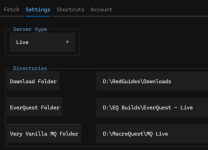
That was the first thing I did was check to make sure all the locations matched (they do). If the update was monday then it is not that. Reason is everything was working great yesterday. So going to check my system out and make sure that it is not something that I did. (been known to screw up stuff) and windows just had an update and this might be the cause. Will let you know what I find out.
Zeb
Zeb
Well guys and gals I got it working. As soon as I tried to launch Very Vanilla I would get asked to provide a password or in this case a master password. So I went to the Autologin section and looked at setting and yeppers, it was there. Retrieve Master Password. So knowing my memory I got a pen (old school stuff) and wrote it down. Closed everything up and started over. Yes just as I tried to launch VV, up pops the password box and this time I entered that password. Low and behold I was able to autolog my group. Now the only thing that has me confused is I never made a master password, so where did it come from?
Zeb
Zeb
Keep in mind, that is auto login, which has nothing to do with redfetch at all.Well guys and gals I got it working. As soon as I tried to launch Very Vanilla I would get asked to provide a password or in this case a master password. So I went to the Autologin section and looked at setting and yeppers, it was there. Retrieve Master Password. So knowing my memory I got a pen (old school stuff) and wrote it down. Closed everything up and started over. Yes just as I tried to launch VV, up pops the password box and this time I entered that password. Low and behold I was able to autolog my group. Now the only thing that has me confused is I never made a master password, so where did it come from?
Zeb
Redfetch is just the patcher system to update mq, luas, macros, plugins, maps, etc

Moved my VV installation to a new computer by simply copying my c:\pdq folder to the new computer. Didn't bother with the old patcher stuff.
Had problems with Redfetch wanting to create an extensive secondary set of nested folders.
Found the settings tab and changed VV to point to C:\PDQ and things got better. But it still insists on creating an empty C:\PDQ\Downloads\VanillaMQ_Live and a C:\PDQ\VanillaMQ_Live folder.
I feel very uncomfortable having a folder named something so obviously MQ related. It would be super simple for Daybroke to scan your hard drive for that hard coded folder name.
Also, it would be nice if the installer explicitly mentioned where to find redfetch.exe after it's finished installing itself. Some of us like to clean the downloads folder on a regular basis.
Sorry if this sounds harsh, it's not intended, just offering my observations. It's working great once I learned how to use it properly.
Had problems with Redfetch wanting to create an extensive secondary set of nested folders.
Found the settings tab and changed VV to point to C:\PDQ and things got better. But it still insists on creating an empty C:\PDQ\Downloads\VanillaMQ_Live and a C:\PDQ\VanillaMQ_Live folder.
I feel very uncomfortable having a folder named something so obviously MQ related. It would be super simple for Daybroke to scan your hard drive for that hard coded folder name.
Also, it would be nice if the installer explicitly mentioned where to find redfetch.exe after it's finished installing itself. Some of us like to clean the downloads folder on a regular basis.
Sorry if this sounds harsh, it's not intended, just offering my observations. It's working great once I learned how to use it properly.
did you follow the new guides?Can't get MQ to populate whatsoever and am completely lost as to what to do to get everything up and running.

RedGuides - Thread 'REDGUiDES.NFO'
Code:
_///////                   _//   _////                   _//
_//    _//                 _// _/    _//          _/     _//
_//    _//     _//         _//_//        _//  _//        _//   _//     _////
_/ _//       _/   _//  _// _//_//        _//  _//_// _// _// _/   _// _//
_//  _//    _///// _//_/   _//_//   _////_//  _//_//_/   _//_///// _//  _///
_//    _//  _/        _/   _// _//    _/ _//  _//_//_/   _//_/            _//
_//      _//  _////    _// _//  _/////     _//_//_// _// _//  _////   _// _//
+-----[    H A I L  A N D  W E L L  M E T ,  A D V E N T U R E R    ]-----+
|...- Redbot
- Replies: 38
- Forum: /yell for /help
what step did you get to?
redfetch it the means and method to update your macroquest and scripts/plugins/macros/maps/etc to the most recent available files for the respective builds (live, test, emu).Have a question for give me if its insignificant but I can't get my hotkeys to save? is it because im patching the game through MQ? Still can't get Eqlp to work Aswell. Any help would be greatly appreciated.
it doesn't have anything to do actually with macroquest, the luas/macros/plugins themselves
you can't patch everquest via macroquest - you'd want to exit macroquest entirely (i recommend a computer restart if you're unsure), and then run the daybreak launcher to update eq, then exit the daybreak launcher, and then run redfetch to update everything -> then run MQ -> then launch MQ via autologin in the macroquest launcher.
all the various things called "launcher" can certainly be confusing
Redfetch -> updates mq/luas/plugins/macros/maps, etc
MQ Launcher -> launches macroquest / autologin, etc
DBG launcher -> updates eq

918Ape
New member
I did follow the steps but I can't get MQ to open.did you follow the new guides?
RedGuides - Thread 'REDGUiDES.NFO'
Code:_/////// _// _//// _// _// _// _// _/ _// _/ _// _// _// _// _//_// _// _// _// _// _//// _/ _// _/ _// _// _//_// _// _//_// _// _// _/ _// _// _// _// _///// _//_/ _//_// _////_// _//_//_/ _//_///// _// _/// _// _// _/ _/ _// _// _/ _// _//_//_/ _//_/ _// _// _// _//// _// _// _///// _//_//_// _// _// _//// _// _// +-----[ H A I L A N D W E L L M E T , A D V E N T U R E R ]-----+ |...
- Redbot
- Replies: 38
- Forum: /yell for /help
what step did you get to?
This has happened to me before i needed to update and I checked if auto login was checked offWell something strange happened this morning. I ran redfetch as usual. Updated all the stuff, and went to autologin my group and nothing. I got a box wanting me to enter my master password. The funny thing is I never made one. So I found what looks like a password it starts with WPWord=====. Okay so I then tried to just login one toon and it seems that when it got to the eq login window the password for the account was wrong. So I manually entered the password for that account and got right in. So I don't know what changed in Redfetch, but it changed all passwords for each account. Going to manually log in a group and then see if anything else is messed up (like Kissassist).
Zeb
I was getting this error when Updating Redfetch

I am not watching button master (3003) and I have not downloaded it, but it's included as part of the staff picks.
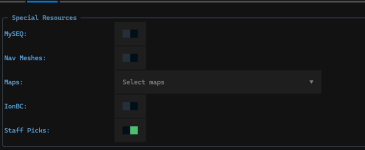
Kaen helped me sort it out and I'm posting it here to help others.
Go to the shortcuts tab and click the settings.local.toml button.
This opens the file.
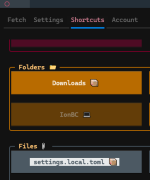
You can edit your buttonmaster file to: opt in = false
# buttonmaster
[LIVE.SPECIAL_RESOURCES.3003]
opt_in = false
The button master part wasn't in my settings.locla.toml file so I copy and pasted it in and that fixed the issue.
Thanks a ton to a bunch of people on Discord that helped me get everything sorted out.
I am not watching button master (3003) and I have not downloaded it, but it's included as part of the staff picks.
Kaen helped me sort it out and I'm posting it here to help others.
Go to the shortcuts tab and click the settings.local.toml button.
This opens the file.
You can edit your buttonmaster file to: opt in = false
# buttonmaster
[LIVE.SPECIAL_RESOURCES.3003]
opt_in = false
The button master part wasn't in my settings.locla.toml file so I copy and pasted it in and that fixed the issue.
Thanks a ton to a bunch of people on Discord that helped me get everything sorted out.
It was @brainiac who figured this out. Seems like a really silly error, especially since the log and downloads said otherwise.I was getting this error when Updating Redfetch
View attachment 75255
I am not watching button master (3003) and I have not downloaded it, but it's included as part of the staff picks.
View attachment 75256
Kaen helped me sort it out and I'm posting it here to help others.
Go to the shortcuts tab and click the settings.local.toml button.
This opens the file.
View attachment 75257
You can edit your buttonmaster file to: opt in = false
# buttonmaster
[LIVE.SPECIAL_RESOURCES.3003]
opt_in = false
The button master part wasn't in my settings.locla.toml file so I copy and pasted it in and that fixed the issue.
Thanks a ton to a bunch of people on Discord that helped me get everything sorted out.
Oh, sorry. No offense meant. Brainiac was instrumental in resolving my issues. I simple meant Kaen was the one who walked me through the changes I needed to make.It was @brainiac who figured this out. Seems like a really silly error, especially since the log and downloads said otherwise.
Redbot updated redfetch with a new update entry:
1.1.0
Read the rest of this update entry...
1.1.0
Added
- Windows: optional Desktop shortcut, toggle it in the TUI settings.
- Staff picks: Scriber, Bazaar/Auction Helper, and Skill Skillup are now on LIVE/TEST/EMU.
Fixed
- Staff picks: Buttonmaster was pointing at the deleted beta resource, giving everyone a 404 log line each run.
Read the rest of this update entry...

Was also a surprise for me, extra double clickWhen updating redfetch, once the update is complete, the window closes. My expected behavior is that redfetch would be automatically started after the update.

When updating redfetch, once the update is complete, the window closes. My expected behavior is that redfetch would be automatically started after the update.
This is trickier than it sounds with a terminal app, but you've got me started and now I have to finish
Is there anything you don’t want to update for some reason? Otherwise I just click the easyupdate button before I start my session.Hi I was told to use this software instead of RGlauncher.
Is it possible with redfetch to know if my "watched" ressources (macros, luas etc) are up to date with (a red/green light)? and how do I proceed to update them? I couldnt find these options.
Thanks
Yes easy update not "make your life hard maybe update lol jk"I had no idea the redfetch easyupdate button would also update my watched macro's and lua's.
Especially because I launched RGlauncher after having redfetch updated and I had stuff that appeared red (update needed) in the RGlauncher.
This is all very confusing for me
Redbot updated redfetch with a new update entry:
1.1.1
Read the rest of this update entry...
1.1.1
Fixed
- Resources will re-download if you change their path.
Read the rest of this update entry...
Redbot updated redfetch with a new update entry:
1.1.2
Read the rest of this update entry...
1.1.2
Fixed
- Fixed a crash when starting the RG web interface.
Read the rest of this update entry...
you don't appear to be lvl 2?When I run it, a window appears and then closes automatically almost immediately. The same thing happens when I open it using System Administrator.
I imagine it is because of that

When I run it, a window appears and then closes automatically almost immediately. The same thing happens when I open it using System Administrator.
DONT VOLUNTARILY RUN SHIT YOU FOUND ON THE INTERNET AS ADMINISTRATOR

LVWG
Member
I got it. Thanks.DONT VOLUNTARILY RUN SHIT YOU FOUND ON THE INTERNET AS ADMINISTRATOR
Users who are viewing this thread
Total: 1 (members: 0, guests: 1)
Share: