• You've discovered RedGuides, an EverQuest multi-boxing and scripting community 🧙‍♀️⚙️. We want you to play several EQ characters at once, come join us and say hello! 👋

  • A TLP without truebox has thawed (Very Vanilla ready)
    Frostreaver
redfetch

💾Software redfetch (1 Viewer) 1.2.0

Download
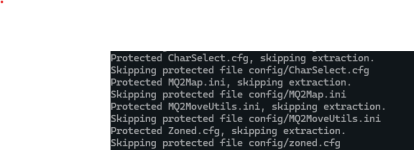
View attachment 69288

my *guess* is that the settings location is an "unsafe" location like eq directory
It may be because of the symlinking I used to be able to use RGlauncher when I have non-default Lua/macro/config directories (as each of those shares a directory for all three mq environments)

Edit: Those symlinks are simply one level up in the file tree, however.

So i guess being able to specify those directories would be nice, if that is the issue?

Next day edit:
The message only pops up when attempting to unzip the MQ package to the folders. I am able to update Lua/macro scripts in the symlinked folders normally. I have a workaround for myself for now.

What I said yesterday about specifying those directories would be nice, but that doesn't make sense to me now that I understand what's going on a little better. Wouldn't mind it if unzipping worked with the symlinks, but I guess I can still do what I need to do (by rearranging folder structure/path entries and keeping one install with default directory paths).
 
Last edited:
Back to this issue again, redfetch says it is updating but when I go to play it says the versions are different. RedGuides launcher wont launch at all. In short nothing is working.
 
Back to this issue again, redfetch says it is updating but when I go to play it says the versions are different. RedGuides launcher wont launch at all. In short nothing is working.
what does your error actually say

if you read it, it probably is pretty clear

if your mq date is past your eq date, your eq needs to be patched too
 
It says: eq version may 15, and macroquest version apr 17, so I need to update macroquest. Redguides launcher wont launch at all and in redfetch the easy update button does something and downloads stuff, it says "all resources are up-to-date; no downloads were necesary."
 
It says: eq version may 15, and macroquest version apr 17, so I need to update macroquest. Redguides launcher wont launch at all and in redfetch the easy update button does something and downloads stuff, it says "all resources are up-to-date; no downloads were necesary."
if you haven't already, reboot your PC and try again

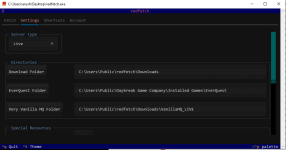
does your settings tab look correct?
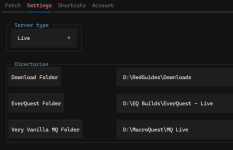
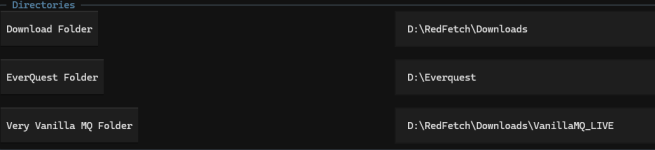
Here mine shows "Live" server type, and shows my MQ live / EverQuest - Live folders
1747942889092.png
 
I have rebooted multiple times, here is my setting screen it looks right to me but....
View attachment 69751
Go back and do the update thing, then launch mq, and let's see where that mq is located.

If it isn't the MQ that is in that VanillaMQ_LIVE folder, that'll be your problem.

Are you launching mq from a shortcut or via the button in redfetch?
 
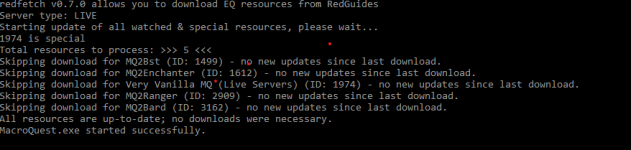
Here is what the redfetch is saying when I use the "easy update button". I typically use a shortcut and it is going to the same place as the setting in redfetch. But starting with redfetch gets me the same outcome either way.


1747954892702.png
 
Deleted everything and reloaded it, and made headway. I don't get the error anymore for the dates, and some things work, but others don't. Pluginman doesn't work cant seem to start autofeed, but the fishing mac works and I got mesh to work again. I give up for today too frustrated to continue.
 
Hmmmm, I'm thinking a video would be great for this once the bugs are worked out. I'm honestly paranoid that a non-computer person like myself will mess things up, and break both and then no more MQ for me till I learn how to fix whatever I messed up. So I'm gonna wait to install out of paranoia. But an ever-popular "Redfetch For Dummies" video by the man, the myth, the legend { @Sic } would be greatly appreciated :)
 
Deleted everything and reloaded it, and made headway. I don't get the error anymore for the dates, and some things work, but others don't. Pluginman doesn't work cant seem to start autofeed, but the fishing mac works and I got mesh to work again. I give up for today too frustrated to continue.
WITSEC and barnacle stocks are going up~
 
Worked on it some more today, and got no where. Still at the same point where it will now load, but only some things work. Plugin manager still wont load, autofeed/drink doesn't work, but guild portal does and so does the fishing mac. Feels like it is a plugin folder issue but I have copied over the plugins from an older saved file and it still does work. Restarted my computer about 15 times today so now I am to frustrated to continue. About to give up on EQ all together, game is not worth this amount of annoyance.
 
Working on switching from RG launcher to Redfetch.

Getting an error:

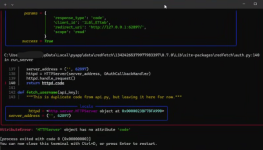
Error in run_synchronization: [Errno 13] Permission denied: 'C:\\Users\\xxxxx\\AppData\\Local\\MySEQ\\Live\\myseqserver.ini'

I took out my name and put in xxxx. Everything else seemed to update fine.
 
Working on switching from RG launcher to Redfetch.

Getting an error:

Error in run_synchronization: [Errno 13] Permission denied: 'C:\\Users\\xxxxx\\AppData\\Local\\MySEQ\\Live\\myseqserver.ini'

I took out my name and put in xxxx. Everything else seemed to update fine.
Imo, I'd move my myseq directory out of appdata
 
Imo, I'd move my myseq directory out of appdata
Interesting, I moved myseq to my programdata directory but couldn't find a place to change the folder location in redfetch. So I just tried to update again and it re-downloaded all the myseq files to the old directory and completed the updated successfully. Now it seems to work fine, other than having two myseq directories.
 
Interesting, I moved myseq to my programdata directory but couldn't find a place to change the folder location in redfetch. So I just tried to update again and it re-downloaded all the myseq files to the old directory and completed the updated successfully. Now it seems to work fine, other than having two myseq directories.
Hrm, guess myseq doesn't have a directory selection on settings.

Are you using an appdata location for your primary installation? I >personally< avoid anything that might run into windows permissions/ conflicts. Not saying it is or isn't "best practice", because I don't know.

@Redbot thoughts?
 
Hrm, guess myseq doesn't have a directory selection on settings.

Are you using an appdata location for your primary installation? I >personally< avoid anything that might run into windows permissions/ conflicts. Not saying it is or isn't "best practice", because I don't know.

@Redbot thoughts?

I might just uninstall and reinstall redfetch so I can reset the myseq folder. There is probably a more elegant way but it will get the job done.
 
I might just uninstall and reinstall redfetch so I can reset the myseq folder. There is probably a more elegant way but it will get the job done.
?

You didn't answer my question - if your directory in the settings tab is set to appdata, then it's make sense that is where it placed myseq.

No need to delete/wipe/witsec - just change the directory for the install
 
?

You didn't answer my question - if your directory in the settings tab is set to appdata, then it's make sense that is where it placed myseq.

No need to delete/wipe/witsec - just change the directory for the install
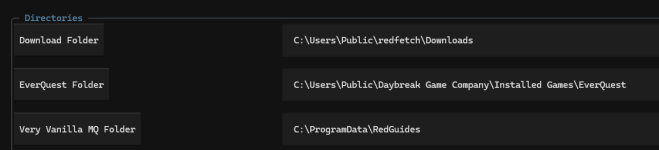
My bad. No it wasn't. Not sure why myseq was the only one there. And Myseq doesn't have a directory option in settings.

1749090418105.png
 
Fixed it. Just uninstalled and reinstalled. For some reason the Myseq directory defaulted to the appdata file even when the directory didn't exist there. I selected the custom option and selected the proper directory during install. Everything looks good now.
 
Switched over to this full time now as well since it looks like this will be the new norm =) Had to uninstall it from the first time I tried it, but I finally got it working. The RG launcher is still installed for what that's worth with myseq functioning
I'm having a similar issue to Granditos with myseq though. I'm using the RedFetch\Downloads default directory.

1749306593897.png

After install, there is obviously no myseq directory until you opt for it in the special resources. Once you do and update from the main screen, it creates a directory in the downloads folder of D:\RedFetch\Downloads\MySEQ_LIVE but the folder is empty and the MySEQ pink button on the Shortcuts tab is obviously greyed out. I searched and can not find another directory on any drive where it would have installed unless it's somehow linked to the old RGLuancher MySEQ directory.

I was watching the overview tab of 151, 153, and 303. When running the update, I see this from the log

[CODE highlight="10"]redfetch v0.7.0 allows you to download EQ resources from RedGuides
Server type: LIVE
Starting update of all watched & special resources, please wait...
1865 is a dependency of 151
303 is special
1974 is special
151 is special
153 is special
153 is a dependency of 151
Resources erroneously marked as watching: [153]
Special resources to be removed from db: [153]
Total resources to process: >>> 80 <<<
Skipping download for KissAssist (ID: 4) - no new updates since last download.
Skipping download for Bazaar.mac (ID: 23) - no new updates since last download.
Skipping download for MySEQ Open (Live server offsets) (ID: 151) - no new updates since last download.[/CODE]

If I unwatch 153, I get the following

Code:
redfetch v0.7.0 allows you to download EQ resources from RedGuides
Server type: LIVE
Starting update of all watched & special resources, please wait...
1974 is special
151 is special
153 is special
153 is a dependency of 151
303 is special
1865 is a dependency of 151
Special resources to be removed from db: [153]
Total resources to process: >>> 80 <<<
Skipping download for KissAssist (ID: 4) - no new updates since last download.
Skipping download for Bazaar.mac (ID: 23) - no new updates since last download.
Skipping download for MySEQ Open (Live server offsets) (ID: 151) - no new updates since last download.

The MySEQ directory is still empty at this point. So I input 153 int the single resource update and get
1749308488442.png
Code:
redfetch v0.7.0 allows you to download EQ resources from RedGuides
Server type: LIVE
Downloading resource please wait...
153 is special
153 is a dependency of 151
Total resources to process: >>> 1 <<<
Downloading updates for Brewall's EverQuest Maps (ID: 153).
Downloading file D:\Everquest\maps\Brewall_Maps\brewall-maps_20241203.zip
Extracting with structure to D:\Everquest\

And the same for 151 and get


Code:
redfetch v0.7.0 allows you to download EQ resources from RedGuides
Server type: LIVE
Downloading resource please wait...
Resource 151 will be re-downloaded.
151 is special
153 is special
153 is a dependency of 151
1865 is a dependency of 151
Total resources to process: >>> 3 <<<
Downloading updates for MySEQ Open (Live server offsets) (ID: 151).
Downloading file D:\RedFetch\Downloads\MySEQ_LIVE\myseqserver.ini
Downloading updates for Brewall's EverQuest Maps (ID: 153).
Downloading file D:\RedFetch\Downloads\MySEQ_LIVE\maps\brewall-maps_20241203.zip
Flattening extraction to D:\RedFetch\Downloads\MySEQ_LIVE\maps
Downloading updates for MySEQ (ID: 1865).
Downloading file D:\RedFetch\Downloads\MySEQ_LIVE\myseq.zip
Extracting with structure to D:\RedFetch\Downloads\MySEQ_LIVE
All resources downloaded successfully.

There are now files in the d:\RedFetch\Downloads\MySEQLive directory and the MySEQ button is clickable in the executable under shortcuts. Problem is, when you click the button, it promptly causes an error I can not see and terminates Redfetch.

Below is what I have in the settings.local.toml in the d:\RedFetch folder

INI:
[LIVE]
EQPATH = "D:\\Everquest"

[LIVE.SPECIAL_RESOURCES.151]
opt_in = true

[LIVE.SPECIAL_RESOURCES.153]
opt_in = true

[LIVE.SPECIAL_RESOURCES.303]
opt_in = true

[LIVE.PROTECTED_FILES_BY_RESOURCE]
2088 = ["character.lua"]
3071 = ["init.lua", "raid-list.lua"]
3117 = ["init.lua"]
2607 = ["overseer.lua"]
3048 = ["init.lua"]

MySEQ still works from the old RG Launcher. Is there something I need to change to get MySEQ working that I'm missing?

6/12 EDIT - Can launch the server and map from the directory but not with the button in RedFetch, so the files in the directory are correct.
 
Last edited:
This is probably a daft question But i play on laz and use a mix of RGmercs and E3N depending on what i am doing. Can i use this to just update any Lua files and leave actual MQ alone?
 
Just wanted to pop in here with 2 things.

1. Thank you for this. As a new user, it seems easier/better than launcher.
2. As a new user, I tried installing this and running it without VV installed to see if I could d/l from Redfetch. Unfortunately, after the configuration (install directory, EQ directory, and allow permissions on the forum account) running Redfetch causes it to almost immediately close, since I didn't have VV installed already. This forced me to install Launcher, then VV, then I was able to run Redfetch. Might be something to look at, if you are wanting to replace Launcher.

Again, thanks for all that you all do!
 
There was a hotfix on EQ last night and today I see that the Redfetch update button says "MQ Down: Patch Day". I can run MQ fine but I can't currently update it.

I absolutely get why I shouldn't patch EQ until MQ is ready but is there any reason why I shouldn't update MQ in the meantime (to catch up on other changes made yesterday)?

Sorry if this is a dumb question! Thanks!
 
I was helping a friend get set up last night and also had issue on the initial login.
Situation was exactly as two posts above me, so I had him install launcher, and as soon as he hit login from the launcher instead, redfetch immediately started working. He didn't do anything other than log in via the RG Launcher.
He tried a couple of different browsers, etc. I don't think it was AV or adblock related, kind of hard to know, as the window is immediately closing. Something about the key being invalid.
He was fast enough to grab the taskbar during one instance so we got some partial messaging, if needed and this is logged somewhere, I can have him post the full thing.
Discord_9o1yDZxiFO.png

mod edit: @Redbot
 
Last edited by a moderator:
There was a hotfix on EQ last night and today I see that the Redfetch update button says "MQ Down: Patch Day". I can run MQ fine but I can't currently update it.

I absolutely get why I shouldn't patch EQ until MQ is ready but is there any reason why I shouldn't update MQ in the meantime (to catch up on other changes made yesterday)?

Sorry if this is a dumb question! Thanks!
yes, because it doesn't match the current eq build - which is why "mq is down" - otherwise people patch eq and then it doesn't work
 
yes, because it doesn't match the current eq build - which is why "mq is down" - otherwise people patch eq and then it doesn't work

Well, I guess that's the safest test (maybe the only test) and it's no great hardship. Thanks for the answer.
 
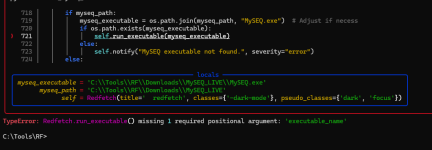
Shortcut to MySEQ in shortcut tab not working.

Was told the shortcut calls run_executable and it should take 2 arguments but only one is being passed. @Redbot
 

Attachments

  • image.png
    image.png
    44.7 KB · Views: 0
I was helping a friend get set up last night and also had issue on the initial login.
Situation was exactly as two posts above me, so I had him install launcher, and as soon as he hit login from the launcher instead, redfetch immediately started working. He didn't do anything other than log in via the RG Launcher.
He tried a couple of different browsers, etc. I don't think it was AV or adblock related, kind of hard to know, as the window is immediately closing. Something about the key being invalid.
He was fast enough to grab the taskbar during one instance so we got some partial messaging, if needed and this is logged somewhere, I can have him post the full thing.
View attachment 70832

mod edit: @Redbot

I forgot to mention we have handling for this now, I think anyway. I never replicated it!
 
💾Software redfetch

Users who are viewing this thread

  • S
Back
Top
Cart