• You've discovered RedGuides, an EverQuest multi-boxing and scripting community 🧙‍♀️⚙️. We want you to play several EQ characters at once, come join us and say hello! 👋

  • A TLP without truebox has thawed (Very Vanilla ready)
    Frostreaver

Guide - Re-Organizing Tabs

As I was booting up the other day, Windows Explorer crashed and happily rearranged all my toons in a random new order on resume. It's hard enough finding the right tab when they are in the correct order, and if they're out of order there's just no way. Not wanting to re-log all my tabs, I did some searching around and found the perfect tool to allow fixing exactly this problem or for putting things in a new order for raids etc.

7+ Taskbar Tweaker

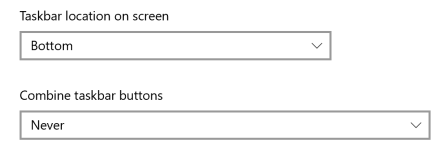
Just install the portable version and make sure the following is checked:
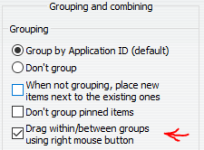
1666237038800.png

Voila, to re-order toons just right click and drag them around the taskbar.
 
Last edited:
That is good to know. Also the BoxHud Lua allows you to just click on the name of the toon in the list and it will switch to their tab. (if you are in same zone!)
 
That is good to know. Also the BoxHud lua allows you to just click on the name of the toon in the list and it will switch to their tab. (if you are in same zone!)
Zone is just the boxhud default for who to display. It can be changed to all or eq group or any other dannet group.

Does it use the MQ2AutoLogin window switching thing to do that?
It sends /foreground commands, nothing related to autologin
 
As I was booting up the other day, Windows Explorer crashed and happily rearranged all my toons in a random new order on resume. It's hard enough finding the right tab when they are in the correct order, and if they're out of order there's just no way. Not wanting to re-log all my tabs, I did some searching around and found the perfect tool to allow fixing exactly this problem or for putting things in a new order for raids etc.

7+ Taskbar Tweaker

Just install the portable version and make sure the following is checked:
View attachment 42925

Voila, to re-order toons just right click and drag them around the taskbar.
Strange to come across this post. I also like my tabs on the taskbar in order of toons so I always know where my main is specifically and my other toons in order. Something happened yesterday (no idea what) but when I went to maximize my tank I noticed all my toons were out of order on the task bar. With windows 11 I simply started dragging the toons back to the correct order. Not sure if we are talking about the same thing, but I didn't have to download anything or install any kind of taskbar tweaker.
 
Strange to come across this post. I also like my tabs on the taskbar in order of toons so I always know where my main is specifically and my other toons in order. Something happened yesterday (no idea what) but when I went to maximize my tank I noticed all my toons were out of order on the task bar. With windows 11 I simply started dragging the toons back to the correct order. Not sure if we are talking about the same thing, but I didn't have to download anything or install any kind of taskbar tweaker.
yeah, I think that is a win 10 or 11 feature. I also prefer a specific order and was not able to find anything to show me how to put them back in older windows but I did find it in 10/11
 
Hell I don't even know how to unstack tabs on the taskbar yet lol, but glad you can click and drag to rearrange the tabs once you manage to get them unstacked lol.
 
yeah, I think that is a win 10 or 11 feature. I also prefer a specific order and was not able to find anything to show me how to put them back in older windows but I did find it in 10/11
There isn't a way to do this natively in Win 10, and i've avoided upgrading to Win 11 because of their tab always-stacked issues. Did they fix this or are you using a replacement taskbar?
 
There isn't a way to do this natively in Win 10, and i've avoided upgrading to Win 11 because of their tab always-stacked issues. Did they fix this or are you using a replacement taskbar?
No, I do not use 10 or 11. I was researching this because I had heard about it and wanted to incorporate it into my older windows and came across that info.
 
@nerp Tweaker is awesome, I also feel all weird if something gets borked in Windows or an EQ instance crashes and my group gets out of order.

@ASmith50 if you're on Win 7 or 10, I have not checked it on 11, but I think its similar. I'll check later, you can right click on an empty area of your taskbar and Click Taskbar Settings on the popup menu.
Then you will see this at the bottom of the Taskbar Window..I use Never for the grouping, you can change it back anytime. If you also use the Tweaker software linked above, its extra awesome, and free.
1666339573446.png
 
Curious about a few things in this thread. Number one being, @Redmonkey - if you are not using 10 or 11, what are you using? Not 7 I hope.

As for organizing tabs - are you not using MQ2AutoLogin? If so, just set up hot keys to switch windows - something like CTRL-SHIFT-1...6. I would never go back to tab switching. Unless I am missing something as to why you aren't using this.
 
Strange to come across this post. I also like my tabs on the taskbar in order of toons so I always know where my main is specifically and my other toons in order. Something happened yesterday (no idea what) but when I went to maximize my tank I noticed all my toons were out of order on the task bar. With windows 11 I simply started dragging the toons back to the correct order. Not sure if we are talking about the same thing, but I didn't have to download anything or install any kind of taskbar tweaker.
Ditto...it's happened like 3 times in the last 3 days...coincidence?....ugh!...this is specially annoying when you have 2 or 3+ 6 box teams...fucks up your day right up...

max greenfield fox GIF by New Girl
 
Zone is just the boxhud default for who to display. It can be changed to all or eq group or any other dannet group.


It sends /foreground commands, nothing related to autologin
Nice! I did not know that! I just got used to my toon dropping off the roster once he zoned.
 
Hell I don't even know how to unstack tabs on the taskbar yet lol, but glad you can click and drag to rearrange the tabs once you manage to get them unstacked lol.
 
The best way to organize the tabs I feel is to line up all the hot bars at bottom of the screen and to the center.

After this its up to you how many bars you want, but I line up the Defensive, DPS, specialty and mandatory stuff all on separate lines. You need to figure out what works best for you and how you like it arranged, but do something that when your playing its very comfortable and pleasant looking when engaging your hot bars.

How many you need and how many buttons again is at your discretion, I have about 6 usually load in.
 
Guide - Re-Organizing Tabs

Users who are viewing this thread

Back
Top
Cart