• You've discovered RedGuides, an EverQuest multi-boxing and scripting community 🧙‍♀️⚙️. We want you to play several EQ characters at once, come join us and say hello! 👋

  • A TLP without truebox has thawed (Very Vanilla ready)
    Frostreaver
Quick HUD

Release Quick HUD 2022-12-10

No permission to download
Joined
Nov 7, 2020
RedCents
947¢
loki submitted a new resource:

Quick HUD - Quick HUD provides some handy information and functionality at a glance.

Quick HUD​

Quick HUD is a Lua addon for use with MacroQuest that enables some handy information and functionality at a glance.
Repo: https://gitlab.com/anonymousbitshifter/quickhud

View attachment 38449

Motivation​


When I realized that the Lua implementation in MacroQuest has UI capabilities baked in I was inspired to re-interpret a MQ2HUD configuration to display some heads up data regaring character/zone/macro info.

This...

Read more about this resource...
 
hey loki, iits not being able to find several files. heres the screenshot. 1646410889201.png
 
loki updated Quick HUD with a new update entry:

Enhancements and Fixes

  • Added option for background style for stats area depending on combat state
    View attachment 38517
  • Added toggle for window title (default off)
  • Added option for window opacity (does not work when docked)
  • Added option for content opacity
    View attachment 38519
  • Rounded corners on widgets
  • Applied a default window size
  • Fixed issue where window would collapse when clicking bookmark or nav buttons when window wasn't docked

Read the rest of this update entry...
 
Nice work!
Is it possible to add Gold or Silver status of the char? I found out i often forget to renew subscription or use krono :)
 
@Kingfisher Thank you and yeah I would be happy to add a status indicator for that. I should be able to have a version with this feature released soon.
 
GM in the zone makes my Lua crash. Not sure if others have seen this or not. I didn’t get a screenshot. I’ll do it the next time the unicorn appears.
 
@burdsjm Thank you, you are 100% correct! I discovered this the hard way too. I have a fix for that along with some other updates that I will publish shortly.
 
loki updated Quick HUD with a new update entry:

Theming / Settings Window Redesign / Breakout Window / Configurability

There are quite a few changes in this update as I did a poor job at compartmentalizing enhancements. The list below is a summary of a good deal of the changes.

NOTE: If any of the updates break anything or if you find them particularly upsetting please let me know and I'm happy to make improvements.

Changes​

  • changed to use short class names by default (this is configurable)
  • categorized settings window settings to reduce clutter...

Read the rest of this update entry...
 
It's beautiful masterpiece, somehow where or how can I tweak it so it will show many other TLO/Values I want to know from the hud please?
 
@KingArthur Thank you! Unfortunately I didn't have that ability built-in but it is close to some functionality from another tool I'm working on and I think I can add it in and push up a release today or tomorrow.
 
Thank you Loki the god of mischief! :hfive: If I can customized it in some degree to suit my raid scenario then this gonna be another game changer I found this season
 
loki updated Quick HUD with a new update entry:

Implemented ability to add custom elements to the hud

This change includes the ability to add custom elements to the HUD.

Thanks to @KingArthur for motivating me to finally implement this feature.

Example: (this is a but ugly but used for demonstration purposes)
View attachment 39837

There will now but a View attachment 39845 button that will now appear in the "Custom Elements" section of the HUD. Clicking this button will add a row to the HUD that will allow you to define your own custom...

Read the rest of this update entry...
 
@craggyisland I'm so glad you like it! I can definitely add some enhancements but I want to make sure I understand. Do you want to see the player casting bar and spell name/cast time or do you want to see the casting bar/time of a target (I could add both) or are you looking for a different type of casting message?
 
@craggyisland I'm so glad you like it! I can definitely add some enhancements but I want to make sure I understand. Do you want to see the player casting bar and spell name/cast time or do you want to see the casting bar/time of a target (I could add both) or are you looking for a different type of casting message?

I was looking for to add a row that shows My casting spellname/time. Though now that you mention it targets would be useful to great idea.
 
@craggyisland Sorry for the delay, unfortunately I haven't had a lot of time to work on this but I did make an example widget that is a casting bar (IE: 1653446416458.png) and I will upload the version with it shortly. I would like to make it easier to share widgets and that will be another thing I focus on when I get a chance.

Also just to note, currently it isn't possible to get the target casting information but if it becomes possible I will add something for it.
 
Last edited:
Is it possible to add to the settings menu to remove the right click edit icon from the widget section. I find it spamming its self over my text and want to not see it.. I can always re enable the edit feature if i need to edit with a option.
I ended up just removing the icon commenting out lines 450, 451, 452 of custom-elements-components.Lua And i can still edit just fine with no edit button overshadowing the button text..


also on your conditional display widget, if condition is not met can that space just be gone instead of a blank box ?
 
Last edited:
@Aipoc76 Yeah I think that is a great idea, it annoys me too. Yeah I should be able to just conditionally display the whole widget, I am not sure exactly how that might screw up the row arrangements of widgets though because of how ImGui columns work so if it behaves too wonky I might have to consider doing away with ImGui columns as well.
 
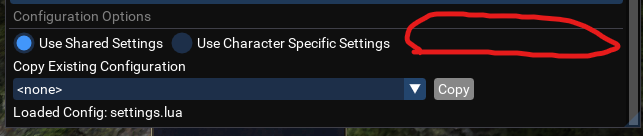
I would like to see where you have the shared settings / use character specific settings, if you could add a use class specific settings. That way you dont have to set up for 36 berserkers! :)
1654936282629.png
 
Last edited:
You've done an amazing job with this! Thank you for putting in so much effort to make it amazing :-)

I may have an idea to make it even more powerful...

Feature Request
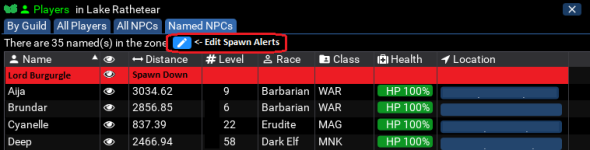
  • "Spawn Alerting" integration into the "Spawn Breakout Window"
  • Rough Example:
  • QuickHud.png
    • You could make Quick Hud even moar awesomer with alerting functionality for NPCs spawning.
    • On the Breakout Window, add a "NPC Spawn Alerts" button, which will come up with an editable list (likely saved locally as an INI file)
    • If any entries exist in the spawn list for your current zone, they should appear at the top of the "All NPCs" and "Named NPCs" tabs of the breakout window, showing that you're currently monitoring for their spawns.
    • For instance, if you're in SolA, you click the "Edit Spawn Alerts" button,
      • An ImGUI window instantiates and populates with the [soldunga] section of the Spawn Alert INI file.
      • An input box and "Add" button should exist to insert entries into the INI
      • Entries should be selectable, with a "Remove" button, which would delete entries from the INI.
      • After saving/closing the "Edit Spawn Alerts" window, the INI should be rescanned and the current watch list should be reflected at the top of the Spawn Breakout Window (as seen in Red in the picture above).
Anyway, this was just a wild idea I had, if you made this happen it would be amazing :-).

Thanks again for making such an awesome script!
 
You've done an amazing job with this! Thank you for putting in so much effort to make it amazing :-)

I may have an idea to make it even more powerful...

Feature Request
  • "Spawn Alerting" integration into the "Spawn Breakout Window"
  • Rough Example:
  • View attachment 40746
    • You could make Quick Hud even moar awesomer with alerting functionality for NPCs spawning.
    • On the Breakout Window, add a "NPC Spawn Alerts" button, which will come up with an editable list (likely saved locally as an INI file)
    • If any entries exist in the spawn list for your current zone, they should appear at the top of the "All NPCs" and "Named NPCs" tabs of the breakout window, showing that you're currently monitoring for their spawns.
    • For instance, if you're in SolA, you click the "Edit Spawn Alerts" button,
      • An ImGUI window instantiates and populates with the [soldunga] section of the Spawn Alert INI file.
      • An input box and "Add" button should exist to insert entries into the INI
      • Entries should be selectable, with a "Remove" button, which would delete entries from the INI.
      • After saving/closing the "Edit Spawn Alerts" window, the INI should be rescanned and the current watch list should be reflected at the top of the Spawn Breakout Window (as seen in Red in the picture above).
Anyway, this was just a wild idea I had, if you made this happen it would be amazing :-).

Thanks again for making such an awesome script!
It might be easier to edit HunterHUD for this purpose, since it's already doing some of these tasks?
 
It might be easier to edit HunterHUD for this purpose, since it's already doing some of these tasks?
The idea behind what I'm requesting is the ability to customize it for any NPC (and potentially PC alerting also), whereas HunterHUD is purpose-built for Hunter Achievement NPCs only. Seems it would be massive scope-creep for HunterHUD...while QuickHUD seems to be a swiss army knife. Just my 2 cents.
 
The ImGui annotations don't define those methods and I'm guessing the ImGui changes in this release impacted the previous working code.
 
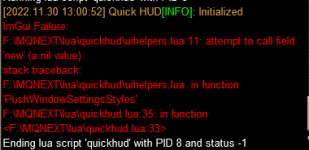
ever since the last 2 updates, i have been getting this error when launching the Hud. I've exited all programs, and patched eq, and VV red guides. and still getting the following error * see screenshot*
 
ever since the last 2 updates, i have been getting this error when launching the Hud. I've exited all programs, and patched eq, and VV red guides. and still getting the following error * see screenshot*
Might want to cut your toon names out of that image.

in your file uihelpers.Lua in quickhud folder remove the two instances of .new

from

ImGui.PushStyleVar(ImGuiStyleVar.FramePadding, ImVec2.new(style.FramePadding.x, style.FramePadding.y * (state.settings.paddingMultiplier or 1)))
ImGui.PushStyleVar(ImGuiStyleVar.ItemSpacing, ImVec2.new(style.ItemSpacing.x, style.ItemSpacing.y * (state.settings.paddingMultiplier or 1)))

ImGui.PushStyleVar(ImGuiStyleVar.FramePadding, ImVec2(style.FramePadding.x, style.FramePadding.y * (state.settings.paddingMultiplier or 1)))
ImGui.PushStyleVar(ImGuiStyleVar.ItemSpacing, ImVec2(style.ItemSpacing.x, style.ItemSpacing.y * (state.settings.paddingMultiplier or 1)))
 
Last edited:
Might want to cut your toon names out of that image.

in your file uihelpers.lua in quickhud folder remove the two instances of .new

from

ImGui.PushStyleVar(ImGuiStyleVar.FramePadding, ImVec2.new(style.FramePadding.x, style.FramePadding.y * (state.settings.paddingMultiplier or 1)))
ImGui.PushStyleVar(ImGuiStyleVar.ItemSpacing, ImVec2.new(style.ItemSpacing.x, style.ItemSpacing.y * (state.settings.paddingMultiplier or 1)))

ImGui.PushStyleVar(ImGuiStyleVar.FramePadding, ImVec2(style.FramePadding.x, style.FramePadding.y * (state.settings.paddingMultiplier or 1)))
ImGui.PushStyleVar(ImGuiStyleVar.ItemSpacing, ImVec2(style.ItemSpacing.x, style.ItemSpacing.y * (state.settings.paddingMultiplier or 1)))
Doh, I had blocked it out, I must not have clicked save. Thanks
 
This script is very nice. If I had found it earlier it may have saved me hours. lol

One issue that I have is the quick hud settings, when clicking the Character tab it crashes imgui and the game too. Other than that everything is well done. Thank you for sharing this. Learning a lot from it as well.
 
Release Quick HUD

Users who are viewing this thread

Back
Top
Cart