
Thanks. Happens randomly among the horde.I have a tweak to reward claiming - haven't been able to reproduce the errors discussed so was hoping a few days of testing would reveal.
Probably push this next step out later today/tomorrow to see if it corrects your issues.

Install the app
How to install the app on iOS
Follow along with the video below to see how to install our site as a web app on your home screen.
Note: This feature may not be available in some browsers.
-
 You've discovered RedGuides, an EverQuest multi-boxing and scripting community 🧙♀️⚙️. We want you to play several EQ characters at once, come join us and say hello! 👋
 -
 EverQuest (live servers) were brought down for a scheduled patch.
Here's what to expect on patchdays.
Please use this to check for updates/info, and where to post bugs/issues/crashes, etc.
You are using an out of date browser. It may not display this or other websites correctly.
You should upgrade or use an alternative browser.
You should upgrade or use an alternative browser.
Resource icon
Release Overseer (1 Viewer) 04/27/2026
No permission to download
- Thread starter GoldenFrog
- Start date
- Joined
- Jun 13, 2016
- RedCents
- 32,041¢
GoldenFrog updated Overseer with a new update entry:
3.72: Reward Claiming Update
Read the rest of this update entry...
3.72: Reward Claiming Update
- Claims Missions and Rewards together
- Previously completed all missions, then all rewards. Had issues when less than 5 reward slots available
- Next step towards (possibly) banking max exp pending Bonus periods or new expansions
- MAY minimize the "option selection issue" problem, but most likely still exists
Have only seen the "option selection issue" one time myself. Have guesses and taking steps to try and address. Sadly a little guess work due to...
Read the rest of this update entry...

- Joined
- Jun 13, 2016
- RedCents
- 32,041¢
Neat! [Insert time travel joke I'm not awake enough to make].
Been a long while since I've looked at the logic around that calculation. Remember being more than expected for some reason. Added that to my notes to look into. Thank you

- Joined
- Oct 7, 2015
- RedCents
- 495¢
I'm still seeing issues with the Rewards window. Running on just a single character just now it successfully claimed my Character Experience on the first completed quest. On the second quest it was successful as well however the Lua seems not to have recognized that it was successful. It's stuck in a loop right now continuing to try and claim the reward for which it was already successful!
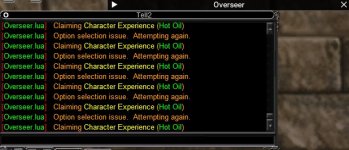
Edited to add, I had to stop and restart the Lua twice in order to successfully complete the process for all 5 quests.
Edited to add, I had to stop and restart the Lua twice in order to successfully complete the process for all 5 quests.
- Joined
- Jun 13, 2016
- RedCents
- 32,041¢
Okay. Thanks. Didn't see this on any test runs this morning so going off of some guessing.I'm still seeing issues with the Rewards window. Running on just a single character just now it successfully claimed my Character Experience on the first completed quest. On the second quest it was successful as well however the LUA seems not to have recognized that it was successful. It's stuck in a loop right now continuing to try and claim the reward for which it was already successful!
Edited to add, I had to stop and restart the LUA twice in order to successfully complete the process for all 5 quests.
Have a change to push later today to see if it addresses.
Apologies as always. Frustrating for a core utility to jack up like this.

Saren42
Member
- Joined
- Sep 15, 2021
- RedCents
- 10¢
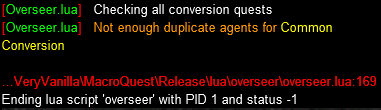
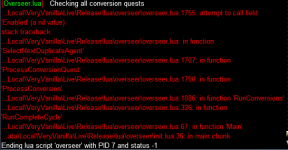
Although, this keeps happening randomly on the accounts as well. No additional information provided. Same error on 2 different clients on the same PC, the 3rd client did not error. Looking in the actual Overseer.Lua file, line 169, is a blank line.


- Joined
- Dec 1, 2006
- RedCents
- 1,889¢
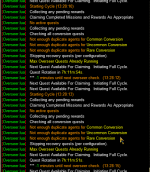
Logged in right now and getting spammed with the text below. It seems to be in an endless loop.
- Joined
- Oct 7, 2015
- RedCents
- 495¢
After the EQ patch today all my Overseer issues seemed to be resolved. I ran the script simultaneously on 6 characters and then on 4 and all ran to completion without any issues at all. Perhaps there was some server response issue?

- Joined
- Jun 13, 2016
- RedCents
- 32,041¢
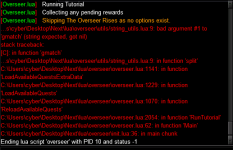
Oh, man. Tutorials. I don't know if I have any accounts/server combinations still available to run that thing and test it.Hi GF, reporting a crash. This was on a new first open of Overseer, crashed upon running the tutorial:
Will look at the code and see if I can find one that'll allow me to run things.
- Joined
- Oct 7, 2015
- RedCents
- 495¢
I'm also a bearer of bad news. None of my characters were able to successfully run the Lua today. As before they all had problems claiming rewards. Sometimes I would stop and restart the Lua up to 3 times to get them to complete.
I shut my computer off every night so this morning the computer and the game logins were all fresh and new. My game ping generally runs around 90ms and was in that range today. My characters are actually standing in live zones with very few other players. Each of my characters has about 700 total agents. I run a CMD file every morning to ensure my computer's clock is sync'd to Internet time.
To complicate matters I use a social to launch the Lua on up to 6 characters at a time.
I shut my computer off every night so this morning the computer and the game logins were all fresh and new. My game ping generally runs around 90ms and was in that range today. My characters are actually standing in live zones with very few other players. Each of my characters has about 700 total agents. I run a CMD file every morning to ensure my computer's clock is sync'd to Internet time.
To complicate matters I use a social to launch the Lua on up to 6 characters at a time.
/pause 55, /dgae /overseer/dgae /lua run overseer
Looing into an issue myself post patch. Lua runs fine without errors but stopped starting new missions on all toons for some reason. It claims rewards and looks for converts, but will not begin any new quests now. Anything I can do to help or provide to debug it?
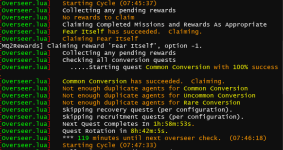
This is the debug output for a test run
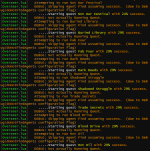
EDIT - Older versions do not work either, so this seems to be something DB did in the 10/16 patch
EDIT - Custom UI issue with Sparxx, not this Lua. The addition of the max active quests caused it

Reverting to the old ui windows solved it. Attached is the revised Sparxx UI window that appears to be working thus far for me.
This is the debug output for a test run
EDIT - Older versions do not work either, so this seems to be something DB did in the 10/16 patch
EDIT - Custom UI issue with Sparxx, not this Lua. The addition of the max active quests caused it
Reverting to the old ui windows solved it. Attached is the revised Sparxx UI window that appears to be working thus far for me.
Attachments
Last edited:
- Joined
- Jun 13, 2016
- RedCents
- 32,041¢
I completely missed this. Not at an EQ machine so will check when home - do you know which element(s) those were?They made changes to the overseer window. Adding at least one new element.
- Joined
- Jun 13, 2016
- RedCents
- 32,041¢
Thank you, @Psy . There's obviously more foundational issues than what I thought. Taking them one at a time.Looing into an issue myself post patch. Lua runs fine without errors but stopped starting new missions on all toons for some reason. It claims rewards and looks for converts, but will not begin any new quests now. Anything I can do to help or provide to debug it?
This is the debug output for a test run
EDIT - Older versions do not work either, so this seems to be something DB did in the 10/16 patch
EDIT - Custom UI issue with Sparxx, not this lua. The addition of the max active quests caused it
View attachment 65602
Reverting to the old ui windows solved it so sparxx ui overseer window needs to be edited.
Looks like you ran the Preview
 .
.On all chars I have - this works.
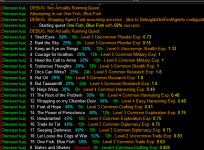
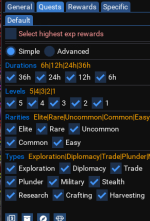
The actual quests are based on configurations. Can you verify that your selected check boxes exist - sometimes we can end up with "Only 36h" quests, and none are found.
I have been editing the original post. Thought about deleting it since it was a UI issue with Sparxx but then thought it may help others if they look/search that use Sparxx so I left it. Solved it afaik and attached the new UI file for Sparxx. Not your Lua at all!!!Thank you, @Psy . There's obviously more foundational issues than what I thought. Taking them one at a time.
Looks like you ran the Preview View attachment 65603.
On all chars I have - this works.
View attachment 65604
The actual quests are based on configurations. Can you verify that your selected check boxes exist - sometimes we can end up with "Only 36h" quests, and none are found.
View attachment 65605
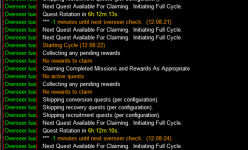
I has this same issue with the new overseerui.
Can try manually running the quests one time and that resolved the -1 min issue for me. I still had to edit the XML file for the window though to add Max Active Quests count to get it to select the quests again automatically.
- Joined
- Dec 1, 2006
- RedCents
- 1,889¢
Actually that did help me, as I am also running the Sparxx UI. I will try with the xml file you postedI have been editing the original post. Thought about deleting it since it was a UI issue with Sparxx but then thought it may help others if they look/search that use Sparxx so I left it. Solved it afaik and attached the new UI file for Sparxx. Not your lua at all!!!
Added a Max Active Quests label to the Quests tab of the Overseer windowI completely missed this. Not at an EQ machine so will check when home - do you know which element(s) those were?
From the patch notes, I haven't looked at the window myself.
GoldenFrog
I read the above posts, and I am having some of the same problems. Mine won't run "Run Recruit Quest" from the button on the Lua menu. I can run anything, including Recruit quests manually. Just use the button. Not a real big deal, just wanted to mention it if it was actually different than above.
Thanks for all the great Lua's, appreciate all your hard work. Hell, seems like maintaining them is worse than creating them lol.
Vrak
I read the above posts, and I am having some of the same problems. Mine won't run "Run Recruit Quest" from the button on the Lua menu. I can run anything, including Recruit quests manually. Just use the button. Not a real big deal, just wanted to mention it if it was actually different than above.
Thanks for all the great Lua's, appreciate all your hard work. Hell, seems like maintaining them is worse than creating them lol.
Vrak
- Joined
- Jun 13, 2016
- RedCents
- 32,041¢
Thank you, Vrak. And I will say - both here and in the "real" world, maintaining is usually the trickier part by far.Thanks for all the great LUA's, appreciate all your hard work. Hell, seems like maintaining them is worse than creating them lol.
Vrak
With that said - when you say "won't run Recruit Quests", does it do the cycle, but ignore Recruits? Or generate any errors when it tries.
If you had a chance, on the "Actions" > "Preview Quest Cycle" button - it should run through and generate a list of what it WOULD run at that moment. Curious if your list shows Recruit in the list or at the "Skipped" section on bottom.
GoldenFrog
Not even that complicated, it just comes back and says "Max Overseer Quests Already Running". This is after I run all the completed quests on that toon. So I have NO quests running at the time. Just started after this latest patch.
I tried running the "Preview Quest Cycle" and didn't see "Recruit" listed at all (not even in the skipped section), and when I check my settings I have everything selected except for "36h" (under the Quests tab). As a matter of fact I don't see where "Recruit" is even a selection under the Quests tab/ Types.
Hope that helps some.
Vrak
Not even that complicated, it just comes back and says "Max Overseer Quests Already Running". This is after I run all the completed quests on that toon. So I have NO quests running at the time. Just started after this latest patch.
I tried running the "Preview Quest Cycle" and didn't see "Recruit" listed at all (not even in the skipped section), and when I check my settings I have everything selected except for "36h" (under the Quests tab). As a matter of fact I don't see where "Recruit" is even a selection under the Quests tab/ Types.
Hope that helps some.
Vrak
- Joined
- Jun 13, 2016
- RedCents
- 32,041¢
GoldenFrog updated Overseer with a new update entry:
3.73: Notify User if Overseer UI Skin Requires Updates
Read the rest of this update entry...
3.73: Notify User if Overseer UI Skin Requires Updates
- Added notification if current UI skin (i.e. Sparxx) is missing key UI elements allowing this to run
DETAILS:
Fixing issues one at a time: Sparxx - I can see the problem, but not what's specifically different in the XML.
This isn't the new field on tab 1, but rather something changed on the 3rd tab:
Default UI: View attachment 65619
Sparxx: View attachment 65620...
Read the rest of this update entry...
- Joined
- Jun 13, 2016
- RedCents
- 32,041¢
GoldenFrog updated Overseer with a new update entry:
3.74: Turn off AutoRestart if Invalid UI Detected
NOTE: If using Sparxx UI, get @Psy update to the Overseer Window here:
Read the rest of this update entry...
3.74: Turn off AutoRestart if Invalid UI Detected
- Turns off AutoRestartIf an invalid UI is detected (missing MaxActiveQuests labels)
- If RunOnStartup is checked, will still perform one loop, claiming completed missions
- Thank you @stuff for that catch
NOTE: If using Sparxx UI, get @Psy update to the Overseer Window here:
Read the rest of this update entry...
Last edited:
- Joined
- Jun 13, 2016
- RedCents
- 32,041¢
@B_I_G__D_A_D_D_YI'm also a bearer of bad news. None of my characters were able to successfully run the LUA today. As before they all had problems claiming rewards. Sometimes I would stop and restart the LUA up to 3 times to get them to complete.
I shut my computer off every night so this morning the computer and the game logins were all fresh and new. My game ping generally runs around 90ms and was in that range today. My characters are actually standing in live zones with very few other players. Each of my characters has about 700 total agents. I run a CMD file every morning to ensure my computer's clock is sync'd to Internet time.
To complicate matters I use a social to launch the LUA on up to 6 characters at a time.
/pause 55, /dgae /overseer
/dgae /lua run overseer
I launch overseer that way as well on all the characters - though you shouldn't need to manually open the /overseer window, it can't hurt.
Also have some chars with 1200+ agents (really silly, actually) and haven't seen issues besides things taking a bit longer.
Some questions:
- When you say "successfully run the Lua", what is happening? Was it erroring out - or just not running missions?
- Are you using a custom skin like the Sparxx issue Psy and others reported?
- Joined
- Dec 1, 2006
- RedCents
- 1,889¢
I think the fix introduced a bug when switching characters if overseer is running. Every time a /switchchar toon since the update, I get a MQPverlay paused box, and have to Resume Overlay. I am running Sparxx UI, and have dropped in Psy's fix.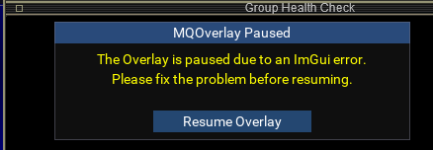
- Joined
- Jun 13, 2016
- RedCents
- 32,041¢
GoldenFrog updated Overseer with a new update entry:
3.75: Correct Recently-Introduced Issue when Swapping Characters
Read the rest of this update entry...
3.75: Correct Recently-Introduced Issue when Swapping Characters
- Corrected crash when swapping characters
- Thank you, @Nightmare327
Read the rest of this update entry...

- Joined
- Jun 13, 2016
- RedCents
- 32,041¢
Which errors were you getting, Myysterio? Or is it the same as above but with a different skin?If anyone wants to know what files to update to make lua overseer work again. These are the ones i had to fix in my irrelevantly "custom" UI.
View attachment 65640
Are you able to claim and start overseer quests manually? If not, you may need to petition to have it unlocked by DB. Guessing though as if you can not run them manually, then it's not the Lua.If I run /bcaa //lua run overseer , some character will happen "Still waiting for DB lock", what is this please?
Ya, running one by one is good, the problem is all my characters run overseer together.. then some of them happened DB lock....Are you able to claim and start overseer quests manually? If not, you may need to petition to have it unlocked by DB. Guessing though as if you can not run them manually, then it's not the lua.
- Joined
- Oct 7, 2015
- RedCents
- 495¢
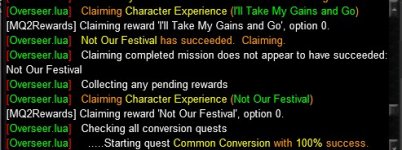
I downloaded 3.75 this morning. Ran it simultaneously on 6 characters and they were all able to complete all 5 quests successfully. However, they all reported once that the last quest they processed was not successful in claiming the reward. Then on the 2nd attempt they all were able to claim it. Each reported a different quest although it turned out in every case that it was the 5th to claim that failed. But each went on and claimed and then ran my settings to completion!
Attachments
- Joined
- Jun 13, 2016
- RedCents
- 32,041¢
GoldenFrog updated Overseer with a new update entry:
3.76: Reward Looping Potential Work-Around
Read the rest of this update entry...
3.76: Reward Looping Potential Work-Around
- Should catch SelectReward-Option Looping problem and continue gracefully
- Does not address the cause of the loop, just the looping itself.
- Any skipped rewards will get picked up in the next cycle
- Addressed Database Lock issue reported by @dpanaben
Read the rest of this update entry...
- Joined
- Jun 13, 2016
- RedCents
- 32,041¢
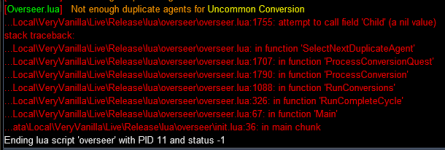
Thanks for that update. I haven't seen this, either - a pattern of me not reproducing what many of you seem to be seeing.I downloaded 3.75 this morning. Ran it simultaneously on 6 characters and they were all able to complete all 5 quests successfully. However, they all reported once that the last quest they processed was not successful in claiming the reward. Then on the 2nd attempt they all were able to claim it. Each reported a different quest although it turned out in every case that it was the 5th to claim that failed. But each went on and claimed and then ran my settings to completion!
Check latest update and let me know if you still see issues.


Users who are viewing this thread
Total: 2 (members: 0, guests: 2)
Share: