• You've discovered RedGuides, an EverQuest multi-boxing and scripting community 🧙‍♀️⚙️. We want you to play several EQ characters at once, come join us and say hello! 👋

  • A TLP without truebox has thawed (Very Vanilla ready)
    Frostreaver
MyUI

Release MyUI v8.5

Download
grimmier updated MyUI with a new update entry:

v7.6

[7.6] - 2026-01-16​


Bug Fixes 🐛


- Force show cast bar
(3dc77b0) ~grimmier378
- MySpells castbar appearing off screen
Fixed the bug where the casting bar may appear off screen. This would happen on the first time running the script, making it hard to reset it back on screen.

I changed the way we get the default location and hard set it at 100,100

I...

Read the rest of this update entry...
 
Hey Grimmier!!!! I was looking at some of your other stuff and saw this. Think I am going to put this on the watch list and play around with it some. Looking for things to mess up and let you know. (HEHEHEHE)


Zeb
 
What is the filter tokens to setup a new tab for: system messages (message of the day/server admin notices etc.), skills, who, other, item speech, and other typical eq chat filters?
 
What is the filter tokens to setup a new tab for: system messages (message of the day/server admin notices etc.), skills, who, other, item speech, and other typical eq chat filters?
check MyChat Overview
there are some videos on the overview and some in the discussion that should help with setting up channels \ events \ filters.

Helpful hint. you can enable the spam channel (don't leave this on all the time)
this will mostly filter out anything you already have channels set up to filter, and only shows the stuff not pulled out already.
I use this all the time to create my new channels and set up events.
 
grimmier updated MyUI with a new update entry:

v8.0

[8.0] - 2026-02-25​


〰️Commits​


New Progress Bars

ProgressBars
* Added new progress bars

AAParty
* added drop shadow

Alertmaster
* updated from standalone

BigBag
* added jewlery and weapons tabs

MyGroup
* Added new progress bars and options.
* Added option to draw pet bars vertically on the end.

PlayerTarg
* Added New progress bars and options
* Added dynamic option for endurance bars as well.
...

Read the rest of this update entry...
 
from my test chars on my own local emu server

1771990530970.png
group window with pet hp vertical

1771990617258.png
target of target and main playertarg window

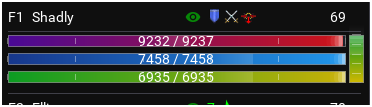
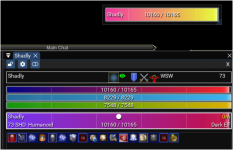
gradients can be disabled as well as dynamic bars. check settings for bar options.

All colors are customizable
Ticks on the bars can be disabled and the spacing can be adjusted in the above they are set at 20%
 
grimmier updated MyUI with a new update entry:

v8.4

[8.4] - 2026-04-07​


Features ⛲


Features, typo fixes and cleanup

fixed some typo's and removed some old testing files.
mydps charts
added a pie chart view to the current battle
added battle history pie charts you can go back and look at the last 50 battles.

myinventory
add tooltips on context windo
when right clicking an item. the context list will now have tooltips that show your stat changes if swapped for the item hovered.
this will help...

Read the rest of this update entry...
 
I know there have been alot changes with the new compile. Here is a window that pops up every time I log in then just goes away. Not sure if related to this or the compile but I see myui mentioned in it along with alertmaster ect. Also causes the screen to blink with a white see through overlay then it goes away when this alert leaves.

1777148589419.png
 
i have been looking for this UI but unable to find it. the lastest update has make my EQ so small I cant read anything. if anyone has a like to to this would be much apppreaded.
 
i have been looking for this UI but unable to find it. the lastest update has make my EQ so small I cant read anything. if anyone has a like to to this would be much apppreaded.
Well, thats a doozy..I am unsure what you mean you cannot find this UI, but are posting about it in its own resource page. I am wondering if you are looking for MyUI over on the UI website or something?

This is a Lua script of many Lua scripts Grim makes. Install it like any other. Go to the Overview tab, hit Watch, then go to RedFetch and update yourself. Use the MQ icon and use AutoLogin and once back in game
Code:
/lua run myui
. Once its loaded, you can choose what options you want.
 
Well I have been messing around with MyUI for a bit and I like most of the modules and some I have not tried yet, but over all its solid and works well. Some modules I would have merged into one but thats just me. Great job and Thanks.


Zeb
 
Hello, i'm new here and have been looking at the bundle band downloaded it from github. I have been searching to figure out how to install it with no success, possibly due to me missing the installation instructions somewhere. I know GitHub shows "Grimmiers UI Bundle, Has the ability to load any script if you modularize it. see instructions. (comming soon)" but i wasn't sure if it was somewhere else already.
Thank You.
 
Hello, i'm new here and have been looking at the bundle band downloaded it from github. I have been searching to figure out how to install it with no success, possibly due to me missing the installation instructions somewhere. I know GitHub shows "Grimmiers UI Bundle, Has the ability to load any script if you modularize it. see instructions. (comming soon)" but i wasn't sure if it was somewhere else already.
Thank You.
if you download the release as a zip from github, unzip it and rename the folder from MyUI-8.5 to MyUI and move the folder to your {MQ folder}/lua/ directory. in game you will run /lua run myui
 
Release MyUI

Users who are viewing this thread

Back
Top
Cart