grimmier updated MyUI with a new update entry:
v6.0
Read the rest of this update entry...
v6.0
Read the rest of this update entry...


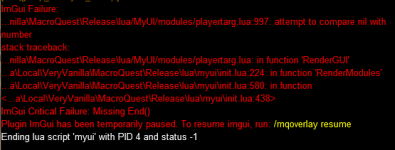
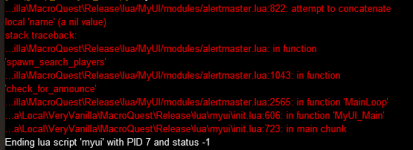
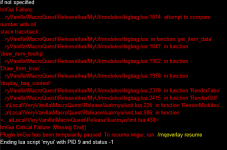
fix coming =)Been getting this crash alot on zone. Just wanted to report since I dont see any other reports.
View attachment 71114
[6.1] - 2025-08-14
Bug Fixes
- Playertarg error
(6c8cd64) ~grimmier378MyAA
show timers for activated abilities
MyPet
Pet Buff Display fix
PlayerTarg
Fix Crash when zoning
You're the best! Thanks
click the chat window andHow do you change the font size in mychat? It is too small for me to see. I can change UI text size but not the font size in chat.
Ctrl + - on the number row to shrink and Ctrl + = to increase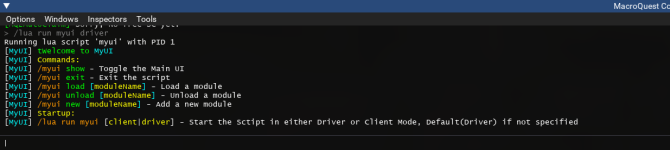
I drag the windows to the edges and dock them into the frame shape. With the viewport option enabled in mqsettings.I just discovered this UI and it looks very nice. I do have a few questions that I did not see answered in the discussions here.
1) How do you get your EQ picture to show up in the square window with the MyUI elements outside that square area? When I loaded up MyUI, all the MyUI elements were on top of the EQ picture area.
2) I noticed the Macroquest Overlay ini file that you posted on page 1. In order to use that, I would backup my current Macroquest Overlay ini file and replace that with a new one that has your posted ini information in it?
How do you handle keyboard input going into one of the EQ chat windows. Like you hit enter and then instead of moving you are just mashing wwwwwwwwwwwwwwwwwwwwwwww in the chat box. I find myself doing that a lot and not noticing because I don't see the in game chat box.I drag the windows to the edges and dock them into the frame shape. With the viewport option enabled in mqsettings.
I probably wouldn't bother with the overlay file as that is auto managed by mq and editing it directly can cause issues. Warning out of the way, yes I would back up the current one first. This file holds all of your characters info, some imgui windows use a char name in the id others do not, if they don't then all characters share the same positioning / docking. Which is why things can break easily.
[6.2] - 2025-10-20
Bug Fixes
- Added Window constraints
(fa659cd) ~grimmier378MyUI Main window has a min allowed size now.
- Ui errors on empty spell slots (MySpells)
...MySpells
Fixed the unique ID's causing ui errors on empty spell slots
[6.3] - 2025-10-22
Features
- Pop out item details
(1cfe3c4) ~grimmier378BigBag
Shift + RIght clicking an item will pop out the item details into its own imgui window.
this is the same data as the tooltip
Styling
- Added icons to the tooltip
...Added item icons to the tooltip \ info window
[6.4] - 2025-10-22
Styling
- Added spell/efx descriptions
(2160ad7) ~grimmier378BigBag
tooltips and pop-out details now show focus and spell efx descriptions.
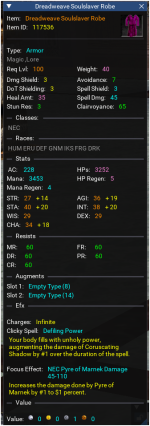
[6.5] - 2025-10-22
Features
- BigBag spell efx links
(8d2cd44) ~grimmier378BigBag
you can click the spell , worn, focus , and clicky efx names to open the spell description windows in game.
[6.6] - 2025-10-22
Features
- Esc close and details win locations
(47f3c99) ~grimmier378BigBag
when you pop open the items details window it will no appear under the mouse the first time you inspect that item.
Pressing escape will close the details window that has focus if any.
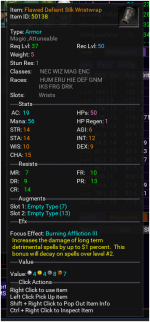
I love the look of the window and very fast response to see item info versus EQ default. TY for this Grimgrimmier updated MyUI with a new update entry:
v6.6
Read the rest of this update entry...
View attachment 72399
[6.7] - 2025-10-24
Features
- Item compare
(f06112c) ~grimmier378Clicking on the icon in the item pop out window will open a window for each item you have equipped in a slot that the item can be worn in.
ex. a ring will open both flinger slot items(if different) etc
- Esc minimizes MyUI Main window...
[6.8] - 2025-10-25
Styling
- BigBag text coloring
(5f4c841) ~grimmier378Added item text coloring on the Name and lvl based on if you can wear
added grey text to item name for consumables.
Clicking on the item Name or ID will copy that field to your clipboard to paste elsewhere
[6.9] - 2025-10-25
Bug Fixes
- Req level compare
(4a36267) ~grimmier378BigBag
fixed typo in required level compare.
[7.0] - 2025-10-27
Features
- Alertmaster Spawns ini to SQLite
(b000e7b) ~grimmier378Converted the ini to a SQLite db. this should prevent corruption on the ini side and be easier to see updates across characters,
Performance
- Actors messaging timings...
[7.2] - 2025-10-27
Bug Fixes
- Alertmaster
(7a092b1) ~grimmier378I fixed one issue and broke something else.
fix sql statement return
[7.3] - 2025-10-27
Bug Fixes
- ALertmaster
(76a3b33) ~grimmier378Potential fix for race issue when multiple chars are running the script and trying to fetch data at the same times
ahh good to know will check on that when i get home from work.BigBag is crashing myui when I click on the Icon. It opens and a couple secs later it crashes and I get this Error. Live build.
View attachment 72504
[7.4] - 2025-10-30
Bug Fixes
- AlertMaster import
(53762a9) ~grimmier378Added a zone-list.lua to help with converting from long to short names.
The list is a work in progress and may is missing some zones still and may have mistakes as the list i went off of may not have been up to date.
- BigBag nil check...
I dock everything to the outside edges and have MQ adjust the game viewport (world) to fit inside the docked windows.Looking to give this a whirl Grimmier
Is there a quick / easy way that launching one of the windows ( eg group window ) auto closes the normal UI version or how do you personally get rid of all the native UI junk to use your UI
Cheers in advance
/mygroup show|hide to toggle the imgui window./myui load|unload modulename example: /myui load mybuffsi believe there is a way to do that for buttonmaster but i haven't really tried.Cheers pal as always
Couple of other things
is there a way to bind keys to button master ( so I can press 1 for example and have that perform one of the buttons so I can get rid of that bar )
and
Is there an equivalent in your setup for pressing "I" in game ?
many thanks