• You've discovered RedGuides, an EverQuest multi-boxing and scripting community 🧙‍♀️⚙️. We want you to play several EQ characters at once, come join us and say hello! 👋

  • A TLP without truebox has thawed (Very Vanilla ready)
    Frostreaver
MyUI

Release MyUI v8.5

Download

grimmier

grimGUI
Creator
Joined
Nov 14, 2023
RedCents
3,016¢
grimmier submitted a new resource:

MyUI - GrimUI Bundle - Included 14 of my scripts converted to modules, with support for adding more.

MyUI

Description


This is a collection of the scripts I have written so far, bundled together and converted into Modules. This way you only need to run 1 command and have your choice of the currently 14 scripts to load at once. There is also a template included incase anyone wants to build their own modules or convert a script to a module.

Getting Started
When you first load the script, you will be presented with a very simple GUI window.
All of the modules first come...

Read more about this resource...
 
I started using your LUAs last week when I was playing on Lazarus. I really like the way your UI is setup. Are you willing to share your layout files so it can be copied by us, and across characters?
 
I started using your LUAs last week when I was playing on Lazarus. I really like the way your UI is setup. Are you willing to share your layout files so it can be copied by us, and across characters?
currently i just dock everything and mqoverlay does well with saving that nicely. floating window locations is where it has issue it seems.

here is my current drivers overlay settings though for the curious.

swap out YOURCHARNAME with your Characters name with proper Case ie: Bob not bob or BOB
Swap out SERVER NAME with your SERVER NAME respecting the spaces.

[CODE lang="ini" title="MacroQuesst_Overlay.ini"][Window][Achievements Inspector]
Collapsed=0
DockId=0x00000003

[Window][Switch Inspector]
Pos=1057,358
Size=969,403
Collapsed=0
DockId=0x00000005,0

[Window][Window Inspector]
Collapsed=0
DockId=0x00000007

[Window][###WindowPropertyViewer1]
Collapsed=0
DockId=0x00000008

[Window][Hidden DockSpace Window]
Pos=0,0
Size=2552,1520
Collapsed=0

[Window][MacroQuest Console]
Pos=1268,1210
Size=1284,310
Collapsed=0
DockId=0x00000012,0

[Window][Debug##Default]
Pos=60,60
Size=800,150
Collapsed=0

[Window][MacroQuest Settings]
Pos=923,431
Size=600,650
Collapsed=0

[Window][Button Master - 1]
Pos=0,1210
Size=668,310
Collapsed=0
DockId=0x00000013,0

[Window][Button Master - 2]
Pos=350,1127
Size=1824,81
Collapsed=0
DockId=0x0000001A,0

[Window][Box HUD##YOURCHARNAMEdefault]
Pos=2176,983
Size=376,225
Collapsed=0
DockId=0x00000010,0

[Window][##MySpells_YOURCHARNAME]
Pos=356,210
Size=70,598
Collapsed=0

[Window][MyPet##Main_YOURCHARNAME]
Pos=1753,937
Size=421,196
Collapsed=0

[Window][AA Party##AA_Party_YOURCHARNAME]
Pos=1858,0
Size=315,193
Collapsed=0

[Window][Waypoints]
Pos=2176,983
Size=376,225
Collapsed=0
DockId=0x00000010,1

[Window][MyPaths##Main_YOURCHARNAME]
Pos=2176,143
Size=376,539
Collapsed=0
DockId=0x0000000E,0

[Window][MyPaths HUD##HUD]
Pos=1009,3
Size=362,112
Collapsed=0

[Window][My Group##MyGroupYOURCHARNAME]
Pos=163,0
Size=185,1208
Collapsed=0
DockId=0x0000001B,0

[Window][MyBuffs##YOURCHARNAME]
Pos=0,0
Size=161,1208
Collapsed=0
DockId=0x0000001D,0

[Window][YOURCHARNAME##Target]
Pos=0,1210
Size=1266,310
Collapsed=0
DockId=0x00000014,0

[Window][Chat Relay MiniYOURCHARNAME]
Pos=557,4
Size=54,52
Collapsed=0

[Window][XTargetX##YOURCHARNAME]
Pos=163,791
Size=191,417
Collapsed=0
DockId=0x0000001C,0

[Window][My Chat - Main##YOURCHARNAME_0]
Pos=1268,1210
Size=1284,310
Collapsed=0
DockId=0x00000012,1

[Window][Alert Window##YOURCHARNAME]
Pos=2176,0
Size=376,141
Collapsed=0
DockId=0x0000000D,0

[Window][Alert Master##YOURCHARNAME]
Pos=2176,143
Size=376,539
Collapsed=0
DockId=0x0000000E,1

[Window][MyDPS##YOURCHARNAME]
Pos=1861,544
Size=313,391
Collapsed=0

[Window][DPS Report##YOURCHARNAME]
Pos=2176,684
Size=376,524
Collapsed=0
DockId=0x0000000F,0

[Window][Force Target]
Pos=354,855
Size=353,252
Collapsed=0

[Window][###rgmercsuiMin]
Pos=614,4
Size=54,52
Collapsed=0

[Window][Casting##MyCastingWin_YOURCHARNAME]
Pos=921,1024
Size=390,53
Collapsed=0

[Window][Dots##YOURCHARNAME]
Pos=726,3
Size=16,16
Collapsed=0

[Window][DotsSelf##YOURCHARNAME]
Pos=1405,4
Size=16,16
Collapsed=0

[Window][Config##MySpells_]
Pos=1222,4
Size=353,236
Collapsed=0

[Window][###rgmercsui]
Pos=873,204
Size=921,791
Collapsed=0

[Window][xpTrack]
Pos=2176,684
Size=376,297
Collapsed=0
DockId=0x0000000F,1

[Window][PlayerTarg Conf##PlayerTarg]
Pos=554,279
Size=480,396
Collapsed=0

[Window][SAST##YOURCHARNAME]
Pos=1588,5
Size=266,56
Collapsed=0

[Window][###BIS Check]
Pos=973,378
Size=800,500
Collapsed=0

[Window][###BIS Check Mini]
Pos=500,5
Size=54,52
Collapsed=0

[Window][Event Configuration]
Pos=1192,439
Size=630,445
Collapsed=0

[Window][MyBuffs Debuffs##YOURCHARNAME]
Pos=0,887
Size=161,321
Collapsed=0
DockId=0x0000001E,0

[Window][Breath##MyBreathWin_YOURCHARNAME]
Pos=2153,635
Size=150,55
Collapsed=0

[Window][NPC Dialog##DialogDB_Main_YOURCHARNAME]
Pos=898,1074
Size=16,16
Collapsed=0

[Window][Loot]
Pos=679,215
Size=822,720
Collapsed=0

[Window][###lem]
Pos=834,32
Size=510,468
Collapsed=0

[Window][Named]
Pos=436,492
Size=543,312
Collapsed=0

[Window][MyDPS##load]
Pos=60,60
Size=400,200
Collapsed=0

[Window][DPS Report##load]
Pos=60,60
Size=400,200
Collapsed=0

[Window][##MySpells_load]
Pos=60,60
Size=70,598
Collapsed=0

[Window][My Group##MyGroupload]
Pos=60,60
Size=216,239
Collapsed=0

[Window][MyBuffs##load]
Pos=60,60
Size=216,239
Collapsed=0

[Window][load##Target]
Pos=60,60
Size=216,239
Collapsed=0

[Window][Channel Editor]
Pos=843,452
Size=691,533
Collapsed=0

[Window][Edit Button]
Pos=1034,542
Size=1259,553
Collapsed=0

[Window][Icon Picker]
Pos=538,365
Size=1762,732
Collapsed=0

[Window][Alert master Config]
Pos=1343,346
Size=640,404
Collapsed=0

[Window][Text Icon Picker]
Pos=840,480
Size=636,468
Collapsed=0

[Window][MQOverlay Paused]
Pos=1096,60
Size=360,120
Collapsed=0

[Window][Loot Report##Looted]
Pos=0,1210
Size=668,310
Collapsed=0
DockId=0x00000013,1

[Window][FAQ]
Pos=1302,668
Size=530,337
Collapsed=0

[Window][Pull]
Pos=896,387
Size=726,597
Collapsed=0

[Window][Perf]
Pos=659,310
Size=555,394
Collapsed=0

[Window][Movement]
Pos=668,191
Size=697,468
Collapsed=0

[Window][Drag]
Pos=563,264
Size=458,230
Collapsed=0

[Window][Debug Console##RGMercs]
Pos=1268,1210
Size=1284,310
Collapsed=0
DockId=0x00000012,2

[Window][ThemeZ Builder##]
Pos=871,261
Size=458,447
Collapsed=0

[Window][MyPaths Config##Config_YOURCHARNAME]
Pos=946,153
Size=162,210
Collapsed=0

[Window][XTargetX Settings]
Pos=1099,582
Size=334,274
Collapsed=0

[Window][MyBuffs Conf]
Pos=794,285
Size=438,482
Collapsed=0

[Window][Lua Expression Evaluator]
Pos=558,734
Size=350,239
Collapsed=0

[Window][Chat Relay##Chat Relay_YOURCHARNAME]
Pos=355,851
Size=607,278
Collapsed=0

[Window][NPC Dialog Config##Dialog_Config_YOURCHARNAME]
Pos=739,311
Size=580,350
Collapsed=0

[Window][MyUI]
Pos=680,459
Size=796,414
Collapsed=0

[Window][Lua Task Manager]
Pos=1535,247
Size=500,440
Collapsed=0

[Window][Chat Relay Config]
Pos=504,154
Size=389,304
Collapsed=0

[Window][AA Party MailBox##MailBox_YOURCHARNAME]
Pos=447,446
Size=671,372
Collapsed=0

[Window][MyUI##YOURCHARNAME]
Pos=993,415
Size=375,312
Collapsed=0

[Window][GrimGUI##YOURCHARNAME]
Pos=711,384
Size=312,227
Collapsed=0

[Window][Chat Relay Mini##YOURCHARNAME]
Pos=672,3
Size=54,52
Collapsed=0

[Window][MyBuffs MailBox##MailBox_MyBuffs_YOURCHARNAME]
Pos=804,346
Size=783,419
Collapsed=0

[Window][Benchmarks]
Pos=133,122
Size=1803,950
Collapsed=0

[Window][Looted Items Local##Imported_YOURCHARNAME]
Pos=0,1210
Size=668,310
Collapsed=0
DockId=0x00000013,1

[Window][MyUI##MiniYOURCHARNAME]
Pos=561,4
Size=54,52
Collapsed=0

[Window][Zone Inspector]
Pos=1641,165
Size=485,980
Collapsed=0

[Window][Template##YOURCHARNAME]
Pos=1440,291
Size=302,208
Collapsed=0

[Window][Alphasong##SERVER NAME_YOURCHARNAME]
Pos=472,549
Size=176,218
Collapsed=0
DockId=0x00000021,0

[Window][Alphabuff##SERVER NAME_YOURCHARNAME]
Pos=472,111
Size=176,436
Collapsed=0
DockId=0x00000020,0

[Window][###lemeditor]
Pos=879,248
Size=1222,889
Collapsed=0

[Window][SillySounds##SillySounds]
Pos=1095,339
Size=685,402
Collapsed=0

[Window][###SwitchViewer1]
Pos=720,244
Size=323,506
Collapsed=0

[Window][###SwitchViewer2]
Pos=983,146
Size=283,805
Collapsed=0

[Window][Macro Expression Evaluator]
Pos=547,820
Size=480,60
Collapsed=0

[Window][Help##DialogDB_YOURCHARNAME]
Pos=60,60
Size=600,350
Collapsed=0

[Window][MyGroup Conf]
Pos=1079,203
Size=416,470
Collapsed=0

[Window][MyBuffs Debuffs##load]
Pos=60,60
Size=80,98
Collapsed=0

[Window][ConfigEditor##Main2]
Pos=893,393
Size=761,532
Collapsed=0

[Window][Edit Dialog##Dialog_Edit_YOURCHARNAME]
Pos=783,736
Size=580,350
Collapsed=0

[Window][MyPet Config##Config_YOURCHARNAME]
Pos=1119,557
Size=340,544
Collapsed=0

[Window][ColorTest##Main_YOURCHARNAME]
Pos=945,575
Size=637,295
Collapsed=0

[Window][SAST##load]
Pos=60,60
Size=266,56
Collapsed=0

[Window][RGMercs Loader]
Pos=1076,431
Size=400,80
Collapsed=0

[0x1EDE8546,2]
Column 0 Weight=1.5563
Column 1 Weight=0.4435

[0xF3317C0F,3]
Column 0 Weight=0.8154
Column 1 Weight=1.4562
Column 2 Weight=0.7281

[0xAAA2AFA0,8]
Column 0 Weight=1.0000 Visible=0
Column 1 Weight=0.7336 Visible=1
Column 2 Weight=1.2733 Visible=1
Column 3 Weight=0.6690 Visible=1
Column 4 Weight=1.0000 Visible=0
Column 5 Weight=1.1871 Visible=1
Column 6 Weight=0.9926 Visible=1
Column 7 Weight=1.1439 Visible=1

[0x26A97361,8]
RefScale=16
Column 0 Width=15 Visible=1
Column 1 Width=129 Visible=1
Column 2 Width=30 Visible=1
Column 3 Width=40 Visible=1 Sort=0v
Column 4 Width=37 Visible=1
Column 5 Width=30 Visible=0
Column 6 Width=90 Visible=0
Column 7 Width=15 Visible=1

[0x86A46561,8]
Column 0 Weight=0.9932 Visible=1
Column 1 Weight=0.9932 Visible=1
Column 2 Weight=1.3243 Visible=1
Column 3 Weight=0.6621 Visible=1
Column 4 Weight=1.0000 Visible=0
Column 5 Weight=0.9932 Visible=1
Column 6 Weight=1.0168 Visible=1
Column 7 Weight=1.0168 Visible=1

[0x49E08367,9]
RefScale=16
Column 0 Width=30 Visible=0 Order=1
Column 1 Width=50 Visible=1 Order=0
Column 2 Width=50 Visible=0 Order=3
Column 3 Width=30 Visible=0 Order=4
Column 4 Width=51 Visible=1 Order=2
Column 5 Width=35 Visible=0 Order=5
Column 6 Width=24 Visible=0 Order=6
Column 7 Width=40 Visible=0 Order=7
Column 8 Width=60 Visible=1 Order=8

[0x1B86F10E,8]
Column 0 Weight=1.0000
Column 1 Weight=1.0000
Column 2 Weight=1.0000
Column 3 Weight=1.0000
Column 4 Weight=1.0000
Column 5 Weight=1.0000
Column 6 Weight=1.0000
Column 7 Weight=1.0000

[0x165783EF,1]
Column 0 Weight=1.0000 Sort=0v

[0x11B35D11,8]
Column 0 Weight=1.0000
Column 1 Weight=1.0000
Column 2 Weight=1.0000
Column 3 Weight=1.0000
Column 4 Weight=1.0000
Column 5 Weight=1.0000
Column 6 Weight=1.0000
Column 7 Weight=1.0000

[0x89598D72,3]
Column 0 Weight=1.0000
Column 1 Weight=1.0000
Column 2 Weight=1.0000

[0x65EBED40,2]
Column 0 Weight=0.7637
Column 1 Weight=1.2359

[0x28ACADA9,5]
RefScale=16
Column 0 Width=16
Column 1 Width=148
Column 2 Width=33
Column 3 Width=35
Column 4 Width=59

[0xEEDA575A,8]
Column 0 Weight=1.0000
Column 1 Weight=1.0000
Column 2 Weight=1.0000
Column 3 Weight=1.0000
Column 4 Weight=1.0000
Column 5 Weight=1.0000
Column 6 Weight=1.0000
Column 7 Weight=1.0000

[0xB4353ED2,3]
RefScale=16
Column 0 Width=100
Column 1 Width=200
Column 2 Weight=1.0000

[0xC70B41AD,3]
RefScale=16
Column 0 Width=100
Column 1 Width=200
Column 2 Weight=1.0000

[0x691AAFEA,3]
RefScale=16
Column 0 Width=100
Column 1 Width=200
Column 2 Weight=1.0000

[0x398CD81B,6]
RefScale=16
Column 0 Width=32 Visible=1
Column 1 Width=136 Visible=1
Column 2 Width=90 Visible=0
Column 3 Width=108 Visible=0
Column 4 Width=80 Visible=0
Column 5 Width=60 Visible=1

[0x58460CA7,2]
Column 0 Weight=1.0000
Column 1 Weight=1.0000

[0xC7970D65,8]
Column 0 Weight=1.0000
Column 1 Weight=1.0000
Column 2 Weight=1.0000
Column 3 Weight=1.0000
Column 4 Weight=1.0000
Column 5 Weight=1.0000
Column 6 Weight=1.0000
Column 7 Weight=1.0000

[0xC2D1C4ED,8]
Column 0 Weight=1.0000
Column 1 Weight=1.0000
Column 2 Weight=1.0000
Column 3 Weight=1.0000
Column 4 Weight=1.0000
Column 5 Weight=1.0000
Column 6 Weight=1.0000
Column 7 Weight=1.0000

[0x0D754169,3]
RefScale=16
Column 0 Weight=1.0000
Column 1 Width=68
Column 2 Width=71

[0x8B9F1C89,5]
RefScale=16
Column 0 Width=100 Visible=1
Column 1 Width=100 Visible=0
Column 2 Width=100 Visible=0
Column 3 Width=32 Visible=1
Column 4 Width=179 Visible=1

[0xEC812102,3]
RefScale=16
Column 0 Width=139 Sort=0v
Column 1 Width=80
Column 2 Width=20

[0xD01753A6,2]
RefScale=16
Column 0 Width=271
Column 1 Weight=1.0000

[0x7D51F7F2,3]
RefScale=16
Column 0 Width=202 Sort=0v
Column 1 Width=50
Column 2 Width=30

[0x4FC19039,5]
RefScale=16
Column 0 Width=40
Column 1 Weight=1.0000
Column 2 Width=50
Column 3 Width=100 Sort=0v
Column 4 Weight=1.0000

[0x3B89CAA2,2]
RefScale=16
Column 0 Width=114
Column 1 Weight=1.0000

[0x6397638A,2]
RefScale=16
Column 0 Width=114
Column 1 Weight=1.0000

[0xE1069931,8]
Column 0 Weight=1.0000
Column 1 Weight=1.0000
Column 2 Weight=1.0000
Column 3 Weight=1.0000
Column 4 Weight=1.0000
Column 5 Weight=1.0000
Column 6 Weight=1.0000
Column 7 Weight=1.0000

[0xCBFE9DCB,2]
RefScale=16
Column 0 Width=272
Column 1 Weight=230.0000

[0x8047F274,8]
Column 0 Weight=1.0000
Column 1 Weight=1.0000
Column 2 Weight=1.0000
Column 3 Weight=1.0000
Column 4 Weight=1.0000
Column 5 Weight=1.0000
Column 6 Weight=1.0000
Column 7 Weight=1.0000

[0x6E33DCC5,2]
Column 0 Weight=1.0000
Column 1 Weight=1.0000

[Docking][Data]
DockNode ID=0x0000001F Pos=472,111 Size=176,656 Split=Y
DockNode ID=0x00000020 Parent=0x0000001F SizeRef=176,347 Selected=0xA082D11A
DockNode ID=0x00000021 Parent=0x0000001F SizeRef=176,173 Selected=0xDCD0B44E
DockNode ID=0x39F4E9B5 Pos=100,100 Size=480,640 Split=Y
DockNode ID=0x00000007 Parent=0x39F4E9B5 SizeRef=480,319 NoWindowMenuButton=1
DockNode ID=0x00000008 Parent=0x39F4E9B5 SizeRef=480,319
DockNode ID=0x82EFDB8C Pos=1057,358 Size=969,403 Split=Y
DockNode ID=0x00000005 Parent=0x82EFDB8C SizeRef=480,319 NoWindowMenuButton=1 Selected=0xF7EBD211
DockNode ID=0x00000006 Parent=0x82EFDB8C SizeRef=480,319
DockSpace ID=0xC01FAFA0 Window=0x7F5C34C2 Pos=0,0 Size=2552,1520 Split=Y
DockNode ID=0x00000001 Parent=0xC01FAFA0 SizeRef=2552,1208 Split=X
DockNode ID=0x00000009 Parent=0x00000001 SizeRef=2174,1131 Split=X
DockNode ID=0x00000015 Parent=0x00000009 SizeRef=161,1211 Split=Y Selected=0xE6586133
DockNode ID=0x0000001D Parent=0x00000015 SizeRef=168,882 Selected=0xE6586133
DockNode ID=0x0000001E Parent=0x00000015 SizeRef=168,320 Selected=0xC4F440CA
DockNode ID=0x00000016 Parent=0x00000009 SizeRef=2011,1211 Split=X
DockNode ID=0x00000017 Parent=0x00000016 SizeRef=185,1211 Split=Y Selected=0xA0863AA8
DockNode ID=0x0000001B Parent=0x00000017 SizeRef=262,786 Selected=0xA0863AA8
DockNode ID=0x0000001C Parent=0x00000017 SizeRef=262,416 Selected=0xD3A308D1
DockNode ID=0x00000018 Parent=0x00000016 SizeRef=1824,1211 Split=Y
DockNode ID=0x00000019 Parent=0x00000018 SizeRef=1753,1125 CentralNode=1
DockNode ID=0x0000001A Parent=0x00000018 SizeRef=1753,81 Selected=0x302F122E
DockNode ID=0x0000000A Parent=0x00000001 SizeRef=376,1131 Split=Y Selected=0xCD0B59AC
DockNode ID=0x0000000B Parent=0x0000000A SizeRef=463,682 Split=Y Selected=0xCD0B59AC
DockNode ID=0x0000000D Parent=0x0000000B SizeRef=463,141 Selected=0x75E34A9A
DockNode ID=0x0000000E Parent=0x0000000B SizeRef=463,539 Selected=0xCD0B59AC
DockNode ID=0x0000000C Parent=0x0000000A SizeRef=463,524 Split=Y Selected=0xADAB87D2
DockNode ID=0x0000000F Parent=0x0000000C SizeRef=363,297 Selected=0xADAB87D2
DockNode ID=0x00000010 Parent=0x0000000C SizeRef=363,225 Selected=0xAAE871F3
DockNode ID=0x00000002 Parent=0xC01FAFA0 SizeRef=2552,310 Split=X Selected=0xCBBA9126
DockNode ID=0x00000011 Parent=0x00000002 SizeRef=1266,387 Split=X Selected=0x61AB7866
DockNode ID=0x00000013 Parent=0x00000011 SizeRef=668,387 Selected=0x778F68FE
DockNode ID=0x00000014 Parent=0x00000011 SizeRef=596,387 Selected=0x61AB7866
DockNode ID=0x00000012 Parent=0x00000002 SizeRef=1284,387 Selected=0x3ED818A3
DockNode ID=0xC522CD24 Pos=100,100 Size=480,640 Split=Y
DockNode ID=0x00000003 Parent=0xC522CD24 SizeRef=480,319 NoWindowMenuButton=1
DockNode ID=0x00000004 Parent=0xC522CD24 SizeRef=480,319


[/CODE]
 
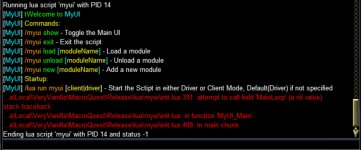
Ran into this issue tonight upon starting the Lua.
According to RG Manager I'm up to date.

ImGui Failure:
C:\Next\Lua/MyUI/modules/myspells.Lua:587: attempt to perform arithmetic on upvalue 'scale' (a nil value)
stack traceback:
C:\Next\Lua/MyUI/modules/myspells.Lua: in function 'RenderGUI'
C:\Next\Lua\myui\init.Lua:169: in function 'RenderModules'
C:\Next\Lua\myui\init.Lua:375: in function <C:\Next\Lua\myui\init.Lua:262>
ImGui Critical Failure: Mismatched Begin/BeginChild vs End/EndChild calls: did you forget to call End/EndChild?
Plugin ImGui has been temporarily paused. To resume imgui, run: /mqoverlay resume
Ending Lua script 'myui' with PID 10 and status -1
 
Excuse my stupidity but when I start /Lua run myui all I see is a loading modules icon in the middle of the screen and nothing else happens. What am I missing? Folder under myui looks complete with all the modules in place.
 
You should have a gui window after its done loading with the checkboxes for each module inside if not try /myui show
 
I am having same problem as wizman1. no commands works when loading screen is up but the /myui exit. the loading screen will exit.
 
It doesn't appear to finish loading. Loading modules icon never goes away.
I am having same problem as wizman1. no commands works when loading screen is up but the /myui exit. the loading screen will exit.
i had completely forgot to retest from a fresh start no configs.
should be fixed now. if i missed any module that causes issues let me know. i think i got them all this time, as I nuked my configs folder to test with nothing.
 
Hey there, I'm still getting this error message when I run this Lua. Is it a "me problem"?
If it's something anyone knows what I personally need to do or look into I'd appreciate
a nod in the right direction.

ImGui Failure:
C:\Next\Lua/MyUI/modules/myspells.Lua:579: attempt to perform arithmetic on upvalue 'scale' (a nil value)
stack traceback:
C:\Next\Lua/MyUI/modules/myspells.Lua: in function 'RenderGUI'
C:\Next\Lua\myui\init.Lua:175: in function 'RenderModules'
C:\Next\Lua\myui\init.Lua:381: in function <C:\Next\Lua\myui\init.Lua:268>
ImGui Critical Failure: Mismatched Begin/BeginChild vs End/EndChild calls: did you forget to call End/EndChild?
Plugin ImGui has been temporarily paused. To resume imgui, run: /mqoverlay resume
Ending Lua script 'myui' with PID 11 and status -1
 
Hey there, I'm still getting this error message when I run this lua. Is it a "me problem"?
If it's something anyone knows what I personally need to do or look into I'd appreciate
a nod in the right direction.

ImGui Failure:
C:\Next\lua/MyUI/modules/myspells.lua:579: attempt to perform arithmetic on upvalue 'scale' (a nil value)
stack traceback:
C:\Next\lua/MyUI/modules/myspells.lua: in function 'RenderGUI'
C:\Next\lua\myui\init.lua:175: in function 'RenderModules'
C:\Next\lua\myui\init.lua:381: in function <C:\Next\lua\myui\init.lua:268>
ImGui Critical Failure: Mismatched Begin/BeginChild vs End/EndChild calls: did you forget to call End/EndChild?
Plugin ImGui has been temporarily paused. To resume imgui, run: /mqoverlay resume
Ending lua script 'myui' with PID 11 and status -1
try nuking the config/myui/myspells folder see if that fixes it. might be some bad data from prior failed loads.
 
Anytime. seen that happen with other Lua as well where crashing happens while writing the config. so you get a garbage config file.
 
liked this Lua but i do have an issue. i tried to add your configedit in the add custom and it added it to the list, but when i click on the box it shuts myui completely down and doesnt work again unless i delete the toon name.Lua file in the config folder. just tested this with taskhud and it does the same thing.
myui bug.jpg
 
Grim

Hi, just wanted to ask some dumb questions before I dive into this. I, like others I am sure, already have a UI setup. I use Balfor's in this case. Been using it for years, I like the green color, what can I say? And I use a bunch of addon IMGui/Lua's to compliment it. And I use ISBoxer/Innerspace for window control and autologin. The best part about ISB is window management. It allows me to use 2 monitors, with my main toon (driver) on my best monitor and the other 5 on a separate monitor. So I can see all 6 at the same time. This helps when running around and you can see whether a toon has gotten stuck on something. Also, window switching, I use a Logitech G11 keyboard (that has the 18 keys on the left side of the KB) and I can assigned those keys to each toon in my group for instant switching. Those are the main reasons I use ISB. There are other things I use it for but those are the main ones.

But I have noticed the one big drawback to ISB, it doesn't play well with MQ where window positioning is concerned. You can setup everything, just so, on your driver toon (as far as "where" you want your Lua windows to go) and then switch to another toon, and the windows are all back at the default position. Like if you just started the Lua up. Now I have messed with this until I was "blue in the face". And I have found that some Lua's play nicer than others with ISB. Mostly though I have adjusted my UI to be "Upper left" orientated. Most of my UI elements are located in the upper left corner of the screen.

The one that is the worst offender (in particular) is ButtonMaster. I really wanted to use it to replace the default UI's buttons, which I have located at the BOTTOM of the screen. But every time I switch toons it reverts back to default position at the top, left corner. Now I can get it to lock into a new position, within the upper left quadrant of the screen, but nothing radical anywhere else. And here is the kicker that tells me it's ISB and not something else (like MQ related). If I log the group in using just MQ (instead of Innerspace), then all the Lua's and bags, and inventory is messed up. Not majorly, but definitely out of position.

So here we are, I was looking at this UI yesterday and really liked it. I had seen it before in some of your previous video's and it stuck, so to speak. All the interfaces on EQInterface are getting REAL long in the tooth, and the one I use (Balfor's) hasn't been updated for the new patch yet. And he is not answering comments, nor does he have an email to contact him with. I would like to use yours (interface), but have some questions about setting it up initially. Hope you don't mind answering some of them. They are pretty basic stuff, but can be headaches if you don't know what your doing lol. So I am heading them off at the pass.

1. First question is; do I need to disable all the stuff in my "ingame.cfg" file BEFORE I start up MYUI? I load 5-6 Lua's from here depending on which group I am playing. And furthermore, I use playername.cfg for some other stuff on my driver toons. Do I need to change that stuff because they get loaded when I login that toon or group of toons? I know I can go through and unload all of them from the Lua window, but I don't want to do that each time I login. Also concerning ingame.cfg, do I need to put /Lua run myui into it so it runs each time I login?

2. I have been meaning to ask this question for awhile now. Can you please explain what Actors means when you refer to them concerning Lua? I am definitely NOT a programmer so keep it simple ok? Just a general description will do.

3.Here is the key question though. Will your UI play nice with ISB? You probably don't know the answer to this right off the top of your head, but I had to ask anyways. I am willing to give this a shot on my FTP account just to mess with it. But, as you know, it is a PITA to setup a new UI and get everything just so. I don't necessarily NEED to use ISB, but it would be nice not to have to do without it either.

4. What do you use for your "social keys" at the lower left of the screen? Is it Buttonmaster? Or default? Looks like Buttonmaster though.

5. Does your term "Template" refer to the layout of all the disparate windows? And I take it, that it can be changed or adjusted?

6. And speaking of which, does the resolution of the monitor impact the UI in anyway? Will it need to be adjusted, like say, if you have a Widescreen monitor?

7. I am not sure if I noticed this or not, but does your "MyGroup" window have the extra 3 buttons available?

8. I already use MyBuffs. Can I change the colors and font size like MyBuffs for the whole UI? That would be cool.

Well, I am sure that is enough for now. Thanks in advance for any light you can shed on these questions. And thanks for all the new Lua's you have put out here lately. I probably already use a quarter of them. So I already like the look of them anyways. Frankly this just gives me an excuse to use them all.

Vrak
 
1. First question is; do I need to disable all the stuff in my "ingame.cfg" file BEFORE I start up MYUI? I load 5-6 Lua's from here depending on which group I am playing. And furthermore, I use playername.cfg for some other stuff on my driver toons. Do I need to change that stuff because they get loaded when I login that toon or group of toons? I know I can go through and unload all of them from the Lua window, but I don't want to do that each time I login. Also concerning ingame.cfg, do I need to put /Lua run myui into it so it runs each time I login?

If you load a module in MyUI and it was already running as a script that script is closed and the module is opened. so say you already had MyGroup running as the standalone Lua and then toggled on MyGoup in MyUI it will close the standalone and then load the module instead. The settings for MyUI on which modules you have loaded is saved per character so you can have different things open on different characters.

2. I have been meaning to ask this question for awhile now. Can you please explain what Actors means when you refer to them concerning Lua? I am definitely NOT a programmer so keep it simple ok? Just a general description will do.

Actors allows your clients running on the same machine to talk to eachother and send data back and forth. Similar to how DanNet or EQBC do this over the network to other machines. But Actors only relays on the same machine (Currently network actors is being worked on)

3.Here is the key question though. Will your UI play nice with ISB? You probably don't know the answer to this right off the top of your head, but I had to ask anyways. I am willing to give this a shot on my FTP account just to mess with it. But, as you know, it is a PITA to setup a new UI and get everything just so. I don't necessarily NEED to use ISB, but it would be nice not to have to do without it either.

there is a new Window Clamping setting inside /mqsettings that should help ISB users. beyond that not really sure as I don't use it myself.
1730509245403.png
4. What do you use for your "social keys" at the lower left of the screen? Is it Buttonmaster? Or default? Looks like Buttonmaster though.

Yeah that is ButtonMaster.

5. Does your term "Template" refer to the layout of all the disparate windows? And I take it, that it can be changed or adjusted?

Template is incase you want to build your own or convert something to run as a module within MyUI

6. And speaking of which, does the resolution of the monitor impact the UI in anyway? Will it need to be adjusted, like say, if you have a Widescreen monitor?

Only in the sense of text scaling most of the things you can scale though i do try to add that to my gui windows. Old Eyes not a fan of tiny text.

7. I am not sure if I noticed this or not, but does your "MyGroup" window have the extra 3 buttons available?

No not the ones you can drop stuff into like the ingame window does.

8. I already use MyBuffs. Can I change the colors and font size like MyBuffs for the whole UI? That would be cool.

Yeah pretty much all of the modules are able to be custom themed. you can either set them all the same or make each window different =)


I think I got em all =)
 
Grim

Thanks so much for taking the time to answer my questions. There is only one of the questions that I have a follow up on, that is #1 and you replied with this:

If you load a module in MyUI and it was already running as a script that script is closed and the module is opened. so say you already had MyGroup running as the standalone Lua and then toggled on MyGoup in MyUI it will close the standalone and then load the module instead. The settings for MyUI on which modules you have loaded is saved per character so you can have different things open on different characters.

To be honest I wasn't real concerned about your addons (or Lua's), I was more concerned about others. Right now I use all of them sporadically and leave most of them minimized. Buttonmaster is the only one I leave open all the time. Let me show you what I mean. Here is a copy of my ingame.cfg file:

/docommand /${Me.Class.ShortName} pause on (starts all CWTN plugins on "pause")
/timed 50 /Lua run dontmakemesayit
/timed 75 /Lua run lootier
/timed 100 /Lua run magellan
/timed 125 /Lua run buttonmaster
/timed 150 /Lua run Mybuffs

So, not being critical here but can I run my ingame.cfg as normal and fit the minimized bars in somewhere over your UI? I sure would hate to give some of these up. They are really nice to have when the situation demands it. Like lootier and lootly, can't live without them at this point. I don't know if I could manually loot anything anymore lol.

Also, can I carry all my buttons over to your buttonmaster?

Again thanks for the answers, I really appreciate it.

Vrak
 
yeah you can run all of those with MyUI.

Button master isn't officially inside of MyUI but it can me made into a module. I do have a working version of buttonmaster included in my personal test version
 
Hi Grim

Got another setup question for you. I setup a whole group this weekend using My UI. Took me about 3 hours because I was also looking at different UI compilations at the same time. And I screwed it all up one time and had to start over lol. Anyways here is my question:

1. Can I setup one toon and then use that setup (Theme, scale etc) as a template for other toons? I looked through the .Lua files in the MQ/config/MYUI folder and the sub folders for each different UI element (MyBuffs etc) and didn't see any obvious way to copy it over from one toon to the next. But I did notice an "Import" feature in one of the elements. Is "Import" for importing those features?

Still getting things setup but I have to say that these really change the "look" of my UI and the functionality also.

Thanks for all you do and putting up with my stupid questions.

Vrak
 
Grim

How can I make all the different elements stay in the place I want them in? I have tried all the ways that I know of:

1. Turn them off (from the "X" in the window) and then start back up from the Lua Task Manager.

2. Logging out to Character selection screen and then Logout button. This works for "normal" EQ windows.

3. I even tried Disabling them from the MyUI Lua and re enabling.

I don't have the problem with switching back and forth between toons and losing the positioning anymore, thanks to you telling me about the "Ignore Windows Settings" check mark in Settings. Thanks to whoever implemented that (Brainiac?) nice little bit of programming.

But I lose the positioning for all the MyUI elements (modules?) when I logout and then back in. They all end up in the upper left corner of the screen. Wait do I have to lock them all individually? But they all don't have locks on them?

I put MyUI in each toons .cfg file, mostly because I was experimenting with stuff, not in the ingame.cfg file. Is that ok? Or should it be the very first line of ingame.cfg?

Sorry man, but just like anything else I try that is new from here, I seem to have these teething problems at the beginning.

Vrak
 
ahh the only ways to fix random Lua repositioning to the top left. I know of are:

  1. find that char in questions settings inside of macroquest_overlay.ini and edit or nuke them (no really recommended but can help)
  2. log each char one at a time as the only character and position the windows then camp out and rinse repeat. (time consuming but fixes the multiple users writing the same file at the same time collisions)
I will work on just adding window position/size settings to the saved configs. this way we can ignore macroquest_overlay issues.
 
Grim

Thanks man, appreciate it. I will try what you suggested, cause I have heard that before. Does the "lock" on each module work for positioning or is that just so you can't move them accidentally?

Also can you please address the previous post to the last one? 2 above your latest post.

1. Can I setup one toon and then use that setup (Theme, scale etc) as a template for other toons? I looked through the .Lua files in the MQ/config/MYUI folder and the sub folders for each different UI element (MyBuffs etc) and didn't see any obvious way to copy it over from one toon to the next. But I did notice an "Import" feature in one of the elements. Is "Import" for importing those features?

Thanks for finding a way to fix this particular problem. I had MyBuffs installed before I tried MyUI and it stayed where I put it, hmmm. I have no idea why it does that lol.

Vrak
 
lock is so you can't accidently move it.

Except in Alertmaster, there lock also saves the gui state so if locked it will always appear when loaded without needing to /alertmaster show

I need to combine the module settings into a single myui settings per char file. then you can just copy one and rename. but currently because each module was a standalone script to start, they have their own settings files. so you would need to find the ones you wanted. They should all live in config/MyUI/moduleName folders. with the main MyUI in config/MyUI/servername/charname.Lua files

Or maybe move them to /config/MyUI/servername/charname/ folder as their own files but this way you can just copy a characters folder and not need to rename each file. still debating both options
 
Grim

Just wanted to let you know that the log each in individually worked. The positions are now saved and come up right when the toon starts up. Thanks man appreciate your patience.

And as to your last post, I looked at the files in each module, well most of them. For one they are .Lua files and some of them are quite long, and secondly they are in each module, so I think consolidation is the way to go here. It certainly would tie everything together. I am thinking about cfg files for each toon in the MyUI folder that is used by any module.

I know you probably weren't thinking about a compilation, but, well, it already looks like it is one, hehe. I bet you were thinking that this was just a nice, easy way to distribute your Lua's. See? No good turn ever goes unpunished. You feeling punished yet? LOL

Thanks again, I can't say it enough.

Vrak
 
Grim

Just wanted to let you know that the log each in individually worked. The positions are now saved and come up right when the toon starts up. Thanks man appreciate your patience.

And as to your last post, I looked at the files in each module, well most of them. For one they are .lua files and some of them are quite long, and secondly they are in each module, so I think consolidation is the way to go here. It certainly would tie everything together. I am thinking about cfg files for each toon in the MyUI folder that is used by any module.

I know you probably weren't thinking about a compilation, but, well, it already looks like it is one, hehe. I bet you were thinking that this was just a nice, easy way to distribute your LUA's. See? No good turn ever goes unpunished. You feeling punished yet? LOL

Thanks again, I can't say it enough.

Vrak
Glad to hear you got them to position and save =) that is my typical approach, just one at a time.

I am certainly leaning towards the folder based layout just so keeping the code the same between module and standalone is easier. while allowing each module to save as things need to change without having 2 try and again write the same file at once.

I contemplated using one theme / lock option to apply to all modules but I do like the ability to set them individually.

The reason we use Lua files for configs is ease of reading and writing it directly to and from tables inside the script. Sadly editing these by hand in a standard editor is a nightmare for larger tables, something like VSCode makes it much easier when you can collapse sections to follow it easier. I'm thinkin of some of the Buttonmaster configs or MyChat which can get rather long in the tooth.

Doing config/MyUI/severname/charname/modulename_cofig.Lua would make copying one character to another by folder or specific module settings if you wanted to cherry pick from other toons.
servername folder keeps things separate as a lot of people will recycle names on different servers but not always the same class thus layout etc.
 
Release MyUI

Users who are viewing this thread

Back
Top
Cart