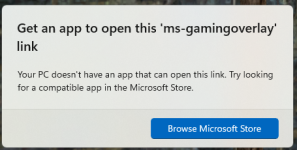
i had this issue, i think it was related to discord, i think i made an edit to the windows registry based on this reply from a ms specialist
Dear Charles Shaffer1
I am glad to receive your reply.
There is some feedback from users that this issue is related to Discord, you can try removing Discord to fix the issue.
If you are not using the Xbox Game Bar
You can refer to the following registry solution:
Press WIN+R and type
reg add HKEY_CURRENT_USER\SOFTWARE\Microsoft\Windows\CurrentVersion\GameDVR /f /t REG_DWORD /v “AppCaptureEnabled “ /d 0
reg add HKEY_CURRENT_USER\System\GameConfigStore /f /t REG_DWORD /v “GameDVR_Enabled” /d 0
Disclaimer: Modifying the registry or workgroups is usually geared towards advanced users, administrators, and IT professionals, and it can help fix some problems, however, improper registry modifications can cause serious problems. Therefore, please make sure to strictly follow the steps below. For further protection, make a backup of the registry before modifying it. For more information on how to backup and restore the registry ref:
How to back up and restore the registry in Windows - Microsoft Support
Just restart your computer when you are done.
Hope the above information can help you.
Looking forward to your further reply.
Best Wish
Shawn.Z-MSFT | Microsoft Community Support Specialist