
-
 Hail, we're RedGuides. We want you to play six (yes, 6!) EverQuest characters at once. We have scripts and a friendly community to help, please join our playstyle and say hello! 👋
 -
 We've added LLM sections to our Terms & Rules and Resource Rules, for everyone's sanity & in-game safety.
Read more
a. Do not replace your voice with an LLM. This goes for your posts and your scripts. Drafting and editing with a tool is fine, but don't take you out of what you share.
b. Do not replace your EQ character's voice with an LLM. We don't want scripts that speak over/ooc,/shoutor other public channels. This has been an unwritten rule that's kept casino scripts off the site for decades, but we're now compelled to make it clear: keep automated communication private.
Why Does RG Review Scripts?
Nearly every LLM-written Lua script we see is making your character do impossible things, and rarely in a way that's beneficial to you. We've seen heavy server hammering,/targetover impossible distances when/nav spawnwould passively accomplish the same thing, a spawn search that fires 20+ times per second, and other pointless actions that are likely annoying GMs.
You are welcome to use LLMs as a tool to structure, draft, and edit your work, but please read critically before hitting/lua run
You are using an out of date browser. It may not display this or other websites correctly.
You should upgrade or use an alternative browser.
You should upgrade or use an alternative browser.

Release MQ2Say
- Thread starter sl968
- Start date


craggyisland
Unwise Decision Designator
Anyone else done the Rallos Earring quest with this on?
Per the overview page "The plugin creates a dedicated window for Say Messages which originated from player characters, it will ignore NPC or item say messages. Say messages from a GM or Guide, should be flagged with a special (GM) tag."
I did the 'All Hail Rallos Zek' to Crusader Vraket to start Totality of War and got this.
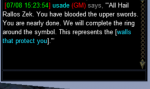
The text in normal chat window is yellow. I guess it is a certain way this npc's speech is coded that causes it to mark as (GM).
Per the overview page "The plugin creates a dedicated window for Say Messages which originated from player characters, it will ignore NPC or item say messages. Say messages from a GM or Guide, should be flagged with a special (GM) tag."
I did the 'All Hail Rallos Zek' to Crusader Vraket to start Totality of War and got this.
The text in normal chat window is yellow. I guess it is a certain way this npc's speech is coded that causes it to mark as (GM).
craggyisland
Unwise Decision Designator
Yeah his regular white text does not cause this issue. Must be linked to the yellow text he spews.

- Commits
- 36
1) Is it feasible to add default ignore values in settings?
[Settings]
DefaultIgnoreGroup=0/1
DefauItgnoreGuild=0/1
DefaultIgnoreFellowship=0/1
DefaultIgnoreRaid=0/1
2) Add a say filter and a list that you can add NPC names to. If you are near an instance, it's a beepfest. Is adding a copy/paste or click select possible in the window?
3) Add a list for you to recognize known GM's and beep like hell if that tag shows up.
Love it Hope I never have the circumstance arise.
[Settings]
DefaultIgnoreGroup=0/1
DefauItgnoreGuild=0/1
DefaultIgnoreFellowship=0/1
DefaultIgnoreRaid=0/1
2) Add a say filter and a list that you can add NPC names to. If you are near an instance, it's a beepfest. Is adding a copy/paste or click select possible in the window?
3) Add a list for you to recognize known GM's and beep like hell if that tag shows up.
Love it
Hope I never have the circumstance arise.If you look at the help, there’s a per character setting. If you turn off the per character setting, the general settings will be for every character. But if you’re asking if you can have different defaults on a per character basis set from a global setting, that’s pretty niche since setup per character only has to happen one time.
NPC names shouldn’t be triggering say, but are you asking because you want to filter out people hailing a specific NPC? You can do this with MQ’s built in filtering I believe. Maybe something more for AlertMaster to handle.
You are probably looking for something like MQ2GMCheck for the last request.
NPC names shouldn’t be triggering say, but are you asking because you want to filter out people hailing a specific NPC? You can do this with MQ’s built in filtering I believe. Maybe something more for AlertMaster to handle.
You are probably looking for something like MQ2GMCheck for the last request.
Last edited:
- Commits
- 36
If you look at the help, there’s a per character setting. If you turn off the per character setting, the general settings will be for every character. But if you’re asking if you can have different defaults on a per character basis set from a global setting, that’s pretty niche since setup per character only has to happen one time.
NPC names shouldn’t be triggering say, but are you asking because you want to filter out people hailing a specific NPC? You can do this with MQ’s built in filtering I believe. Maybe something more for AlertMaster to handle.
You are probably looking for something like MQ2GMAlertfor the last request.
1) I thought I was being clear; I fail. I looked at the help. Based on what I saw of my INI when I first edited it, I saw a ton of entries and this likely confused me, as I would have expected SaveByChar to be 0.
Perhaps on the very first load of the plugin, also create a [Global] entry, and that serves as the template if the user enables SaveByChar.
2) I saw Gribbles say things, so I infer it must be a defect. I updated MQNext just a few minutes ago, and I am under the impression it's provided.
3) My perception after reading every post in Discussion as well as the Overview is that the PURPOSE of MQ2Say was to alert the user if a gm was saying something. Why have yet another plugin. The point is to allow a filter that omits extraneous "say" messages.
EDIT: Additional thoughts on "You can do this with MQ’s built in filtering " and "You are probably looking for something like MQ2GMAlert for the last request. "
There's a vast array of plugins that I am unaware of, each with separate configurations, and I'm intimidated by the whole thing.
Last edited:
I think it loads from [Default] which would already match what you’re asking from [Global] but I’d have to look.
If an NPC is getting picked up, report that so it can be reproduced and fixed. Is it getting picked up as a GM? If so the message probably comes in on the wrong channel and the plugin needs to account for that.
The plugin is meant to catch any human say. It exists because you can’t already separate this into a separate window using existing EQ functionality, the emphasis on GM is beneficial but not the sole purpose.
If an NPC is getting picked up, report that so it can be reproduced and fixed. Is it getting picked up as a GM? If so the message probably comes in on the wrong channel and the plugin needs to account for that.
The plugin is meant to catch any human say. It exists because you can’t already separate this into a separate window using existing EQ functionality, the emphasis on GM is beneficial but not the sole purpose.
- Commits
- 36
My MQ2Say.ini, the one in config, does not contain a [default] section.
I was standing nearby Gribble, and someone else went up and hailed him, and I saw Gribble say his spiel in the MQ2Say window. I saw it happen only once. Other characters hailed him (not mine and all my ignore defaults were 0). There was not a red [GM] warning.
I was standing nearby Gribble, and someone else went up and hailed him, and I saw Gribble say his spiel in the MQ2Say window. I saw it happen only once. Other characters hailed him (not mine and all my ignore defaults were 0). There was not a red [GM] warning.
- Commits
- 36
RE: MQ2GMCheck
Check here: https://www.redguides.com/community/threads/mq2gmcheck.66836/
On May 28, 2021:
Redbot said:
I'd like to remove this plugin as it's silly, GMs can hide from it if they like. Does anyone want me to keep it around?
Check here: https://www.redguides.com/community/threads/mq2gmcheck.66836/
On May 28, 2021:
Redbot said:
I'd like to remove this plugin as it's silly, GMs can hide from it if they like. Does anyone want me to keep it around?


i believe the beep is a system beep, do you have that disabled/turned off somehow?Having an issue with this, but only on one computer. Beeps are not relayed when a say goes through. I've compared the ini's on both comps and they're identical. /say will still show up in the mqsay window, but no beeps are sounded. Any thoughts on this? Thanks.
you can access system sounds by rightclicking on your tray speaker icon. Win10-choose "Sounds", "Sounds" tab, and test your system sounds from there. Win 11 is slightly different but the result is the same. Win 11-"Sound Settings"-scroll down-"more sounds settings"-"Sounds" tab, and test.
I noodled around and couldn't find the exact sound that MQSay makes so this might not help at all.
I noodled around and couldn't find the exact sound that MQSay makes so this might not help at all.
Thanks! That seems to be where the problem is. Most of the sound on my system is working fine, i.e. videos, YouTube, music, etc. but when I go to play the Test sounds or adjust the master volume or anything, no sounds are played whatsoever. I didn't tinker with any settings and I don't see that I have anything turned off...it just seems to be no working. Any input as to what could be going on?you can access system sounds by rightclicking on your tray speaker icon. Win10-choose "Sounds", "Sounds" tab, and test your system sounds from there. Win 11 is slightly different but the result is the same. Win 11-"Sound Settings"-scroll down-"more sounds settings"-"Sounds" tab, and test.
I noodled around and couldn't find the exact sound that MQSay makes so this might not help at all.
windows sound problems are the devil. First thing to try - the troubleshooter. It's on the right click menu.
On more thinking, your problem might be that you have the wrong device chosen in system settings, whereas your browser and other sound user apps are using the correct device. right click, open sound settings, and look at the output device. If you have more than one listed, try each until it works.
On more thinking, your problem might be that you have the wrong device chosen in system settings, whereas your browser and other sound user apps are using the correct device. right click, open sound settings, and look at the output device. If you have more than one listed, try each until it works.

I love this "say" tracking plugin, it's great.
Class it as a 'must have' plugin.
tl;dr; ensure have system sounds application enabled!
Today, I've learned something new that some may already know. But if it helps someone else, I wanted to write here so all can be sure.
In the Windows "Volume Mixer" app, I control which applications are allowed to make sounds and not.
From time to time I've disabled the "System Sounds" application, which quiets Windows but lets other applications get on doing their things ok.
Today, I've had a guy come up to my camp and say.
I saw him arrive on the map and stand by the camp, I saw the text in the "say detection" window, but I didn't hear anything.
Yet the EQ app is making all its environmental sounds, also the spell casts, and combat noises.
To test, I did /beep ( as that is how the plugin defaults to make sound notification ), and heard nothing.
I unchecked the speaker disabling system sounds.
Retested with /beep, and it worked!
I'd thought that the EQ process was doing the beeps, but it appears it requests it to come from Windows.
I assume most are familiar with it, but this is the Volume Mixer app:
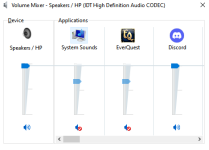
I believe there have been changes in Windows 10, that it's features have been moved around into system settings.
The speaker icon and access to "volume mixer" may not be present on those task bar icons.
I launch it by entering this to the Run window: SndVol
( the binary is actually located in c:\windows\system32 )
Once launched, I can then pin it to the task bar for easy access.
One last thing to add.
If you have multiple EQ instances up, then each one has it's own bar in the Volume Mixer.
Not only that, it will not just be label as "Everquest". It picks up the title of the window.
For me, that means I get the EQ badge and "the character name (level and zone)" displayed in the Volume Mixer.
It makes it quick to enable / disable per instance as you choose.
All in all, one stop shop for enabling / disabling audio, per app quickly.
Regards and Best Wishes.
Class it as a 'must have' plugin.
tl;dr; ensure have system sounds application enabled!
Today, I've learned something new that some may already know. But if it helps someone else, I wanted to write here so all can be sure.
In the Windows "Volume Mixer" app, I control which applications are allowed to make sounds and not.
From time to time I've disabled the "System Sounds" application, which quiets Windows but lets other applications get on doing their things ok.
Today, I've had a guy come up to my camp and say.
I saw him arrive on the map and stand by the camp, I saw the text in the "say detection" window, but I didn't hear anything.
Yet the EQ app is making all its environmental sounds, also the spell casts, and combat noises.
To test, I did /beep ( as that is how the plugin defaults to make sound notification ), and heard nothing.
I unchecked the speaker disabling system sounds.
Retested with /beep, and it worked!
I'd thought that the EQ process was doing the beeps, but it appears it requests it to come from Windows.
I assume most are familiar with it, but this is the Volume Mixer app:
I believe there have been changes in Windows 10, that it's features have been moved around into system settings.
The speaker icon and access to "volume mixer" may not be present on those task bar icons.
I launch it by entering this to the Run window: SndVol
( the binary is actually located in c:\windows\system32 )
Once launched, I can then pin it to the task bar for easy access.
One last thing to add.
If you have multiple EQ instances up, then each one has it's own bar in the Volume Mixer.
Not only that, it will not just be label as "Everquest". It picks up the title of the window.
For me, that means I get the EQ badge and "the character name (level and zone)" displayed in the Volume Mixer.
It makes it quick to enable / disable per instance as you choose.
All in all, one stop shop for enabling / disabling audio, per app quickly.
Regards and Best Wishes.
Redbot updated MQ2Say with a new update entry:
mqsettings and "/mqsay ui"
Read the rest of this update entry...
mqsettings and "/mqsay ui"
Read the rest of this update entry...

Norgold
Member
Is there a function that plays a beep or something?sl968 submitted a new resource:
MQ2Say - A Say Detection and Alerting Plugin.
Read more about this resource...

alerts <on/off>
- toggles sounding an alert on a new say.
From the commands tab up at the top of this page.
- toggles sounding an alert on a new say.
From the commands tab up at the top of this page.
Redbot updated MQ2Say with a new update entry:
FilterNPC and cleanup
Read the rest of this update entry...
FilterNPC and cleanup
- Cleanup some unused variables and remove unnecessary logic
- Fix an issue where the spawn would not be shown properly when an
NPC uses the say channel
- Add an option to filter out NPCs using the say channel (will still
show them if they are GM flagged NPCs) -- use with caution
- Add FilterNPC Option and Cleanup

Add FilterNPC Option and Cleanup (!5) · Merge requests · RG Creators / Plugins / MQ2Say
Cleanup some unused variables and remove unnecessary logic Fix an issue where the spawn would not be shown properly when an NPC uses the say...gitlab.com
Read the rest of this update entry...
novadude17
Member
When I have multiple EQ's running if one of my toons receives a /tell that EQ's window will flash indicating it received a message. However, when MQ2Say's Say Detection window records a say the EQ tab doesn't flash.
Is there a setting somewhere that can change this?
Is there a setting somewhere that can change this?
That’s a feature of MQ (flash on tells) and I don’t believe it has a command associated with it but I didn’t look. You can bring the window to the foreground automatically with /foreground, you can send yourself a tell to recreate that (though I wouldn’t) with ;tell.

- Commits
- 191
Looks like there is a command for it. /flashontells
Also, /beepontells
options for both are on/off
So while it's not part of the says, I suppose it would be possible to look at how it's done in the flashontells to see how to make it flash on say?
Probably worth mentioning that in the past the flashing used to mess with typing if I recall, and so some people didn't like the flash on tells.
It's certainly useful for background toons to tell you which box needs your attention for one reason or another. So all depends on the user.
Also, /beepontells
options for both are on/off
So while it's not part of the says, I suppose it would be possible to look at how it's done in the flashontells to see how to make it flash on say?
C++:
    if (gbFlashOnTells)
    {
        HWND hEQWnd = GetEQWindowHandle();

        if (hEQWnd)
        {
            FLASHWINFO fwi = { sizeof(FLASHWINFO) };
            fwi.dwFlags = FLASHW_ALL;
            fwi.hwnd = hEQWnd;
            fwi.uCount = 3;
            fwi.dwTimeout = 0;
            FlashWindowEx(&fwi);
        }
    }
Probably worth mentioning that in the past the flashing used to mess with typing if I recall, and so some people didn't like the flash on tells.
It's certainly useful for background toons to tell you which box needs your attention for one reason or another. So all depends on the user.
- Commits
- 191
Ahh I see.To be clear, I meant there’s not a command to call that function, not there’s not a command to change the setting.
novadude17
Member
Looks like there is a command for it. /flashontells
Also, /beepontells
options for both are on/off
So while it's not part of the says, I suppose it would be possible to look at how it's done in the flashontells to see how to make it flash on say?
C++:if (gbFlashOnTells) { HWND hEQWnd = GetEQWindowHandle(); if (hEQWnd) { FLASHWINFO fwi = { sizeof(FLASHWINFO) }; fwi.dwFlags = FLASHW_ALL; fwi.hwnd = hEQWnd; fwi.uCount = 3; fwi.dwTimeout = 0; FlashWindowEx(&fwi); } }
Probably worth mentioning that in the past the flashing used to mess with typing if I recall, and so some people didn't like the flash on tells.
It's certainly useful for background toons to tell you which box needs your attention for one reason or another. So all depends on the user.
Thanks for the info. I asked because I seldom keep my audio on, but do have eyes on my screens.
Everquest02
Active member
This seems to have stopped working for me after 04/20/22 patch & subsequent launcher & MQ update.
anyone else?

anyone else?
what specifically?This seems to have stopped working for me after 04/20/22 patch & subsequent launcher & MQ update.
anyone else?
View attachment 39525
mq2say is working here for me.
do you have it loaded
/plugin mq2sayEverquest02
Active member
/Whistle
funny, guess it got turn off, and I didn't have that line in my social.
thanks for the obvious and quick response!
funny, guess it got turn off, and I didn't have that line in my social.
thanks for the obvious and quick response!
RedMan updated MQ2Say with a new update entry:
20220903
Read the rest of this update entry...
20220903
 Commits
Read the rest of this update entry...

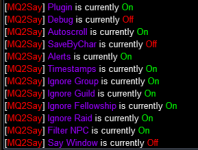
How do I turn off the "Say Window?" It appears to be set to OFF, but keeps coming back at reload. Am I doing something derpy?
My /MQsay settings:
My MQ2Say.ini:
[Settings]
SayStatus=1
SayDebug=0
AutoScroll=1
SaveByChar=0
AlertPerSpeaker=1
IgnoreDelay=300
[Default]
UseWindow=0
IgnoreGroup=1
IgnoreGuild=1
IgnoreFellowship=1
IgnoreRaid=1
FilterNPC=1
Alerts=1
Timestamps=1
AlertCommand=/multiline ; /beep ; /timed 1 /beep ; /timed 2 /beep
WindowTitle=Say Detection
SayTop=10
SayBottom=210
SayLeft=300
SayRight=600
Locked=0
Fades=0
Delay=2000
Duration=500
Alpha=255
FadeToAlpha=255
BGType=1
BGTint.alpha=255
BGTint.red=0
BGTint.green=0
BGTint.blue=0
FontSize=4
My /MQsay settings:
My MQ2Say.ini:
[Settings]
SayStatus=1
SayDebug=0
AutoScroll=1
SaveByChar=0
AlertPerSpeaker=1
IgnoreDelay=300
[Default]
UseWindow=0
IgnoreGroup=1
IgnoreGuild=1
IgnoreFellowship=1
IgnoreRaid=1
FilterNPC=1
Alerts=1
Timestamps=1
AlertCommand=/multiline ; /beep ; /timed 1 /beep ; /timed 2 /beep
WindowTitle=Say Detection
SayTop=10
SayBottom=210
SayLeft=300
SayRight=600
Locked=0
Fades=0
Delay=2000
Duration=500
Alpha=255
FadeToAlpha=255
BGType=1
BGTint.alpha=255
BGTint.red=0
BGTint.green=0
BGTint.blue=0
FontSize=4
Users who are viewing this thread
Total: 1 (members: 0, guests: 1)
Share: