• You've discovered RedGuides, an EverQuest multi-boxing and scripting community 🧙‍♀️⚙️. We want you to play several EQ characters at once, come join us and say hello! 👋

  • A TLP without truebox has thawed (Very Vanilla ready)
    Frostreaver
Resource icon

Release MQ2RelayTells

Teichou

RedGuides OG
Creator
Joined
Jun 15, 2011
RedCents
853¢
MQ2Relaytells -by Sadge is a plugin that will relay any incoming tell a character receives to a chat channel you specify (default /bc for EQBC). You can relay tells to either an email account or text message using the BLAT win32 command line email utility. You can also filter out messages you don't wish to relay using settings in the INI file.

Commands
Rich (BB code):
/relayhelp - Displays current settings and other command info.
/relaymailhelkp - Displays current mail relay settings.
/relayload Reloads - the INI file settings.
/relaycustom <text> - Adds <text> to the custom filter section of the INI file and will not relay any tells that include <text>.
Ini file settings
Rich (BB code):
ChatChannel: Defines what channel to relay tells to.
ChannelMessage: Custom message given when relaying tells.
RelayTellsInGame: Toggles if you wish to relay the tells in game or not.
RelayAFKMessage: Toggles the relay of the auto-AFK responses from tells.
RelayTraderTells: Toggles the relay of trader tells.
RelayPetTells: Toggles the relaying of any pet tells.
RelayPetAttack: Toggles the relaying of pet attack messages.
RelayPetSuspend: Toggles the relaying of pet suspend messages.
RelayPetMezzed: Toggles the relaying "Cannot wake" pet messages.
RelayNPCTells: Toggles the relaying of NPC tells
RelayToMail: Toggles the relaying of tells to email.text messages (using blat program).
EmailTo: Destination address for the relayed tell mail.
EmailFrom: Custom address for the sender of the relayed tell mail.
MailSubject: Custom subject for the relayed tell mail.
MailServer: Your smtp server used for sending the mail.
MailUserName: Your email user name.
MailPassword: Your email password.

Ini file example
Rich (BB code):
[Settings]
ChatChannel=/bc
ChannelMessage= sent ${Me} a tell that said: 
RelayTellsInGame=TRUE
RelayAFKMessage=FALSE
RelayTraderTells=FALSE
[Pet]
RelayPetTells=FALSE
RelayPetAttack=FALSE
RelayPetSuspend=FALSE
RelayPetMezzed=FALSE
[NPC]
RelayNPCTells=FALSE
[Mail]
RelayToMail=FALSE
[email protected]
[email protected]
Subject=Tell Received
Server=smtp.yourserver.com
UserName=YourUserName
Password=YourPassword
 
Last edited by a moderator:
MQ2Relaytells is awesome.

Anyone know if there is a way to make it so my toon doesn't stop moving for a second when I get a message? it has gotten me killed a couple times.

Rich (BB code):
[Settings]
ChatChannel=/bc
ChannelMessage= sent ${Me} a tell that said: 
RelayTellsInGame=FALSE
RelayAFKMessage=FALSE
RelayTraderTells=FALSE
[Pet]
RelayPetTells=FALSE
RelayPetAttack=FALSE
RelayPetSuspend=FALSE
RelayPetMezzed=FALSE
[NPC]
RelayNPCTells=FALSE
[Mail]
RelayToMail=FALSE
[email protected]
[email protected]
Subject=Tell Received
Server=smtp.yourserver.com
UserName=YourUserName
Password=YourPassword
 
This is just a guess based on the MQ2Notify plugin I wrote (It's on the MQ2 Forums), but you'd probably have to re-write the plugin to complete the notification asynchronously. I have a similar issue with that one. It sends the message synchronously, which means it can lock up the UI until the message is either sent, or fails.
 
I was having this happen to me as well. Extremely Frustrating. Try this command and see if it does what your looking for as it did for me. /Flash off
 
This had been working, with tell windows, until recently. I had done some directed marketing in General channel over the past few days and noticed it wasn't working anymore. I played around with turning tell windows off and reloading the plugin and didn't make a difference.

Many Thanks!
 
I'm still not having any luck with this...

Till recently, a patch or 2, this had been working for me with tell windows enabled.

What I've tried so far...

Unloading and Loading plugin
Turning tell windows off, then unloading and loading plugin
Turning tell windows off and on, each time trying the /relayload command
Deleted my MacroQuest.ini and letting it rebuild the aliases (that was fun since I hadn't used the builder since joining RG! There some minor details to that step I had forgotten!)
Deleted all the relaytell.inis and unloaded/reloaded plugin to let it rebuild them.

Any suggestions would be appreciated!
 
Can this be configured to use MQ2Gmail?
GMail uses oauth2, so I do not think I can use username/password in this config
 
I was having an infinite messages problem, but I fixed it.

If you have a message like this

ChannelMessage= sent ${Me} a tell that said:

Then you need to add a [CustomTell] like this to filter out the messages that are getting relayed.

Tell2=a tell that said
 
Has anybody an idea if it is possible to setup with MQ2Dannet?
I tried to change the ChatChannel=/bc
/bc only responds to all in the same channel
/dga or /dga /echo would respond to all active channels but I don't get that to work.
 
arrrg..
sorry guys, solved it:

ChatChannel=/dga /echo

with e.g.

/dga rtsetkey ChatChannel=/dga /echo

and this is necessary to work:

/relayload Reload
 
I'm struggling to get this set up to send a text. Here is the ini file:

INI:
[Settings]
ChatChannel=/bc
ChannelMessage= sent ${Me} a tell that said:
RelayTellsInGame=TRUE
RelayAFKMessage=FALSE
RelayTraderTells=FALSE
[Pet]
RelayPetTells=FALSE
RelayPetAttack=FALSE
RelayPetSuspend=FALSE
RelayPetMezzed=FALSE
[NPC]
RelayNPCTells=FALSE
[Mail]
RelayToMail=TRUE
EmailTo=<myverizoncellnumber>@vtext.com
[email protected]
Subject=Tell Received
Server=smtp.gmail.com
UserName=<mygmail_login>
Password=<mygmail_ pw>
[/CODE

Suggestions?
 
If I recall correctly, relaytells relies on an extra program (which I think is no longer maintained) to send text messages. Probably use another plugin for that component. I just use mq2discord with push notices.
 
Blat has not seen much love, but it should still work in very basic environments
Unfortunately GMail is not a basic environment. Here are a few problems you will run into:

-- GMail is a real pain in the arse to make work with simple SMTP login. Think they call it Less Secure Auth or Legacy Auth.. Even with less secure I do not think they allow non TLS/SSL connection. Given the age of Blat I doubt it would support the needed levels of encryption.
-- vtext.com is limited. It is a low limit. If you send too many in a short period they drop future attempts for like a day. You do not get a bounce back, it just never gets sent.

MQ2Discord can be finicky to setup but once you do its great. Push notification on your phone and you can respond back. I've chatted with guildies while mowing the lawn.
 
How do I make this work with a regular chat channel? i.e. I made a password protected channel but anything I put in the ChatChannel setting other than /bc doesn't work.

I tried ChatChannel=/MyChatChannel and I tried ChatChannel=MyChatChannel but result in "Couldn't parse /MyChatChannel..." and "Couldn't parse MyChatChannel.." respectively.

Any examples of using this with something other than /bc ?
 
How do I make this work with a regular chat channel? i.e. I made a password protected channel but anything I put in the ChatChannel setting other than /bc doesn't work.

I tried ChatChannel=/MyChatChannel and I tried ChatChannel=MyChatChannel but result in "Couldn't parse /MyChatChannel..." and "Couldn't parse MyChatChannel.." respectively.

Any examples of using this with something other than /bc ?
Needs to be an actual chat channel. IE: /g, /gu, /fsay, /say, /1, /2, /bc, /bca, /bct mytoonsname, etc.

You can't just /SuperDuperChatChannelThatIMadeUpButDoesn'tReallyExist
 
Needs to be an actual chat channel. IE: /g, /gu, /fsay, /say, /1, /2, /bc, /bca, /bct mytoonsname, etc.

You can't just /SuperDuperChatChannelThatIMadeUpButDoesn'tReallyExist

Ah ok, so if I make a chat channel with /join MyChatChannel:SomePassword I would have to use the /# where # is whatever was assigned to that channel I think. Though, I wonder, if the number is persistent enough to be the same every time I log out and back in.

Thanks for the other list of options, I wasn't sure how do go about using other channels anyway, so that was helpful.
 
Good evening,


Just want to confirm, ChatChannel=/dga /echo is the correct INI entry for Dannet, and what in-game channel will the tells show up in? I'd like to get tells forwarded from my 6 toons to my drivers /g channel is my goal.

Thanks,
T
 
Hey folks, I'm trying to get tells relayed to a single toon. Below is what I have and, of course, it doesn't work. Is there something beside the /bct I should have?

Code:
[Settings]
ChatChannel=/bct <MyCoolToonsNameHere>
ChannelMessage= sent ${Me} a tell that said:
RelayTellsInGame=TRUE
RelayAFKMessage=FALSE
RelayTraderTells=FALSE
[Pet]
RelayPetTells=FALSE
RelayPetAttack=FALSE
RelayPetSuspend=FALSE
RelayPetMezzed=FALSE
[NPC]
RelayNPCTells=FALSE
[Mail]
RelayToMail=FALSE
EmailTo=
EmailFrom=
Subject=Tell Received
Server=s
UserName=
Password=YourPassword

Thanks all.

BB~
 
Hey folks, I'm trying to get tells relayed to a single toon. Below is what I have and, of course, it doesn't work. Is there something beside the /bct I should have?

Code:
[Settings]
ChatChannel=/bct <MyCoolToonsNameHere>
ChannelMessage= sent ${Me} a tell that said:
RelayTellsInGame=TRUE
RelayAFKMessage=FALSE
RelayTraderTells=FALSE
[Pet]
RelayPetTells=FALSE
RelayPetAttack=FALSE
RelayPetSuspend=FALSE
RelayPetMezzed=FALSE
[NPC]
RelayNPCTells=FALSE
[Mail]
RelayToMail=FALSE
EmailTo=
EmailFrom=
Subject=Tell Received
Server=s
UserName=
Password=YourPassword

Thanks all.

BB~
Going to bump this just one time.

Trying to have toons relay incoming tells to a single driver toon. The tells I do receive get lost in other chats.


Thanks guys-

BB~
 
Going to bump this just one time.

Trying to have toons relay incoming tells to a single driver toon. The tells I do receive get lost in other chats.


Thanks guys-

BB~
[CODE title="Relay chat channels" highlight="15"] else if (!_strnicmp(szArg, szSetFSWatch, sizeof(szArg)))
{
ToggleSetting(&WatchFsay, &bToggle, &bTurnOn, "FSWatch", "Relay fellowship chat to /bc");
}
else if (!_strnicmp(szArg, szSetGroupWatch, sizeof(szSetGroupWatch)))
{
ToggleSetting(&WatchGroup, &bToggle, &bTurnOn, "GroupWatch", "Relay group chat to /bc");
}
else if (!_strnicmp(szArg, szSetGuildWatch, sizeof(szArg)))
{
ToggleSetting(&WatchGuild, &bToggle, &bTurnOn, "GuildWatch", "Relay guild chat to /bc");
}
else if (!_strnicmp(szArg, szSetTellWatch, sizeof(szArg)))
{
ToggleSetting(&WatchTell, &bToggle, &bTurnOn, "TellWatch", "Relay all tells to /bc");
}
else if (!_strnicmp(szArg, szSetRaidWatch, sizeof(szArg)))
{
ToggleSetting(&WatchRaid, &bToggle, &bTurnOn, "RaidWatch", "Relay all raid to /bc");
}[/CODE]

[CODE title="commands" highlight="1"]const char* szSetTellWatch = "tellwatch";
const char* szSetRaidWatch = "raidwatch";
const char* szSetGuildWatch = "guildwatch";
const char* szSetGroupWatch = "groupwatch";
const char* szSetFSWatch = "fswatch";[/CODE]

best I can tell there is a build in option to watch for tells that will relay it to bc, which is to say it would just put it in the chat channel of EQBC (doesn't issue any commands) this is the same as typing /bc hello.
While all members on the EQBC could see this message, assuming you're running all the characters that should be acceptable under normal circumstances.

Try /bccmd set tellwatch true
 
[CODE title="Relay chat channels" highlight="15"] else if (!_strnicmp(szArg, szSetFSWatch, sizeof(szArg)))
{
ToggleSetting(&WatchFsay, &bToggle, &bTurnOn, "FSWatch", "Relay fellowship chat to /bc");
}
else if (!_strnicmp(szArg, szSetGroupWatch, sizeof(szSetGroupWatch)))
{
ToggleSetting(&WatchGroup, &bToggle, &bTurnOn, "GroupWatch", "Relay group chat to /bc");
}
else if (!_strnicmp(szArg, szSetGuildWatch, sizeof(szArg)))
{
ToggleSetting(&WatchGuild, &bToggle, &bTurnOn, "GuildWatch", "Relay guild chat to /bc");
}
else if (!_strnicmp(szArg, szSetTellWatch, sizeof(szArg)))
{
ToggleSetting(&WatchTell, &bToggle, &bTurnOn, "TellWatch", "Relay all tells to /bc");
}
else if (!_strnicmp(szArg, szSetRaidWatch, sizeof(szArg)))
{
ToggleSetting(&WatchRaid, &bToggle, &bTurnOn, "RaidWatch", "Relay all raid to /bc");
}[/CODE]

[CODE title="commands" highlight="1"]const char* szSetTellWatch = "tellwatch";
const char* szSetRaidWatch = "raidwatch";
const char* szSetGuildWatch = "guildwatch";
const char* szSetGroupWatch = "groupwatch";
const char* szSetFSWatch = "fswatch";[/CODE]

best I can tell there is a build in option to watch for tells that will relay it to bc, which is to say it would just put it in the chat channel of EQBC (doesn't issue any commands) this is the same as typing /bc hello.
While all members on the EQBC could see this message, assuming you're running all the characters that should be acceptable under normal circumstances.

Try /bccmd set tellwatch true
Thanks a bunch man. Going to give this a shot when I get in game.


Appreciate it CWTN-

BB
 
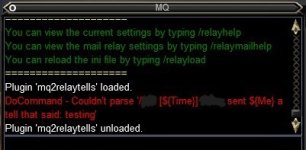
Could I get some help with this. I got the channel added.. /Character name. All toons joined it. Set each ones Ini file the same. Sent one a tell and this is what I get out.
EQ000003.jpg
Here is an example INI file
[CODE title="IniFile"][Settings]
ChatChannel=/NoParse /CharNameChannel
ChannelMessage= sent ${Me} a tell that said:
RelayTellsInGame=TRUE
RelayAFKMessage=FALSE
RelayTraderTells=FALSE
[Pet]
RelayPetTells=FALSE
RelayPetAttack=FALSE
RelayPetSuspend=FALSE
RelayPetMezzed=FALSE
[NPC]
RelayNPCTells=FALSE
[Mail]
RelayToMail=FALSE
[email protected]
[email protected]
Subject=Tell Received
Server=smtp.yourserver.com
UserName=YourUserName
Password=YourPassword[/CODE]
 

Attachments

Any chance at help on this one? Or did I do something so obviously wrong that all just not willing to tell me?
 
I have moved to dannet and I haven't got this working yet. Is there help for Dannet? I just want it to relay to my MQ chat window or anywhere.
 
I have moved to dannet and I haven't got this working yet. Is there help for Dannet? I just want it to relay to my MQ chat window or anywhere.
Have you tried:

ChatChannel=/dt


ChatChannel=/dgt

If you want all your toons to see it.
 
Last edited:
Any help would be greatly appreciated.

I have read every link regarding DanNet and RelayTells.
I want anyone in my group to send a tell to my main anytime they get a tell with dannet echo. I can get them to send messages to each other and get a correct messages.

I am not sure if I am screwing up DanNet or RelayTells TBH

I have DanNet and RelayTells freshly unload/reload, I send a tell to a from one alt to another alt, I do not see it in dannet if not part of the tell window itself.

It is likely something simple I screwed up.

[CODE title="current ini settings"]MQ2RelayTells INI

[Settings]

ChatChannel=/dtell <CHARNAME>

ChannelMessage= sent ${Me} a tell that said:

RelayTellsInGame=TRUE

RelayAFKMessage=FALSE

RelayTraderTells=FALSE

[Pet]

RelayPetTells=FALSE

RelayPetAttack=FALSE

RelayPetSuspend=FALSE

RelayPetMezzed=FALSE

[NPC]

RelayNPCTells=TRUE

[Mail]

RelayToMail=FALSE

[email protected]

[email protected]

Subject=Tell Received

Server=smtp.yourserver.com

UserName=YourUserName

Password=YourPassword

[CustomTells]

Tell1=load[/CODE]

Verified DanNet was set to loopback interface but I was using EQBC before this return to EQ/RG.
I think I may be missing the connection with all the commands and syntax options blah blah

I just want to log in and if any character gets a tell or other send my main a tell with the info.....
 
I'm probably missing something obvious, but is there an in game command to update the chat channel, or do you have to manually edit every character's ini file?
 
I'm probably missing something obvious, but is there an in game command to update the chat channel, or do you have to manually edit every character's ini file?
Not sure but have you tried a group command lke /dgge /rtsetkey as indicated below?

1736566180391.png
 
Yes....and came up blank on the syntax, unfortunately.
Make sure the plugin is loaded on all toons first.

I tested it last night and received the same error you did when the plugin was not loaded. Once loaded, it worked.

EDIT - I also was receiving multiple spam tells once it was setup and found this post above - https://www.redguides.com/community/threads/mq2relaytells.66881/post-418638. Just to clarify it for folks that may wonder exactly what the poster meant, you need to add the line below to each of the ini's manually to add these lines at the bottom;

INI:
[CustomTells]
Tell1=a tell that said

or use the command
INI:
/relaycustom a tell that said
 
Make sure the plugin is loaded on all toons first.

I tested it last night and received the same error you did when the plugin was not loaded. Once loaded, it worked.

EDIT - I also was receiving multiple spam tells once it was setup and found this post above - https://www.redguides.com/community/threads/mq2relaytells.66881/post-418638. Just to clarify it for folks that may wonder exactly what the poster meant, you need to add the line below to each of the ini's manually to add these lines at the bottom;

INI:
[CustomTells]
Tell1=a tell that said

or use the command
INI:
/relaycustom a tell that said
Thanks for the help! Finally got it working!

Turn relaying on:
/dgga /rtsetkey Settings RelayTellsInGame TRUE
Set the chat channel:
/dgga /rtsetkey Settings ChatChannel "/dgt all"
Stop spam looping:
/dgga /relaycustom a tell that said
 
Release MQ2RelayTells

Users who are viewing this thread

Back
Top
Cart