
-
 Hail, we're RedGuides. We want you to play six (yes, 6!) EverQuest characters at once. We have scripts and a friendly community to help, please join our playstyle and say hello! 👋
 -
 We've added LLM sections to our Terms & Rules and Resource Rules, for everyone's sanity & in-game safety.
Read more
a. Do not replace your voice with an LLM. This goes for your posts and your scripts. Drafting and editing with a tool is fine, but don't take you out of what you share.
b. Do not replace your EQ character's voice with an LLM. We don't want scripts that speak over/ooc,/shoutor other public channels. This has been an unwritten rule that's kept casino scripts off the site for decades, but we're now compelled to make it clear: keep automated communication private.
Why Does RG Review Scripts?
Nearly every LLM-written Lua script we see is making your character do impossible things, and rarely in a way that's beneficial to you. We've seen heavy server hammering,/targetover impossible distances when/nav spawnwould passively accomplish the same thing, a spawn search that fires 20+ times per second, and other pointless actions that are likely annoying GMs.
You are welcome to use LLMs as a tool to structure, draft, and edit your work, but please read critically before hitting/lua run
You are using an out of date browser. It may not display this or other websites correctly.
You should upgrade or use an alternative browser.
You should upgrade or use an alternative browser.
Resource icon
Release MQ2PluginManager
- Thread starter grimmier
- Start date


Plugins
these are the plugins i have loaded pr default
INI:
[Plugins]
mq2advpath=1
mq2autoaccept=1
mq2autologin=1
mq2camera=1
mq2dannet=1
mq2easyfind=1
mq2eqbugfix=1
mq2itemdisplay=1
mq2lua=1
mq2map=1
mq2moveutils=1
mq2nav=1
mq2portalsetter=1
mq2rez=1
mq2say=1
mq2xptracker=1
mq2status=1
these are the plugins i have loaded pr default

your better off without it.

Please make sure to post in the correct discussion thread.i closed my manager window by accident and cant remember how to re-open it.
If you check the FAQ or commands for t
Mq2Pluginmanager you'll see

/pluginmanI don't know what it is called, SORRY, but my window that showed all of my plugins is missing ...can someone tell me how to get it back please and thank you.
Thank you/pluginman
i did the same thing. not because i'm on crack but because my character was running rampant every time the puller targeted a mob. my toon would run into the middle of the zone and engage the mob. so i shut everything off. now the window is gone and the list of commands wont bring it back. any help is appreciated.So, I let someone use my account to do some trade skills and, because he has the patience of a crack addict in withdrawal, he shut off EVERYTHING in the mq2 management window. He didn't ask how to unload it or anything, he just right clicked everything that was green in the management window. Now, I don't know what the default settings are and I need assistance to reset it. I did try to uninstall/reinstall Redguides but it didn't change anything. Anyone have any way to get back to what I had previously?
if you check the mq2pluginmanager resource you'll see faq/commandsi did the same thing. not because i'm on crack but because my character was running rampant every time the puller targeted a mob. my toon would run into the middle of the zone and engage the mob. so i shut everything off. now the window is gone and the list of commands wont bring it back. any help is appreciated.
/plugin pluginmanager to load mq2pluginmanager/pluginman to show the plugin manager window/pluginman typed in as written did not work.
couldn't parse /pluginman/pluginman typed in as written did not work.
/plugin pluginmanger to load it... then /pluginman to open gui to see whats on or off... neither works?/pluginman typed in as written did not work.
have to load it first, if indeed everything was turned off, it is not loaded friend...couldn't parse /pluginman
this means you skipped the part where you have to load the plugin/pluginman typed in as written did not work.
couldn't parse /pluginman
did you reload your ui/plugin pluginmanager could not initialize plugin tool window
dumb i know but what is that command?/plugin pluginmanger to load it... then /pluginman to open gui to see whats on or off... neither works?
have to load it first, if indeed everything was turned off, it is not loaded friend...
Q: How do i show the window?/plugin pluginmanager could not initialize plugin tool window
A:
/plugin mq2pluginmanager
/loadskin default or /reloadui
pause, time out.dumb i know but what is that command?
please make sure you read each reply.
earlier i had told you to check the faq/commands and follow that information, which tells you to load the plugin and then reload your ui (you get a warning to do so too).
so let's recap
load the plugin -> /plugin mq2pluginmanager
reload your ui -> /reloadui
show the pluginmanager window if it is not displayed -> /pluginman
nothing happensdumb i know but what is that command?
you are running redguides veryvanilla mq?nothing happens
How do I get the plugin manager to save the escape to exit setting ? I tried right clicking on the window and selected esc to exit and then /camp desktop vs /q and it still doesn’t save the setting. I have to manually right click and select esc to exit on each toon. Seemed to not have this issue until after the update. Any help is appre
Those are in your UI_Toonname_server_classshortname.ini file in your everquest directoryHow do I get the plugin manager to save the escape to exit setting ? I tried right clicking on the window and selected esc to exit and then /camp desktop vs /q and it still doesn’t save the setting. I have to manually right click and select esc to exit on each toon. Seemed to not have this issue until after the update. Any help is appre
Ok so I just checked all my ui ini files like you said and all of my settings look right when I scroll down to the plugin manager block in the ini file esc to exit is set to 1 then I login and it still requires me to manually right click and change it. Am I doing something wrong hereThose are in your UI_Toonname_server_classshortname.ini file in your everquest directory

- Commits
- 191
Escape to exit is false in the xml file itself. You'd have to change that to true on the xml file in the UI fileOk so I just checked all my ui ini files like you said and all of my settings look right when I scroll down to the plugin manager block in the ini file esc to exit is set to 1 then I login and it still requires me to manually right click and change it. Am I doing something wrong here
mqfolder\resources\uifiles\MQUI_PluginManagerWnd.xml
Scroll all the way to the bottom.
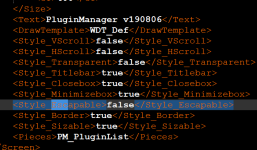
Change this to true then save the file.
Now you need to reload your UI.
It should now persist.
Also, this setting has been this way in the xml file. Nothing has changed with it in over a year.
One more question. I accidentally turned off my mq2 manager where do I type /pluginman at is it in game or in the ini folder to bring it back up?It's all good. There are a ton of options, so mess around with them and find what works for you. It'll also play your Mage, Druid, Ranger, Enchanter, and I am working on SK, Rogue, Warrior... But, I don't have tight release schedules... It's sorta when I have time after work. If you need heals, I got a plugin for that too (also free).
I just did a lot of refactoring, so some things may be buggy. There are some fixes coming for current known issues. There's a test version you can play with in the MQ2AFNuke thread if you're brave.

lndknox
Member
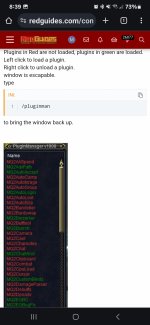
No it's the drop down menu pluginmanagerif you are talking about the console to type the command in, I believe you are looking for /mqconsole show
No it's the drop down menu pluginmanager
Attachments



Robban
Ultimate seasoned veteran member
One more question. I accidentally turned off my mq2 manager where do I type /pluginman at is it in game or in the ini folder to bring it back up?
So I need to type all that out for it to come back up?
Robban
Ultimate seasoned veteran member
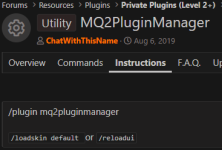
IF the plugin is running ---> /pluginmanSo I need to type all that out for it to come back up?
that will bring up the window again
IF the plugin isnt running you need to start it with /plugin mq2pluginmanager
that will start the plugin again if you accidentaly shut it down. This will also tell you if its already running.
How do I fix this?IF the plugin is running ---> /pluginman
that will bring up the window again
IF the plugin isnt running you need to start it with /plugin mq2pluginmanager
that will start the plugin again if you accidentaly shut it down. This will also tell you if its already running.
Attachments
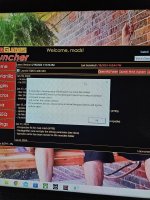
You need to unload MQ (log out of EQ preferred) and update via the RG launcher.How do I fix this?
Got it thanksYou need to unload MQ (log out of EQ preferred) and update via the RG launcher.
- Commits
- 191
wrong forum, but also, there were instructions in the cell phone picture of the computerized screen that explained how to address the issue.
Users who are viewing this thread
Total: 1 (members: 0, guests: 1)
Share: