• You've discovered RedGuides, an EverQuest multi-boxing and scripting community 🧙‍♀️⚙️. We want you to play several EQ characters at once, come join us and say hello! 👋

  • A TLP without truebox has thawed (Very Vanilla ready)
    Frostreaver
MQ2GroupInfo

Release MQ2GroupInfo

Wrong forum
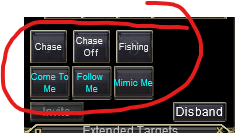
Upon logging in this morning, I noticed that my 3 buttons I had for the follow me/ mimic me/ come to me buttons, along with the options of right clicking any name in group and being able to swap to that screen, or make me leader, etc, are all gone. I'm unaware of which plugin this actually used. I tried a small search of "followme/mimicme/ etc buttons disappearing and didnt' see anything, although I'm sure it's come up before. I couldn't track down a fix, does anyone have a link to anyone else's thread that may have had this issue before? Or an idea how to fix it? Ran all the updates to RGL, I tried unloading and unloading mq2nav(which I think is which plugin utilizes those options?) but having some issues w/ it this morning.
 
i replied to you and moved your thread.

you don't need to make another new thread.
 
Hello all,

Question, when I click the Mimic button for a quest for my box crew, it spams the same thing over and over and won't stop. For example if I'm trying to get a quest with all my toons via mimic and I hail, it will spam hail for all six of my toons over and over and won't stop. Is there a command to just stop it? I have to camp to desk top and restart everything to get it to stop.

Thank you.
 
Hello all,

Question, when I click the Mimic button for a quest for my box crew, it spams the same thing over and over and won't stop. For example if I'm trying to get a quest with all my toons via mimic and I hail, it will spam hail for all six of my toons over and over and won't stop. Is there a command to just stop it? I have to camp to desk top and restart everything to get it to stop.

Thank you.
Sounds like you might have mimic me turned on for more than one toon. I'd check em all and make sure.
 
Thanks Psy, i will check it out tomorrow to see if I had another toon with mimic on.
What he said. Seriously if 2 chars have mimic on it gets ugly fast. Be sure you dont have it set that way or it will be VERY VERY OBVIOUS what you are doing
 
Wrong forum
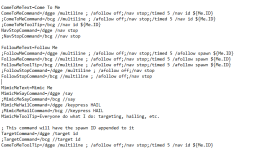
I just built a new PC, and I'm able to issue commands with Dannet and eqbc. the ComeToMe and MimicMe buttons work, but FollowMe will not no matter if I comment out the dannet lines or the eqbc lines.
 

Attachments

  • Annotation 2024-02-17 101342.png
    Annotation 2024-02-17 101342.png
    41.1 KB · Views: 0
Good Day Folks hope someone can assist The Follow me and come to me keys stopped working with recent patch , when pressing {follow me } it returns /multiline ;/afollow off/nav stop followed by a Red {NAV} no navigation path currently active.. for {come to me } key it returns /multiline ;/afollow off/nav stop/timed 5/nav id 703, advpath is loaded . thank you
 
my auto follow wont work after clickin it any suggestions i jus run 5 toons
merged your post into the mq2groupinfo thread.

afollow is mq2advpath, so everyone needs mq2advpath loaded - your button in mq2groupinfo uses mq2dannet to issue the afollow command to your group.

does everyone have mq2advpath loaded?
do you have dannet configured and setup appropriately?
are you actually in a group? (happens to all of us sometimes)
 
For some reason one day my dannet auto follow button stopped working. I did not think much of it because i was still learning and messing with kissassist as well. But not I am trying to get dannet to work and issuing commands and it will not respond. The auto follow hot Butten or nothing will work. Any clue on what happened?
 
what exactly does dannet autofollow mean? you mean groupinfo?
 
Forgot to add that i tried to run MQ2shaman around the time this started, and it would not allow me to run it on a truebox server. This is two different computers.
 
Ya know, I'm in this same boat. Oddly, it works locally on my laptop I two box from, but not on my main machine. The come to me button works though and I have just been using that as a workaround. They'll chase me if I don't stop and let them get too close.

Same thing with /afollow. Works on the laptop, but not the home computer. It'd be nice to have an answer for when I start doing more dungeon crawly style gameplay again, but so far, I've haven't had much of an issue moving my people around from camp to camp.
 
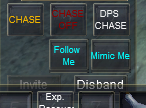
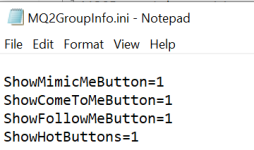
If you are talking about the 3 buttons on the bottom of your group window, that is a plugin called mq2groupinfo and has an ini file with the same name where you can see/edit what those buttons do.

The /afollow command (used by default) is part of the MQ2AdvPath plugin. Make sure that's enabled/loaded.
 
Awesome, thanks @Rare Spawn . I'll double check both of those, thanks!
 
MQ / Redguides / Very Vanilla - and I might be incorrect here - is not supported on truebox servers until they become relaxed truebox.

This may also be part of your problem.
 
Assuming you may be thinking my set up odd, naa, I play live. I just play an "EQ lite" gameplay style when I'm not home and have the extra time lol. Laptop cant handle much more than two EQ instances at a time and while I can remote into the home PC to play everyone, it does become a bit more tedious to do certain things with a whole group. So I'm typically doing boring, non-intensive stuff while not home.
 
Just a little update, for whatever reason, no one was running advpath except my bard lol. that fixed it perfectly, thanks @Rare Spawn !
 
Hey all i seem to have misplaced my come to me button. No idea how i did this, can any 1 advise on how to get the button back? thanks
 

Attachments

  • 1714542199365.png
    1714542199365.png
    35.3 KB · Views: 0
Quick little update to the above unloading and loading the mq2 grp info plugin does not bring the come to me button back.
 
Quick little update to the above unloading and loading the mq2 grp info plugin does not bring the come to me button back.
Shot in the dark here but it almost looks like you need to try and make the window bigger or reset the UI. Not sure if you are using any parts of a custom UI, so hard to tell but I can't think of anything that would cause 1 of 3 buttons to not appear.
 
If it helps, the command (so you can make your own) is:
/dgge /nav id ${Me.ID}
 
Each resource on RG has an Overview / Discussion Thread and either a link to their wiki or tabs with FAQ, Commands, Etc.
Please make sure to post in the respective discussion thread, and check the FAQ/Commands/Wiki for information before posting.

Those buttons are part of MQ2Groupinfo

by default these commands utilize mq2dannet, so you'll want to ensure that your mq2dannet is setup and functioning

if you are instead using eqbc, you'll want to ensure that is working
 
I'm using Sparxx_v1.4.4 and distance to group members is not showing. I've tried many options like right clicking and toggling "Show Distance" and editing the MQ2GroupInfo.ini file to no avail. The problem is that these numbers aren't showing up at all anywhere in the group window or else I would manually edit their location via MQ2GroupInfo.ini

Anyone have any ideas? You can stretch the group window to any size you like in game for Sparxx UI so editing the xml file doesn't do much.
1719643469084.png
 
It turns out the GroupDistanceLoc for UI_Sparxx_v1.4.4 was way off. It was out of the range of group window completely.

Here's the correct one;
GroupDistanceLoc=13,170,15,3

Edit: Typed too soon. When I logged in with my other toons all the distances were in the exact same spot. I had to set DynamicUI=0 as that was the culprit in scrambling everything.
 
Last edited:
The follow, come to me and mimic me buttons just stopped working for me is there any clue as to what might be happening? not even broadcasting my hitting the buttons or /dgge on other toons besides the one hitting them
 
Release MQ2GroupInfo

Users who are viewing this thread

Back
Top
Cart