
I absolutely love this and am using it for some different groundspawns in different zones. I've noticed that the toon doesn't necessarily go to the closes spawns - is there a command to fix that? Just seems weird to run by two or three, then come back to them later...

-
 Hail, we're RedGuides. We want you to play six (yes, 6!) EverQuest characters at once. We have scripts and a friendly community to help, please join our playstyle and say hello! 👋
You are using an out of date browser. It may not display this or other websites correctly.
You should upgrade or use an alternative browser.
You should upgrade or use an alternative browser.

Release MQ2GroundSpawns
- Thread starter ChatWithThisName
- Start date

We don't stop and change if stuff spawns as we're going around to get one, that's likely what you're seeingI absolutely love this and am using it for some different groundspawns in different zones. I've noticed that the toon doesn't necessarily go to the closes spawns - is there a command to fix that? Just seems weird to run by two or three, then come back to them later...
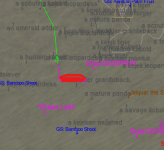
I'm actually seeing it already on the map - my toon just runs past it on his way to whatever he targets first. My toon started down by the "GS: Bamboo Shoot" and started running like 2K away for a drop.
and actually this is incorrect, we actually *do* do this when new items spawnWe don't stop and change if stuff spawns as we're going around to get one, that's likely what you're seeing
anyhow, yeah i guess we're just using the order that the spawns are listed in to go and get them rather than by distance themselves, outside of when a new one spawns or one despawns, then we'd check the "changed spawn"
don't really have any plans on changing that, but let me give it a think about the value/benefit of copying and then sorting, using that

- Commits
- 191
We go to them based on the length of their nav path. If no path can be found they are ignored. They are likely unreachable. Under world, top of a tree, off mesh etc.I'm actually seeing it already on the map - my toon just runs past it on his way to whatever he targets first. My toon started down by the "GS: Bamboo Shoot" and started running like 2K away for a drop.
View attachment 69587
I reloaded the entire toon and it seems to be working as I would have expected now, but both of the above explanations make sense.
Thanks for all you do Sic and CWTN!!
Thanks for all you do Sic and CWTN!!

The in-game clicky thing also bypasses nearby collectibles. I think it shows you the oldest spawn first. Which is maddening in a large or complex zone.

GKD1231
Well-known member
I have noticed that when you are picking multiple different items in a zone, that it will also go pick up all the same type first, then move to the next type... Example: All the 'Green Leaf", the move on to all the "Drop 12345/6789", etc. But I can live with that, it gets the job done.
yes, because that is how it worksI have noticed that when you are picking multiple different items in a zone, that it will also go pick up all the same type first, then move to the next type... Example: All the 'Green Leaf", the move on to all the "Drop 12345/6789", etc. But I can live with that, it gets the job done.
In Gilded Spire many of the upper floor collectibles are off the mesh. You can add these to your gildedspire_3.txt file and find them manually. This is a reasonably complete set of locs but I'm sure there are some I missed...
Gilded Spire collectible locations
Gilded Spire collectible locations
Code:
P 280.4395, -692.6754, 1157.2948,  0, 0, 0,  3,  Collection
P -106.3144, -632.9114, 1089.9784,  0, 0, 0,  3,  Collection
P -245.0070, -614.6001, 1154.2422,  0, 0, 0,  3,  Collection
P -455.8773, -536.4974, 6.9075,  0, 0, 0,  3,  Collection
P 251.1706, -363.0222, 0.0204,  0, 0, 0,  3,  Collection
P -272.4939, -413.9659, 272.6799,  0, 0, 0,  3,  Collection
P -40.1984, -42.9497, 272.5071,  0, 0, 0,  3,  Collection
P -74.1188, -50.2264, 766.1888,  0, 0, 0,  3,  Collection
P -137.2100, -197.5273, 849.8721,  0, 0, 0,  3,  Collection
P 64.8798, -149.5827, 534.0336,  0, 0, 0,  3,  Collection
P 305.6371, -233.3502, 948.8080,  0, 0, 0,  3,  Collection
P 152.9522, -426.4904, -0.2869,  0, 0, 0,  3,  Collection
P -145.8361, -443.3772, -0.3097,  0, 0, 0,  3,  Collection
P 66.6495, -502.2988, 0.4306,  0, 0, 0,  3,  Collection
P 450.4021, -312.5153, 0.0169,  0, 0, 0,  3,  Collection
P 448.8732, -400.0801, -0.0055,  0, 0, 0,  3,  Collection
P 452.1177, -459.3771, -0.0003,  0, 0, 0,  3,  Collection
P 293.7526, -720.0024, -0.0031,  0, 0, 0,  3,  Collection
P 86.8104, -702.5362, -0.0616,  0, 0, 0,  3,  Collection
P -268.7853, -722.9016, -0.0582,  0, 0, 0,  3,  Collection
P -437.7021, -467.9756, 0.0977,  0, 0, 0,  3,  Collection
P -315.9066, -179.7831, 2.3957,  0, 0, 0,  3,  Collection
P -79.9926, -182.2313, -0.0658,  0, 0, 0,  3,  Collection
P -271.6831, -831.5397, 81.8691,  0, 0, 0,  3,  Collection
P -459.6942, -312.5762, 186.1207,  0, 0, 0,  3,  Collection
P -280.1291, -44.4516, 187.5258,  0, 0, 0,  3,  Collection
P 284.0478, -140.3181, 189.1814,  0, 0, 0,  3,  Collection
P 546.3322, -302.4996, 181.6415,  0, 0, 0,  3,  Collection
P 463.6531, -549.5270, 97.9871,  0, 0, 0,  3,  Collection
P 78.6496, -821.5859, 10.4192,  0, 0, 0,  3,  Collection
P -67.4854, -831.8503, 7.5419,  0, 0, 0,  3,  Collection
P 274.4705, -218.7488, 272.5004,  0, 0, 0,  3,  Collection
P 309.0455, -414.8433, 272.8055,  0, 0, 0,  3,  Collection
P 198.1292, -519.9937, 272.4956,  0, 0, 0,  3,  Collection
P -256.3940, -206.3461, 272.5230,  0, 0, 0,  3,  Collection
P -173.7194, -288.1733, 272.4852,  0, 0, 0,  3,  Collection
P 9.0259, -460.9190, 538.5891,  0, 0, 0,  3,  Collection
P -402.3738, -284.8447, 545.9880,  0, 0, 0,  3,  Collection
P -405.7000, -374.8420, 545.1381,  0, 0, 0,  3,  Collection
P -270.1624, -198.5240, 545.1368,  0, 0, 0,  3,  Collection
P -59.7151, -189.3498, 545.1169,  0, 0, 0,  3,  Collection
P 285.3890, -210.3915, 545.1118,  0, 0, 0,  3,  Collection
P 397.6628, -477.5107, 545.1331,  0, 0, 0,  3,  Collection
P 539.3985, -283.8961, 684.8553,  0, 0, 0,  3,  Collection
P 285.2551, -525.1436, 859.1776,  0, 0, 0,  3,  Collection
P -352.4053, -593.7717, -16.0434,  0, 0, 0,  3,  Collection
P 270.7245, -170.1808, 273.1248,  0, 0, 0,  3,  Collection
P 301.7796, -732.3876, 91.1734,  0, 0, 0,  3,  Collection
P -294.4366, -714.2303, 0.3241,  0, 0, 0,  3,  Collection
P 163.2598, -515.6318, 0.3368,  0, 0, 0,  3,  Collection
P -552.0864, -555.3691, 91.4973,  0, 0, 0,  3,  Collection
P -148.7203, -561.9678, 276.6871,  0, 0, 0,  3,  Collection
P -368.0965, -314.7599, 134.0493,  0, 0, 0,  3,  Collection
P -435.2736, -532.6553, 84.1261,  0, 0, 0,  3,  Collection
P 194.3558, -178.1863, 188.8211,  0, 0, 0,  3,  Collection
P 88.8893, -349.8006, 188.8150,  0, 0, 0,  3,  Collection
P 78.9673, -217.7948, 188.8215,  0, 0, 0,  3,  Collection
P 232.2421, -700.8657, 954.6223,  0, 0, 0,  3,  Collection
P 105.7443, -619.6663, 949.1938,  0, 0, 0,  3,  Collection
P 278.8563, -192.6025, 870.8044,  0, 0, 0,  3,  Collection
P -278.1553, -621.3907, 854.3513,  0, 0, 0,  3,  Collection
P -313.9093, -499.6143, 545.0913,  0, 0, 0,  3,  Collection
P 410.2225, -794.9355, 648.8796,  0, 0, 0,  3,  Collection
P 87.3803, -45.8223, 762.7465,  0, 0, 0,  3,  Collection
P 208.0716, -263.4328, 1154.6583,  0, 0, 0,  3,  Collection
P 35.8748, -484.3833, 1154.6567,  0, 0, 0,  3,  Collection
P 127.0953, -193.1141, 949.2013,  0, 0, 0,  3,  Collection
P -96.9865, -852.6904, 934.3554,  0, 0, 0,  3,  Collection
P 252.1137, -616.8087, 1154.6478,  0, 0, 0,  3,  Collection
P -283.4663, -765.7255, 949.4896,  0, 0, 0,  3,  Collection
P 282.7197, -292.7851, 859.2900,  0, 0, 0,  3,  Collection
P -262.5867, -322.1223, 551.7821, 0, 0, 0, 3, CollectionThis doesn't really have anything to do with the mq2groundspawns pluginIn Gilded Spire many of the upper floor collectibles are off the mesh. You can add these to your gildedspire_3.txt file and find them manually. This is a reasonably complete set of locs but I'm sure there are some I missed...
Gilded Spire collectible locations
Code:P 280.4395, -692.6754, 1157.2948, 0, 0, 0, 3, Collection P -106.3144, -632.9114, 1089.9784, 0, 0, 0, 3, Collection P -245.0070, -614.6001, 1154.2422, 0, 0, 0, 3, Collection P -455.8773, -536.4974, 6.9075, 0, 0, 0, 3, Collection P 251.1706, -363.0222, 0.0204, 0, 0, 0, 3, Collection P -272.4939, -413.9659, 272.6799, 0, 0, 0, 3, Collection P -40.1984, -42.9497, 272.5071, 0, 0, 0, 3, Collection P -74.1188, -50.2264, 766.1888, 0, 0, 0, 3, Collection P -137.2100, -197.5273, 849.8721, 0, 0, 0, 3, Collection P 64.8798, -149.5827, 534.0336, 0, 0, 0, 3, Collection P 305.6371, -233.3502, 948.8080, 0, 0, 0, 3, Collection P 152.9522, -426.4904, -0.2869, 0, 0, 0, 3, Collection P -145.8361, -443.3772, -0.3097, 0, 0, 0, 3, Collection P 66.6495, -502.2988, 0.4306, 0, 0, 0, 3, Collection P 450.4021, -312.5153, 0.0169, 0, 0, 0, 3, Collection P 448.8732, -400.0801, -0.0055, 0, 0, 0, 3, Collection P 452.1177, -459.3771, -0.0003, 0, 0, 0, 3, Collection P 293.7526, -720.0024, -0.0031, 0, 0, 0, 3, Collection P 86.8104, -702.5362, -0.0616, 0, 0, 0, 3, Collection P -268.7853, -722.9016, -0.0582, 0, 0, 0, 3, Collection P -437.7021, -467.9756, 0.0977, 0, 0, 0, 3, Collection P -315.9066, -179.7831, 2.3957, 0, 0, 0, 3, Collection P -79.9926, -182.2313, -0.0658, 0, 0, 0, 3, Collection P -271.6831, -831.5397, 81.8691, 0, 0, 0, 3, Collection P -459.6942, -312.5762, 186.1207, 0, 0, 0, 3, Collection P -280.1291, -44.4516, 187.5258, 0, 0, 0, 3, Collection P 284.0478, -140.3181, 189.1814, 0, 0, 0, 3, Collection P 546.3322, -302.4996, 181.6415, 0, 0, 0, 3, Collection P 463.6531, -549.5270, 97.9871, 0, 0, 0, 3, Collection P 78.6496, -821.5859, 10.4192, 0, 0, 0, 3, Collection P -67.4854, -831.8503, 7.5419, 0, 0, 0, 3, Collection P 274.4705, -218.7488, 272.5004, 0, 0, 0, 3, Collection P 309.0455, -414.8433, 272.8055, 0, 0, 0, 3, Collection P 198.1292, -519.9937, 272.4956, 0, 0, 0, 3, Collection P -256.3940, -206.3461, 272.5230, 0, 0, 0, 3, Collection P -173.7194, -288.1733, 272.4852, 0, 0, 0, 3, Collection P 9.0259, -460.9190, 538.5891, 0, 0, 0, 3, Collection P -402.3738, -284.8447, 545.9880, 0, 0, 0, 3, Collection P -405.7000, -374.8420, 545.1381, 0, 0, 0, 3, Collection P -270.1624, -198.5240, 545.1368, 0, 0, 0, 3, Collection P -59.7151, -189.3498, 545.1169, 0, 0, 0, 3, Collection P 285.3890, -210.3915, 545.1118, 0, 0, 0, 3, Collection P 397.6628, -477.5107, 545.1331, 0, 0, 0, 3, Collection P 539.3985, -283.8961, 684.8553, 0, 0, 0, 3, Collection P 285.2551, -525.1436, 859.1776, 0, 0, 0, 3, Collection P -352.4053, -593.7717, -16.0434, 0, 0, 0, 3, Collection P 270.7245, -170.1808, 273.1248, 0, 0, 0, 3, Collection P 301.7796, -732.3876, 91.1734, 0, 0, 0, 3, Collection P -294.4366, -714.2303, 0.3241, 0, 0, 0, 3, Collection P 163.2598, -515.6318, 0.3368, 0, 0, 0, 3, Collection P -552.0864, -555.3691, 91.4973, 0, 0, 0, 3, Collection P -148.7203, -561.9678, 276.6871, 0, 0, 0, 3, Collection P -368.0965, -314.7599, 134.0493, 0, 0, 0, 3, Collection P -435.2736, -532.6553, 84.1261, 0, 0, 0, 3, Collection P 194.3558, -178.1863, 188.8211, 0, 0, 0, 3, Collection P 88.8893, -349.8006, 188.8150, 0, 0, 0, 3, Collection P 78.9673, -217.7948, 188.8215, 0, 0, 0, 3, Collection P 232.2421, -700.8657, 954.6223, 0, 0, 0, 3, Collection P 105.7443, -619.6663, 949.1938, 0, 0, 0, 3, Collection P 278.8563, -192.6025, 870.8044, 0, 0, 0, 3, Collection P -278.1553, -621.3907, 854.3513, 0, 0, 0, 3, Collection P -313.9093, -499.6143, 545.0913, 0, 0, 0, 3, Collection P 410.2225, -794.9355, 648.8796, 0, 0, 0, 3, Collection P 87.3803, -45.8223, 762.7465, 0, 0, 0, 3, Collection P 208.0716, -263.4328, 1154.6583, 0, 0, 0, 3, Collection P 35.8748, -484.3833, 1154.6567, 0, 0, 0, 3, Collection P 127.0953, -193.1141, 949.2013, 0, 0, 0, 3, Collection P -96.9865, -852.6904, 934.3554, 0, 0, 0, 3, Collection P 252.1137, -616.8087, 1154.6478, 0, 0, 0, 3, Collection P -283.4663, -765.7255, 949.4896, 0, 0, 0, 3, Collection P 282.7197, -292.7851, 859.2900, 0, 0, 0, 3, Collection P -262.5867, -322.1223, 551.7821, 0, 0, 0, 3, Collection

I manually collected all, died all, and used Exp Recovery… Recovering all 
It sounds like you might be asking about mq2groundspawns.I looked but did not find so ill ask . Is there anyway to get the collects when using the auto collect without the rog running into the death area ?
Thanks in advance !
RBFIII
Mq2groundspawns uses mq2nav and the nav mesh you have.
Each resource on RG has an Overview / Discussion Thread and either a link to their wiki or tabs with FAQ, Commands, Etc.
Please make sure to post in the respective discussion thread, and check the FAQ/Commands/Wiki for information before posting.
You'd want to edit your mesh and make it a "no nav area" if you don't already have that. (Without checking I don't recall if the current mesh on the updater has a no, or an avoid area (so you can get it).
At the least I'd suggest ensuring that your mesh is up to date, and if it is, then you'd want to edit yourself a mesh with that area entirely "no navigation"
.
- Commits
- 191
I don't know what "The Death Area" is that you're referring to. But as mentioned it uses MQ2Nav so you would need to modify your mesh to make the area you don't want to go unnavigable.I looked but did not find so ill ask . Is there anyway to get the collects when using the auto collect without the rog running into the death area ?
Thanks in advance !
RBFIII
it is in ToE the area that is lazers until the server defeats the baddiesI don't know what "The Death Area" is that you're referring to. But as mentioned it uses MQ2Nav so you would need to modify your mesh to make the area you don't want to go unnavigable.
@rbf3
double checking what i have uploaded (and im going to re-upload it because whomever's file had the recent addition didn't have the created avoidance zones areas)
this area is "hella avoid" with a preference to go around. This is important because if you get kicked or fell into the "bad area" you wouldn't know how to get out. which is why it is a high weighted avoid, with a low weighted prefer around it.
hopefully in future versions of meshgenerator we'll have something like "can nav out but don't ever go in there on purpose" areas
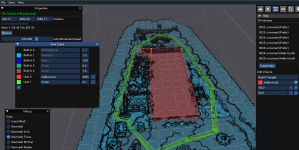
as mentioned if you're gonna use automation to get all the shinies in the zone, you'd want to make that hella-avoid area a "Not Walkable" area instead
Thanks Much. I will try to make sure i get questions in the correct spot.It sounds like you might be asking about mq2groundspawns.
Mq2groundspawns uses mq2nav and the nav mesh you have.
Each resource on RG has an Overview / Discussion Thread and either a link to their wiki or tabs with FAQ, Commands, Etc.
Please make sure to post in the respective discussion thread, and check the FAQ/Commands/Wiki for information before posting.
You'd want to edit your mesh and make it a "no nav area" if you don't already have that. (Without checking I don't recall if the current mesh on the updater has a no, or an avoid area (so you can get it).
At the least I'd suggest ensuring that your mesh is up to date, and if it is, then you'd want to edit yourself a mesh with that area entirely "no navigation"
.
RBFIII


thanksJust a heads up (pardon the screenshot, was how i could capture the issue in time): might wanna wait til ingame for this? This is during the login process as soon as mq injects.
View attachment 70484

A quick QOL suggestion for this one. It would be cool if it had a switch for quest items where everyone only needs one instance of the item. As it stands you can use it, you just have to babysit who is active as they grab stuff and wait for the respawn. I suspect I am one of just a few that actually enjoy the gearing process questing through the zones and fitting out new characters, but that small change would really make this a one stop shop for ground spawn stuff.
there's several reasons why that isn't really possible.A quick QOL suggestion for this one. It would be cool if it had a switch for quest items where everyone only needs one instance of the item. As it stands you can use it, you just have to babysit who is active as they grab stuff and wait for the respawn. I suspect I am one of just a few that actually enjoy the gearing process questing through the zones and fitting out new characters, but that small change would really make this a one stop shop for ground spawn stuff.
- many ground spawns are just generic groundspawn items - we usually don't know what it is until it is collected
- you'd now need to maintain a list of things and how many to get
- - this would need to magically know that if you have 123 of xyz that you no longer want to groundspawn at all in the whole zone
it would be better to manage this with a Lua script to turn it on/off once you have collected whatever you have decided you need and thus no longer want to be groundspawn-ing in that zone

Are there any plugins other than mq2nav that are required? Using this on emu and it runs to the groundspawn but will not pick it up. Specifically the evergreen leafs in greater faydark.
- Commits
- 191
Only the Nav. It's possible that the one it has arrived at is above/below the world. When you say it doesn't pick it up, does it just stand there, or does it try to pick it up and fails?Are there any plugins other than mq2nav that are required? Using this on emu and it runs to the groundspawn but will not pick it up. Specifically the evergreen leafs in greater faydark.
I can see the groundspawn and manually click to pick it up, otherwise it returns this error and moves to the next spawn loc and repeats -

Also, when I manually click to pick it up, it will automatically inventory the item and proceed to next item.
are you sure it is the same one? that zone is notorious for putting ground items in trees and other places out of reach.I can see the groundspawn and manually click to pick it up, otherwise it returns this error and moves to the next spawn loc and repeats -
View attachment 72390
- Commits
- 191
That zone specifically as mentioned is known for doing some whacky stuff with the placement of them. If you're able to verify that it does pick up stuff anywhere else, or at some point during it's attempt it will pick up an item, then chances are the one it was after was simply out of reach.I can see the groundspawn and manually click to pick it up, otherwise it returns this error and moves to the next spawn loc and repeats -
View attachment 72390
Yep, expecially considering it's happening on every ground item location - 
- Commits
- 191
When you're standing over one of the items, try /itemtarget *Green LeafYep, expecially considering it's happening on every ground item location -
then /click left item
Let me know if that actually picks it up for you or not. We /squelch those commands, so it's likely not going to output that it's doing it or that there is an issue when using the commands unless you manually put them in.
Here's what happens when I manually click it -

Here's what happens when I /itemtarget *Green Leaf then /click left item -

It doesn't return anything in the mq2 window with /click left item
Here's what happens when I /itemtarget *Green Leaf then /click left item -
It doesn't return anything in the mq2 window with /click left item
- Commits
- 191
That's fairly odd, as that's exactly what the plugin is doing.Here's what happens when I manually click it -
View attachment 72392
Here's what happens when I /itemtarget *Green Leaf then /click left item -
View attachment 72393
It doesn't return anything in the mq2 window with /click left item
- Commits
- 191
Will give this a look tomorrow. For now I'd suggest making that a hotkey and mind numbingly hitting it when the plugin stops.That's fairly odd, as that's exactly what the plugin is doing.
Appreciate your help!
- Commits
- 191
After a bit of headache to get into misty because I needed to find an old misty file, I was not able to recreate your issue unfortunately. Which means I'm unable to troubleshoot it.Appreciate your help!
It was in GFay, not misty. Trying to farm Evergreen Leaf.After a bit of headache to get into misty because I needed to find an old misty file, I was not able to recreate your issue unfortunately. Which means I'm unable to troubleshoot it.
The part we were trying to duplicate is not picking up and not dropping - which worked as expectedIt was in GFay, not misty. Trying to farm Evergreen Leaf.
It's dropping if I manually left lick it, just not picking up. The "/click left item" does nothing.The part we were trying to duplicate is not picking up and not dropping - which worked as expected
I'm on the Aegis of Norrath EMU server FWIW.
Q. Some items are weird names, like Drop11125/123?Im trying to use for some collections that have the name Drop###/## the next one keeps increasing by 1. I've tried using the name of the item but its not seen because of the generic spawn ID. Anyway to fix this without having to keep adding the next one?
A. you can just /ground add 11125 and it would find any of the weird entries for "Drop11125/123" Do not use addglobal, global won't find these.
did you do this thing from the FAQ?
Users who are viewing this thread
Total: 1 (members: 0, guests: 1)
Share: