
Install the app
How to install the app on iOS
Follow along with the video below to see how to install our site as a web app on your home screen.
Note: This feature may not be available in some browsers.
-
 You've discovered RedGuides, an EverQuest multi-boxing and scripting community 🧙♀️⚙️. We want you to play several EQ characters at once, come join us and say hello! 👋
 -
 EverQuest (live servers) were brought down for a scheduled patch.
Here's what to expect on patchdays.
Please use this to check for updates/info, and where to post bugs/issues/crashes, etc.

You are using an out of date browser. It may not display this or other websites correctly.
You should upgrade or use an alternative browser.
You should upgrade or use an alternative browser.

Release MQ2GroundSpawns
- Thread starter ChatWithThisName
- Start date

hrm, i can take a look at thatCan the /ground invalid report spit out the location of those that are invalid or ignored, instead of just the number? This way we can take a look at the meshes and look at locations to see where the issue(s) might be.
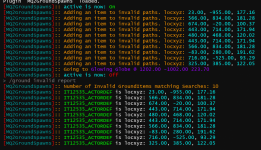
update notes didn't post yet - but rebuild just went through so patch and should have itAwesome! Thanks Sic!

- Joined
- Dec 29, 2017
- RedCents
- 24,194¢
ChatWithThisName updated MQ2GroundSpawns with a new update entry:
9/29/2023
Read the rest of this update entry...
9/29/2023
- We will now report the locations (in x,y,z format) for the items we add to the invalid list
- "/ground invalid report" will now also spit out the locations of invalid objects (in x,y,z format)
Read the rest of this update entry...
Can shoot me later..
I have another thought... There is a difference between invalid and manually ignored. Can those be differenanciated in a report type? and maybe even the reset command be separated out. This might address another thing from earlier in the thread where if you only wanted to farm a certain collection type or area. You could manually ignore area 1, and collect area 2, and then visa versa. but anything that would be an invalid path would be added to invalid.
/ground ignore report/reset
/ground invalid report/rest
I have another thought... There is a difference between invalid and manually ignored. Can those be differenanciated in a report type? and maybe even the reset command be separated out. This might address another thing from earlier in the thread where if you only wanted to farm a certain collection type or area. You could manually ignore area 1, and collect area 2, and then visa versa. but anything that would be an invalid path would be added to invalid.
/ground ignore report/reset
/ground invalid report/rest
i can look into that - currently they're one "group" but i can see why there'd be an idea for them to be independent of one anotherCan shoot me later..
I have another thought... There is a difference between invalid and manually ignored. Can those be differenanciated in a report type? and maybe even the reset command be separated out. This might address another thing from earlier in the thread where if you only wanted to farm a certain collection type or area. You could manually ignore area 1, and collect area 2, and then visa versa. but anything that would be an invalid path would be added to invalid.
/ground ignore report/reset
/ground invalid report/rest

I am in Misty Thicket and on the map there are numerous items on the map that say Drop11124/5, 6, etc. I can't get my toon to go and pick up these items even after manually typing them in the .ini file. Speaking of the .ini file, I am farming GS's in Shar Vahl - NOS and it just goes after the Globes with no problem. Is there something funky with Misty Thicket, am I missing something, are those items that appears on the map not really items at all??? Any suggestions would be greatly appreciated as I would like to farm some Acorns. Peace Out 
Read the FAQ plz.I am in Misty Thicket and on the map there are numerous items on the map that say Drop11124/5, 6, etc. I can't get my toon to go and pick up these items even after manually typing them in the .ini file. Speaking of the .ini file, I am farming GS's in Shar Vahl - NOS and it just goes after the Globes with no problem. Is there something funky with Misty Thicket, am I missing something, are those items that appears on the map not really items at all??? Any suggestions would be greatly appreciated as I would like to farm some Acorns. Peace Out
Plz don't type anything in the ini.

Kingkiller71
Well-known member
- Joined
- Jan 4, 2023
- RedCents
- 1,285¢
Is there a way to set one particular collectible to ignore, not the type, just the collectible itself?
I'm in Argin-Hiz and one collectible is behind a locked door that I can't get in. I don't really know how to change the mesh to stop going to it but each time I run into the door I have to turn off the mqspawn, run somewhere else on the map and then turn it back on.
All I know it is "Glowing Globe @ 635.00"
I'm in Argin-Hiz and one collectible is behind a locked door that I can't get in. I don't really know how to change the mesh to stop going to it but each time I run into the door I have to turn off the mqspawn, run somewhere else on the map and then turn it back on.
All I know it is "Glowing Globe @ 635.00"
- Joined
- Dec 29, 2017
- RedCents
- 24,194¢
/ground ignorecurrent - this will temporarily add the shiny you are currently after to your invalid group.Is there a way to set one particular collectible to ignore, not the type, just the collectible itself?
I'm in Argin-Hiz and one collectible is behind a locked door that I can't get in. I don't really know how to change the mesh to stop going to it but each time I run into the door I have to turn off the mqspawn, run somewhere else on the map and then turn it back on.
All I know it is "Glowing Globe @ 635.00"
Listed in the list of commands tab of this resource.
Kingkiller71
Well-known member
- Joined
- Jan 4, 2023
- RedCents
- 1,285¢
Many thanks sir for the knowledge and the quick response (I'm in UK so didn't expect a response for a good 8 hours lol!)/ground ignorecurrent - this will temporarily add the shiny you are currently after to your invalid group.
Listed in the list of commands tab of this resource.

Soandso2
Well-known member
- Joined
- Mar 13, 2023
- RedCents
- 937¢
I use this plug a lot but I never let my toon auto-play. I am always at the game. Often items that are "off mesh" still accessible for me, if I pause the plug, collect the item manually. Would it be possible to disable the "ignore this off-mesh shiny" and instead just run as close as possible and halt there while beeping? I notice that in some zones, I miss a LOT of quite accessible shinies.
- Joined
- Dec 29, 2017
- RedCents
- 24,194¢
The mesh is what the mesh is. We actually try to go directly to the shiny, but if there is no navigation path found to the item we search in a radius around the item to see if we can get close to it. If we can't get close we say it's invalid because the plugin just doesn't know how to get there.I use this plug a lot but I never let my toon auto-play. I am always at the game. Often items that are "off mesh" still accessible for me, if I pause the plug, collect the item manually. Would it be possible to disable the "ignore this off-mesh shiny" and instead just run as close as possible and halt there while beeping? I notice that in some zones, I miss a LOT of quite accessible shinies.
Unfortunately there is no option to "navigate as close as you can" with Nav. Either the mesh supports a path to the object or it doesn't.
I recommend either altering your mesh in a way that allows you to get to it or manually grabbing items you miss. Just the way it is.
Soandso2
Well-known member
- Joined
- Mar 13, 2023
- RedCents
- 937¢
That is kind of what I meant. Just, instead of listing it as invalid and continue, just stop and beep. Many many times the shiny can be collected manually. Just saying that I think that it would be a nice option to have, for me at least.we search in a radius around the item to see if we can get close to it. If we can't get close we say it's invalid because the plugin just doesn't know how to get there.

- Joined
- Dec 29, 2017
- RedCents
- 24,194¢
The plugin doesn't run towards any clickies it doesn't think it can get to at all. It just skips them. If you happen to be standing close to that shiny, it's pure coincidence.That is kind of what I meant. Just, instead of listing it as invalid and continue, just stop and beep. Many many times the shiny can be collected manually. Just saying that I think that it would be a nice option to have, for me at least.
The idea that it should stop and do nothing but beep defeats the purpose of the plugin and makes it clear you have a fundamental misunderstanding of how the plugin works. It will invalidate every shiny in a zone as soon as you zone in if it doesn't find a valid path. So just stopping and beeping in stratos isn't really helpful. It will however invalidate any it can't get to, and then go get the ones it can. Again, if you can't get to something, fix your mesh so you can.
Soandso2
Well-known member
- Joined
- Mar 13, 2023
- RedCents
- 937¢
Ah. I thought it ivalidated once it had tried to get to a shiny but failed. Oh well. I will have to try to remember which ones it cannot get to and simply get them manually, until I have figured out this mesh thingy.The plugin doesn't run towards any clickies it doesn't think it can get to at all. It just skips them. If you happen to be standing close to that shiny, it's pure coincidence.
The idea that it should stop and do nothing but beep defeats the purpose of the plugin and makes it clear you have a fundamental misunderstanding of how the plugin works. It will invalidate every shiny in a zone as soon as you zone in if it doesn't find a valid path. So just stopping and beeping in stratos isn't really helpful. It will however invalidate any it can't get to, and then go get the ones it can. Again, if you can't get to something, fix your mesh so you can.
Soandso2
Well-known member
- Joined
- Mar 13, 2023
- RedCents
- 937¢
Pray explain...If you run the plugin for long enough, you'll get a gold mine of collections in a single unreachable spot and a dopamine rush from picking them all up.
- Joined
- Dec 29, 2017
- RedCents
- 24,194¢
The glowing globes only spawn in a finite amount of locations. Which are all pre-determined. If you keep letting the plugin run eventually all the glowing globes will stack on top of each other at the locations that were invalidated. They respawn at a set rate, if you wait long enough you can stop the plugin and go get the "bundles" of glowing globes.Pray explain...
With that said, the longer you run the plugin with invalid locations in the area the more items will go to the invalid locations and the less items the plugin will be able to get to, eventually causing the plugin to be unable to reach any of the glowing globes. So while this will help you gather the glowing globes, it still requires some level of awareness of the invalid count compared to the total count.
- Joined
- Dec 29, 2017
- RedCents
- 24,194¢
I've yoinked this screenshot from Sic's post
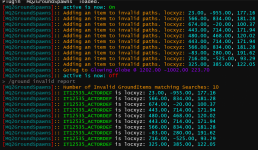
Here we can see the ground spawns that are being added for invalidation, which come complete with a location!
Now, since we have the location we can go into mesh gen for that zone and type those coordinates into the YXZ location boxes provided, which will put us exactly where that shiny is located.
Then we need only back the camera up to look at the surrounding area, which should show up why we aren't able to get there assuming the issue is directly related to the area immediately around the shiny. If it's not due to the area immediately surrounding it, you can use the path tool to see if a path can be made from your current location to the location of the shiny, and if not, identify the break in the mesh that prevents you from arriving at the shiny. Thus allowing you to create offmesh links and other modifications to the mesh giving you a path to that ground items spawn location.
So while this doesn't show you how to do it, I can only say that the tools exist and the information is available for you to make those adjustments.
Without more information and adjustment to the mesh cannot be made because I know neither the zone that is your issue nor the location of the items in question.
When I personally make adjustments to the meshes I submit those changes to the mesh repo where everyone gets their mesh. If you can get to every shiny in a zone, chances are you can get anywhere in a zone.
Here we can see the ground spawns that are being added for invalidation, which come complete with a location!
Now, since we have the location we can go into mesh gen for that zone and type those coordinates into the YXZ location boxes provided, which will put us exactly where that shiny is located.
Then we need only back the camera up to look at the surrounding area, which should show up why we aren't able to get there assuming the issue is directly related to the area immediately around the shiny. If it's not due to the area immediately surrounding it, you can use the path tool to see if a path can be made from your current location to the location of the shiny, and if not, identify the break in the mesh that prevents you from arriving at the shiny. Thus allowing you to create offmesh links and other modifications to the mesh giving you a path to that ground items spawn location.
So while this doesn't show you how to do it, I can only say that the tools exist and the information is available for you to make those adjustments.
Without more information and adjustment to the mesh cannot be made because I know neither the zone that is your issue nor the location of the items in question.
When I personally make adjustments to the meshes I submit those changes to the mesh repo where everyone gets their mesh. If you can get to every shiny in a zone, chances are you can get anywhere in a zone.

Enormo
Well-known member
- Joined
- Mar 6, 2023
- RedCents
- 1,148¢
The good stuff is always in the FAQ! This is going to save me so much time and headache
Q. Some items are weird names, like Drop11125/123?
A. you can just /ground add 11125 and it would find any of the weird entries for "Drop11125/123"
- Joined
- Dec 29, 2017
- RedCents
- 24,194¢
Yes, we tend to hide all the information that someone might ask frequently in the Frequently Asked Questions section. I apologize.The good stuff is always in the FAQ! This is going to save me so much time and headache
I have the problem that can not collect ground spawns as it sounds alarm as if off mapped area. I also can not ctrl find to run to npc and will not ctrl shift to anywhere in zone.
I ghhave download brewell maps and updated mesh generator. I am sure missing something simple.
Thank You
Grrizz
I ghhave download brewell maps and updated mesh generator. I am sure missing something simple.
Thank You
Grrizz
this sounds like an mq2groundspawn question, but you posted out in the aether.I have the problem that can not collect ground spawns as it sounds alarm as if off mapped area. I also can not ctrl find to run to npc and will not ctrl shift to anywhere in zone.
I ghhave download brewell maps and updated mesh generator. I am sure missing something simple.
Thank You
Grrizz
if it is an mq2groundspawn question - then yes, if you are offmesh, then you need to edit your mesh so you're on a meshed area of the zone.

- Joined
- Oct 7, 2015
- RedCents
- 266¢
Just a comment, I find it can help to click off Levi in some zones because if you're too high it will mark the shiny as invalid when it simply takes time to float down on top of the shiny. Of course there are other zones with Levi is a must!
Also, keep in mind that currently in LS, there are a number of shinies that are currently spawning underworld. That is 'supposed' to be fixed in the next patch. But I will say this, everyone will be after those, because that's all they are missing from collections. So use caution after the next patch.

- Joined
- Dec 1, 2006
- RedCents
- 1,669¢
I am doing the new collection quest in Mountains of Rathe, and the /ground spawns shows a bunch of spawns like Drop12539/131 etc. I tried just adding the Drop 12539 to the local list, but when it was active it would not go and collect the items. I ended up having to add each slash version to the local list. Is this a bug, or working as intended?
Also, one issue that made me scratch my head, when it collects something, it states Dropping: Item Name. I had to check to make sure it was actually keeping the items, and not dropping it on the ground. You might consider changing the wording to Keeping or something similar.
Edit: And I found the answer once I read more carefully. you cannot add Drop12539, you just do a /ground add 12539, and it handles the drop and slash index.
Also, one issue that made me scratch my head, when it collects something, it states Dropping: Item Name. I had to check to make sure it was actually keeping the items, and not dropping it on the ground. You might consider changing the wording to Keeping or something similar.
Edit: And I found the answer once I read more carefully. you cannot add Drop12539, you just do a /ground add 12539, and it handles the drop and slash index.
Last edited:
yep, correctEdit: And I found the answer once I read more carefully. you cannot add Drop12539, you just do a /ground add 12539, and it handles the drop and slash index.
- Joined
- Dec 1, 2006
- RedCents
- 1,669¢
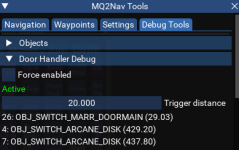
Running the plugin in West Freeport now, and running into a small issue with nav not opening a door. The door is located at 647.29 -1675.80 -112.03. Since I am watching it as it is running, I just hit the U key to open the door and it continues, but I thought I might add this as a bug. Should this post be on the MQ2Nav plugin page?
mq2groundspawns doesn't do anything with doors.Running the plugin in West Freeport now, and running into a small issue with nav not opening a door. The door is located at 647.29 -1675.80 -112.03. Since I am watching it as it is running, I jut hit the U key to open the door and it continues, but I thought I might add this as a bug. Should this post be on the MQ2Nav plugin page?
the door might "scripted" and you need to make sure you don't have "ignore scripted doors" checked
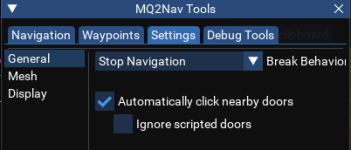
or it might be something due to distance or toonsize you need to increase your trigger distance (that isn't persistent)
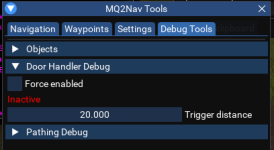
but no, nothing to do with groundspawn
- Joined
- Dec 1, 2006
- RedCents
- 1,669¢
I had just found that tool and was looking at it. When I am at the door, it shows it being 29.03 distance, and is set to 20. I increased it to 35 and the problem seems to be solved. I did check the scripted flag, and it is set as you showed it.
novadude17
Member
- Joined
- Dec 14, 2017
- RedCents
- 72¢
Any advice for adding the new gnoll essence in Blackburrow to the list of groundspawns?
Any advice for adding the new gnoll essence in Blackburrow to the list of groundspawns?

Utility - MQ2GroundSpawns - Extra info
 www.redguides.com
Q. Some items are weird names, like Drop11125/123?
A. you can just /ground add 11125 and it would find any of the weird entries for "Drop11125/123"
Anyway to:
A) If multiple toons in same group are running around to a spawn an option that only the closest will try and get it or have a distance limit setting?
and/or
B) Once a spawned object is grabbed or no longer available the toon will go back to a set point - like a camp
this way if you have multiple toons in the same zone they dont end up clumped up from overlap and chasing the same thing - each having a go back to point allows coverage?
If another tool could do B in conjuction
A) If multiple toons in same group are running around to a spawn an option that only the closest will try and get it or have a distance limit setting?
and/or
B) Once a spawned object is grabbed or no longer available the toon will go back to a set point - like a camp
this way if you have multiple toons in the same zone they dont end up clumped up from overlap and chasing the same thing - each having a go back to point allows coverage?
If another tool could do B in conjuction
this isn't designed to do things like that.Anyway to:
A) If multiple toons in same group are running around to a spawn an option that only the closest will try and get it or have a distance limit setting?
and/or
B) Once a spawned object is grabbed or no longer available the toon will go back to a set point - like a camp
this way if you have multiple toons in the same zone they dont end up clumped up from overlap and chasing the same thing - each having a go back to point allows coverage?
If another tool could do B in conjuction
they're always going to go after the closest available one to them - you could start them in different areas of the zone, but eventually they'd only have the same ones to compete against

Tupperbaby
New member
- Joined
- May 4, 2023
- RedCents
- 0¢
Wrong forum
Long-time listener, first-time caller.
Since event shinies are not labelled as "Glowing Orb," is there a method to autocollect them like "/ground active on" works? Each spawn has a random sequence at the end of its name, so they can't be collected with a specific name command. Or can they?
I hope this question makes sense.
Since event shinies are not labelled as "Glowing Orb," is there a method to autocollect them like "/ground active on" works? Each spawn has a random sequence at the end of its name, so they can't be collected with a specific name command. Or can they?
I hope this question makes sense.
Users who are viewing this thread
Total: 1 (members: 0, guests: 1)
Share: