
Install the app
How to install the app on iOS
Follow along with the video below to see how to install our site as a web app on your home screen.
Note: This feature may not be available in some browsers.
-
 You've discovered RedGuides, an EverQuest multi-boxing and scripting community 🧙♀️⚙️. We want you to play several EQ characters at once, come join us and say hello! 👋
You are using an out of date browser. It may not display this or other websites correctly.
You should upgrade or use an alternative browser.
You should upgrade or use an alternative browser.

Release MQ2GroundSpawns
- Thread starter ChatWithThisName
- Start date

mq2groundspawns doesn't open doorsI'm having some trouble with this not opening doors in zones, was in Skyshrine and was just getting stuck at the doors instead of opening them, any ideas on how to fix?
mq2nav opens doors - you will want to check your settings in there.
the most common things are:
- being at a scripted door, but have "ignore scripted doors" checked
/nav ui -> settings ->
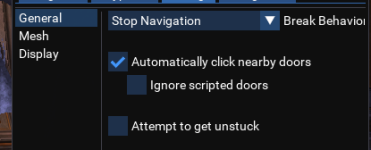
- a mesh that needs to be edited
- a door that's trigger distance is greater than 20
you can adjust this in /nav ui -> debug tools -> trigger distance (this doesn't save)
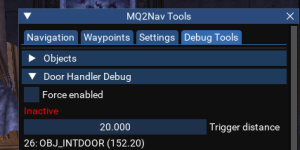
It looks like it was the Scripted doors one that was was the culprit!mq2groundspawns doesn't open doors
mq2nav opens doors - you will want to check your settings in there.
the most common things are:
- being at a scripted door, but have "ignore scripted doors" checked
/nav ui -> settings ->
View attachment 42681
- a mesh that needs to be edited
- a door that's trigger distance is greater than 20
you can adjust this in /nav ui -> debug tools -> trigger distance (this doesn't save)
View attachment 42682
As always you're the best @Sic

It won't pick up the Berries in Misty Thicket, any idea why?
[Mistythicket]
ItemList=|Berries|IT63_ACTORDEF|13045|
That is what it added when I did /ground add 13045
The in-game map displays : Generic (sm)
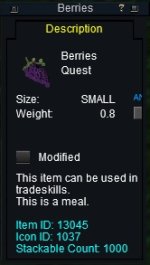
Finally got it working with this:
[Mistythicket]
ItemList=|Berries|IT63_ACTORDEF|13045|Generic (sm)|
[Mistythicket]
ItemList=|Berries|IT63_ACTORDEF|13045|
That is what it added when I did /ground add 13045
The in-game map displays : Generic (sm)
Finally got it working with this:
[Mistythicket]
ItemList=|Berries|IT63_ACTORDEF|13045|Generic (sm)|
Last edited:
Howdy Randy,It won't pick up the Berries in Misty Thicket, any idea why?
[Mistythicket]
ItemList=|Berries|IT63_ACTORDEF|13045|
That is what it added when I did /ground add 13045
The in-game map displays : Generic (sm)
View attachment 43343
I'm not sure why you added those other things, those are not what would be listed when you did a
/ground spawns which shows viable ground spawn items and if it listed Drop1234|999" you would /ground add 1234 (this is the usual thing people want in misty thicket).the items aren't displayed as *actually* what they are, otherwise we could just look for item ID - same with "Glowing Globe" - they aren't the actual item on the ground - if you took a collection item you had in your inventory and dropped it on the ground it would show "Glowing Globe" on the spawn checking for ground items.
so with that in mind
logging in and checking for you - doing a
/ground spawns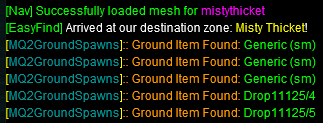
so in this case the item is "Generic (sm)"
/ground add Generic (sm)
/ground active on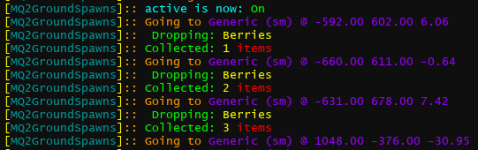
hope that helps - have a good one

Anyone else having odd behavior after the last patch (Nov 24)?
I've been collecting a few of the Feast of Giving collections over the last week. Before the 24th, runs around and collects as expected.
After the 24,th when I run

First thing is the wrong name, second the plugin doesn't appear to be using my MQ2GroundSpawns.ini
So for fun, I
I also added another entry (Drop12539) and checked my MQ2GroundSpawns.ini. No additional entries made:
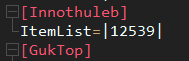
I have no clue what ini it is now using. I've sorted the ini's in config folder and opened the most recent ones, but haven't seen any ItemList entries.
I've deleted MQ2GroundSpawns.dll and reinstalled via Red Guides Launcher. Same result.
Anyone seeing similar results?
I've been collecting a few of the Feast of Giving collections over the last week. Before the 24th, runs around and collects as expected.
After the 24,th when I run
/ground active on I get the following message:First thing is the wrong name, second the plugin doesn't appear to be using my MQ2GroundSpawns.ini
So for fun, I
/ground add 12539 and off he goes to grab collectibles.I also added another entry (Drop12539) and checked my MQ2GroundSpawns.ini. No additional entries made:
I have no clue what ini it is now using. I've sorted the ini's in config folder and opened the most recent ones, but haven't seen any ItemList entries.
I've deleted MQ2GroundSpawns.dll and reinstalled via Red Guides Launcher. Same result.
Anyone seeing similar results?

2 Innothule? maybe something there?Anyone else having odd behavior after the last patch (Nov 24)?
I've been collecting a few of the Feast of Giving collections over the last week. Before the 24th, runs around and collects as expected.
After the 24,th when I run/ground active onI get the following message:
View attachment 43635
First thing is the wrong name, second the plugin doesn't appear to be using my MQ2GroundSpawns.ini
So for fun, I/ground add 12539and off he goes to grab collectibles.
I also added another entry (Drop12539) and checked my MQ2GroundSpawns.ini. No additional entries made:
View attachment 43634
I have no clue what ini it is now using. I've sorted the ini's in config folder and opened the most recent ones, but haven't seen any ItemList entries.
I've deleted MQ2GroundSpawns.dll and reinstalled via Red Guides Launcher. Same result.
Anyone seeing similar results?
innothule and innothuleb
I only have a single innothule.2 Innothule? maybe something there?
innothule and innothuleb
Guessing it is labeled b because it was revamped.

I am having the same exact issue! MQ2Necro is not loaded and I am using my Cleric.Anyone else having odd behavior after the last patch (Nov 24)?
I've been collecting a few of the Feast of Giving collections over the last week. Before the 24th, runs around and collects as expected.
After the 24,th when I run/ground active onI get the following message:
View attachment 43635
First thing is the wrong name, second the plugin doesn't appear to be using my MQ2GroundSpawns.ini
So for fun, I/ground add 12539and off he goes to grab collectibles.
I also added another entry (Drop12539) and checked my MQ2GroundSpawns.ini. No additional entries made:
View attachment 43634
I have no clue what ini it is now using. I've sorted the ini's in config folder and opened the most recent ones, but haven't seen any ItemList entries.
I've deleted MQ2GroundSpawns.dll and reinstalled via Red Guides Launcher. Same result.
Anyone seeing similar results?
it is just an error in the writeout, it will be fixed in next update.I am having the same exact issue! MQ2Necro is not loaded and I am using my Cleric.
re: not collecting stuff in innothuleb - working here as expected
the mq2necro error is funny copy/paste issue with working on some emu stuff
Q. Some items are weird names, like Drop11125/123?
A. you can just /ground add 11125 and it would find any of the weird entries for "Drop11125/123"
the mq2necro error is funny copy/paste issue with working on some emu stuff
you already had the item with "12539" there is no "Drop12359" to addmq2groundspawns said:> /ground spawns
[MQ2GroundSpawns]:: Ground Item Found: Drop12539/1804
[MQ2GroundSpawns]:: Ground Item Found: Drop12539/1805
[MQ2GroundSpawns]:: Ground Item Found: Drop12539/1806
[MQ2GroundSpawns]:: Ground Item Found: Drop12539/1811
[MQ2GroundSpawns]:: Ground Item Found: Drop12539/1812
[MQ2GroundSpawns]:: Ground Item Found: Drop12539/1813
[MQ2GroundSpawns]:: Ground Item Found: Drop12539/1814
[MQ2GroundSpawns]:: Ground Item Found: Drop12539/1815
[MQ2GroundSpawns]:: Ground Item Found: Drop12539/1816
[MQ2GroundSpawns]:: Ground Item Found: Drop12539/1817
> /ground add 12539
[MQ2GroundSpawns]:: Added: 12539
[MQ2GroundSpawns]:: [SearchList]
[MQ2GroundSpawns]:: 12539
[MQ2GroundSpawns]:: [Global SearchList]
> /ground active on
[MQ2GroundSpawns]:: active is now: On
[MQ2GroundSpawns]:: Going to Drop12539/1816 @ -329.00 -1041.00 2.48
[MQ2GroundSpawns]:: Dropping: Chewed Honeycomb Marshmallow
[MQ2GroundSpawns]:: Collected: 1 shinies
[MQ2GroundSpawns]:: Going to Drop12539/1813 @ -713.00 -1294.00 -0.12
Q. Some items are weird names, like Drop11125/123?
A. you can just /ground add 11125 and it would find any of the weird entries for "Drop11125/123"
yep i mentioned it already, it is just an error with the writeout in 2 posts above where you just posted.The error has changed now with trying to run MQ2GroundSpawns. Now it sas [MQ2Necro]: alive isn't a valid command! It is kinda a weird because MQ2Necro is not even loaded.
it will be fixed in next update.
it is literally just the words "[MQ2Necro]" that should be "[MQ2GroundSpawns]" there is nothing else
it has nothing to do with mq2necro, it is just a typo
Thank you sir! Will wait on the next update.yep i mentioned it already, it is just an error with the writeout in 2 posts above where you just posted.
it will be fixed in next update.
it is literally just the words "[MQ2Necro]" that should be "[MQ2GroundSpawns]" there is nothing else
it has nothing to do with mq2necro, it is just a typo

- Commits
- 191
ChatWithThisName updated MQ2GroundSpawns with a new update entry:
11/27/2022
Read the rest of this update entry...
11/27/2022
- fixed plugin msg typo
Read the rest of this update entry...

in the Red Guide's launcher, did you "Launch Mesh Updater", and update your meshes? Probably need the new ToL meshes.Heya's,
Just wanting to find out what I need for this to work in the latest expansion. Zone in, start up groundspawns but it says "im off mesh".
cheers, and love ya work
You need to run mesh updater. Like winnower saidHeya's,
Just wanting to find out what I need for this to work in the latest expansion. Zone in, start up groundspawns but it says "im off mesh".
cheers, and love ya work
Should MQ2GroundSpawns be functioning properly now? If so, I must be doing something wrong but I don't know what because this Plugin is pretty simple and self explanatory. I am in North Kaladim collecting ingredients for Kaladim Constitutional and continued recipes. It was working just fine before the whole "copy/paste" issue with MQ2Necro but not that this has been fixed, I still can't get my toon to collect the ground spawns right there in front of her. Sorry for being a pain in arse sometimes but I really try to fix these things on my own first. My ini file looks nothing like the representation above with:
[MQ2GroundSpawns]:: Ground Item Found: Drop12539/1804
[MQ2GroundSpawns]:: Ground Item Found: Drop12539/1805
[MQ2GroundSpawns]:: Ground Item Found: Drop12539/1806
[MQ2GroundSpawns]:: Ground Item Found: Drop12539/1811
[MQ2GroundSpawns]:: Ground Item Found: Drop12539/1812
[MQ2GroundSpawns]:: Ground Item Found: Drop12539/1813
[MQ2GroundSpawns]:: Ground Item Found: Drop12539/1814
[MQ2GroundSpawns]:: Ground Item Found: Drop12539/1815
[MQ2GroundSpawns]:: Ground Item Found: Drop12539/1816
[MQ2GroundSpawns]:: Ground Item Found: Drop12539/1817
ETC ...ETC But, as I said, it was working before the little fubar but now I can't get it to go fetch me a pail of water...J/K. Thanks for letting me know if it is just me. I deleted the .dll and .ini and let it reestablish it but that did not seem to help either. Thanks.
This is my output with I type /ground active on
[MQ2GroundSpawns]:: Ground Item Found: Drop12539/1804
[MQ2GroundSpawns]:: Ground Item Found: Drop12539/1805
[MQ2GroundSpawns]:: Ground Item Found: Drop12539/1806
[MQ2GroundSpawns]:: Ground Item Found: Drop12539/1811
[MQ2GroundSpawns]:: Ground Item Found: Drop12539/1812
[MQ2GroundSpawns]:: Ground Item Found: Drop12539/1813
[MQ2GroundSpawns]:: Ground Item Found: Drop12539/1814
[MQ2GroundSpawns]:: Ground Item Found: Drop12539/1815
[MQ2GroundSpawns]:: Ground Item Found: Drop12539/1816
[MQ2GroundSpawns]:: Ground Item Found: Drop12539/1817
ETC ...ETC But, as I said, it was working before the little fubar but now I can't get it to go fetch me a pail of water...J/K. Thanks for letting me know if it is just me. I deleted the .dll and .ini and let it reestablish it but that did not seem to help either. Thanks.
This is my output with I type /ground active on
Attachments
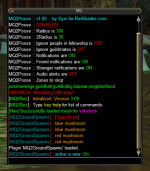
Last edited:
Yes it does work. It hasn't not worked. It was literally just wrong letters in the output msg.Should MQ2GroundSpawns be functioning properly now? If so, I must be doing something wrong but I don't know what because this Plugin is pretty simple and self explanatory. I am in North Kaladim collecting ingredients for Kaladim Constitutional and continued recipes. It was working just fine before the whole "copy/paste" issue with MQ2Necro but not that this has been fixed, I still can't get my toon to collect the ground spawns right there in front of her. Sorry for being a pain in arse sometimes but I really try to fix these things on my own first. My ini file looks nothing like the representation above with:
[MQ2GroundSpawns]:: Ground Item Found: Drop12539/1804
[MQ2GroundSpawns]:: Ground Item Found: Drop12539/1805
[MQ2GroundSpawns]:: Ground Item Found: Drop12539/1806
[MQ2GroundSpawns]:: Ground Item Found: Drop12539/1811
[MQ2GroundSpawns]:: Ground Item Found: Drop12539/1812
[MQ2GroundSpawns]:: Ground Item Found: Drop12539/1813
[MQ2GroundSpawns]:: Ground Item Found: Drop12539/1814
[MQ2GroundSpawns]:: Ground Item Found: Drop12539/1815
[MQ2GroundSpawns]:: Ground Item Found: Drop12539/1816
[MQ2GroundSpawns]:: Ground Item Found: Drop12539/1817
ETC ...ETC But, as I said, it was working before the little fubar but now I can't get it to go fetch me a pail of water...J/K. Thanks for letting me know if it is just me. I deleted the .dll and .ini and let it reestablish it but that did not seem to help either. Thanks.
This is my output with I type /ground active on
Do /ground spawns then read what it says, then add the appropriate thing.
Then ground active on
Did what you said as you will see and nothing happens ...she just stands there with her thumb up her butt. I do not find an MQ2GroundSpawn ini file in the config directory! Dynamic Link Library file is there but no config. At least it is not in the config folder. It says added, but where was it added?Yes it does work. It hasn't not worked. It was literally just wrong letters in the output msg.
Do /ground spawns then read what it says, then add the appropriate thing.
Then ground active on
Attachments
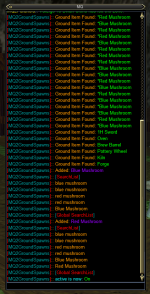
Last edited:
Disregard ...fixed it. It was a stupid asterix in the front of the word red and blue ...anyway ...good to go...thank youDid what you said as you will see and nothing happens ...she just stands there with her thumb up her butt. I do not find an MQ2GroundSpawn ini file in the config directory! Dynamic Link Library file is there but no config. At least it is not in the config folder. It says added, but where was it added?
Yep, the FAQ mentions that item specifically :pDisregard ...fixed it. It was a stupid asterix in the front of the word red and blue ...anyway ...good to go...thank you
I do appreciate you man! Remember I am an OBG(old bald guy) and I didn't think to check the FAQ. We are never to old to learn.Yep, the FAQ mentions that item specifically :p


- Commits
- 191
Could have saved yourself waiting 15 days had you checked the FAQ. Would have been getting those shrooms a lot sooner.I do appreciate you man! Remember I am an OBG(old bald guy) and I didn't think to check the FAQ. We are never to old to learn.
might be :pThat's it ...rub it in!! Well, I have another issue ...it will not create an .ini file so I have to tell it what to farm every time I login. Is that in the FAQ too!?
no it isn't, but will be corrected in next build
even put a reminder for you to patch when the update goes through
- Commits
- 191
ChatWithThisName updated MQ2GroundSpawns with a new update entry:
12/11/2022
Read the rest of this update entry...
12/11/2022
- Fixed no ini / ini not saving
-- thx medicman, please update :p
Read the rest of this update entry...
You are funny as a one legged man in a ass kicking contest!!!might be :p
no it isn't, but will be corrected in next build
even put a reminder for you to patch when the update goes through

RedMan updated MQ2GroundSpawns with a new update entry:
1/5/2023
Read the rest of this update entry...
1/5/2023
- thx zuesizgod
- Added "ignorecurrent" this allows you to manually ignore a current shiny you are going after
-- this is for times to temporarily ignore a shiny that might be behind a locked door, or otherwise one you don't want to get get.

Read the rest of this update entry...
Lately whenever I zone, I notice that the MQ-window is filled with a list presumly of all groundspawns which could be found. Is the there an option to surpress these feature. If not yet I would like a command, which would allow to hide the output of this list. The informations which are scrolled out of sign my producing this list for me often is of more use.
Feature request: please add a command which allows to disable the output of all Groundspawns found when zoning.
Feature request: please add a command which allows to disable the output of all Groundspawns found when zoning.
hrm, can you show me a snip where that is happening, because we should only do that if you do aLately whenever I zone, I notice that the MQ-window is filled with a list presumly of all groundspawns which could be found. Is the there an option to surpress these feature. If not yet I would like a command, which would allow to hide the output of this list. The informations which are scrolled out of sign my producing this list for me often is of more use.
Feature request: please add a command which allows to disable the output of all Groundspawns found when zoning.
/ground spawns (manually)if it shows [MQ2GroundSpawns]:: Ground Item Found: Blah - then it is mq2groundspawns and you are doing a
/ground spawns somehow (maybe a zoned.cfg)
if it doesn't look like the above, then it isn't mq2groundspawns
Unless if you mean that it is telling you what items you are searching for (globally or in the zone) then that isn't listing all the items, that is listing the items you are searching for

which also is how the plugin has been since it came out (as in a "this isn't a lately while you zone thing")
is that what you mean and what you are asking for to be turned off?
Will do a Screenshot and post it here.
Will do a Screenshot and post it here.
You can also copy/paste from the MQ Console (Ctrl-~)
As promised:
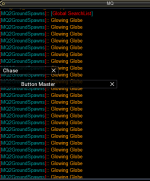
and likely the reason found:
mq2groundspawns.ini
trust me ... it wasn't me, who copied all the |Glowing Globe| into the ini
thanks @Sic for the hint to where to look at. I didn't got the idea by myself to check the ini.
and likely the reason found:
mq2groundspawns.ini
Code:
[Globals]
ItemList=|Glowing Globe|Glowing Globe|Glowing Globe|Glowing Globe|Glowing Globe|Glowing Globe|Glowing Globe|Glowing Globe|Glowing Globe|Glowing Globe|Glowing Globe|Glowing Globe|Glowing Globe|Glowing Globe|Glowing Globe|Glowing Globe|Glowing Globe|Glowing Globe|Glowing Globe|Glowing Globe|Glowing Globe|Glowing Globe|Glowing Globe|Glowing Globe|Glowing Globe|Glowing Globe|
[necropolistwo_mission]
ItemList=|
.....
trust me ... it wasn't me, who copied all the |Glowing Globe| into the ini
thanks @Sic for the hint to where to look at. I didn't got the idea by myself to check the ini.
Last edited:
aaa
That worked, issue solved.yeah, should remove all but 1 of those, and then you'll be fine
Users who are viewing this thread
Total: 1 (members: 0, guests: 1)
Share: