
-
 Hail, we're RedGuides. We want you to play six (yes, 6!) EverQuest characters at once. We have scripts and a friendly community to help, please join our playstyle and say hello! 👋
 -
 We've added LLM sections to our Terms & Rules and Resource Rules, for everyone's sanity & in-game safety.
Read more
a. Do not replace your voice with an LLM. This goes for your posts and your scripts. Drafting and editing with a tool is fine, but don't take you out of what you share.
b. Do not replace your EQ character's voice with an LLM. We don't want scripts that speak over/ooc,/shoutor other public channels. This has been an unwritten rule that's kept casino scripts off the site for decades, but we're now compelled to make it clear: keep automated communication private.
Why Does RG Review Scripts?
Nearly every LLM-written Lua script we see is making your character do impossible things, and rarely in a way that's beneficial to you. We've seen heavy server hammering,/targetover impossible distances when/nav spawnwould passively accomplish the same thing, a spawn search that fires 20+ times per second, and other pointless actions that are likely annoying GMs.
You are welcome to use LLMs as a tool to structure, draft, and edit your work, but please read critically before hitting/lua run
You are using an out of date browser. It may not display this or other websites correctly.
You should upgrade or use an alternative browser.
You should upgrade or use an alternative browser.

Release MQ2Grind 3.1.52471.49
- Thread starter hytiek
- Start date


WiseTrapper
Well-known member
- Buyer
- #1,164
I know, I'm sorry - I think I got it figured out with changing the setup for the pulling spell when i changed from sk tank to mage tank.....it was still trying to cast same spell slot for the pull and that wasn't a good spell for pulling. I changed it to pull with malo aa and put stance in sic tank and it works fine.You aren't giving me much to work from here
BTW, i use this program more than I thought i would. cloak leveling, alt leveling, its effortless now i can divide my attention to tend to while watching tv
- Buyer
- #1,165
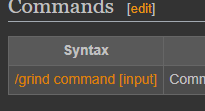
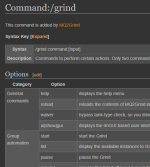
The new ones. Recycle, Go, etc. Sic got me squared away with his screenshots. I didn't realize there was a separate page for the commands from the main wiki article. So I'm *that* kind of moronwhat commands are you not finding?

- Buyer
- #1,166
(This is all IMHO and should serve only as a pointer for you to make your own decisions)
MQ2Grind starts at 95 (Goblins and Fools = the easiest, but maybe also give the GMM mission "The Darkness Howls" a chance, at 100+ is was much easier than Goblins and Fools) - if you are a returning player without adequate raid gear / prestige group gear, this is likely going to be tough. But its not undoable - here are my pointers to have some fun in this instance.
First off: use the MQ framelimiter (https://www.redguides.com/community/threads/mqnext-framelimiter-demo.78448/) - I set the simulation rate at 60fps on all toons, the target fps to 0.1fps and on the main tank to 1 fps + render game scene. In regular EQ, I set the background fps to min CPU, because that gets overwritten by MQ, and when you don't use MQ it uses less CPU that way. But that's just my setup.
Gear suggestion: Main slots - fear touched (RoF) at 95. Grab whatever augments you can get along the way.
AA: it helps if you get at least one round auf autogrant AAs at 95.
Caveat: yes, you will probably still wipe from time to time. Especially if you don't manually end the instances where it is not about destroying barrels, but just killing 2 types of mobs (weaponsmiths / mountain death goblins) + the named, they feature white/yellow mobs sprinkled throughout (my max has been 7 mobs in camp, 4 yellow).
For your tank and your healer, it helps to have top notch help (I got CWTNs plugins - more work with other tools) - but the most crucial if your tank is not super beefy is crowd control / slow, at least to my experience. If not having GL buffs, I always run with TANK/2HEALER/1CC/2DPS. Since the later stages seem to feature more adds, I limit the "safe mode" to 10, but that's absolutely your choice. I did have bad luck and got 7 mobs / 4 yellow at one time at loc 6 I think, amazingly survived. For my healer, it helped to (hopefully) nail down the settings to keep the healer from moving once he reaches the fight nav point - my sweet spot was DelayGroupNav 1 sec, navDistance 10, groupGap 70, set chase distance to 70 as well on healer plugin and set Pull Distance to a lower value (I use 35), to keep the tank from pulling new mobs by moving up. Also check the pull commandos for LTDistPullCmd (this should be just for adds in camp, IMO) and GTDistPullCmd (this should be any new fight).
I have been struggling with my bard, trying various things but finally got as close to my goal by using maui (muleassist UI), with these settings:
Requiem of time in spell slot 1
Aoe mez on 2 adds (AOE Spell|3)
MezStopHPs: 30 (low, but just to be safe)
Melee on
Med on
MeleeTwist on
MeleeTwistWhat starting with Requiem
CAUTION: make sure you have the default (empty) xtarget window and no special setup (may work in higher slots, but lower ranks should remain empty for cc to notice adds)!
If you feel confident with your setup, run the instance by hand. If your toons handle well, you should be ready for MQ2Grind. If not - check if your cc is using AOE / single target mez and slow correctly.
On MQ2Grind, keep in mind to not only set the "tank" config, but also the class config for the tank (for example: CWTN for both), else pause/unpause won't work.
General: burn settings on 3+ mobs
CWTN: add your BP clickies to burn
Also: this LEM "condition event" might help you (install Lua event manager) to enter the fray with a healthy amount of mana:
new and improved
IMPORT
(added stand() as suggested by greyn!)
obviously, set your own mana limits.
What's the best way to rock this without having good gear? Get fully buffed in GL - then you can run with 1 healer pretty fine.
MQ2Grind starts at 95 (Goblins and Fools = the easiest, but maybe also give the GMM mission "The Darkness Howls" a chance, at 100+ is was much easier than Goblins and Fools) - if you are a returning player without adequate raid gear / prestige group gear, this is likely going to be tough. But its not undoable - here are my pointers to have some fun in this instance.
First off: use the MQ framelimiter (https://www.redguides.com/community/threads/mqnext-framelimiter-demo.78448/) - I set the simulation rate at 60fps on all toons, the target fps to 0.1fps and on the main tank to 1 fps + render game scene. In regular EQ, I set the background fps to min CPU, because that gets overwritten by MQ, and when you don't use MQ it uses less CPU that way. But that's just my setup.
Gear suggestion: Main slots - fear touched (RoF) at 95. Grab whatever augments you can get along the way.
AA: it helps if you get at least one round auf autogrant AAs at 95.
Caveat: yes, you will probably still wipe from time to time. Especially if you don't manually end the instances where it is not about destroying barrels, but just killing 2 types of mobs (weaponsmiths / mountain death goblins) + the named, they feature white/yellow mobs sprinkled throughout (my max has been 7 mobs in camp, 4 yellow).
For your tank and your healer, it helps to have top notch help (I got CWTNs plugins - more work with other tools) - but the most crucial if your tank is not super beefy is crowd control / slow, at least to my experience. If not having GL buffs, I always run with TANK/2HEALER/1CC/2DPS. Since the later stages seem to feature more adds, I limit the "safe mode" to 10, but that's absolutely your choice. I did have bad luck and got 7 mobs / 4 yellow at one time at loc 6 I think, amazingly survived. For my healer, it helped to (hopefully) nail down the settings to keep the healer from moving once he reaches the fight nav point - my sweet spot was DelayGroupNav 1 sec, navDistance 10, groupGap 70, set chase distance to 70 as well on healer plugin and set Pull Distance to a lower value (I use 35), to keep the tank from pulling new mobs by moving up. Also check the pull commandos for LTDistPullCmd (this should be just for adds in camp, IMO) and GTDistPullCmd (this should be any new fight).
I have been struggling with my bard, trying various things but finally got as close to my goal by using maui (muleassist UI), with these settings:
Requiem of time in spell slot 1
Aoe mez on 2 adds (AOE Spell|3)
MezStopHPs: 30 (low, but just to be safe)
Melee on
Med on
MeleeTwist on
MeleeTwistWhat starting with Requiem
CAUTION: make sure you have the default (empty) xtarget window and no special setup (may work in higher slots, but lower ranks should remain empty for cc to notice adds)!
If you feel confident with your setup, run the instance by hand. If your toons handle well, you should be ready for MQ2Grind. If not - check if your cc is using AOE / single target mez and slow correctly.
On MQ2Grind, keep in mind to not only set the "tank" config, but also the class config for the tank (for example: CWTN for both), else pause/unpause won't work.
General: burn settings on 3+ mobs
CWTN: add your BP clickies to burn
Also: this LEM "condition event" might help you (install Lua event manager) to enter the fray with a healthy amount of mana:
new and improved
Lua:
local mq = require('mq')
local medding_needed = false
local manamap = {
  CLR = { highmana = 95, lowmana = 30 },
  --SHM = { highmana = 95, lowmana = 25 },
  --DRU = { highmana = 95, lowmana = 40 },
  SHD = { highmana = 95, lowmana = 30 },
  PAL = { highmana = 95, lowmana = 30 },
}
local endmap = {
  SHD = { highend = 95, lowend = 10 },
  --WAR = { highend = 95, lowend = 10 },
  PAL = { highend = 95, lowend = 10 },
  --ROG = { highend = 95, lowend = 10 },
  --RNG = { highend = 95, lowend = 10 },
}
local mana = nil
local endurance = nil
local function all_alive()
  for i = 0, mq.TLO.Group.GroupSize() - 1, 1 do
    if mq.TLO.Group.Member(i).Dead() then
      return false
    end
  end
  return true
end
local function xtar_aggro()
  if mq.TLO.Me.XTarget() > 0 then
    for i = 1, mq.TLO.Me.XTarget() do
      if mq.TLO.Me.XTarget(i).Aggressive() then
        return true
      end
    end
  end
  return false
end
local function condition()
  if mq.TLO.Grind.Active() then
    if (not xtar_aggro() and (mq.TLO.Grind.State() == 0 or mq.TLO.Grind.State() == 2) and all_alive()) then
      if not mq.TLO.Grind.Paused() and mq.TLO.Grind.CurrLoc() > 0 then
        for i = 0, mq.TLO.Group.GroupSize() - 1, 1 do
          mana = manamap[mq.TLO.Group.Member(i).Class.ShortName()]
          if mana then
            if mq.TLO.Group.Member(i).PctMana() < mana.lowmana then
              medding_needed = true
              return true
            end
          else
            endurance = endmap[mq.TLO.Group.Member(i).Class.ShortName()]
            if endurance then
              if mq.TLO.Group.Member(i).PctEndurance() < endurance.lowend then
                medding_needed = true
                return true
              end
            end
          end
        end
        return false
      elseif mq.TLO.Grind.Paused() then
        return true
      end
    elseif (xtar_aggro() and mq.TLO.Grind.Paused()) then
      return true
    end
  end
  return false
end
local function action()
  if (not mq.TLO.Grind.Paused() and medding_needed) then
    print("mana/end not ideal, resting")
    mq.cmd('/grind pause')
    if (mq.TLO.Me.Standing() and not mq.TLO.Me.Casting.ID()) then
      mq.TLO.Me.Sit()
    end
  elseif mq.TLO.Grind.Paused() then
    if not all_alive() then
      --let grind deal with dead peeps
      return
    elseif xtar_aggro() then
      print("oops, monsters!")
      mq.TLO.Me.Stand()
      mq.cmd('/grind resume')
    elseif (mq.TLO.Me.Standing() and medding_needed and not mq.TLO.Me.Casting.ID() and not xtar_aggro()) then
      mq.TLO.Me.Sit()
    else
      medding_needed = false
      for i = 0, mq.TLO.Group.GroupSize() - 1, 1 do
        mana = manamap[mq.TLO.Group.Member(i).Class.ShortName()]
        if mana then
          if mq.TLO.Group.Member(i).PctMana() < mana.highmana then
            medding_needed = true
          end
        end
        endurance = endmap[mq.TLO.Group.Member(i).Class.ShortName()]
        if endurance then
          if mq.TLO.Group.Member(i).PctEndurance() < endurance.highend then
            medding_needed = true
          end
        end
      end
      if medding_needed == false then
        print("mana/end good, lets get cracking")
        mq.TLO.Me.Stand()
        mq.cmd('/grind resume')
      end
    end
  end
end
return { condfunc = condition, actionfunc = action }
IMPORT
Code:
cmV0dXJuIHsKIFsibmFtZSJdID0gImdyaW5kX2xvbSIsCiBbImxvYWQiXSA9IHsKICBbImFsd2F5cyJdID0gZmFsc2UsCiAgWyJ6b25lIl0gPSAiIiwKICBbImNsYXNzIl0gPSAiIiwKIH0sCiBbInR5cGUiXSA9ICJjb25kaXRpb25zIiwKIFsiY2F0ZWdvcnkiXSA9ICJncmluZCIsCiBbImNvZGUiXSA9ICJiRzlqWVd3Z2JYRWdQU0J5WlhGMWFYSmxLQ2R0Y1NjcENteHZZMkZzSUcxbFpHUnBibWRmYm1WbFpHVmtJRDBnWm1Gc2MyVUtiRzlqWVd3Z2JXRnVZVzFoY0NBOUlIc0tJQ0JEVEZJZ1BTQjdJR2hwWjJodFlXNWhJRDBnT1RVc0lHeHZkMjFoYm1FZ1BTQXpNQ0I5TEFvZ0lDMHRVMGhOSUQwZ2V5Qm9hV2RvYldGdVlTQTlJRGsxTENCc2IzZHRZVzVoSUQwZ01qVWdmU3dLSUNBdExVUlNWU0E5SUhzZ2FHbG5hRzFoYm1FZ1BTQTVOU3dnYkc5M2JXRnVZU0E5SURRd0lIMHNDaUFnVTBoRUlEMGdleUJvYVdkb2JXRnVZU0E5SURrMUxDQnNiM2R0WVc1aElEMGdNekFnZlN3S0lDQlFRVXdnUFNCN0lHaHBaMmh0WVc1aElEMGdPVFVzSUd4dmQyMWhibUVnUFNBek1DQjlMQXA5Q214dlkyRnNJR1Z1WkcxaGNDQTlJSHNLSUNCVFNFUWdQU0I3SUdocFoyaGxibVFnUFNBNU5Td2diRzkzWlc1a0lEMGdNVEFnZlN3S0lDQXRMVmRCVWlBOUlIc2dhR2xuYUdWdVpDQTlJRGsxTENCc2IzZGxibVFnUFNBeE1DQjlMQW9nSUZCQlRDQTlJSHNnYUdsbmFHVnVaQ0E5SURrMUxDQnNiM2RsYm1RZ1BTQXhNQ0I5TEFvZ0lDMHRVazlISUQwZ2V5Qm9hV2RvWlc1a0lEMGdPVFVzSUd4dmQyVnVaQ0E5SURFd0lIMHNDaUFnTFMxU1RrY2dQU0I3SUdocFoyaGxibVFnUFNBNU5Td2diRzkzWlc1a0lEMGdNVEFnZlN3S2ZRcHNiMk5oYkNCdFlXNWhJRDBnYm1sc0NteHZZMkZzSUdWdVpIVnlZVzVqWlNBOUlHNXBiQW9LYkc5allXd2dablZ1WTNScGIyNGdZV3hzWDJGc2FYWmxLQ2tLSUNCbWIzSWdhU0E5SURBc0lHMXhMbFJNVHk1SGNtOTFjQzVIY205MWNGTnBlbVVvS1NBdElERXNJREVnWkc4S0lDQWdJR2xtSUcxeExsUk1UeTVIY205MWNDNU5aVzFpWlhJb2FTa3VSR1ZoWkNncElIUm9aVzRLSUNBZ0lDQWdjbVYwZFhKdUlHWmhiSE5sQ2lBZ0lDQmxibVFLSUNCbGJtUUtJQ0J5WlhSMWNtNGdkSEoxWlFwbGJtUUtDbXh2WTJGc0lHWjFibU4wYVc5dUlIaDBZWEpmWVdkbmNtOG9LUW9nSUdsbUlHMXhMbFJNVHk1TlpTNVlWR0Z5WjJWMEtDa2dQaUF3SUhSb1pXNEtJQ0FnSUdadmNpQnBJRDBnTVN3Z2JYRXVWRXhQTGsxbExsaFVZWEpuWlhRb0tTQmtid29nSUNBZ0lDQnBaaUJ0Y1M1VVRFOHVUV1V1V0ZSaGNtZGxkQ2hwS1M1QloyZHlaWE56YVhabEtDa2dkR2hsYmdvZ0lDQWdJQ0FnSUhKbGRIVnliaUIwY25WbENpQWdJQ0FnSUdWdVpBb2dJQ0FnWlc1a0NpQWdaVzVrQ2lBZ2NtVjBkWEp1SUdaaGJITmxDbVZ1WkFvS2JHOWpZV3dnWm5WdVkzUnBiMjRnWTI5dVpHbDBhVzl1S0NrS0lDQnBaaUJ0Y1M1VVRFOHVSM0pwYm1RdVFXTjBhWFpsS0NrZ2RHaGxiZ29nSUNBZ2FXWWdLRzV2ZENCNGRHRnlYMkZuWjNKdktDa2dZVzVrSUNodGNTNVVURTh1UjNKcGJtUXVVM1JoZEdVb0tTQTlQU0F3SUc5eUlHMXhMbFJNVHk1SGNtbHVaQzVUZEdGMFpTZ3BJRDA5SURJcElHRnVaQ0JoYkd4ZllXeHBkbVVvS1NrZ2RHaGxiZ29nSUNBZ0lDQnBaaUJ1YjNRZ2JYRXVWRXhQTGtkeWFXNWtMbEJoZFhObFpDZ3BJR0Z1WkNCdGNTNVVURTh1UjNKcGJtUXVRM1Z5Y2t4dll5Z3BJRDRnTUNCMGFHVnVDaUFnSUNBZ0lDQWdabTl5SUdrZ1BTQXdMQ0J0Y1M1VVRFOHVSM0p2ZFhBdVIzSnZkWEJUYVhwbEtDa2dMU0F4TENBeElHUnZDaUFnSUNBZ0lDQWdJQ0J0WVc1aElEMGdiV0Z1WVcxaGNGdHRjUzVVVEU4dVIzSnZkWEF1VFdWdFltVnlLR2twTGtOc1lYTnpMbE5vYjNKMFRtRnRaU2dwWFFvZ0lDQWdJQ0FnSUNBZ2FXWWdiV0Z1WVNCMGFHVnVDaUFnSUNBZ0lDQWdJQ0FnSUdsbUlHMXhMbFJNVHk1SGNtOTFjQzVOWlcxaVpYSW9hU2t1VUdOMFRXRnVZU2dwSUR3Z2JXRnVZUzVzYjNkdFlXNWhJSFJvWlc0S0lDQWdJQ0FnSUNBZ0lDQWdJQ0J0WldSa2FXNW5YMjVsWldSbFpDQTlJSFJ5ZFdVS0lDQWdJQ0FnSUNBZ0lDQWdJQ0J5WlhSMWNtNGdkSEoxWlFvZ0lDQWdJQ0FnSUNBZ0lDQmxibVFLSUNBZ0lDQWdJQ0FnSUdWc2MyVUtJQ0FnSUNBZ0lDQWdJQ0FnWlc1a2RYSmhibU5sSUQwZ1pXNWtiV0Z3VzIxeExsUk1UeTVIY205MWNDNU5aVzFpWlhJb2FTa3VRMnhoYzNNdVUyaHZjblJPWVcxbEtDbGRDaUFnSUNBZ0lDQWdJQ0FnSUdsbUlHVnVaSFZ5WVc1alpTQjBhR1Z1Q2lBZ0lDQWdJQ0FnSUNBZ0lDQWdhV1lnYlhFdVZFeFBMa2R5YjNWd0xrMWxiV0psY2locEtTNVFZM1JGYm1SMWNtRnVZMlVvS1NBOElHVnVaSFZ5WVc1alpTNXNiM2RsYm1RZ2RHaGxiZ29nSUNBZ0lDQWdJQ0FnSUNBZ0lDQWdiV1ZrWkdsdVoxOXVaV1ZrWldRZ1BTQjBjblZsQ2lBZ0lDQWdJQ0FnSUNBZ0lDQWdJQ0J5WlhSMWNtNGdkSEoxWlFvZ0lDQWdJQ0FnSUNBZ0lDQWdJR1Z1WkFvZ0lDQWdJQ0FnSUNBZ0lDQmxibVFLSUNBZ0lDQWdJQ0FnSUdWdVpBb2dJQ0FnSUNBZ0lHVnVaQW9nSUNBZ0lDQWdJSEpsZEhWeWJpQm1ZV3h6WlFvZ0lDQWdJQ0JsYkhObGFXWWdiWEV1VkV4UExrZHlhVzVrTGxCaGRYTmxaQ2dwSUhSb1pXNEtJQ0FnSUNBZ0lDQnlaWFIxY200Z2RISjFaUW9nSUNBZ0lDQmxibVFLSUNBZ0lHVnNjMlZwWmlBb2VIUmhjbDloWjJkeWJ5Z3BJR0Z1WkNCdGNTNVVURTh1UjNKcGJtUXVVR0YxYzJWa0tDa3BJSFJvWlc0S0lDQWdJQ0FnY21WMGRYSnVJSFJ5ZFdVS0lDQWdJR1Z1WkFvZ0lHVnVaQW9nSUhKbGRIVnliaUJtWVd4elpRcGxibVFLQ214dlkyRnNJR1oxYm1OMGFXOXVJR0ZqZEdsdmJpZ3BDaUFnYVdZZ0tHNXZkQ0J0Y1M1VVRFOHVSM0pwYm1RdVVHRjFjMlZrS0NrZ1lXNWtJRzFsWkdScGJtZGZibVZsWkdWa0tTQjBhR1Z1Q2lBZ0lDQndjbWx1ZENnaWJXRnVZUzlsYm1RZ2JtOTBJR2xrWldGc0xDQnlaWE4wYVc1bklpa0tJQ0FnSUcxeExtTnRaQ2duTDJkeWFXNWtJSEJoZFhObEp5a0tJQ0FnSUdsbUlDaHRjUzVVVEU4dVRXVXVVM1JoYm1ScGJtY29LU0JoYm1RZ2JtOTBJRzF4TGxSTVR5NU5aUzVEWVhOMGFXNW5Ma2xFS0NrcElIUm9aVzRLSUNBZ0lDQWdiWEV1VkV4UExrMWxMbE5wZENncENpQWdJQ0JsYm1RS0lDQmxiSE5sYVdZZ2JYRXVWRXhQTGtkeWFXNWtMbEJoZFhObFpDZ3BJSFJvWlc0S0lDQWdJR2xtSUc1dmRDQmhiR3hmWVd4cGRtVW9LU0IwYUdWdUNpQWdJQ0FnSUMwdGJHVjBJR2R5YVc1a0lHUmxZV3dnZDJsMGFDQmtaV0ZrSUhCbFpYQnpDaUFnSUNBZ0lISmxkSFZ5YmdvZ0lDQWdaV3h6WldsbUlIaDBZWEpmWVdkbmNtOG9LU0IwYUdWdUNpQWdJQ0FnSUhCeWFXNTBLQ0p2YjNCekxDQnRiMjV6ZEdWeWN5RWlLUW9nSUNBZ0lDQnRjUzVVVEU4dVRXVXVVM1JoYm1Rb0tRb2dJQ0FnSUNCdGNTNWpiV1FvSnk5bmNtbHVaQ0J5WlhOMWJXVW5LUW9nSUNBZ1pXeHpaV2xtSUNodGNTNVVURTh1VFdVdVUzUmhibVJwYm1jb0tTQmhibVFnYldWa1pHbHVaMTl1WldWa1pXUWdZVzVrSUc1dmRDQnRjUzVVVEU4dVRXVXVRMkZ6ZEdsdVp5NUpSQ2dwSUdGdVpDQnViM1FnZUhSaGNsOWhaMmR5YnlncEtTQjBhR1Z1Q2lBZ0lDQWdJRzF4TGxSTVR5NU5aUzVUYVhRb0tRb2dJQ0FnWld4elpRb2dJQ0FnSUNCdFpXUmthVzVuWDI1bFpXUmxaQ0E5SUdaaGJITmxDaUFnSUNBZ0lHWnZjaUJwSUQwZ01Dd2diWEV1VkV4UExrZHliM1Z3TGtkeWIzVndVMmw2WlNncElDMGdNU3dnTVNCa2J3b2dJQ0FnSUNBZ0lHMWhibUVnUFNCdFlXNWhiV0Z3VzIxeExsUk1UeTVIY205MWNDNU5aVzFpWlhJb2FTa3VRMnhoYzNNdVUyaHZjblJPWVcxbEtDbGRDaUFnSUNBZ0lDQWdhV1lnYldGdVlTQjBhR1Z1Q2lBZ0lDQWdJQ0FnSUNCcFppQnRjUzVVVEU4dVIzSnZkWEF1VFdWdFltVnlLR2twTGxCamRFMWhibUVvS1NBOElHMWhibUV1YUdsbmFHMWhibUVnZEdobGJnb2dJQ0FnSUNBZ0lDQWdJQ0J0WldSa2FXNW5YMjVsWldSbFpDQTlJSFJ5ZFdVS0lDQWdJQ0FnSUNBZ0lHVnVaQW9nSUNBZ0lDQWdJR1Z1WkFvZ0lDQWdJQ0FnSUdWdVpIVnlZVzVqWlNBOUlHVnVaRzFoY0Z0dGNTNVVURTh1UjNKdmRYQXVUV1Z0WW1WeUtHa3BMa05zWVhOekxsTm9iM0owVG1GdFpTZ3BYUW9nSUNBZ0lDQWdJR2xtSUdWdVpIVnlZVzVqWlNCMGFHVnVDaUFnSUNBZ0lDQWdJQ0JwWmlCdGNTNVVURTh1UjNKdmRYQXVUV1Z0WW1WeUtHa3BMbEJqZEVWdVpIVnlZVzVqWlNncElEd2daVzVrZFhKaGJtTmxMbWhwWjJobGJtUWdkR2hsYmdvZ0lDQWdJQ0FnSUNBZ0lDQnRaV1JrYVc1blgyNWxaV1JsWkNBOUlIUnlkV1VLSUNBZ0lDQWdJQ0FnSUdWdVpBb2dJQ0FnSUNBZ0lHVnVaQW9nSUNBZ0lDQmxibVFLSUNBZ0lDQWdhV1lnYldWa1pHbHVaMTl1WldWa1pXUWdQVDBnWm1Gc2MyVWdkR2hsYmdvZ0lDQWdJQ0FnSUhCeWFXNTBLQ0p0WVc1aEwyVnVaQ0JuYjI5a0xDQnNaWFJ6SUdkbGRDQmpjbUZqYTJsdVp5SXBDaUFnSUNBZ0lDQWdiWEV1VkV4UExrMWxMbE4wWVc1a0tDa0tJQ0FnSUNBZ0lDQnRjUzVqYldRb0p5OW5jbWx1WkNCeVpYTjFiV1VuS1FvZ0lDQWdJQ0JsYm1RS0lDQWdJR1Z1WkFvZ0lHVnVaQXBsYm1RS2NtVjBkWEp1SUhzZ1kyOXVaR1oxYm1NZ1BTQmpiMjVrYVhScGIyNHNJR0ZqZEdsdmJtWjFibU1nUFNCaFkzUnBiMjRnZlFvPSIsCn0=(added stand() as suggested by greyn!)
obviously, set your own mana limits.
What's the best way to rock this without having good gear? Get fully buffed in GL
- then you can run with 1 healer pretty fine.
Last edited:

Shadow
Ultimate seasoned veteran member
- Buyer
- #1,168
Choose different grind areas, restart grind, etc. Where are you seeing this happen?When zoning out, there seems to be enough players in the zone to sometimes spawn a pick, which prevents the characters from restarting the grind because not everyone is in the same zone.
Has anyone made a workaround,or ideas on a workaround for that?
- Seller
- #1,169
You spelled "educated" wrongly dude!The new ones. Recycle, Go, etc. Sic got me squared away with his screenshots. I didn't realize there was a separate page for the commands from the main wiki article. So I'm *that* kind of moron
- Seller
- #1,170
When zoning out, there seems to be enough players in the zone to sometimes spawn a pick, which prevents the characters from restarting the grind because not everyone is in the same zone.
Has anyone made a workaround,or ideas on a workaround for that?
Yes, I did in MQ2Grind if you allow it to handle the issue it takes about 30 seconds.
That being said, did your toons not self-heal and get into the instance? (if so which instance/more details help)
- Seller
- #1,171
Choose different grind areas, restart grind, etc. Where are you seeing this happen?
This answer, I do not agree with at all. This is misleading and creating a perception that a busy zone is a problem, when it's not. I did cater for this scenario by sending group members instructions on how to target the quest mob and what to say to get back in when they do not get in the first time. This can be experienced in a busy zone where a pick is spun up and 1 or more toons land there after its spun up delaying the process of getting in.
- Seller
- #1,172
The new ones. Recycle, Go, etc. Sic got me squared away with his screenshots. I didn't realize there was a separate page for the commands from the main wiki article. So I'm *that* kind of moron
I realized that "go" was left off, I've added it now: https://www.redguides.com/docs/projects/mq2grind/cmd-grind/
- Buyer
- #1,173
My characters were outside for at least an hour in Eastern Wastes when the bard got sent to a different pick. I can't recall the exact messaging, but I don't think the tank requested the instance because not everyone was in zone.Yes, I did in MQ2Grind if you allow it to handle the issue it takes about 30 seconds.
That being said, did your toons not self-heal and get into the instance? (if so which instance/more details help)
I think the workaround that has been working today is checking the "pick as a group" button on the group leader, but it could also just be less people were around today.
- Buyer
- #1,174
That appeared to be pure luck.. Characters zoned out about 45 minutes ago. All 6 are standing by the quest NPC, 5 in one pick, 1 in the other.My characters were outside for at least an hour in Eastern Wastes when the bard got sent to a different pick. I can't recall the exact messaging, but I don't think the tank requested the instance because not everyone was in zone.
I think the workaround that has been working today is checking the "pick as a group" button on the group leader, but it could also just be less people were around today.
[MQ2Grind] TLO variable output
------------------------------
${Grind.Active}: false
${Grind.Instance}: 1
${Grind.State}: 0
${Grind.CurrLoc}: 30
${Grind.Paused}: false
${Grind.RunCount}: 12
${Grind.TotalKills}: 684
${Grind.KPH}: 112
${Grind.DeadAtBind}: false
[MQ2Grind] Debug variable output
--------------------------------
pulseSkip: 20
taskState: 6
GroupSize: 6
grindState: 0
grindLastState: 0
cfTypeID: 0
currLocID: 30
bLockStart: true
bWaitForLoot: false
isDeadAtBind: false
isTargetValidNPC: false
distance: 0
inInstance: false
HaveRezSickness: false
ExitMode: taskquit
currSafeSpotID: 30
navDistance: 38
groupGap: 77
bWaiverSigned: false
bDebug: false
isTankType: true
isTankChecked: true
bGrindCanStart: false
bDisplayGrindNotification: true
bGotZoneTaskNotification: true
HaveAggro: false
inCombat: false
EQ_Auto_Attack: false
The second I pick character #6 over, the task is requested and things resume as normal
- Seller
- #1,176
hytiek updated MQ2Grind with a new update entry:
UX updates
Read the rest of this update entry...
UX updates
02/20/2023
---
Enhancements
- Added error message when /grind resume is attempted while in a customTakeOver (Wiki updated as well)
- Updated project to be v143 build ready
Bug fixes
- Fixed display issue of "14 15" from Shei Vinitras listing in Safe Mode
- Fixed the display of total locations for GMM and Restless Assault
Read the rest of this update entry...
- Buyer
- #1,177
This is mq2groundspawns thread, not mq2grindTrying to use MQ2 Grind for the first time. I'm getting an error message. Failed to start, you group must be next to you. We are all right here together at the Quest NPC. Any help would be appreciated. I read through the threads and saw a notation this bug was fixed, but this is the error I"m receiving. I went through the config and selected my group class members and the appropriate plugin. CWTN for the Shadow Knight, Cleric, and Monk. And Kiss Assist for my wizard and druid. Then typed /grind start and it gave me that error message.
I can manually hail the NPC and obtain the quest, but can't get M2Q grind to work.
Ok, got is fixed. Something simple. My Merc was not close by! About to give it a shot.

- Seller
- #1,178
hytiek updated MQ2Grind with a new update entry:
Added "WaitForGroupFullMana" and some other house keeping things
Read the rest of this update entry...
Added "WaitForGroupFullMana" and some other house keeping things
03/03/2023 (avail once new Live and Test build finishes)
---
Enhancements
- Added "WaitForGroupFullMana" - meds the group to Full Mana prior to exiting the Grind (zek players in mind)
- Added lastRunCmd to debug output
- Added customTakeOverCmd to debug output
- Added "/squelch" to all executed commands
- Updated "/twist off" references to "/stopsong"
WaitForGroupFullMana is a temporary setting. This means that if you have a group which could benefit from this, you must go into the Grind UI...
Read the rest of this update entry...
- Buyer
- #1,179
Hey! Love this plugin so far! I am having one issue. It seems to be localized to just the Contract of War mission. When running to some of the locations sometimes one or two of my characters will get slightly left behind, far enough from the camp that they are not assisting with the mob. My group is an sk using mq2eskay, shaman using mq2shaman, and ranger/monk/enchanter all using rgmercs. The issue seems to be only with the rgmercs toons. I have yet to see the shaman get left out on any of the locations/pulls. As I watch the shaman seems to stay much closer to the tank than the others. Is there a setting I need to change on the rgmercs toons to keep them tighter to the locations? As a stopgap measure to try and help I did raise their assist range from 100 to 150 but even that is sometimes out of range of the tanks pull. Chasedistance on them is set to 25, although I don't think this plugin uses chase correct? Autoassistat is set at 98 on all 3 and autocampradius is set at 30 on all 3. Any ideas?
- Buyer
- #1,180
Hey! Love this plugin so far! I am having one issue. It seems to be localized to just the Contract of War mission. When running to some of the locations sometimes one or two of my characters will get slightly left behind, far enough from the camp that they are not assisting with the mob. My group is an sk using mq2eskay, shaman using mq2shaman, and ranger/monk/enchanter all using rgmercs. The issue seems to be only with the rgmercs toons. I have yet to see the shaman get left out on any of the locations/pulls. As I watch the shaman seems to stay much closer to the tank than the others. Is there a setting I need to change on the rgmercs toons to keep them tighter to the locations? As a stopgap measure to try and help I did raise their assist range from 100 to 150 but even that is sometimes out of range of the tanks pull. Chasedistance on them is set to 25, although I don't think this plugin uses chase correct? Autoassistat is set at 98 on all 3 and autocampradius is set at 30 on all 3. Any ideas?
you can either put "/rg chaseon ${Group.MainTank} " as an element in your multiline config (caveat: you need to call rgmercs differently when using this, more details in the wiki / first page - "/mac regmercs\RGMERC.mac" and so on) with a suitable timed value, OR you can try to reduce the "groupGap" setting in grind, that way grind pulls the group together if its too far.
- Seller
- #1,181
hytiek updated MQ2Grind with a new update entry:
Happy St. Patty's day and a midnight bug fix
Read the rest of this update entry...
Happy St. Patty's day and a midnight bug fix
03/17/2023
---
Bug fixed: /grind go now works again
Read the rest of this update entry...
- Buyer
- #1,182
Hello partners.
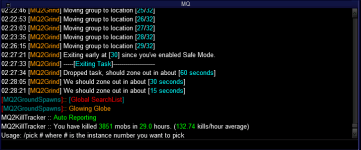
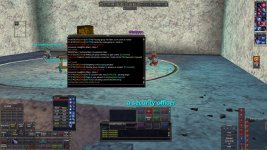
I have a problem with MQ2grind, when I start it, most of the time it enters the zone, moves to the first starting point and sits there doing nothing. I get the messages from the photo.
I put /grind resume, but it tells me: This command does not work with "/grind custom".
Greetings.
P.D: By problems, I mean that I'm doing something wrong and I don't know how to use this wonderful plugin, not that the program doesn't work correctly.
I have a problem with MQ2grind, when I start it, most of the time it enters the zone, moves to the first starting point and sits there doing nothing. I get the messages from the photo.
I put /grind resume, but it tells me: This command does not work with "/grind custom".
Greetings.
P.D: By problems, I mean that I'm doing something wrong and I don't know how to use this wonderful plugin, not that the program doesn't work correctly.
Attachments
Last edited:
- Buyer
- #1,183
Hello partners.
I have a problem with MQ2grind, when I start it, most of the time it enters the zone, moves to the first starting point and sits there doing nothing. I get the messages from the photo.
I put /grind resume, but it tells me: This command does not work with "/grind custom".
Other times, one of the group does not enter the area, so you have to restart again.
And sometimes, some character gets stuck, I play with everyone in wolf form because of the shaman buff. Very rarely, it starts me correctly.
Greetings.
P.D: By problems, I mean that I'm doing something wrong and I don't know how to use this wonderful plugin, not that the program doesn't work correctly.
Well, how do you start grind?
/grind custom is probably not where you want to start, because that does exactly this: grabs the instance, puts you to the starting point, and then stops - so you can run the instance by hand, or do some other automation (which you will have to provide separately through the "command"). Grind itself does nothing in the instance, then.Try
/grind start
- Buyer
- #1,184
...also, even though layered, don't post pics where your toon names can be read
- Seller
- #1,185
Hello partners.
I have a problem with MQ2grind, when I start it, most of the time it enters the zone, moves to the first starting point and sits there doing nothing. I get the messages from the photo.
I put /grind resume, but it tells me: This command does not work with "/grind custom".
Greetings.
P.D: By problems, I mean that I'm doing something wrong and I don't know how to use this wonderful plugin, not that the program doesn't work correctly.
Hi athor
From the image and phrasing you've shared, I suspect a few things:
1) You are using: /grind custom instead of /grind start
2) You have NOT configured the plugin, please spend 6 minutes and configure the Tank Configuration tab and the Class Configuration (including your tank class)
3) Enjoy it once you've configured it
- Buyer
- #1,186
Ohh. I didn't know this, thanks....also, even though layered, don't post pics where your toon names can be read
- Buyer
- #1,187
Hello Hytiek, first of all congratulations for such an excellent plugin.
All these things are beyond me but I don't give up and by failing sometimes I achieve my goal. I am going to try to explain what I do, and thus you will better understand what I am doing wrong, which must be the majority.
I saw the video of sic because since I don't understand these things, I follow the videos step by step as best I can, but many things are taken for granted and that's where I almost always get lost.
I take the group to the npc that gives the quest, there I put /grind custom and configure what little I know on the screen that appears. In the general tab I don't touch anything other than the wait for full mana box and I mark the safe zone. In the tank setup I choose kissassist because it's what I use, the rest I don't even understand. And in the class settings I choose kissassist for the rest of the group. Then I close the screen and type /grind start.
An automatic command sequence begins in which my players receive and accept the quest, kissassist is activated and then they select the npc and write ready (sometimes, one of them says ready without selecting the npc so I have to do it manually ).
So they enter the area where the npc is and move to the next point and that's where they stay indefinitely and I get that message. Yesterday there were two or three times that magically worked, but now it doesn't work any time.
You tell me that I am using: /grind custom instead of /grind start. So should I just put /grind start on arrival and that's it?
You also tell me to configure the plugin, but how is this done without getting the custom screen?
Sorry for such a long answer, but this way you will have a clearer idea of what is happening to me.
Thank you very much for the answers and greetings.
All these things are beyond me but I don't give up and by failing sometimes I achieve my goal. I am going to try to explain what I do, and thus you will better understand what I am doing wrong, which must be the majority.
I saw the video of sic because since I don't understand these things, I follow the videos step by step as best I can, but many things are taken for granted and that's where I almost always get lost.
I take the group to the npc that gives the quest, there I put /grind custom and configure what little I know on the screen that appears. In the general tab I don't touch anything other than the wait for full mana box and I mark the safe zone. In the tank setup I choose kissassist because it's what I use, the rest I don't even understand. And in the class settings I choose kissassist for the rest of the group. Then I close the screen and type /grind start.
An automatic command sequence begins in which my players receive and accept the quest, kissassist is activated and then they select the npc and write ready (sometimes, one of them says ready without selecting the npc so I have to do it manually ).
So they enter the area where the npc is and move to the next point and that's where they stay indefinitely and I get that message. Yesterday there were two or three times that magically worked, but now it doesn't work any time.
You tell me that I am using: /grind custom instead of /grind start. So should I just put /grind start on arrival and that's it?
You also tell me to configure the plugin, but how is this done without getting the custom screen?
Sorry for such a long answer, but this way you will have a clearer idea of what is happening to me.
Thank you very much for the answers and greetings.
- Buyer
- #1,188
Hello Hytiek, first of all congratulations for such an excellent plugin.
All these things are beyond me but I don't give up and by failing sometimes I achieve my goal. I am going to try to explain what I do, and thus you will better understand what I am doing wrong, which must be the majority.
I saw the video of sic because since I don't understand these things, I follow the videos step by step as best I can, but many things are taken for granted and that's where I almost always get lost.
I take the group to the npc that gives the quest, there I put /grind custom and configure what little I know on the screen that appears. In the general tab I don't touch anything other than the wait for full mana box and I mark the safe zone. In the tank setup I choose kissassist because it's what I use, the rest I don't even understand. And in the class settings I choose kissassist for the rest of the group. Then I close the screen and type /grind start.
An automatic command sequence begins in which my players receive and accept the quest, kissassist is activated and then they select the npc and write ready (sometimes, one of them says ready without selecting the npc so I have to do it manually ).
So they enter the area where the npc is and move to the next point and that's where they stay indefinitely and I get that message. Yesterday there were two or three times that magically worked, but now it doesn't work any time.
You tell me that I am using: /grind custom instead of /grind start. So should I just put /grind start on arrival and that's it?
You also tell me to configure the plugin, but how is this done without getting the custom screen?
Sorry for such a long answer, but this way you will have a clearer idea of what is happening to me.
Thank you very much for the answers and greetings.
The quick start (if you got a decent crew):
/grind ui1.) configure the TANK section (depending on the automation, can just take the defaults)
2.) configure the CLASS section for all your toons. Don't forget to also configure your TANK here (so if you run CWTN SK, be sure to click the button in the TANK section as well as in the CLASS section). You already did this, perfect
/grind startwhen in front of the questgiver. Win!
- Buyer
- #1,189
Heh...that's also something you can try to avoid. Sometimes, if automation is startet at questgiver, it starts buffing and summoning stuff and does this between selecting quest NPC and saying the phrase. I avoid this by making sure my "start" command for each class includes setting that automation to "paused" - need to look up the multiline command when I'm home.(sometimes, one of them says ready without selecting the npc so I have to do it manually ).
- Buyer
- #1,190
Thank you very much, the first time I tried that way it worked for me. Little by little I will learn the basic mechanics to make the most of it. If I figure out the greeting to the npc thing, and find something to nullify the shaman's wolf illusions that cause my characters to get stuck sometimes, or get my shaman to use group shrink, I'll be happy.

- Buyer
- #1,191
Right click the buff icon in your short duration buffs and click "Add this spell to list of blocked spell"and find something to nullify the shaman's wolf illusions that cause my characters to get stuck sometimes
- Buyer
- #1,192
Impressive, there are so many things I don't know about this great game. Thank you so much.Right click the buff icon in your short duration buffs and click "Add this spell to list of blocked spell"
- Buyer
- #1,193
Thank you very much, the first time I tried that way it worked for me. Little by little I will learn the basic mechanics to make the most of it. If I figure out the greeting to the npc thing, and find something to nullify the shaman's wolf illusions that cause my characters to get stuck sometimes, or get my shaman to use group shrink, I'll be happy.
This is what I use for KA start in grind:
/multiline ; /mac kissassist assist ${Group.MainTank}; /mqp on; - starts KA up, and immediately pauses it.- Buyer
- #1,194
Thanks a lot. As soon as I have a minute I try it, to see if I know how to do it. Sorry for the question, but I still don't know a lot about this topic. The only thing I know how to do is look for an ini of my class in the KA library and copy and paste it into the ini of my character. These instructions that you put, should I put them in the ini of my characters? Somewhere in particular? general, melee, dps...This is what I use for KA start in grind:/multiline ; /mac kissassist assist ${Group.MainTank}; /mqp on;- starts KA up, and immediately pauses it.
- Buyer
- #1,195
Thanks a lot. As soon as I have a minute I try it, to see if I know how to do it. Sorry for the question, but I still don't know a lot about this topic. The only thing I know how to do is look for an ini of my class in the KA library and copy and paste it into the ini of my character. These instructions that you put, should I put them in the ini of my characters? Somewhere in particular? general, melee, dps...
Just using
/grind ui - you can edit the config there, in the class sections. All edits are immediately active!- Buyer
- #1,196
I'll try, thank you very much.Just using/grind ui- you can edit the config there, in the class sections. All edits are immediately active!
- Buyer
- #1,197
Hello a_moss_snake.Just using/grind ui- you can edit the config there, in the class sections. All edits are immediately active!
I'm going to show you step by step what I do, because it gives me an error and I'm sure I'm doing something wrong.
I open /grind ui and click edit on class configuration for each of my characters, including the tank. There, there is already a command line "/mac kissassist assist $.... and what I do is put ; and add your command line.
I also do it in the Tank configuration tab with my tank. I click on save and start the automation. But it gives me an error, which I have not remembered to point out and it beeps.
Regards.
- Buyer
- #1,198
Hello a_moss_snake.
I'm going to show you step by step what I do, because it gives me an error and I'm sure I'm doing something wrong.
I open /grind ui and click edit on class configuration for each of my characters, including the tank. There, there is already a command line "/mac kissassist assist $.... and what I do is put ; and add your command line.
I also do it in the Tank configuration tab with my tank. I click on save and start the automation. But it gives me an error, which I have not remembered to point out and it beeps.
Regards.
Wait, you need to *replace* the simple
/mac kissassist assist... with /multiline ; /mac kissassist assist ${Group.MainTank}; /mqp on, not add this. Also, it's important to have the <space> around the ;This is what your config probably looked before:
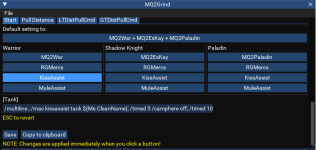
If you add the
/mqp on in the existing multilne you need to put a proper /timed value there, maybe 20:
Now, for say a Druid:
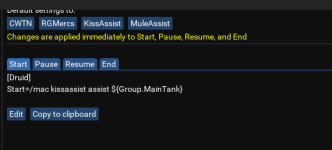
turns into:
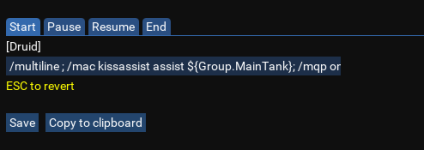
- Buyer
- #1,199
Great, now I totally understand. You'll excuse me, but my level is very low. I follow all the steps literally, so if I'm missing any I improvise, but many times I don't get it right.Wait, you need to *replace* the simple/mac kissassist assist...with/multiline ; /mac kissassist assist ${Group.MainTank}; /mqp on, not add this. Also, it's important to have the <space> around the ;
This is what your config probably looked before:
View attachment 47317
If you add the/mqp onin the existing multilne you need to put a proper/timedvalue there, maybe 20:
View attachment 47318
Now, for say a Druid:
View attachment 47319
turns into:
View attachment 47320
Thank you very much and greetings friend.
- Seller
- #1,200
Great, now I totally understand. You'll excuse me, but my level is very low. I follow all the steps literally, so if I'm missing any I improvise, but many times I don't get it right.
Thank you very much and greetings friend.
It seems I missed the notification here, my apologies!
It seems like you're in a better state with the functionality, all good now athor?
Users who are viewing this thread
Total: 1 (members: 0, guests: 1)
Share: