• You've discovered RedGuides, an EverQuest multi-boxing and scripting community 🧙‍♀️⚙️. We want you to play several EQ characters at once, come join us and say hello! 👋

  • A TLP without truebox has thawed (Very Vanilla ready)
    Frostreaver
MQ2Eskay

Plugin - MQ2Eskay 3.1.52471.11

Q. I spam memorize my mana conversion / skeleton illusion spell?
A. You probably have auto remove illusion turned on, but don't actually have the illusion from this spell added to your blocked buffs. This will make you want to recast the spell. If you don't want to re-cast the spell to get the illusion, you will want to add it to your blocked buffs.
 
You can either turn off auto remove illusion, then right click scorched skeletal for and "add to blocked buffs" or you can hit the eq button, character, blocked buffs, and type scorched skeletal for and add it there
 
I'm curious if it would be possible for hunter-tank mode to ignore targets that are currently aggroing an out of group PC. I was using it today for the first time to PL an alt when another group showed up and pulled one through my camp and I ended up chasing it down (and apologized haha).
 
I'm curious if it would be possible for hunter-tank mode to ignore targets that are currently aggroing an out of group PC. I was using it today for the first time to PL an alt when another group showed up and pulled one through my camp and I ended up chasing it down (and apologized haha).
They don't go to a mob that is already fighting, but if you're running to a mob to pull it and someone else grabs it, you're already on the way.

Edit: or in this case rolling into your area close enough to be considered in your camp.
 
Last edited:
Which means mobs coming into the area that you want to respond to mobs in. This is intended and would need to stay that way. A lot of folks use toons out of group and such, having tanks not pick up lobs that are in their camp radius would be a problem.

But since you saw people drag mobs through you, you should probably pause, or switch modes and go elsewhere
 
awesome script, works really well! Only thing I noticed is that it very often mems & casts 'Tiny Companion' for some reason
 
awesome script, works really well! Only thing I noticed is that it very often mems & casts 'Tiny Companion' for some reason
sounds like your pet needs to be shrunk.

if you don't want to shrink your pet have you considered /shd petshrink off?

if is also a window option if you just want to temporary turn off shrinking your pet.
1621628503444.png

you can also add a pet shrink clicky item to your shrinkgroup it will use that to shrink your pet (and turn off petshrink so you don't memorize tiny companion)

the list is smaller for sks - but items like Iceband Trinket work well
 
Hi Sic, thanks for answering. I knew about this option, just was wondering why it keeps casting it. But think it is related that the Enc cast NightTerror on pet. So no biggy.

Did noticed some small bug though, I am unable to turn off SummonRemains by command line /shd summonremains off - it does not seems to trigger.
 
Hi Sic, thanks for answering. I knew about this option, just was wondering why it keeps casting it. But think it is related that the Enc cast NightTerror on pet. So no biggy.

Did noticed some small bug though, I am unable to turn off SummonRemains by command line /shd summonremains off - it does not seems to trigger.
For pet, you should pet block the ndt illusion portion. There is nothing that says,"this is min and max size" of a thing, so if u have an illusion that can't be srunk and you have shrink on, you should determine which one you want to do
 
Hi Sic, thanks for answering. I knew about this option, just was wondering why it keeps casting it. But think it is related that the Enc cast NightTerror on pet. So no biggy.

Did noticed some small bug though, I am unable to turn off SummonRemains by command line /shd summonremains off - it does not seems to trigger.
from MQ2Eskay Commands:
Class Specific:
/shd AutoSummonRemains true/false/on/off/0/1 - Sets if you want to auto summon your group members

the window doesn't show "AutoSummonRemains" because of the length - but I can overload the function to accept /shd summonremains in the future
 
So, my 115 SK occasionally turns itself into an Iksar Skeleton.
Why?
It's from the lvl 88 version of Covenant. Gixblat's Covenant.
Just curious why this would happen if I have Syl`Tor's Covenant scribed?
I mean, it's a cool look I guess...
 
So, my 115 SK occasionally turns itself into an Iksar Skeleton.
Why?
It's from the lvl 88 version of Covenant. Gixblat's Covenant.
Just curious why this would happen if I have Syl`Tor's Covenant scribed?
I mean, it's a cool look I guess...
all of your mana conversion spells have skeleton illusion.

you should block that spell if you use autoremove illusion as mentioned in the FAQ

Q. I spam memorize my mana conversion / skeleton illusion spell?
A. You probably have auto remove illusion turned on, but don't actually have the illusion from this spell added to your blocked buffs. This will make you want to recast the spell. If you don't want to re-cast the spell to get the illusion, you will want to add it to your blocked buffs.

 
Sorry, the question wasn't about the illusion.
To be more clear: Why does Eskay sometimes use Gixblat's Covenant (lvl 88) instead of Syl`Tor's covenant (lvl 113)? Byos is off.
 
It shouldn't be doing that. They are in the same spell line, and only the highest spell is selected. When you first load the plugin what outputs for ManaConversion line?

1621761810978.png

Should output close to the bottom of the list.

Also, you say it's casting "gixblat's", does it out put like this?

1621761920136.png

That MQ2Eskay is casting it?
 
Sorry, the question wasn't about the illusion.
To be more clear: Why does Eskay sometimes use Gixblat's Covenant (lvl 88) instead of Syl`Tor's covenant (lvl 113)? Byos is off.
the only way that would be possible is if your unity spell was only high enough rank to give you the poopy covenant verison (i believe it is rank IV that has the super old gixblat) - in which case we could cast the actual higher spell version afterward anyhow

and dark lord's azia is also used as the "stuck spell gem" stuff - so its also possible that it is casting that if you are manually casting spells (you can turn off the stuck spell gem check stuff if you want)
/shd checkforstuckgems off
 
Last edited:
On my sk I have the plugin for him.. how ever he keeps casting Helot Covenant and the Autoremoveillusion takes it off.. it a circle.. Is there a way to stop this where I can manually cast the spell if i need it?
 

Attachments

  • 1.jpg
    1.jpg
    29.8 KB · Views: 4
From the FAQ located here : https://www.redguides.com/community/resources/mq2eskay.1153/field?field=faq

INI:
Q. I spam memorize my mana conversion / skeleton illusion spell?
A. You probably have auto remove illusion turned on, but don't actually have the illusion from this spell added to your blocked buffs. This will make you want to recast the spell. If you don't want to re-cast the spell to get the illusion, you will want to add it to your blocked buffs.
 
Hey Sic

So I watched your video.. I do have the spell blocked in my spell bar.. but it keeps casting the illusion Skelton when i dont want to be a Skelton. i have auto illusion off clicked.. IT just stuck in the circle. Cast spell turns on the illusion. it see its blocked will remem and cast again. over and over. what am i missing?
 

Attachments

  • huh.jpg
    huh.jpg
    28.4 KB · Views: 5
Hey Sic

So I watched your video.. I do have the spell blocked in my spell bar.. but it keeps casting the illusion Skelton when i dont want to be a Skelton. i have auto illusion off clicked.. IT just stuck in the circle. Cast spell turns on the illusion. it see its blocked will remem and cast again. over and over. what am i missing?
you are missing the step where you actually add the blocked buff to your blocked buffs.

"I do have the spell blocked in my spell bar" --- I'm not even sure what that means, but that does not sound like you have added the illusion to your blocked buffs.

you can add a spell to your blocked buffs in a couple of ways.

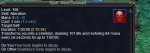
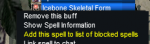
you can right click on a buff and click "add spell to list of blocked buffs"
1621885224919.png

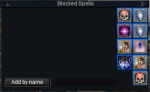
you can open your EQMenuButton -> Character -> Blocked buffs
1621884980816.png

This opens a window, with your everquest blocked buffs
you can add a spell in here by typing the name of the spell
1621884994090.png

if I wanted to add "Icebone skeletal form" to my blocked buffs via this eq menu
I would type it in the box where it says "Add by name"
1621885090170.png
And then click "Add by name"
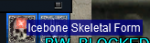
and voila - it is added to my blocked buffs.
1621885098022.png

if you know the ID of your spell, you can also use the eq command for adding a blocked spell

/blockspell add me #

icebone skeletal form is 9492, for example.
so you can
/blockspell add me 9492

Then EQ spits out that it has been added to your blocked spells.
1621885188786.png
 
you are missing the step where you actually add the blocked buff to your blocked buffs.

"I do have the spell blocked in my spell bar" --- I'm not even sure what that means, but that does not sound like you have added the illusion to your blocked buffs.

you can add a spell to your blocked buffs in a couple of ways.

you can right click on a buff and click "add spell to list of blocked buffs"
View attachment 30381

you can open your EQMenuButton -> Character -> Blocked buffs
View attachment 30376

This opens a window, with your everquest blocked buffs
you can add a spell in here by typing the name of the spell
View attachment 30377

if I wanted to add "Icebone skeletal form" to my blocked buffs via this eq menu
I would type it in the box where it says "Add by name"
View attachment 30378
And then click "Add by name"
and voila - it is added to my blocked buffs.
View attachment 30379

if you know the ID of your spell, you can also use the eq command for adding a blocked spell

/blockspell add me #

icebone skeletal form is 9492, for example.
so you can
/blockspell add me 9492

Then EQ spits out that it has been added to your blocked spells.
View attachment 30380

Thank Sir .. The Eq button menu did it..
 
Any word on when this might be functional with MQNext compiles? I'm using RedGuide's MQNext preview build currently. :)
 
Any word on when this might be functional with MQNext compiles? I'm using RedGuide's MQNext preview build currently. :)
The plugins will be shipped with Very Vanilla for next once next is closer to launch, and is on the Very Vanilla launcher. Cwtn will no longer be rebuilding them every day to send them out to requests unfortunately.
 
Last edited:
The plugins will be shipped with Very Vanilla for next once next is closer to launch, and is on the Very Vanilla launcher. Cwtn will no longer be rebuilding them every day to send them out to requests unfortunately.
Understood, thanks sir!
 
Spent about 20 minutes searching for this answer, Opened the a copy of the MQ2Eskay.dll in a text editor and found the answer. So the named checks are compiled into the plugin, answers my first quest. Second anyway we as users can disable or add our own custom names or remove names? Sure there is a great reason to set it up like this. The spawn that was causing me to look into this was the "a shrouded bat" in ToFS. Seems the EQ designers decided to use the same name for regular and named spawn, albeit they have different levels which the plugin has no way to figure out. Would it cause to much trouble to remove this one named from the list seeing as its triggering named stuff on the 10 or 15 so spawns in this room.

I have turned off BurnAllNamed while at this camp, and just waiting for the true named bat to spawn. Just thought I would ask.
 
Spent about 20 minutes searching for this answer, Opened the a copy of the MQ2Eskay.dll in a text editor and found the answer. So the named checks are compiled into the plugin, answers my first quest. Second anyway we as users can disable or add our own custom names or remove names? Sure there is a great reason to set it up like this. The spawn that was causing me to look into this was the "a shrouded bat" in ToFS. Seems the EQ designers decided to use the same name for regular and named spawn, albeit they have different levels which the plugin has no way to figure out. Would it cause to much trouble to remove this one named from the list seeing as its triggering named stuff on the 10 or 15 so spawns in this room.

I have turned off BurnAllNamed while at this camp, and just waiting for the true named bat to spawn. Just thought I would ask.
to be clear, only the frozenshadowtwo (the ToV) we (cwtn) have nameds added including the "a shrouded bat".

for zones that we haven't added - like regular tofs, it uses the regular mq2 named check, which goes off of information from eq.

so if you're talking about old timey tofs, then you'd probably need to just turn off burnallnamed, as we didn't specify a manual list

are you in tov or old timey version - I don't mind removing the tov a shrouded bat, but don't intent on adding a list for old timey zone at this time
 
frozenshadowtwo (the ToV) specifically sorry tried to word that as precise as possible.
 
Is there a way to save settings, like I have honed pulling radius, and other variables for this certain place, and really got em workin. Now I would love to SAVE em.... so when I come back next time, I can just pick the saved, and start to Pull an' roll?
 
Is there a way to save settings, like I have honed pulling radius, and other variables for this certain place, and really got em workin. Now I would love to SAVE em.... so when I come back next time, I can just pick the saved, and start to Pull an' roll?
Pwentti,

yup there sure its.

it is the first item in the FAQ, and something that is addressed in the videos/information guides

Q. The UI Window Doesn't save my settings?
A. This is intentional. The UI acts as a "hot swap" allowing you to adjust on the fly. If you want to "save" your settings, adjust it with the slash command.
Explained here > UI Video @ 9:10 <
 
OW, the good old RTFM.
well, it is the most frequently asked question, and the one that is answered the most, and referenced in the most places - i link the rest of the information because if you have that question, it means you're likely going to have more questions, even things you didn't know you wanted to know.
 
Is there a way to save settings, like I have honed pulling radius, and other variables for this certain place, and really got em workin. Now I would love to SAVE em.... so when I come back next time, I can just pick the saved, and start to Pull an' roll?

Sic answered your specific question, but this morning I was just thinking it would be nice to have setting configurations to establish/pick from. That way someone could just pick the configuration they established earlier for a quick set of adjustments (say, one for raiding vs grouping, though I could envision having different configs based on where I'm set up).
 
I know, I am kinda lazy, will watch the videos, and try to learn something :D
Thanks for Quick response, to my total lack of manual reading. You rule.
 
Sic answered your specific question, but this morning I was just thinking it would be nice to have setting configurations to establish/pick from. That way someone could just pick the configuration they established earlier for a quick set of adjustments (say, one for raiding vs grouping, though I could envision having different configs based on where I'm set up).
you would want to make yourself a little macro that issues all the settings changes via slash command that you want.

/mac eskaygroup would do:
/shd setting blah
/shd setting2 blah
etc

/mac eskayraid would do:
/shd setting notblah
/shd setting2 notblah
etc

we absolutely won't be having multiple settings saves as that can quickly become an unmanagable mess
 
I finally got the named shrouded bat. It came up in Eskay window as #a_shrouded_bat00 if that helps.
 
Honestly if you know what the settings are it wouldn't be too much trouble to make a hotkey you can smash, or even an alias

/alias /campWW /multiline ; /shd pullarc 220; /shd radius 1400; /shd mode 5
/alias /campCS /multiline ; /shd pullarc 360; /shd radius 1500; /shd mode 5

or just setup a hotkey for much the same effect.

format is
/alias /nameofalias /CommandYouWantToPerform

then you can /campWW or /campCS, or whatever you decide to call it.

The above hotkeys are made up from randomly picking number for no reason and aren't meant to be a hotkey you should create without directly modifying the information to reflect the choices you would like them to make.
 
Plugin - MQ2Eskay

Users who are viewing this thread

Back
Top
Cart